How To - Build a 6V AC Regulator

Thread Starter

Lumenosity

Joined Mar 1, 2017
614
Bertus
Thanks. I just checked it again.

If there was, would that account for the hot R1 resistor?

To be honest, you may be on to something.....it appeared there "may" have been a microscopic connection I missed before.
Am going to try it again now that I've further separated the Red AC in wire from the trace below it.

For the final when it's working, I think I'll drill through the board and run the wires tothe solder pads from the other side.

I know its sloppy and ugly. The Final will be MUCH cleaner and better soldered.

This a great forum with many helpful people like yourself and Alec_t and others. Thanks for making it available.
 
Last edited:

Alec_t

Joined Sep 17, 2013
15,124
If there was, would that account for the hot R1 resistor?
Yes. A drain-to-gate short would have that effect and also result in one FET conducting but the other one not; hence poor regulation.
Are you using un-leaded solder? If so it would explain what look like dry solder joints. Use leaded solder if you have some.
 

Alec_t

Joined Sep 17, 2013
15,124
Comparing the pics in posts 70 and 79 I'm pretty sure I've found the source of your woes: your FETs are the wrong way round! Each one should be rotated 180° to swap the source and gate connections. It's easy to forget that the top and bottom of the board are mutual mirror images :).
The wrong orientation explains R1 heating and the regulation failure.
 
Last edited:

Thread Starter

Lumenosity

Joined Mar 1, 2017
614
Comparing the pics in posts 70 and 79 I'm pretty sure I've found the source of your woes: your FETs are the wrong way round! Each one should be rotated 180° to swap the source and gate connections. It's easy to forget that the top and bottom of the board are mutual mirror images :).
The wrong orientation explains R1 heating and the regulation failure.
Alec_t,
forgive my lack of experience, but after examining the pinouts and my PCB illustration above carefully, I'm coming up with only Q9 needing to be flipped 180?

I can't get my head around it but from all indications that I can come up with, MOSFET Q7 seems to be orientated correctly while MOSFET Q9 is the only one that needs to be flipped 180 ?

Are you sure Q7 needs to be flipped? I can't see how Q7 would match the schematic if it was flipped. Q9 however, does appear to be installed incorrectly.
 
Last edited:

Alec_t

Joined Sep 17, 2013
15,124
I can't see how Q7 would match the schematic if it was flipped.
It wouldn't, but I'll come to that.
Looking at the second pic in post 79, each FET has its gate on the left-most pin. Q7 is the FET on the right and Q9 is on the left. Q9 gate is at the board left edge and Q7 source is on the board right edge.
Now imagine the board upside-down. Q9 gate should now be at the right edge, but as you currently have Q9 oriented it is not. Similarly, Q7 source should be at the board left edge but it is not. So both FETs are wrongly connected.
There are two solutions:
(1) Keep the FET orientations as they are but mount them on the copper side (bottom) of the board instead. Not recommended, as there would be little physical support for the FETs and heatsinks.
(2) Reverse the orientations of both. However, this would leave R1 and R2 connected wrongly, so would require cutting of a pcb trace and correcting the R1, R2 connections.
 

ebeowulf17

Joined Aug 12, 2014
3,307
It wouldn't, but I'll come to that.
Looking at the second pic in post 79, each FET has its gate on the left-most pin. Q7 is the FET on the right and Q9 is on the left. Q9 gate is at the board left edge and Q7 source is on the board right edge.
Now imagine the board upside-down. Q9 gate should now be at the right edge, but as you currently have Q9 oriented it is not. Similarly, Q7 source should be at the board left edge but it is not. So both FETs are wrongly connected.
There are two solutions:
(1) Keep the FET orientations as they are but mount them on the copper side (bottom) of the board instead. Not recommended, as there would be little physical support for the FETs and heatsinks.
(2) Reverse the orientations of both. However, this would leave R1 and R2 connected wrongly, so would require cutting of a pcb trace and correcting the R1, R2 connections.
I'm not following this at all.

The FETs just have 3 pins in a straight line. If item (1) above is true, which certainly seems right to me, then the alternative should just be turning each FET 180 degrees.

How could the FET location influence R1/R2 connections, as long as the FET pins are in the correct order? All it takes to get them in order is a simple 180 rotation on each FET.

Is there confusion here because of DIP packages? With those, there's no amount of spinning that will allow you to mount them on the wrong side of the board without rearranging traces, but with a SIP package it's just a simple flip.
 

Alec_t

Joined Sep 17, 2013
15,124
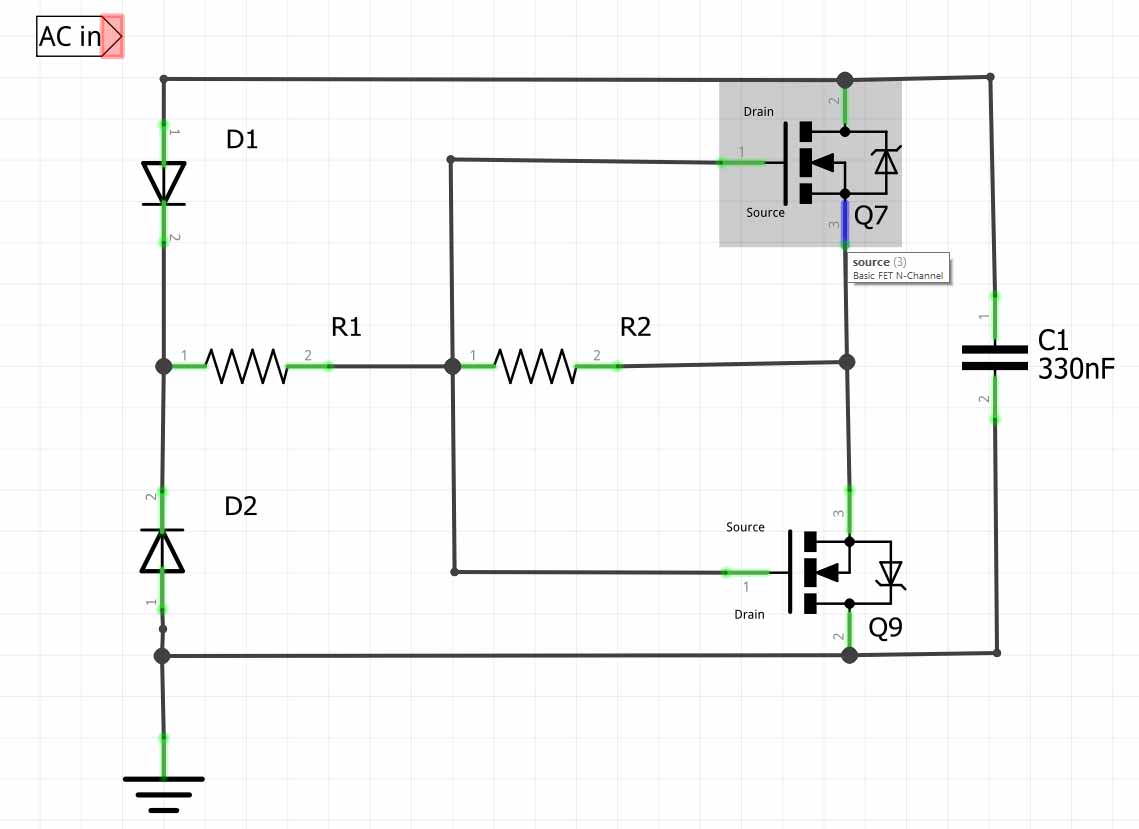
This is what you currently have
CircuitMod.jpg
Note that R1 is connected directly to the two sources, which is incorrect.
the alternative should just be turning each FET 180 degrees.
Sorry, I confused myself :). You're right. Rotating the FETs should be sufficient to correct things.
 
Last edited:

Thread Starter

Lumenosity

Joined Mar 1, 2017
614
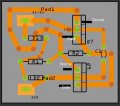
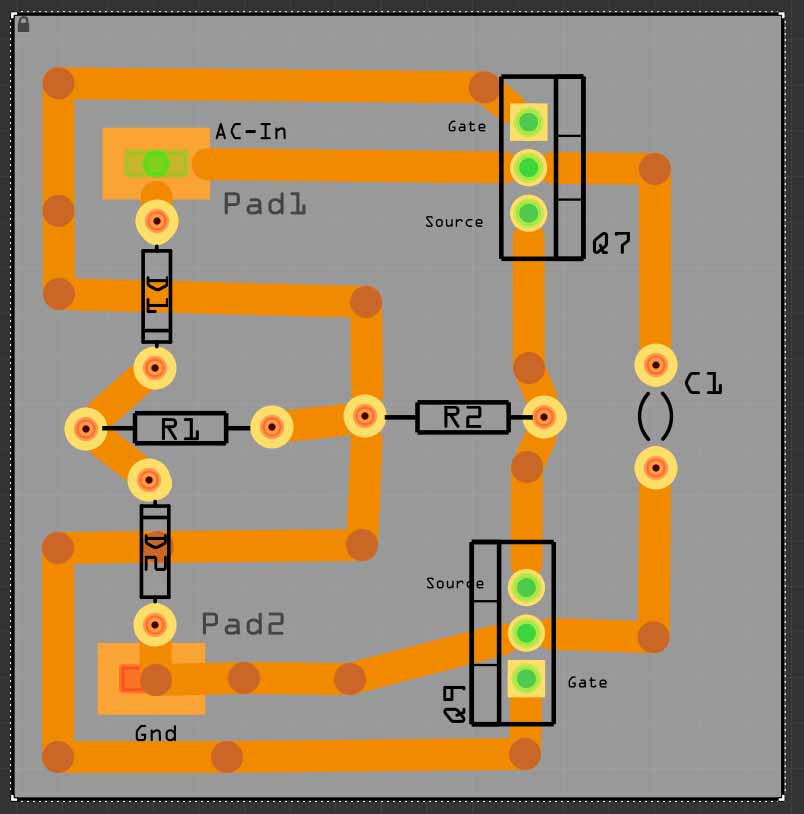
Due to confusion (mine).....I've revised the schematic
Maybe this will (hopefully) greatly simplify things. I think I had Q9 the wrong way.
But I'll be following the advice of the two posts above for sure.

Note: All copper is on the Bottom and all components are on the Top
So this view is looking down from the top at the components and the copper traces are all seen through the board on the bottom.

I think electrically, this is identical to the schematic on page one of this thread.

 
Last edited:

Alec_t

Joined Sep 17, 2013
15,124
Looks neater. It's certainly easier to follow the circuit with that symmetrical layout.
I'd make the traces between the sources, and from pads to drains, a bit wider to handle the the current.
 

Thread Starter

Lumenosity

Joined Mar 1, 2017
614
Looks neater. It's certainly easier to follow the circuit with that symmetrical layout.
I'd make the traces between the sources, and from pads to drains, a bit wider to handle the the current.
Thank you sir.
I decided that the other PCB was just not laid out properly and re-did it. As you said, it does follow the schematic better and is easier to see what's going on. I made this PCB tonight and have all the components attached ready for another shot tomorrow.

The traces are set to 70 mils. I hope that's enough?

Your help has been invaluable. I wish I could return the favor.
 

Thread Starter

Lumenosity

Joined Mar 1, 2017
614
I'm not following this at all.

The FETs just have 3 pins in a straight line. If item (1) above is true, which certainly seems right to me, then the alternative should just be turning each FET 180 degrees.

How could the FET location influence R1/R2 connections, as long as the FET pins are in the correct order? All it takes to get them in order is a simple 180 rotation on each FET.

Is there confusion here because of DIP packages? With those, there's no amount of spinning that will allow you to mount them on the wrong side of the board without rearranging traces, but with a SIP package it's just a simple flip.
I cannot understand why BOTH would need to be flipped?
I can understand Q9.....but Q7 has all the pins connected properly according to the Schematic.

Are we all assuming that the Components mount on top of the PCB and all copper is on the bottom?

In that configuration, if Q7 is flipped, it will no longer be connected according to the schematic. Are you saying the Schematic is incorrect because that is what I'm using as my guide.
 

ebeowulf17

Joined Aug 12, 2014
3,307
I cannot understand why BOTH would need to be flipped?
I can understand Q9.....but Q7 has all the pins connected properly according to the Schematic.

Are we all assuming that the Components mount on top of the PCB and all copper is on the bottom?

In that configuration, if Q7 is flipped, it will no longer be connected according to the schematic. Are you saying the Schematic is incorrect because that is what I'm using as my guide.
Your board layout drawing (the one you built) was correct, assuming all components were mounted on the copper side. The only error was mounting the MOSFETs on the other side. It's ok to mount them there too, but they need to rotate 180 from how you mounted them.

I'm not sure why you suddenly think just one is wrong in that layout. Numerous people, including me, checked it and said it was correct. I'm pretty sure we were correct and that layout, as it was drawn, was correct. The only problem was mounting them on the backside without maintaining the pin order.
 

ebeowulf17

Joined Aug 12, 2014
3,307
All should be fine if the post #88 layout is used.
Yes, although with the same risk as the first layout:

if MOSFETs are mounted on the side of the board with the traces, then the MOSFET outlines show the correct orientation...

But if MOSFETs are mounted on the other side like they were before, then once again the orientations need to be flipped.

This layout is electrically identical to the first one that was built, so it's correct, but still carries the same risk if components are mounted on both sides of the board.
 

Thread Starter

Lumenosity

Joined Mar 1, 2017
614
I think I may be misinterpreting the Schematic Symbol.
I'm using Fritzing and it is still telling me the pins are in the correct place according to my PCB in Post #88
In Post #88 the copper is all on the bottom and the components are all on the top.

Just to be on the same page, I will definitely be mounting the components on the opposite side from the copper traces.

I can't explain it, but I'm having a VERY difficult time with this because if I flip the components 180 degrees, they will no longer match the schematic according to Fritzing. But with the copper on the bottom and the components on the top (opposite side) Fritzing is reporting the connections are correct (according to the schematic). Maybe I have the Symbols reversed in the Schematic ??? (See next Post)

You guys are telling me to ignore Fritzing and flip the MOSFETS 180 from what Fritzing is saying is correct. I'm terribly confused. Please forgive my ignorance here.

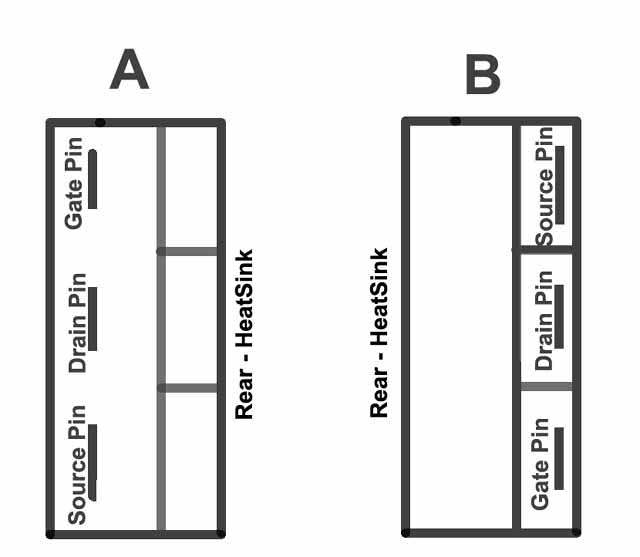
Can you please tell me which of these illustrations is correct....A or B ?
According to whoever created the PCB symbol for Fritzing, A is correct.
I apologize for my confusion.
Thanks for your patience.

 
Last edited:

ebeowulf17

Joined Aug 12, 2014
3,307
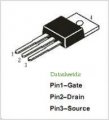
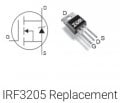
It's really strange to me that l can't find the pinout in the datasheet, but the other results online all agree with each other so far, and they appear to agree with what you've highlighted on your schematic:
upload_2018-7-24_10-51-0.jpeg
upload_2018-7-24_10-52-3.jpeg

I would agree that "A" above is correct, assuming you mount the MOSFET on the side with the silkscreen.
 

ebeowulf17

Joined Aug 12, 2014
3,307
I can't explain it, but I'm having a VERY difficult time with this because if I flip the components 180 degrees, they will no longer match the schematic according to Fritzing. But with the copper on the bottom and the components on the top (opposite side) Fritzing is reporting the connections are correct (according to the schematic).
Maybe there's something wrong with how Fritzing handles components on the back side of the board. I've done very little with Fritzing, so I'm not much help there.

In my experience with other programs, whichever side you see the pads and silkscreen on is the side the component is expected to be on. You can, of course, do anything you want with those pads, but usually the default behavior is for the side with all the stuff (pads, silkscreen, etc.) to be the side the components are on. I'm not saying it should be this way - structurally you're better off doing what you're doing since you're only making single sided boards - but the software is generally optimized for plated through holes, pads on both sides, and all graphics are on whichever side you're placing the component on.

Just make sure you know which hole needs to be the gate on each MOSFET, and make sure you put the gate there. If Fritzing disagrees, ignore it.
 
Top