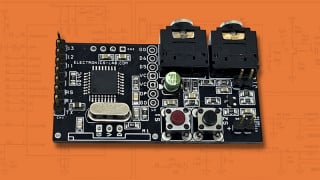
Two. One for USB communication between the microcontroller and the PC. And the second one is for communicating with all of the servos. All servos must be individually given an ID, then connected to the same data line and then all write to servo commands start by addressing a specific servo ID. The read from servo commands come back on the same data line but I think start with the servo they are from.I agree that the selling point of ESP32 is wireless. I vote for something other than ESP32.
For this application I would not use software UART. It is not more efficient than HW UART.
How many UARTs in total do you need?
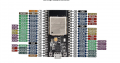
So if I use GPIO 10 to the servo data wire, I can use hardware serial between the ESP32 and the servos, while using hardware serial for the USB communication? And then in my code I just use Serial1 for servos and Serial for USB?Probably. The pin out you have posted here conflicts with the one at the Amazon link:
View attachment 272293
This one calls out all three UARTs.
Yes I know, I have assigned each servo an ID 1 through 4 individually and then daisy chained them together in the arm already. Also they are being powered by a 7.5V power supply with a common ground to the ESP32.I just had a quick look at the LX-225 servo User Manual.
The LX225 is designed to be daisy-chained using a single UART TX/RX, i.e. UART signal is relayed from one servo to the next.
Baud is 115200
Default ID is 1. You need to change the IDs so that each servo has a unique ID.
It says working voltage is 6-8.4V.

This part is critical, the servo bus is half duplex. It doesn’t have two ports, one for RXD and one for TXD. Instead, it uses one port and switches function so to use the read commands you need to send the command then switch the MCU from TXD to RXD and listen to the answer.UPDATE:
The logic level shifter (3.3V to 5V) combined with the ESP32 Serial2 TX (pin 17) seems to work great for some write commands and fixes a lot of issues (such as not all of the motors always responding to commands).
But I'm still tryna figure out a few of the other write commands and how to do any of the read commands. I can't find any sample code and I don't understand what to do based on the documentation either. Is there a library that does these functions for me, or at least some sample code for some of these functions?
The important functions I need to use that I know exist but cannot implement are:
- reading the servo position (for initial calibration, I know that the servo is closed loop internally when you write it to a position)
- writing the angle offset to allow it to have 360 degree motion
-writing the mode (there are two modes: 1. continuous rotation w/ set velocity and 2. set positions in set amount of time). this is particularly important for the 5:1 geared servo that must make multiple full rotations (the reduced output also has a limit switch)
Thank you everyone for your help here BTW!
Hmm so if I buy this board then I can connect the board then I can connect the ESP32 Serial2 (pins 16 and 17) to RX and TX of the board and then talk both ways?This part is critical, the servo bus is half duplex. It doesn’t have two ports, one for RXD and one for TXD. Instead, it uses one port and switches function so to use the read commands you need to send the command then switch the MCU from TXD to RXD and listen to the answer.
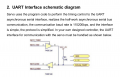
The schematic shows using two of a 74H126’s line drivers to do the switching. It requires using 2 GPIO pins of the MCU (or one pin and an inverter) to select TX or RX. While it doesn’t say so anywhere, it appears they are using RS485 rather than RS232. If this is true the ESP32 can use half duplex RS485 with its own driver so that the extra hardware and software to handle the switching isn’t needed.
I haven’t used RS485 with the ESP32 so I am not sure if there is a library for the Arduino to simplify this but you can use the API directly if needed. There is documentation available on how to make your own calls directly to unsupported functions in the Arduino IDE.
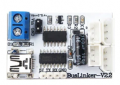
Alternatively, Hiwonder sell a controller board that is designed to do this (debugger) among other things so it is one possible route. It isn’t very expensive at ~$13.00 so it might make your life easier since it also includes debugging functionality.

That's what they say about it.Hmm so if I buy this board then I can connect the board then I can connect the ESP32 Serial2 (pins 16 and 17) to RX and TX of the board and then talk both ways?
View attachment 272367
FYI
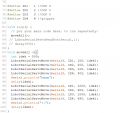
You can post program code directly into the forum post.
Enclose the text with code tags like this:
[code] ... your code goes here ...[/code]
ok
lol
This board seems like my best bet for 2 way communication ngl, and its pretty cheap so I think I'll get it and work on the other parts while I am waiting for it to arrive.That's what they say about it.
The MAX485 modules are not a bad option either, they are very widely used so a lot of help is available but the debugging board would be useful in any case since it allows using the computer to talk to the servos.This board seems like my best bet for 2 way communication ngl, and its pretty cheap so I think I'll get it and work on the other parts while I am waiting for it to arrive.
#define LOBOT_SERVO_FRAME_HEADER 0x55
#define LOBOT_SERVO_MOVE_TIME_WRITE 1
//serial2
#define RXD2 16
#define TXD2 17
//-
byte LobotCheckSum(byte buf[])
{
byte i;
uint16_t temp = 0;
for (i = 2; i < buf[3] + 2; i++) {
temp += buf[i];
}
temp = ~temp;
i = (byte)temp;
return i;
}
void LobotSerialServoMove(HardwareSerial &SerialX, uint8_t id, int16_t position, uint16_t time)
{
byte buf[10];
if(position < 0)
position = 0;
if(position > 1000)
position = 1000;
buf[0] = buf[1] = LOBOT_SERVO_FRAME_HEADER;
buf[2] = id;
buf[3] = 7;
buf[4] = LOBOT_SERVO_MOVE_TIME_WRITE;
buf[5] = GET_LOW_BYTE(position);
buf[6] = GET_HIGH_BYTE(position);
buf[7] = GET_LOW_BYTE(time);
buf[8] = GET_HIGH_BYTE(time);
buf[9] = LobotCheckSum(buf);
SerialX.write(buf, 10);
}