Why won't my linear stepper motor work?

be80be

Joined Jul 5, 2008
2,395
The way you have the coils is not right like the one I posted if I turn the magnets around the one coil just holds the magnet and is kind of shakes a bit.
I flipped the magnet the rod moves out I change battery terminals it moves back in.

The second pic above let's you move it without changing terminals your using half of the coil the way you have it you may as well be using one coil.
 

Thread Starter

Ben Varvil

Joined Apr 30, 2018
197
RE: Turn-off resistor
Ignore that suggestion about a single resistor. Brain lapse. I was thinking parallel mosfets in which you have individual gate resistors but a single turn-off resistor. Obviously, your gate drives are intended to be isolated so that won't work. I apologize for that error.

RE: On when it should be off
Here are two links that discuss failure modes. One failure mode is in the on state. As is pointed out, that state may be short lived as it often results in excessive current and destruction of the device to make it open circuit. Since your current is limited, maybe one or more of your mosfets has failed but not self-destructed.
https://www.4qd.co.uk/docs/mosfet-failure-mechanisms/
http://www.ti.com/lit/an/slyt502/slyt502.pdf
Have you tested the drain-source resistance (positive lead on the drain) with the gate grounded? If your meter has a diode test function, that should show conduction source to drain from the body diode but not reversed.
Ok! Needing 4 turn-off resistors is a relief. I thought I was going to have to rebuild some of my fundamental understandings of circuits. Glad we got it sorted.

RE: one of the MOSFETs failing, in the "on state."
In one of my earlier posts, I show a mosfet exploding in a dramatic double explosion fashion. It was suggested that the MOSFET first failed (explosion 1) and that the fail state was an ON-state, which then created overcurrent within the casing (explosion 2).

Those articles are dense... on my list to tackle. Thanks.

I'll test the circuits as you described when I get back to the shop. If it shows conduction, from drain to source, I've got a blown MOSFET. Can do.

Do you think the 10V regulator draws enough current to light the lamp as much as it did? This is my theory about why the lamp is on all the time...
 

Thread Starter

Ben Varvil

Joined Apr 30, 2018
197
The way you have the coils is not right like the one I posted if I turn the magnets around the one coil just holds the magnet and is kind of shakes a bit.
I flipped the magnet the rod moves out I change battery terminals it moves back in.

The second pic above let's you move it without changing terminals your using half of the coil the way you have it you may as well be using one coil.
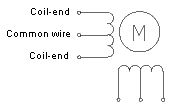
When I get back to the shop, I'll take a video of me shorting the battery over the coils, one after another. You'll see the nearest disc magnet center itself in the activated coil. As I relax the first coil and activate the next. The same disc magnet (and the tube) moves to the right.

I'll give you that each coil will be pulling 50+ amps. But you'll have to give me that the tube advances... supporting the idea that when I eventually get the coils firing, as drawn, 1 2 3 4 1 2 3 4 moves the tube to the right, 4 3 2 1 4 3 2 1 to the left.
 

Thread Starter

Ben Varvil

Joined Apr 30, 2018
197
Have a long look here and tell me what you see
Is your coil made like this no it's not you have 4 coils you need 2 coils with center tap what that lets you do is move the magnet by changing which side of the coil is powered
RE: Tell you what I see
I see 2 sets of 2 coils, mounted perpendicularly next to what I presume is the top view of a disc magnet.
I agree, my coil is not like this.
I don't see how this diagram applies to my application of moving the disc magnet, in this case, into or out of the page.
 

Thread Starter

Ben Varvil

Joined Apr 30, 2018
197
Did you miss this one it should be clear in it
I see wiring that alternates the polarity of the coil magnetic fields.

Eventually, I'd like to be able to control the polarity of each individual coil through an H-bridge somehow. A drawing of how that would be wired would be very helpful.
 

shortbus

Joined Sep 30, 2009
10,050
There really are genuine linear steppers out there, shortbus. But they're rather expensive and their applications are confined to a specific niche.

Hi C, sorry I'm so late to answer, had a really, really bad last week. Had 3 mini heart attacks(didn't know they were heart attacks) and then a big one. Spent the week in hospital, where they found I also have a pulmonary embolism.

I am aware of those linear motors, we used them to make a conveyor line that had a very precise movement for a laser welding operation. But they are not really considered or normally called a linear stepper, but a variable reluctance motor, or that's what the engineers called them. If you look at the second link closely it shows that the way they work is no where near what Ben is trying to do. No "stack of permanent magnets" and no "stack of coils". So I stick by my statement that the proposed 'motor' isn't going to work the way he thinks it will. It is also how basically how a Maglev train moves forward and even some amusement park rides move.

With all of the time and money spent so far it could have been done like the guy in Ben's one link much faster and even better. The one that showed the robot using a motor and rack arrangement to move the cue.
 

Thread Starter

Ben Varvil

Joined Apr 30, 2018
197
With all of the time and money spent so far it could have been done like the guy in Ben's one link much faster and even better. The one that showed the robot using a motor and rack arrangement to move the cue.
Hey Shortbus, sorry to hear about the health issues. I hope you are feeling better.

I realized this morning that I didn't connect the ground on either of the 2 driver chips. I connected those.

I measured both outputs on both driver chips and was surprised to see that ALL ARE SHOWING 10V when all inputs are NOT activated. (input measures 0.092V) This means that all 4 MOSFETS are firing when I connect the battery, explaining the lamp being on.

Any ideas why the driver chips are giving 10V outputs when input is off? I'm lost... did I fry the drivers by running them with no ground?

Here is the data sheet: https://www.mouser.com/datasheet/2/308/mc34151-d-1193008.pdf

Thanks for any help.
 

cmartinez

Joined Jan 17, 2007
8,768
Hey Shortbus, sorry to hear about the health issues. I hope you are feeling better.

I realized this morning that I didn't connect the ground on either of the 2 driver chips. I connected those.

I measured both outputs on both driver chips and was surprised to see that ALL ARE SHOWING 10V when all inputs are NOT activated. (input measures 0.092V) This means that all 4 MOSFETS are firing when I connect the battery, explaining the lamp being on.

Any ideas why the driver chips are giving 10V outputs when input is off? I'm lost... did I fry the drivers by running them with no ground?

Here is the data sheet: https://www.mouser.com/datasheet/2/308/mc34151-d-1193008.pdf

Thanks for any help.
Did you install pull-down resistors to ground at their inputs? Say, 10k would be a good value.
And no, you can't fry a chip just because you didn't ground it. The only thing that would happen is that the chip won't work.
 

Thread Starter

Ben Varvil

Joined Apr 30, 2018
197
Did you install pull-down resistors to ground at their inputs? Say, 10k would be a good value.
And no, you can't fry a chip just because you didn't ground it. The only thing that would happen is that the chip won't work.
Thank you. I'm glad I didn't cook the driver chips.
I'll add 10K pull down resistors now.
 
Last edited:

Thread Starter

Ben Varvil

Joined Apr 30, 2018
197
Your post #172 shows then as well as the picture you posted before that (#167) seems to show 10K resistors connected to something. Confused.
John
Yes, I have pull down resistors to the inputs of the MOSFET gates.
I'm assuming CMartinez is asking (#190) for me to put pull down resistors at the inputs of the driver chips. That is what I've added now... with no change in performance. still showing 10V on all outputs.
 

Thread Starter

Ben Varvil

Joined Apr 30, 2018
197
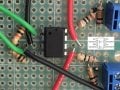
I thought I'd be reporting shooting force vs current data right now. Instead, I'm asking about driver chips. I spent what time I had today struggling to get controlled outputs. I measure 0.002V on the inputs. I measure 10.02V on both outputs. This seems very straight forward, but it has my progress halted. How is 10V getting on the output pins if not through the driver?

driver chip image.jpg
 

cmartinez

Joined Jan 17, 2007
8,768
I thought I'd be reporting shooting force vs current data right now. Instead, I'm asking about driver chips. I spent what time I had today struggling to get controlled outputs. I measure 0.002V on the inputs. I measure 10.02V on both outputs. This seems very straight forward, but it has my progress halted. How is 10V getting on the output pins if not through the driver?

View attachment 153668
Have you triple-checked all your wiring?
 

shortbus

Joined Sep 30, 2009
10,050
I measure 0.002V on the inputs. I measure 10.02V on both outputs. This seems very straight forward, but it has my progress halted. How is 10V getting on the output pins if not through the driver?
(I may be wrong about this.) On the first page of the data sheet it says, "The MC34151/MC33151 are dual inverting high speed drivers ". To my way of thinking that means that the output will be high when the driver input is low. So the question is, what is your Arduino output pin setting? If you are setting the outputs low when at rest, that means your driver is working fine, doing what it is supposed to. Low input from Arduino means high output to mosfet. Figure 2 shows this.

Learning all of this logic stuff from an older age and pretty much self taught, I didn't know , until recently that a lot of circuits and people design them using "reverse logic". Kind of the way a PLC controller is made,"you activate an out put to shut it off". Seems wrong to my pea brain but that's how the world and electronics work.
 

Thread Starter

Ben Varvil

Joined Apr 30, 2018
197
(I may be wrong about this.) On the first page of the data sheet it says, "The MC34151/MC33151 are dual inverting high speed drivers ". To my way of thinking that means that the output will be high when the driver input is low. So the question is, what is your Arduino output pin setting? If you are setting the outputs low when at rest, that means your driver is working fine, doing what it is supposed to. Low input from Arduino means high output to mosfet. Figure 2 shows this.

Learning all of this logic stuff from an older age and pretty much self taught, I didn't know , until recently that a lot of circuits and people design them using "reverse logic". Kind of the way a PLC controller is made,"you activate an out put to shut it off". Seems wrong to my pea brain but that's how the world and electronics work.
AHHHHhahahaha! YES!!!
Shortbus, your comment changes my whole day. I was planning to rebuild, but you have figured it out. I am realizing that when I don't understand a word, such as "inverting" in that description, I just omit it from my reading... talk about a pea brain.

I can think of a dozen ways that a "fail-on" setup like this could create a catastrophic situation, but whatever. I'm on to testing. Note to self: next version, don't get inverting drivers.

Thanks, I learned something today. Hopefully I'll have results to share in the next day or so.
 

Thread Starter

Ben Varvil

Joined Apr 30, 2018
197
Have you triple-checked all your wiring?
... a gazillion times, but as Shortbus observed, my wiring wasn't the problem. It was my reading comprehension.
Regardless, all the extra checks resulted in me properly grounding the chip and in me adding pull down resistors. all good.
 

cmartinez

Joined Jan 17, 2007
8,768
AHHHHhahahaha! YES!!!
Shortbus, your comment changes my whole day. I was planning to rebuild, but you have figured it out. I am realizing that when I don't understand a word, such as "inverting" in that description, I just omit it from my reading... talk about a pea brain.

I can think of a dozen ways that a "fail-on" setup like this could create a catastrophic situation, but whatever. I'm on to testing. Note to self: next version, don't get inverting drivers.

Thanks, I learned something today. Hopefully I'll have results to share in the next day or so.
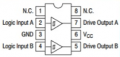
That you've been using the wrong dirver is a real posssibility. But this diagram that you've shown is of a normal, non-inverting driver:

upload_2018-6-5_11-44-45.png

What's the chip number that you've been using?
 

Thread Starter

Ben Varvil

Joined Apr 30, 2018
197
That you've been using the wrong dirver is a real posssibility. But this diagram that you've shown is of a normal, non-inverting driver:


What's the chip number that you've been using?
Interesting, the numbers on the chips are no longer there. Maybe they burned off?
Their brothers still in the case read: MC34151P then AKAA then 1806G
 
Top