Various 4017 Things.

Thread Starter

Kim Sleep

Joined Nov 6, 2014
398
I read it as all LEDs off meaning the cathodes are not connected to ground until button is pressed.
Button press freezes the count for 5 seconds with the one LED lit.
Repeat button press sometime later to reveal which # LED is now lit.
The TS mentioned it was for a game. Maybe whatever number LED is lit means that's how many spaces you move on a board game or maybe you are to try and guess which number LED will light when the button is pressed.
I don't see the point for #2, all LEDs on
You are absolutely correct on all points, and my typo saying LEDS instead of LED has really confused everyone, I am sorry about that
 

Thread Starter

Kim Sleep

Joined Nov 6, 2014
398
I understand the sequence of events to be.

1. all LEDs off
2. press button - all LEDs on for 5 seconds
3. After 5 seconds LEDs off (reset), then begin lighting leds in sequence 0-9.
4. press button - freeze sequence (only one led lit)
5. goto 2
It SHOULD be:
1. all LEDs off
2. press button - all LEDs off for 5 seconds
3. only 1 led illuminates for 5 seconds
4 all leds are then off

Somehow I have over complicated this, and I am very sorry for this
 

Thread Starter

Kim Sleep

Joined Nov 6, 2014
398
You are absolutely correct on all points, and my typo saying LEDS instead of LED has really confused everyone, I am sorry about that
It SHOULD be:
1. all LEDs off
2. press button - all LEDs off for 5 seconds
3. then only 1 led illuminates for 5 seconds
4 Then all leds are then off

Somehow I have over complicated this, and I am very sorry for this
 

Thread Starter

Kim Sleep

Joined Nov 6, 2014
398
I read it as all LEDs off meaning the cathodes are not connected to ground until button is pressed.
Button press freezes the count for 5 seconds with the one LED lit.
Repeat button press sometime later to reveal which # LED is now lit.
The TS mentioned it was for a game. Maybe whatever number LED is lit means that's how many spaces you move on a board game or maybe you are to try and guess which number LED will light when the button is pressed.
I don't see the point for #2, all LEDs on
It SHOULD be:
1. all LEDs off
2. press button - all LEDs off for 5 seconds
3. then only 1 led illuminates for 5 seconds
4 Then all leds are then off

Somehow I have over complicated this, and I am very sorry for this
 

Thread Starter

Kim Sleep

Joined Nov 6, 2014
398
I didn't see anything in the project requirement that mentioned having all 10 LEDs On at the same time.
See post #8.
You are correct...the sequence is:
It SHOULD be:
1. all LEDs off
2. press button - all LEDs off for 5 seconds
3. then only 1 led illuminates for 5 seconds
4 Then all leds are then off

Somehow I have over complicated this, and I am very sorry for this
 

Thread Starter

Kim Sleep

Joined Nov 6, 2014
398
Using the prescribed schematics, I have now built this 3 times, and I cannot get this to work. I know that Im not the smartest pickle in the Barrel, but I usually dont make the same mistake 3x. I must be missing something here
 

Thread Starter

Kim Sleep

Joined Nov 6, 2014
398
Actually , I misspoke again, I would like to use the 4017, as I have a million of them, and I would like to use them in this project
 

AnalogKid

Joined Aug 1, 2013
12,130
Im sorry, I only want 1 led on...ytpo
In that case, is there any reason to Reset the 4017 after a freeze-and-display period? If not, then the components performing the reset can be deleted, simplifying things. You can delete C3 and R3, and connect U1 pin 15 directly to GND.

Also, I did not know this was a random number generator. For that, I would think that the oscillator frequency would be much higher. And, that eliminates the issue of an extra clock edge when disabling the 4017 from counting. This simplifies the circuit logic. Hmmm . . .

ak
 
Last edited:

eetech00

Joined Jun 8, 2013
4,705
It SHOULD be:
1. all LEDs off
2. press button - all LEDs off for 5 seconds
3. only 1 led illuminates for 5 seconds
4 all leds are then off

Somehow I have over complicated this, and I am very sorry for this
OK...but don't you want to an LED to indicated that you've pressed the button?

Otherwise, there is no change to indicate anything happened from #1 to #3.
 

sghioto

Joined Dec 31, 2017
8,634
Using the prescribed schematics, I have now built this 3 times, and I cannot get this to work. I know that Im not the smartest pickle in the Barrel, but I usually dont make the same mistake 3x. I must be missing something here
Have you tried my schematic in post $15?
 

Thread Starter

Kim Sleep

Joined Nov 6, 2014
398
In that case, is there any reason to Reset the 4017 after a freeze-and-display period? If not, then the components performing the reset can be deleted, simplifying things. You can delete C3 and R3, and connect U1 pin 15 directly to GND.
no , the display can simply turn off after the display of the 1 "on" LED.
So is the disconnect c3 and R3 and reconnection of pin 15 the same to do this?


Also, I did not know this was a random number generator. For that, I would think that the oscillator frequency would be much higher. And, that eliminates the issue of an extra clock edge when disabling the 4017 from counting. This simplifies the circuit logic. Hmmm . . .
The clock circuit that is driving the 4017 is already random, so randomness is already there. Im sorry, I misspoke again!!


Again, I am sorry I misspoke! My greatest apologies! Kim N.S.

ak
 

sghioto

Joined Dec 31, 2017
8,634
Yes I have, but it also does not work...Im really batting 100!!!,
Im going to look at it again, as its much simpler.
Now that I have verified the operation , does it still meet my specs for opertion??
Yes it does. I have breadboarded the entire circuit and it works as you require
 

sghioto

Joined Dec 31, 2017
8,634
This is how my circuit should configure into your 4017 circuit with the 555 driver.
Verified on the breadboard as shown.
1734194783950.png
 
Last edited:

eetech00

Joined Jun 8, 2013
4,705
Here's an alternate circuit.

It used two CD4017's, one as a logic state sequencer, and one as an LED sequencer.
This works using LTspice simulation but hasn't been bread boarded.
U2 controls the logic state of the circuit per the spec given by the TS.
The LEDs are limited to ~10mA. Q4 keeps GRN0 LED off when U1 is reset.

If the TS is interested, I will breadboard and test.

Edit: Removed Q4 because its not needed (forgot about Q3). Removed reset U1

1734214524934.png
 
Last edited:

sghioto

Joined Dec 31, 2017
8,634
It SHOULD be:
1. all LEDs off
2. press button - all LEDs off for 5 seconds
3. then only 1 led illuminates for 5 seconds
4 Then all leds are then off
Actually this still doesn't sound correct in my view.
#2 doesn't make sense. Why wait for 5 seconds after the button is pressed to get to #3 since the LEDs are already OFF.

My view is:
1. when power is applied no LED is ON.
2. press button and 1 LED (which represents the count on the 4017 while it is not enabled) illuminates.
3. after a 5 second delay the LED turns OFF, counter is reset to zero and re-enabled to continue count.
 
Last edited:

AnalogKid

Joined Aug 1, 2013
12,130
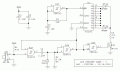
Here is a re-work based of recent posts. As before, U2A and U2B form a 5-second monostable.

U2C is the most simple CMOS oscillator. It can be replaced by some other clock circuit.

The oscillator is not gated by the monostable because this circuit uses the clock enable circuit inside the 4017 to manage when the chip does and does not count.

When the button is pressed, the 4017 stops counting and whatever output is high is illuminated for 5 seconds. Then that LED goes off and the 4017 resumes counting.

As shown, the oscillator frequency is around 800 Hz to assure randomness in the display. Of course, a 4093 can run way faster than that.

ak


!!LED-Stepper-Game-3-c.gif
 
Last edited:
Top