LM386 datasheet circuit problem

Thread Starter

eljeffe

Joined Sep 28, 2017
39
If it is wired correctly, frying usually is caused by oscillation. That's the only time I've seen one die. I killed a TDA2003 the same way, then learned.

ak
Yea I've probably fried about 7 so far - I bought a ton for cheap anticipating a painful learning process.

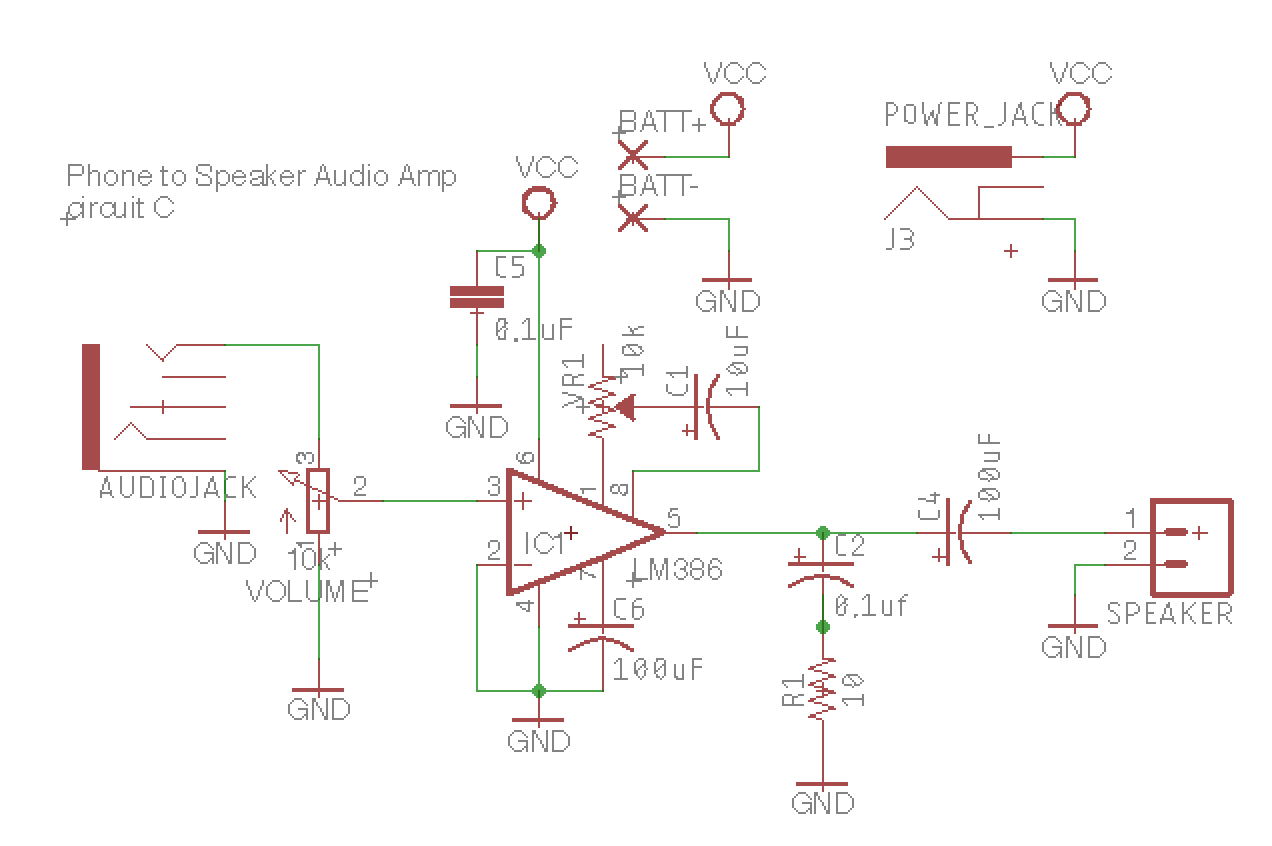
Here's my other circuit that WORKS.

From what I can tell, it is wired up basically the same, but I use different values, and I had added the VCC bypass cap without really knowing what I was doing. It's really surprising to me that this one works so differently from the first one - the values don't seem too different.

I'd appreciate any feedback on what I'm doing good / bad here - I based it off the one from Mims's book, and it seems to work ok.
 

dendad

Joined Feb 20, 2016
4,637
An extra bypass cap of 100uF as well as the 0.01uF could be worth adding. I generally use 0.1uF caps as my standard value.
 

Standisher

Joined Jan 16, 2015
156
It would be good if you could post another photo, zoomed out a bit, so we could see exactly how each component is connected. The zoomed in photo makes it 'appear' that you have a wire (the black one) connected between the end of the output capacitor and ground but that may be just an illusion given by the zoomed in photo.

Here's my other circuit that WORKS.
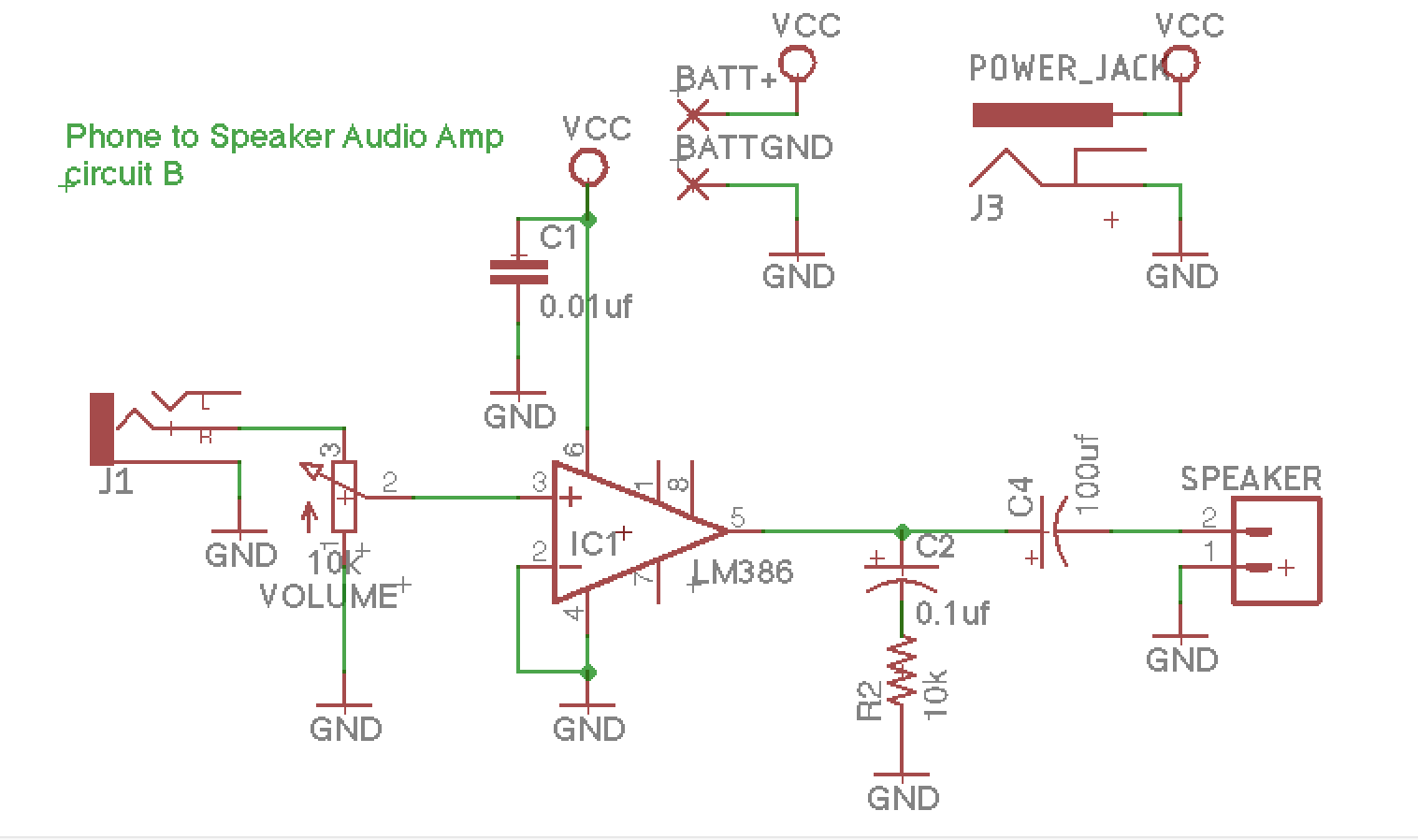
The schematic you have posted there is absolutely fine except for the 10K ohm resistor between pin 5 and ground. That value is way too high...it should be 10 Ohms.

Are you using the same power supply and signal source in your current layout that you used in that circuit?

I'm also assuming (as I cannot see from the photo) that you do have a volume potentiometer on the input? If not, the incoming signal from an iphone would probably be too high (as mentioned by another poster early on in this thread).
 
Last edited:

Thread Starter

eljeffe

Joined Sep 28, 2017
39
An extra bypass cap of 100uF as well as the 0.01uF could be worth adding. I generally use 0.1uF caps as my standard value.
Do you mean another cap in parallel with the 0.01uf cap?
What's the reasoning behind that? When caps are parallel like that, don't they just sort of add together - wouldn't a 100uf + a 0.1uF cap be the same as a 100.1uf cap, and if so, how does that make a difference? I will try that though - thank you for the tip, just would appreciate some explanation as to why (I'm learning).

It would be good if you could post another photo, zoomed out a bit, so we could see exactly how each component is connected. The zoomed in photo makes it 'appear' that you have a wire (the black one) connected between the end of the output capacitor and ground but that may be just an illusion given by the zoomed in photo.

The schematic you have posted there is absolutely fine except for the 10K ohm resistor between pin 5 and ground. That value is way too high...it should be 10 Ohms.

Are you using the same power supply and signal source in your current layout that you used in that circuit?

I'm also assuming (as I cannot see from the photo) that you do have a volume potentiometer on the input? If not, the incoming signal from an iphone would probably be too high (as mentioned by another poster early on in this thread).
Thanks for noticing that - that is actually two wires from the speaker, one to the output cap and one to ground.
I'll try out the 10 ohm resistor instead - what kind of problems might that cause?
Yes exact same power supply and audio source.
I do NOT have an input potentiometer because I have been using the volume control on the phone - isn't that the same thing? At full blast it definitely does distort, but two clicks down seems to work just fine.
 

Thread Starter

eljeffe

Joined Sep 28, 2017
39
An extra bypass cap of 100uF as well as the 0.01uF could be worth adding. I generally use 0.1uF caps as my standard value.
Added the 100uF cap in parallel w/ the 0.01uF to ground. Can't really hear a difference, so definitely interested in the theory behind this.
 

AnalogKid

Joined Aug 1, 2013
12,139
One of the fundamental assumptions behind the math of all analog circuit design and most digital ICs is that any voltage source powering the circuit/chip is a true, theoretically perfect voltage source. That means an output impedance of 0.00 ohms at all frequencies from DC to daylight. In the real world, wires and pc board traces have inductance, and the impedance of an inductor increases with frequency. To counter this, a capacitor is added right at the device pins so it is "between" the inductance and the system. A capacitor's impedance decreases with frequency, offsetting the bad effects of the inductance.

One of the ways that inductance is bad is that as the output stage makes an output, like a sinewave voltage into a load, current comes from the power pin through the chip and out the output pin. So the current into the device has a sinewave component. With an inductor (wire or pc board trace) between the power pin and the power supply, a voltage appears across that impedance at the sine wave frequency. Now the chip no longer sees DC at its power pin; the source voltage is moving around. That means that power to the input stage is moving around, which means that some of the output signal now is fed back to the input by way of the power pin. Positive feedback is the primary requirement of any oscillator circuit, and this is a very common problem.

One solution is to power circuits with power and ground planes, instead of traces, to lower the inductance between the device power pins and the system power. But even that is a 2nd-level fix. The only thing that works all the time every time is capacitors around the device with the shortest possible wires/traces to the power and ground pins. The higher the operating frequency, the more critical the caps are. Digital designers re-learned this as CPU clock speeds increased. It is not uncommon to see a slew of tiny surface mount caps underneath any modern processor. Intel has excellent application notes on how to select and place them. For audio a more general approach works. Analog Devices usually recommends one 0.1 uF ceramic and one 10 uF electrolytic to ground at each power pin of each opamp. One theory for audio power amp chips is that the electrolytic should be the same value as the output coupling capacitor. My experience indicates that 1/2 of that is sufficient, but I've not used every chip out there.

ak
 
Last edited:

Thread Starter

eljeffe

Joined Sep 28, 2017
39
... For audio a more general approach works. Analog Devices usually recommends one 0.1 uF ceramic and one 10 uF electrolytic to ground at each power pin of each opamp....
Wow - once again, a very clear and helpful explanation, thank you.

Can you clarify why the TWO caps are needed? I see also you make the distinction between electrolytic and and ceramic.
That is what I am using since it was suggested, however, it seemed to be working fine with just the ceramic 0.01uf
 

AnalogKid

Joined Aug 1, 2013
12,139
Ceramic caps have lower inductance, and thus "protect" better at the higher frequencies, but do not store enough energy to do much at low frequencies. Electrolytics are a low cost way to get a low impedance at low frequencies, but they have a wound or coiled internal construction and so have a higher inductance that makes them less effective at higher frequencies. The two types and values in parallel do a well documented job of stabilizing most parts in most circuits across a wide range of signal frequencies.

In the past I have use a single 10 uF surface mount ceramic with excellent success because it has the best of both capacitor worlds.

Audio crazies sometimes have 3 or 4 different caps in parallel.

ak
 

Thread Starter

eljeffe

Joined Sep 28, 2017
39
Man I really appreciate the clear info - one is for low freq and one is for high freq - that makes a lot of sense.

Any idea why the manufacturer supplied circuit doesn't work but my own design does? From what you wrote, I have an idea that maybe since the output cap is 250uf, I might need something equal for the bypass cap?

That's when I started blowing chips, I think...I tried the 0.01uf bypass cap on the manufacturer circuit and that thing turned into smoke.
 

Standisher

Joined Jan 16, 2015
156
I'll try out the 10 ohm resistor instead - what kind of problems might that cause?
Yes exact same power supply and audio source.
I do NOT have an input potentiometer because I have been using the volume control on the phone - isn't that the same thing? At full blast it definitely does distort, but two clicks down seems to work just fine.
The Resistor and Capacitor combination forms a 'Zobel Network' which is there to neutralise the effects of the speaker coil inductance. The values of the components are important and are derived through calculation (you will need to Google & read up on Zobel Networks and calculation formulae as it is far to complicated for this thread...and well beyond my expertise :)) Suffice to say that a 10KOhm resistor & 0.1uf capacitor would not fit the design calculation of a Zobel Network and therefore would not help in cancelling speaker inductance - it is quite possible that it would have a negative impact though.
Reducing phone volume will help to reduce signal input strength but is trial and error. I can't understand however why you would want to omit the input pot as it gives complete control over the input voltage. I'm also a little confused why you want to change the circuit which you say works (post #21) - apart from changing the 10KOhm resistor to a 10 Ohm resistor that is. Am I missing something? What is your end goal?

Interestingly, I have never managed to fry an LM386 having built quite a number of circuits using it and have found it to be a robust little chip which operates well up to 12V supply. If the signal input is too high, the chip does distort and, as others have said ,it is important to filter the power supply with capacitors (I use a 100uf and 0.1uf combination). I also place a 4.7uf electrolytic from pin 7 to ground.
 

Thread Starter

eljeffe

Joined Sep 28, 2017
39
The Resistor and Capacitor combination forms a 'Zobel Network' which is there to neutralise the effects of the speaker coil inductance. The values of the components are important and are derived through calculation (you will need to Google & read up on Zobel Networks and calculation formulae as it is far to complicated for this thread...and well beyond my expertise :)) Suffice to say that a 10KOhm resistor & 0.1uf capacitor would not fit the design calculation of a Zobel Network and therefore would not help in cancelling speaker inductance - it is quite possible that it would have a negative impact though.

Reducing phone volume will help to reduce signal input strength but is trial and error. I can't understand however why you would want to omit the input pot as it gives complete control over the input voltage. I'm also a little confused why you want to change the circuit which you say works (post #21) - apart from changing the 10KOhm resistor to a 10 Ohm resistor that is. Am I missing something? What is your end goal?

Interestingly, I have never managed to fry an LM386 having built quite a number of circuits using it and have found it to be a robust little chip which operates well up to 12V supply. If the signal input is too high, the chip does distort and, as others have said ,it is important to filter the power supply with capacitors (I use a 100uf and 0.1uf combination). I also place a 4.7uf electrolytic from pin 7 to ground.
I'll look up the zobel network - thanks for the homework.
I will put a pot on the input for the final design - I'm just prototyping an amp on a breadboard right now strictly with the intention of learning + making a PCB that works. My end goal is a simple line-level amp I can use with this cheap speaker for further experimentation with audio circuits.

You're right, it was probably a mistake to change my circuit, but I'm sort of trying to make mistakes right now to learn from what goes wrong. I started with the Mims book, designed my circuit through trial and error, then I found the official datasheet and thought, 'well that must be just as good if not better' than my hacky design.
I still don't understand why the official schematic works so poorly...I'd expect that from a general user or something but not from the manufacturer.
(edit: this video is almost exactly the effect I was getting. I did not try a cap that big, which could explain why I still couldn't fix it...)

I've experimented with that cap from pin 7 but it doesn't make much of a difference - right now I'm trying to kill the very slight power supply hum I am getting off my 12v wall wart....I don't know if this will go away when I PCB it up w/ a ground plane or what, it's very faint, but of course I want it as silent as possible.
 
Last edited:

Standisher

Joined Jan 16, 2015
156
I still don't understand why the official schematic works so poorly
Actually, you know, your first design is almost identical to the datasheet design (apart from a wrong value on the zobel network and the value of the output capacitor) . Additionally, the datasheet assumes a clean power supply and does say "The power supply should be well regulated and the voltage must be within the specified values. It is recommended to place a capacitor to GND close to the LM386 power supply pin". Wallwarts can be noisy beasts so the power supply smoothing is important (as I say, I use a 100uf electrolytic and 0.1uf ceramic combination). This becomes less important if a battery supply is used.

As you are experimenting, it is worth trying different, higher, values of electrolytic on the output. Higher values give a less 'tinny' sound. 470uf is quite good and I quite like a 1000uf sound, on a variety of speakers I have used. It is also worth experimenting with the gain, using, as described in the datasheet, a capacitor/resistor combo between pins 1 & 8. Virtually all my designs employ a variable gain by using a potentiometer and 10uf capacitor between pins 1 & 8.

Injoy your continued experimentation.
 

Thread Starter

eljeffe

Joined Sep 28, 2017
39
Actually, you know, your first design is almost identical to the datasheet design (apart from a wrong value on the zobel network and the value of the output capacitor) . Additionally, the datasheet assumes a clean power supply and does say "The power supply should be well regulated and the voltage must be within the specified values. It is recommended to place a capacitor to GND close to the LM386 power supply pin". Wallwarts can be noisy beasts so the power supply smoothing is important (as I say, I use a 100uf electrolytic and 0.1uf ceramic combination). This becomes less important if a battery supply is used.

As you are experimenting, it is worth trying different, higher, values of electrolytic on the output. Higher values give a less 'tinny' sound. 470uf is quite good and I quite like a 1000uf sound, on a variety of speakers I have used. It is also worth experimenting with the gain, using, as described in the datasheet, a capacitor/resistor combo between pins 1 & 8. Virtually all my designs employ a variable gain by using a potentiometer and 10uf capacitor between pins 1 & 8.

Injoy your continued experimentation.
I think you are right, and that is nice to have that settled - the design from the manufacturer didn't work because I wasn't using the bypass cap.

I have added a trimpot + 10uF cap between pin 1 and 8 and it is nice having the gain - this thing gets really loud!

Now here's the good news, albeit a bit surprising considering a lot of the feedback I have received here...
I got it working VERY well - sounds good across all audible freqs and there is 0 noise anymore.
The surprising part is, the electrolytic bypass cap seems to ADD noise...if I use a 0.1uf ceramic cap, plus a 10uF cap from pin 7 to ground, things work extremely well. Once I add that electrolytic bypass cap, the noise comes back.
I have also tried different values on the output cap, and can't really hear much of a difference.

Do I have some other value off somewhere that makes that electrolytic bypass cap not work right (I've tried both 10 and 100uF)? Either way, I'm extremely happy it's working and I have learned so much just working things out piece-by-piece in this thread - I sincerely appreciate the support and insight. Here is my working circuit:


But yea...why does the electrolytic cap bring the noise back?
Thanks again all yall for your input, suggestions, and kindness to a beginner.
 
Last edited:

Standisher

Joined Jan 16, 2015
156
Glad you have it working to your satisfaction @eljeffe . It may just be that the 10uf deals better with the low frequency noise in your particular circuit. I've never had added noise when using a 100uf electrolytic as the charge reservoir but hey, if 10uf works better that's fine (the electrolytic can be anywhere between 10uf and 100uf ).
 

Thread Starter

eljeffe

Joined Sep 28, 2017
39
Glad you have it working to your satisfaction @eljeffe . It may just be that the 10uf deals better with the low frequency noise in your particular circuit. I've never had added noise when using a 100uf electrolytic as the charge reservoir but hey, if 10uf works better that's fine (the electrolytic can be anywhere between 10uf and 100uf ).
I actually edited my post - I was wrong about the 10uF working better. NO CAP works best for me.

I wonder if the cap on pin 7 sort of serves the same function, and by adding another from the power pin, I'm over doing it...just a guess.
 

Audioguru

Joined Dec 20, 2007
11,248
The datasheet for the LM386 shows that its works well up to the radio frequency of 1MHz that is much too high for a solderless breadboard. The rows of contacts have capacitance between them and between the wires that are all over the place and the capacitance couples the output back to the input causing oscillation.
Also the contacts cannot carry the high currents of a 4 ohm speaker. Use a compact pcb or soldered stripboard.

At 1MHz the 0.05uF capacitor should be tiny but you said yours is huge so it is probably old, high voltage and wound like an inductor. You do not want any inductance. Use a small 0.047uF/63Vceramic or plastic film capacitor. Why is the 250uF capacitor also huge? It should be a modern little 25V one that will have low inductance.

Did you see what happens with a 12V supply and a 4 ohm speaker? Its maximum output is almost the same low power (only 0.38W) as it is with a 9V supply but its heating is almost doubled.
 

Thread Starter

eljeffe

Joined Sep 28, 2017
39
The datasheet for the LM386 shows that its works well up to the radio frequency of 1MHz that is much too high for a solderless breadboard. The rows of contacts have capacitance between them and between the wires that are all over the place and the capacitance couples the output back to the input causing oscillation.
Also the contacts cannot carry the high currents of a 4 ohm speaker. Use a compact pcb or soldered stripboard.

At 1MHz the 0.05uF capacitor should be tiny but you said yours is huge so it is probably old, high voltage and wound like an inductor. You do not want any inductance. Use a small 0.047uF/63Vceramic or plastic film capacitor. Why is the 250uF capacitor also huge? It should be a modern little 25V one that will have low inductance.

Did you see what happens with a 12V supply and a 4 ohm speaker? Its maximum output is almost the same low power (only 0.38W) as it is with a 9V supply but its heating is almost doubled.
That's interesting about the 12v supply doubling the heat. I'm currently not getting a lot of heat problems but I'll bounce down to a 9v adapter or battery.
As for the size of the caps, I just ordered what I could find at those values. Yea I was a little surprised how gnarly and huge they were.
My design that I did doesn't use them any more and it works great now (even on breadboard!).

Any insight as to why adding an electrolytic bypass cap adds so much noise - or is that what you meant about the breadboard, and those problems would disappear on a pcb?
Thanks
 

Audioguru

Joined Dec 20, 2007
11,248
1) You replaced the huge inductive C2 and C4 capacitors with 0.1uF and 100uF smaller modern ones so that the inductance is less and less chance of high frequency oscillation caused by the breadboard.
2) You added a filter capacitor to pin 7 that the datasheet shows reduces a chance of high frequency oscillation picked up from the power supply. High frequencies on the power supply are common on a breadboard.

A breadboard can be used for low current DC circuits like LEDs blinking on and off.
 

Thread Starter

eljeffe

Joined Sep 28, 2017
39
1) You replaced the huge inductive C2 and C4 capacitors with 0.1uF and 100uF smaller modern ones so that the inductance is less and less chance of high frequency oscillation caused by the breadboard.
2) You added a filter capacitor to pin 7 that the datasheet shows reduces a chance of high frequency oscillation picked up from the power supply. High frequencies on the power supply are common on a breadboard.

A breadboard can be used for low current DC circuits like LEDs blinking on and off.
Awesome - thanks again for the tips.
Hopefully this is the last high-current circuit I will lay out on a breadboard. Part of the reason for making this amp is so I can now breadboard audio circuits and have a line-level amp to speaker to test them with.

Is this correct? Something like a resonant filter using an op-amp would be ok on a breadboard because it is not necessarily high current. Am I understanding that correctly?
Edit: I read now about your mention of DC circuits...I'll keep trying w/ breadboard because I don't know another cheap and dynamic way to test other than simulating in Eagle, which I don't entirely trust yet.
 

Audioguru

Joined Dec 20, 2007
11,248
Most opamps have gain at Megahertz radio frequencies. Many transistors have gain at microwave frequencies. Then the capacitance between all the rows of contacts and between messy long wires all over the place on a breadboard guarantee high frequency oscillation even with low frequency signals or even with no signals.

Years ago every circuit I built on a breadboard oscillated and the contacts were always intermittent. Then I discovered how to plan a compact layout of parts soldered together on a stripboard and used it ever since, even to make single prototypes that looked good enough to be sold as the final products. Each copper strip is cut and used for many parts of a circuit so the strips and a few short jumper wires make the traces of a pcb. If I needed to replace a part then my solder sucker easily removed it. Stripboard has very low capacitance between the parts and no intermittent contacts.
 
Top