IoT flood detection and avoidance project

Thread Starter

sh2000

Joined Jul 25, 2023
9
Aim
The first aim of this project is the design and implementation of a system that detects rain, automatically triggers an alarm or buzzer and switches on an electrical socket which turns on a water pump.
The second aim is the design and implementation of a system that eliminates or lessens the impacts of the flood, using various natural factors to detect flood.

Objectives
Design a system that detects rain (rainwater), then automatically trigger an alarm that switches on (after a predetermined length of time) an electrical socket which turns on a water pump.
Design a system that eliminates the impacts of the flood
Implement the two systems.
Test the systems in real life environment
Using the equipment below how can i establish a connection for the relay to control the pump, and which connection is the most optimal way of doing it.


I have the following equipment:
Arduino uno
ESP-32 module
Breadboard
Ultrasonic sensor
12v power supply (battery)(2 bare wires)
12v DC water pump (2 bare wires)
Lcd screen 16x2
Single relay 12v
DHT-11 humidity sensor
Crocodile clips
Jumper wires
Potentiometer
Buzzer
 

WBahn

Joined Mar 31, 2012
32,760
As this is an assignment for some kind of educational purpose, the goal is for YOU to do the bulk of the work, not just ask others to tell you what to do.

So come up with your best effort and describe that here. Then you can get feedback for you to consider and you can decide what, if any, changes in your approach you believe are warranted.
 

Jon Chandler

Joined Jun 12, 2008
1,572
Look at the functions you need, and figure out how to do it from there. There's plenty on the internet if you break down the pieces.

> How can you control the motor? Lots of suggestions out there....it depends on the size of the motor when the best approach it.

> How will you sense the rain? Again, there are a lot of different ways to do this. Your job is to figure it out. What's been done? Is there a better way?1

Research. Google. Use brain. If you find that somebody's already done this, don't just copy what they did. Figure out what they are doing, why they did it that way and think about how to do it better. If somebody did it a different way, analyze what they did too and look for shortcomings with their approach.
 

Thread Starter

sh2000

Joined Jul 25, 2023
9
As this is an assignment for some kind of educational purpose, the goal is for YOU to do the bulk of the work, not just ask others to tell you what to do.

So come up with your best effort and describe that here. Then you can get feedback for you to consider and you can decide what, if any, changes in your approach you believe are warranted.
I’ve managed to connect the majority of sensors. However, I have a problem with connecting the water pump to the relay but also using the power supply to power it. When I enter the code for the relay to turn on 5 secs and off 5 secs the relay responds but the water pump doesn’t, it just stays on. Are you able to help with this?
 

ericgibbs

Joined Jan 29, 2010
21,419
hi sh,
Welcome to AAC.
Do you have a rough sketch you could post showing the interconnections of your modules?

As you are using an ESP32, is it programmed using the Arduino IDE.?
Post your Code.

E
 

LesJones

Joined Jan 8, 2017
4,511
Show us the schematic of how the motor , relay and the power supply are connected together. Does the motor start before you first apply power to the relay coil ?
Les.
 

Thread Starter

sh2000

Joined Jul 25, 2023
9
Show us the schematic of how the motor , relay and the power supply are connected together. Does the motor start before you first apply power to the relay coil ?
Les.
I don’t have a schematic at hand. I tried using a push button to see if when I press it the pump turns off.


Wiring:

1. Relay Module:

- VCC: Connect to Arduino's 5V.

- GND: Connect to Arduino's GND.

- IN1: Connect to Arduino's digital pin

2. Push Button:

- One end of the push button: Connect to Arduino's digital pin 1.

- Other end of the push button: Connectto Arduino's GND via a 10kΩ resistor (this acts as a pull-down resistor).

3. DC Pump:

- The negative (-) terminal of the pump directly to the negative terminal of your power supply.
- The positive (+) terminal of the pump to the Normally Open (NO) terminal of the relay.
- The Common (COM) terminal of the relay to the positive (+) terminal of your power supply.

The code:
C-like:
const int buttonPin = 1;

const int relayPin = 2;


void setup() {

  pinMode(buttonPin, INPUT);

  pinMode(relayPin, OUTPUT);


  // Ensure relay is off at the start

  digitalWrite(relayPin, LOW);

}


void loop() {

  int buttonState = digitalRead(buttonPin);


  if (buttonState == LOW) {  // Push button is pressed

    digitalWrite(relayPin, HIGH);  // Turn on relay

  } else {

    digitalWrite(relayPin, LOW);   // Turn off relay

  }

}
I used this as a test to see if I’m able to control the pump with the button but it doesn’t work. I’m not sure if it’s the code or the wiring.
 
Last edited by a moderator:

ericgibbs

Joined Jan 29, 2010
21,419
hi sh,
Try this, it works for me on the UNO.

Note A1 and A2 pins.
Added serial to check the operation.


E
C-like:
const int buttonPin = A1;

const int relayPin = A2;

void setup() {
 Serial.begin(9600);
 Serial.println("Ready");
 
  pinMode(buttonPin, INPUT);

  pinMode(relayPin, OUTPUT);


  // Ensure relay is off at the start

  digitalWrite(relayPin, LOW);

}

void loop() {

  int buttonState = digitalRead(buttonPin);

 Serial.println(buttonState);

  if (buttonState == LOW) {  // Push button is pressed

    digitalWrite(relayPin, HIGH);  // Turn on relay

  } else {

    digitalWrite(relayPin, LOW);   // Turn off relay

  }

}
 

Thread Starter

sh2000

Joined Jul 25, 2023
9
hi sh,
Try this, it works for me on the UNO.

Note A1 and A2 pins.
Added serial to check the operation.


E
C-like:
const int buttonPin = A1;

const int relayPin = A2;

void setup() {
Serial.begin(9600);
Serial.println("Ready");

  pinMode(buttonPin, INPUT);

  pinMode(relayPin, OUTPUT);


  // Ensure relay is off at the start

  digitalWrite(relayPin, LOW);

}

void loop() {

  int buttonState = digitalRead(buttonPin);

Serial.println(buttonState);

  if (buttonState == LOW) {  // Push button is pressed

    digitalWrite(relayPin, HIGH);  // Turn on relay

  } else {

    digitalWrite(relayPin, LOW);   // Turn off relay

  }

}
Hello Eric,

I just tried the code you provided and it didn’t work.Can I ask how you made the connections with the pump-relay-power supply?
 

ericgibbs

Joined Jan 29, 2010
21,419
hi sh,
I used a resistor and LED on the A2 pin, when the p/b is pushed the LED, on A2, lights as required, this indicates there is a signal.
You need to post a rough digram showing the pump and relay wiring, I can then help.
E
 

Thread Starter

sh2000

Joined Jul 25, 2023
9
hi sh,
I used a resistor and LED on the A2 pin, when the p/b is pushed the LED, on A2, lights as required, this indicates there is a signal.
You need to post a rough digram showing the pump and relay wiring, I can then help.
E
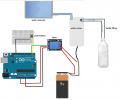
It is like this however the pump has a GND wire and a VCC wire, not 1 as depicted here.

1690368382906.png
 

ericgibbs

Joined Jan 29, 2010
21,419
Hi sh,
Don't use pins 0, 1, they are used by the IDE serial I/O, try A1 and A2

or 11 and 12, change my test program to suit.

If you don't have a pull-up resistor on the button pin, change the code to set it to PULL_UP.

E
 

Thread Starter

sh2000

Joined Jul 25, 2023
9
Hi sh,
Don't use pins 0, 1, they are used by the IDE serial I/O, try A1 and A2

or 11 and 12, change my test program to suit.

If you don't have a pull-up resistor on the button pin, change the code to set it to PULL_UP.

E
Thank you, but I don’t think the code is the problem I think it’s the wiring. The water pump powers on when power supply is connected. I’m not sure if the wiring is correct.
 

Alec_t

Joined Sep 17, 2013
15,112
You need to know the current and voltage requirements of the pump in order to select an appropriate relay. Not all relays can switch heavy DC currents without their contacts welding closed!
What are the pump specs? What are the relay specs?
 

Thread Starter

sh2000

Joined Jul 25, 2023
9
You need to know the current and voltage requirements of the pump in order to select an appropriate relay. Not all relays can switch heavy DC currents without their contacts welding closed!
What are the pump specs? What are the relay specs?
yidenguk DC 12V Submersible... https://www.amazon.co.uk/dp/B07S9CC1Y9?ref=ppx_pop_mob_ap_share

Hailege 2pcs 12V 1 Channel Relay Module Relay Switch With Optocoupler Isolation Support High or Low Level Trigger https://amzn.eu/d/dlHta9q

That’s the relay and pump I’m using.
 

Jon Chandler

Joined Jun 12, 2008
1,572
Can you hear the relay click when it's turned on or off? The click should be audible.

Try disconnecting the relay control pin from the Arduino and connecting it to V+ pin and then ground. One way should close the relay and operate the pump. The other will open the relay and the pump will stop.
 

Thread Starter

sh2000

Joined Jul 25, 2023
9
Can you hear the relay click when it's turned on or off? The click should be audible.

Try disconnecting the relay control pin from the Arduino and connecting it to V+ pin and then ground. One way should close the relay and operate the pump. The other will open the relay and the pump will stop.
I have managed to fix that issue. Thank you to everyone that helped. In terms of integrating the project using IoT cloud which website do you recommend to use?
 
Top