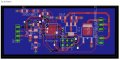
First PCB Design - Need opinions on design

Thread Starter

kyleh04

Joined Jun 18, 2017
54
Hey guys!

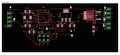
I've been programming MCU's for a while now, and working on prototype boards, but never actually designed a PCB. I am working on a project in which uses a premade RF receiver, an Atmega MCU, and a servo. I have made a PCB design in Eagle, and would love if you guys could give me some opinions on it before I spend the money to have it build just to find out I messed something up.

I have this exact same setup completed on solderable boards, even using the single power supply with the servo, the decoupling/smoothing caps work great.

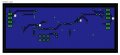
I did my best to keep all runs on the top layer, to allow the bottom layer with the ground plane to be as unobstructed as possible. I'm using 10 mill copper traces for everything. I'll probably change the voltage traces to the servo to 12 mil, since it can draw up around 500mA.

Thank you so much for any advice/help, I'm super excited to get into the PCB design world!

Top Layer:


Bottom Layer:
 

MrChips

Joined Oct 2, 2009
34,628
I have not scanned your layout for errors. Your layout has room for improvements.

PCB Layout Top.jpg

1, 2, 5, 6, 7, 8, 9, 10 - vias not necessary
3 - not connected
4, 11, 12, 14 - give more space when available
14, 15 - route on top layer


PCB Layout Bottom.jpg

Generally, try to route all traces on top layer.
If you are forced to used both top and bottom layers for routing, look to see if you can route all top traces in one direction (e.g. horizontal, if this will handle the vast majority of traces) and route the remaining traces in the 90° direction on the other layer. This is not a rigid rule.

Even though modern PCB houses can do 10mil traces and lower, I like to give more copper and space if space permits. Increase your traces to 12 or 15mil. Increase power traces to 20 or 25mil. For supply and GND I go as fat as space will allow, 50-100mil.
 

SLK001

Joined Nov 29, 2011
1,549
Increase your trace widths - substantially. Flood the top layer with ground and stitch top and bottom planes with quite a few vias. If you want better help, provide the schematic so that we can see what is what.
 

Sensacell

Joined Jun 19, 2012
3,768
Power supply decoupling caps should be connected as short and tight to a chip as possible- place and route this first.
Tie the chip GND leads directly to the ground plane with absolute minimum length.

It may not be 100% necessary in every board, but good high-speed layout practice will serve you well.
 

Thread Starter

kyleh04

Joined Jun 18, 2017
54
Thank you guys so much for your feedback and advice. I pretty much redid the board, taking what you guys said into account. I now have a lot less runs on my ground plane and many fewer via's. My traces are 12/24/50 mils. One question: I am using the same drill size of 10 mils, which is the minimum for the production house that I am using. What size(s) should I use? I assume that the bigger sized traces should have a bigger drill? Thank you again for your help!

Increase your trace widths - substantially. Flood the top layer with ground and stitch top and bottom planes with quite a few vias. If you want better help, provide the schematic so that we can see what is what.
I thought that you should only have one ground plane if possible? Reference: https://electronics.stackexchange.c...are-the-advantages-of-having-two-ground-pours

Power supply decoupling caps should be connected as short and tight to a chip as possible- place and route this first.
Tie the chip GND leads directly to the ground plane with absolute minimum length.

It may not be 100% necessary in every board, but good high-speed layout practice will serve you well.
Done.

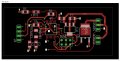
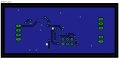
Attached are the new layout, I also added a status LED to the design now.

Top layer:


Bottom Layer:


Schematic:
 

dl324

Joined Mar 30, 2015
18,219
Move R2 so you don't need the scenic route from LED1. Move C2 to straighten the VCC trace to C1. Move C4 up to shorten the trace to the crystal. Enlarge the pads in the ICSP connector for ease in soldering. Remove the 90 degree bend on the bottom layer trace. Widen traces to ground plane. Align the VCC traces on the right.
 

MrChips

Joined Oct 2, 2009
34,628
1 - Move via to fall right on top of the pad. Increase via hole size.
2 - Via not required. Route on top layer.
3 - Use polygon flood.
4 - Move track to outside of IC footprint.
6 - Straighten
7 - 45° angle away from other via.

Don't bend a trace if a straight trace will do.


PCB Layout Top_2.jpg
PCB Layout Bottom_2.jpg
 

djsfantasi

Joined Apr 11, 2010
9,237
The drill holes depend on the parts you use. For each part (or class of part. Like all resistors from the same manufacturer and rated the same), check the datasheet for the lead diameter or width and then pick the next largest drill for the hole. If several parts have different sized leads, but they are close in size, you can use the largest to select the drill size.

Don't use the PCB software default sizes. Don't ask why, just don't.

Your headers definitely won't fit unless you change the hole size
 

Thread Starter

kyleh04

Joined Jun 18, 2017
54
1 - Move via to fall right on top of the pad. Increase via hole size.
2 - Via not required. Route on top layer.
3 - Use polygon flood.
4 - Move track to outside of IC footprint.
6 - Straighten
7 - 45° angle away from other via.

Don't bend a trace if a straight trace will do.
Done. Except I wasn't able to move the via below the pad without getting a clearance error from eagle. I moved the reset line, but I'm not sure if it is better now, it uses the GND plane a lot..

The drill holes depend on the parts you use. For each part (or class of part. Like all resistors from the same manufacturer and rated the same), check the datasheet for the lead diameter or width and then pick the next largest drill for the hole. If several parts have different sized leads, but they are close in size, you can use the largest to select the drill size.

Don't use the PCB software default sizes. Don't ask why, just don't.

Your headers definitely won't fit unless you change the hole size
OK, for the headers, I'm just using the jumper library parts. How would I change the size?

Thanks!

Top & Bottom:


MrChips

Joined Oct 2, 2009
34,628
I'm happy to see that you are posting both top and bottom layers overlayed. I was going to suggest that earlier.

1 - Route entire trace to bottom layer.
2 - Reroute entire trace to top layer to connect to IC +5V pin.
3 - Get the kink out.
4 - Give more space since space is available.
5 - Straighten up.
6 - Use straight traces where there is ample space.
7 - Reduce width to IC pin.

C5 should be 100nF placed on the input side of +5V entry to IC, with shortest possible track length.
I have placed vias right on top of SMD footprint with no problem. The aim is to have minimum trace length to the GND and POWER planes.

Check the drill size of the headers. I use 0394 (1mm) for header pins and 0236 (0.6mm) for via.
Be aware that finished hole diameter will be smaller than drill size. Check with the PCB house as to whether you need to specify finished hole vs drill hole.

PCB Layout Top & Bottom_3.jpg
 

Thread Starter

kyleh04

Joined Jun 18, 2017
54
I'm happy to see that you are posting both top and bottom layers overlayed. I was going to suggest that earlier.

1 - Route entire trace to bottom layer.
2 - Reroute entire trace to top layer to connect to IC +5V pin.
3 - Get the kink out.
4 - Give more space since space is available.
5 - Straighten up.
6 - Use straight traces where there is ample space.
7 - Reduce width to IC pin.

C5 should be 100nF placed on the input side of +5V entry to IC, with shortest possible track length.
I have placed vias right on top of SMD footprint with no problem. The aim is to have minimum trace length to the GND and POWER planes.

Check the drill size of the headers. I use 0394 (1mm) for header pins and 0236 (0.6mm) for via.
Be aware that finished hole diameter will be smaller than drill size. Check with the PCB house as to whether you need to specify finished hole vs drill hole.
Did everything, except what do you mean by "input side" of IC?


JohnInTX

Joined Jun 26, 2012
4,787
On pin 1 (and some others) of the ATMEGA, the trace connects to the pad with an acute angle. This can cause over-etching in the tight corner. Pin 1 of SERVO too. Try to eliminate those.
There is a bump on pin 29 that looks like a stray trace. Get rid of that.
It looks like a via is shorting pins 2 and 3 of the PLCC.
Pull that via at pin 8 of the PLCC down so that it is not so close to the soldered pad.
I would try to get more space between the vias and SMT pads - R2 for example.
Move those vias that are on the SMT pads away from the pad to avoid soldering issues. R1, C1, C2, C3, Q1 for starters.
I'm wondering if the fat traces on the PLCC will cause soldering problems due to differing thermal masses, particularly the one going to the via.
Move any silkscreen legend that crosses a via if you can. I know, picky picky.
Mounting holes?

In the fabrication drawing, specify 'HOLE SIZES AFTER PLATING'. The PCB house will make the necessary allowances.

Looks good to me, too.
 
Last edited:

SLK001

Joined Nov 29, 2011
1,549
Move those vias that are on the SMT pads away from the pad to avoid soldering issues.
Move any silkscreen legend that crosses a via if you can.
Mounting holes?
+1 on these. Vias in any mounting pad is bad practice. If you don't adjust your silkscreens that cross a PAD, the PCB house's software will truncate them and you won't have them any more.
 

Thread Starter

kyleh04

Joined Jun 18, 2017
54
Thanks again so much for the help!

On pin 1 (and some others) of the ATMEGA, the trace connects to the pad with an acute angle. This can cause over-etching in the tight corner. Pin 1 of SERVO too. Try to eliminate those.
There is a bump on pin 29 that looks like a stray trace. Get rid of that.
It looks like a via is shorting pins 2 and 3 of the PLCC.
Pull that via at pin 8 of the PLCC down so that it is not so close to the soldered pad.
I would try to get more space between the vias and SMT pads - R2 for example.
Move those vias that are on the SMT pads away from the pad to avoid soldering issues. R1, C1, C2, C3, Q1 for starters.
I'm wondering if the fat traces on the PLCC will cause soldering problems due to differing thermal masses, particularly the one going to the via.
Move any silkscreen legend that crosses a via if you can. I know, picky picky.
Mounting holes?

In the fabrication drawing, specify 'HOLE SIZES AFTER PLATING'. The PCB house will make the necessary allowances.

Looks good to me, too.
Done. None of the writing will be silk screened when I send it, just for displaying. Mounting will be done by hot glue.

+1 on these. Vias in any mounting pad is bad practice. If you don't adjust your silkscreens that cross a PAD, the PCB house's software will truncate them and you won't have them any more.
 

MrChips

Joined Oct 2, 2009
34,628
Picky, picky, yes. But for good reasons.
This is only your first PCB. You will learn from your own personal experience.
PCB layout is very much an art as it is engineering. You will find that making the layout "pretty" has engineering advantages.

Hence:

1. Keep traces straight where possible.
2. Keep traces short.
3. Take off traces from pads at 0 degrees, not at an angle.
4. Give more space from adjacent copper where space allows.

Did you do a wattage and heat analysis on IC1?
Rotate IC1 180° and give the tab more copper area to act as a heat sink.
This has two advantages:
1 - It moves any heat generation to the edge of the board.
2 - It will get you closer to your +5V flood plane (pin-4 and pin-18).

Do connect AREF (pin-20) to your +5V.

By input side, I meant where Vcc (+5V) enters the 32-pin package. I now see that it is on pin-4. You're ok.
(You have confused Vcc and +5V. +5V should have been labelled Vcc. Vcc should have been labelled Vsupply or something else.)

As for vias on the pads, you are now given two opposing views. I have had no problems putting vias on the pads. I do this for shortest connection to the ground plane. I am not going to argue with the other view. If you are happier pulling the vias away from the pads that will be ok since this is not a critical high frequency design.
 

MrChips

Joined Oct 2, 2009
34,628
In your latest revision, there are traces too close for comfort.
+5V between pin-24 and pin-25 at ATmega.
+5V at IC1.

Get gid of the +5V via under ATmega. Reroute +5V to R2.

There is an extra via on the bottom layer to the right of pin-19.
 

JohnInTX

Joined Jun 26, 2012
4,787
@MrChips - Interesting. I have never considered vias on SMT pads but your electrical reasoning makes sense. No soldering problems then, I assume.

I missed the acute angle under the voltage regulator. I'd straighten that out.
 

MrChips

Joined Oct 2, 2009
34,628
Next step - silk screening.
Are you going to request silk screening (top overlay)?
Simplfy the labelling. Use smaller font. Position better and don't overlap. Avoid long words.
Move from underneath components and away from pads and vias.

For resistances, 300 or 10k is good enough.
For capacitances, drop the F.

If you were doing your own etching, always put at least one string of text in copper on the top layer. This helps to get the orientation right with your photo masks. With a PCB house it doesn't hurt to continue this practice.

If you were doing your own etching, I would also put a flood plane on the top side. Saves on etchant.

As John says, put mounting holes on the board. Doesn't cost extra.
 
Top