Facebook
 Google
 GitHub
 Linkedin

I checked and you are right the _typical_ sink current is 16ma minimum. But...it can be as low as 6ma depending on temperature and he luck of the draw for the device you actually have.From experimenting I didn't see much voltage gain for the triangle when lowering R1. I think the typical sink current for the LM393 is 16mA but I can't find it in the datasheet right now. This may be one reason crutschow has a 2k pull-up resistor.
The way to choose the values of R1, R2 and R3 resistor value is to trade off the high state output voltage when loaded by the feedback resistor against the saturation voltage when in the low state. You want to use most of the maximum allowed sink current when the drop across R1 is about equal to the saturation voltage. You don't want to use all of the sink current in the pullup resistor or there will not be any current to drive stray capacitances.
Correct.But apart from these things, the reason for lowering this value is perhaps to reduce the time constant associated with stray capacitance of the breadboard
 There is also coupling between contact strips -- but that is another issue.
The 16 volts is a good idea. I started my learning about the limitations of the SBB (Solderless BreadBoard) using the LM318. A nice part for its time but it tends to oscillate if you don't do proper layout of the wiring, component placement and power supply bypass. Once you make a LM318 behave you are a long way to understanding what will and what not will work at high frequencies.I'm not too concerned with low supply voltages right now, for one because it allows me to properly drive most opamps that I have. The 16V comes from two dying 9V batteries. I came across the LM318 which has a very high slew rate, might be a good part.
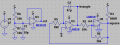
The comparator switches when the voltage at its positive input equals the voltage at its negative input. this voltage is set by the output voltage of the comparator and the ratio of R1 to R2. Keep in mind that the current is the same through both R1 and R2. Why? Because they are in series and the input of the comparator is high impedance and, therefore, draws little current away from R1 and R2.Yes, I see how the hysteresis thresholds set the triangle amplitude given a fast enough comparator. Going by your instructions I lowered the resistor values of the hysteresis ratio. This had great effect on the triangle amplitude though I don understand why.
For example, if R2 is 10 times the value of R1 the comparator will switch at about 2.25 volts and 2.75 volts because there is about 0.25 volts across R1 when the comparator switches.
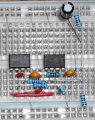
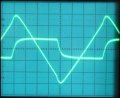
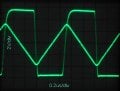
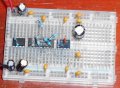
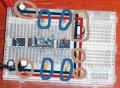
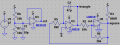
Great.Anyway, I get 600kHz now and the waveform isn't too bad. After de-sloppifying the breadboard the squarewaveform improved, but the triangle still has a slight nick at the tops. EDIT: The 47pF speed-up capacitor across R1 is missing from the diagram.
A slow risetime of the squarewave will cause rounding of the peaks of the triangle wave.
Overshoot on the square wave will cause "peaking" on the tips of the triangle wave. Do you really have overshoot as shown in your waveforms? You do have your scope probe properly compensated don't you?
You can also get a glitch at the peak of the triangle if some of the square wave couples directly into the input of the integrator. This is the likely cause. Check your layout on the SBB.
One final source of a glitch is resistance in series with the timing capacitor. I doubt this is your problem.
Glitches show up better (better?
) with faster op-amps.There are a lot of subtleties in that design. Feel free to ask as many questions as you want until you understand it all.EDIT2: P.s. Thanks for your 10MHz circuit! It is way beyond me but I'll study it and see if I can make sense of parts of it.