Facebook
 Google
 GitHub
 Linkedin
Hello!
I want to automate my Philips 3300 Series LatteGo coffee machine, and ideally without opening it up and voiding warranty.
The cheapest, simplest idea seemed to be remotely activating the capacitive touch buttons on the control panel of the machine.
It seems remote activation of capacitive controls is a niche problem, and the best design I could find was from Leo's Bag of Tricks here .
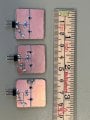
I created three of these modules, based on this circuit.
When I have a piece of copper tape over a button on the 3300 panel, I can touch the tape to activate the button, capacitive touch works through and across the tape.
The moment I stick on the module however, it more or less doesn’t react to my finger at all. Tapping the tape over the button, the tape bridging the gap, the tape on the module, nothing.
If I tap the tape WITH the module itself as I hold it, it will only activate if I hold across the copper of the module, bypassing the circuit, but if I hold on the in-out pins of the module, it more or less never activates from a tap.
I tried wiring the module up to GND and digital pin 5 on an Arduino UNO R4, which I plugged via usb-c to the wall. Running the code:
The LED on the module blinks just fine, but it does absolutely nothing to trigger any manner of capacitive touch, and this has been tried with various lengths and widths of copper tape. With conductive adhesive, of course, 3M #1181.
Is the parasitic capacitance of the circuit/PCB as a whole too high, making the 3300 simply ignore the input, or not register it?
I would really love to automate the capacitive controls on this, and many other devices, but with very little similar projects to go off of, and a limited understanding of electronics, I'm at a standstill here.
I want to automate my Philips 3300 Series LatteGo coffee machine, and ideally without opening it up and voiding warranty.
The cheapest, simplest idea seemed to be remotely activating the capacitive touch buttons on the control panel of the machine.
It seems remote activation of capacitive controls is a niche problem, and the best design I could find was from Leo's Bag of Tricks here .
I created three of these modules, based on this circuit.
When I have a piece of copper tape over a button on the 3300 panel, I can touch the tape to activate the button, capacitive touch works through and across the tape.
The moment I stick on the module however, it more or less doesn’t react to my finger at all. Tapping the tape over the button, the tape bridging the gap, the tape on the module, nothing.
If I tap the tape WITH the module itself as I hold it, it will only activate if I hold across the copper of the module, bypassing the circuit, but if I hold on the in-out pins of the module, it more or less never activates from a tap.
I tried wiring the module up to GND and digital pin 5 on an Arduino UNO R4, which I plugged via usb-c to the wall. Running the code:
C:
void loop() {
  pinMode(triggerPin, OUTPUT);
  digitalWrite(triggerPin, HIGH);
  delay(350);
  pinMode(triggerPin, INPUT);
  delay(3000);
}Is the parasitic capacitance of the circuit/PCB as a whole too high, making the 3300 simply ignore the input, or not register it?
I would really love to automate the capacitive controls on this, and many other devices, but with very little similar projects to go off of, and a limited understanding of electronics, I'm at a standstill here.