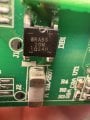
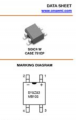
My LED lamp that failed has TB120F rectifier. That one I can see the + & - under 3X and it's about the same size as the MB10F. It also has its half moon between pos & neg. But you have to LOOK closely.
WOW! I have never seen this before. 3 boards with FWBR's all with the half moon between + & -. At least this one can easily be seen with 3X. Unfortunately I can't see the silk screen under the chip. But it MIGHT be there in the SS.
Or it can be Chinesium. Something pulled off of some salvaged board then put up for sale with no knowledge of what it is or its specs or anything else. The giveaway is the incorrect pin identification. Here again is that human element. Anglush is not their first language.
So when you purchased the parts, you must have selected a completely different part number.
From my experience, every part number has to be looked at as a separate thing.
I've actually seen a lot of case styles for bridge rectifiers from DIP package types to very big 30 amp units, and 100 amp dual diode packages. If I told purchasing to buy 10 units of part number A1234 and later wanted something like that, I would have found out that the new part number B1234 was different otherwise I could not have known it was anything even remotely like part number A1234. If I told them to order 10 units of part number B1234 I'd have to know what they were and what their pinout was.
I guess I had so much experience with different pinouts popping up that this is second nature to me. I was going through the thought process of how we select new parts that are similar to old parts, and we sometimes have to do this because we can't get the original part right away or maybe not anymore at all.
I guess the rule of the day is attention to detail. We have to be very attentive to what we are ordering. We all fall prey to this from time to time, and I am certainly no exception.
I could quote other mistakes that have come up in the past like a small transistor with two leads reversed. The transistor gets damaged in a way that makes it's Beta go really low and so no longer works in the application. I can't remember the part number, but it did have something to do with Radio Shack
Here's what one of the 'ai' bots had to say about it. It sounded reasonable this time especially #2 from the second reply [2] below...
START QUOTE AI [1]
Great question! It’s easy to get tricked by a part that looks identical but doesn’t quite function the same way. Here are some tips to make sure you buy the right electronic part:
1. **Check the Part Number**: Always verify the part number and model number of the original part. This is the most reliable way to ensure compatibility.
2. **Read the Specifications**: Make sure the specs of the new part match those of the original. Look at voltage, wattage, dimensions, and other key characteristics.
3. **Source from Reputable Vendors**: Buy parts from reputable sellers and manufacturers. This reduces the risk of getting counterfeit or subpar components.
4. **Compare Photos Closely**: While looks can be deceiving, comparing high-resolution photos can help spot differences.
5. **Read Reviews**: See what others say about the part. Reviews can give you insight into compatibility issues and the overall quality of the component.
6. **Consult a Professional**: If in doubt, ask a technician or someone knowledgeable in the field to help verify the part’s authenticity and compatibility.
7. **Return Policy**: Ensure the seller has a good return policy in case the part turns out to be the wrong one.
Keeping these steps in mind can save you a lot of hassle and ensure your device works perfectly.
END QUOTE AI [1]
After I explained that it was a new part replacing the old part...
START QUOTE AI [2]
I see. When replacing an older part with a newer one, here are some pointers to ensure smooth integration:
1. **Compatibility**: Double-check that the new bridge rectifier matches the specifications of the older part. Look at voltage ratings, current ratings, and peak inverse voltage (PIV).
2. **Pin Configuration**: Ensure the pin layout is the same or adaptable. An incorrect pin configuration could lead to malfunction or damage.
3. **Datasheets**: Compare the datasheets of the old and new parts. The datasheet provides crucial information on the electrical characteristics and mechanical layout.
4. **Testing**: Before committing to the new part in your final build, test it in a controlled environment to make sure it works as expected.
5. **Thermal Management**: If the new part has different thermal characteristics, make sure it can dissipate heat effectively in your setup.
Swapping parts can be a bit tricky, but with some careful checking, you can make it work without any hiccups. Let me know if you need help with anything specific for your project!

 Facebook
 Google
 GitHub
 Linkedin