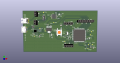
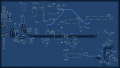
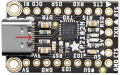
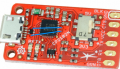
Are there any glaring issues in my first PCB layout based on a STM32 Discovery Board?

Thread Starter

TurtleEnthusiast

Joined Jun 3, 2025
10
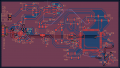
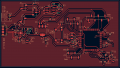
To add some context to this PCB layout, it's a four-layer board with a signal/ground/ground/signal stack-up. Since the inner layers are just reference planes, I didn't add any tracks and didn't see the need to include pictures of them. I used 0.4 mm tracks for nets that needed 5V, 0.3 mm for nets with 3.3V, and 0.2 mm for signals.

My main concern lies in the Micro-B USB connector's data lines and the layout of the J6 and J7 header pins. I added those two headers as a backup option in case the slide switch malfunctions. However, I'm not sure if current would still flow through the switch if it's already shorted.

I would appreciate it if anyone can point out any obvious problems that I may have missed.
 

Attachments

ronsimpson

Joined Oct 7, 2019
4,647
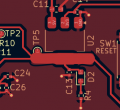
How many watts will be in U2 the voltage regulator? There is not much copper on pin-2 for heat sinking.
If you did something as simple as this U2 would run cooler.
1758459444275.png

What is the smallest component you are using? 0204? They are hell to hand solder! If you have a machine place the parts, then OK.
 
Last edited:

AnalogKid

Joined Aug 1, 2013
12,044
Back View image: Based on the very limited amount of information given, there is no reason for all of the turns and jogs in the routed traces. For example, the lower left corner. The via of one trace is unnecessarily close to the center of another trace. Unless you have a specific reason not to route traces under components, route them with the most direct paths and use the available space to separate things. This applies to the rest of the board, such as the center-right area where there are a lot of corners in a very small routing area.

For the top layer, it is ok to run traces under legend component outlines and text. There is a natural tendency to route around them, but that will fade with experience.

ak
 

ronsimpson

Joined Oct 7, 2019
4,647
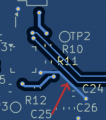
Trace with red arrow. It must be ground? It connects to the ground area fill.
If ground why have it.
1758465562905.png
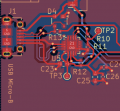
Look at the layout in the data sheet for the USB IC. There should be a page on the layout. If not, any USB data sheet will have it.
I don't know what IC you are using.... Last time I did this I moved J1 down and connected the data lines on the top side directly, first thing. No VIAs. Same length. Short.
It looks like the data lines need to cross. I never had that problem. Please check the connections on the schematic.
1758465902338.png
 
Last edited:

Thread Starter

TurtleEnthusiast

Joined Jun 3, 2025
10
How many watts will be in U2 the voltage regulator? There is not much copper on pin-2 for heat sinking.
If you did something as simple as this U2 would run cooler.
View attachment 356173

What is the smallest component you are using? 0204? They are hell to hand solder! If you have a machine place the parts, then OK.
From a quick glance at the datasheet of U2, it would take up 12W of power. While the smallest component is a 0402, I'm not planning on soldering them manually. I'll be ordering an assembled board instead. As for that wide track, is such an abrupt change in track width a typical occurrence? What about the other track connected to pin 2?
 

Thread Starter

TurtleEnthusiast

Joined Jun 3, 2025
10
Trace with red arrow. It must be ground? It connects to the ground area fill.
If ground why have it.
View attachment 356181
Look at the layout in the data sheet for the USB IC. There should be a page on the layout. If not, any USB data sheet will have it.
I don't know what IC you are using.... Last time I did this I moved J1 down and connected the data lines on the top side directly, first thing. No VIAs. Same length. Short.
It looks like the data lines need to cross. I never had that problem. Please check the connections on the schematic.
View attachment 356183
To be honest, I was under the impression that ground vias on island pours had to be routed to ground vias on non-island pours. However, it seems that the DRC does not care about this to the extent that I thought it would. The IC near the USB connector is a CP2012N. The reason behind the odd routing for the data lines is due to the inconvenient D+ and D- pin location of the USB connector; the D- pin is on top of the D+ pins.
 

MrChips

Joined Oct 2, 2009
34,628
If you are using Silicon Labs CP2102, note that the pad underneath the IC must be connected to ground. I have never used solder paste. Hence for this, I put a large hole under the IC so that I can add solder to the bottom of the IC through the hole.

Also, I would pair the USB D+ and D- to provide a tidy connection from the USB connection to the CP2102 so as to not disrupt the transmission line impedance.
 

ronsimpson

Joined Oct 7, 2019
4,647
From a quick glance at the datasheet of U2, it would take up 12W of power.
12W with an infinite heat sink. Just using the small pads on the PCB you will be lucky to get 1W. I don't know your part number but that package runs about 100C/watt on a pcb with just normal pads. Room temp=25C + 100C rise in temp = 125C at 1W. The silicon is only good to 150C.
 
Top