24V 5A 3-state capacitive touch switch (not a dimmer, without relay)

Jon Chandler

Joined Jun 12, 2008
1,619
*shrug* I don't know. This is your board to lay out. I have explained in several different ways why the DC-025:is an extremely poor choice. I have explained why I have made various suggestions several times but you're just not getting it.

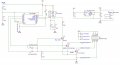
I have drawn you a schematic that includes almost all the parts except for the DC power jack and headers (which I have suggested separately) – parts with full details and footprints which are in stock in JLC's assembly program. All you have to do is click the button to dump the footprints on onto the board arrange them and route tracks. I even suggested a specific video tutorial that shows how to use the exact same software to lay out a board.

Have you even attempted to try to lay out a board? Move the parts around to see how it works? Done anything beyond opening the software?

I have spent many hours to help you get to a place where you would have a good chance to make a nice solution. But it seems you don't want help to learn how to do this – you want someone to turn your ill-defined ideas into reality. I have solved many issues for you that you hadn't even considered.

I don't care how big your board is. I don't care where you position parts. It's not MY project. It's not MY board. I have tried to help. I have said no more, then felt guilty for not providing every f$%&^ detail. But now I just feel stupid.

If you can't do this yourself after almost ALL OF IT has been done for you, it's time to hire someone and pay them actual money to do it for you. But look for someone to "design and build" rather than just lay out a circuit board using MY WORK. I am certain you have skipped on many of the details.

Time to find another sucker.
 

Jon Chandler

Joined Jun 12, 2008
1,619
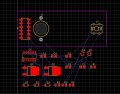
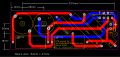
If anyone wants to know how big a fool I am, really big! I should have learned after helping offline with the other thread on laying out a circuit board. Seemed easy enough, except the drawing of "make this board into Gerber files" didn't show the true size of the components and the parts actually hung over the edges. "Small as possible" is rather open-ended and subject to interpretation. When the board was wide enough to accommodate the width of the components in the arrangement shown, it was too wide.

So back to the drawing board to make a board "not too wide"....

You would think I'd have learned my lesson.

PCB_PCB_AAC CROSSOVER -revised-b_2023-03-19.png
 

Thread Starter

oslosl

Joined Jan 13, 2023
270
*shrug* I don't know. This is your board to lay out. I have explained in several different ways why the DC-025:is an extremely poor choice. I have explained why I have made various suggestions several times but you're just not getting it.

I have drawn you a schematic that includes almost all the parts except for the DC power jack and headers (which I have suggested separately) – parts with full details and footprints which are in stock in JLC's assembly program. All you have to do is click the button to dump the footprints on onto the board arrange them and route tracks. I even suggested a specific video tutorial that shows how to use the exact same software to lay out a board.

Have you even attempted to try to lay out a board? Move the parts around to see how it works? Done anything beyond opening the software?

I have spent many hours to help you get to a place where you would have a good chance to make a nice solution. But it seems you don't want help to learn how to do this – you want someone to turn your ill-defined ideas into reality. I have solved many issues for you that you hadn't even considered.

I don't care how big your board is. I don't care where you position parts. It's not MY project. It's not MY board. I have tried to help. I have said no more, then felt guilty for not providing every f$%&^ detail. But now I just feel stupid.

If you can't do this yourself after almost ALL OF IT has been done for you, it's time to hire someone and pay them actual money to do it for you. But look for someone to "design and build" rather than just lay out a circuit board using MY WORK. I am certain you have skipped on many of the details.

Time to find another sucker.
Relax and thanks.
 

MisterBill2

Joined Jan 23, 2018
27,685
I have laid out a few circuit boards and I can back up the claim that it is not simple and seldom is it easy. Certainly with the $25,000 software package it is not as much work, except for the part that requires thinking. So you who have done the layout have done an incredible favor, and I don't think you are getting paid for it. But you should be.
I have rejected a couple of requests because the requester really did not know exactly what they wanted, and whatever it was would be a LARGE amount of effort. Limits on "freebees" are perfectly OK.
 

MaxHeadRoom

Joined Jul 18, 2013
30,697
I have laid out a few circuit boards and I can back up the claim that it is not simple and seldom is it easy. Certainly with the $25,000 software package it is not as much work, except for the part that requires thinking. .
Excellent free, open source one with KiCad!
I found it equally, if not better than $$$ OrCad..
 

Jon Chandler

Joined Jun 12, 2008
1,619
Excellent free, open source one with KiCad!
I found it equally, if not better than $$$ OrCad..
As a former Eagle user, I recommend EasyEDA. It truly is easy, has a HUGE parts library, is free and provides Gerber files that can be used where you like.

It also provides direct access to JLC's essentially free SMT assembly service, with simple parts selection of parts in the service, and BOM and centroid files in the needed format.

I tried Kicad after using Eagle for years. Couldn't make sense of it.
 

MaxHeadRoom

Joined Jul 18, 2013
30,697
I tried Kicad after using Eagle for years. Couldn't make sense of it.
I agree Kicad did have a bit of a learning curve, but now with ver 7, it does all I need, it has quite extensive library's, and I do not use any assy services.
The Support Forum is very good also, on getting any instant answers, if needed.
It has grown quite a bit since CERN got involved with it.
 

Thread Starter

oslosl

Joined Jan 13, 2023
270
Can you make duplicate PCBs of the same curcuit in EasyEDA ? If I simply try copy/paste I get problems with "unnecessary" incomplete connections (blue lines) ! Do I have to duplicate in the diagram too (without Vcc and Gnd), or is there another way ?
 

Attachments

Last edited:

Jon Chandler

Joined Jun 12, 2008
1,619
What are you trying to accomplish?

If you are trying to create a panel of small boards that can be broken apart (see this post as an example), that's called panelizing. With EasyEDA, You draw one copy of the board, and tell the software to create a panel of x × y boards. See the EasyEDA tutorial for guidance.

To allow the boards to snap apart, the panel can be "v-scored", which scores the board so it can be snapped apart. Elecrow offers free v-scoring for a single design on a board. JLC has a price adder for the number of individual boards that result.
 

Thread Starter

oslosl

Joined Jan 13, 2023
270
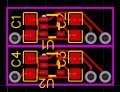
I need a very small 5v regulator board for the BT module (use 5v 100mA). I made one that was only 14 x 5 mm (based on your choice of components), but found out that PCB+SMT requires min 10 mm. Hence try to make a board with 2.

Is it normal that it takes a very long time to generate the PCB with component placement ?
 

MisterBill2

Joined Jan 23, 2018
27,685
The reality is that every circuit should be verified before creating a PCB design, and that is even more important to be certain it works prior to PCB fabrication. I recall very well correcting a consultant error on a production run of 25 boards. That was also the last time I agreed to allow a consultant to design a system to be on a PCB.
 

Jon Chandler

Joined Jun 12, 2008
1,619
Laying out circuit boards is like a puzzle. You want to position components to permit short, direct paths as much as possible.

High current paths are the most important, which in this case is the high power connections between the MOSFETs and the power connector. Ideally, they will be located adjacent to each other with short connections.

The other place short connections are best is the bypass cap for the chip. As close to the power pins as possible is the goal.

You can use both sides of the board to route tracks with vias connecting top to bottom. The soldermask will insulate the board from the metal trim. You might add a thin layer of insulation, like a piece of overhead transparency material, to be safe. Bit no through-hole components in this design.
 

Thread Starter

oslosl

Joined Jan 13, 2023
270
The reality is that every circuit should be verified before creating a PCB design, and that is even more important to be certain it works prior to PCB fabrication. I recall very well correcting a consultant error on a production run of 25 boards. That was also the last time I agreed to allow a consultant to design a system to be on a PCB.
I have ordered components for breadboard test first.
 
Top