Yamaha YDP-142 No Sound on Speaker and Headphone

Thread Starter

Caroexe

Joined Jan 8, 2025
45
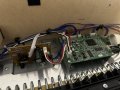
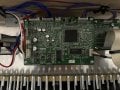
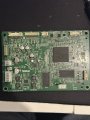
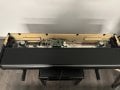
Hi, I have a problem with my a few years old Yamaha YDP-142 Digital Piano. It suddenly stopped giving any sound. It turns on and I am pretty sure the keys are working, because I can perform a factory reset. I don’t hear anything from the headphone jack too. I opened it up to check if there is something loose inside but I couldn’t find anything. I can do soldering and I do have a multimeter laying around so I thought maybe someone with better knowledge could help me to figure out what is not working.
Local On/Off didn’t do anything. Factory reset also. I plugged out the headphone jack from the Mainboard and plugged it back in but that didn’t fixed it.

Also I ordered a new AC adapter that will arrive in a few days. I thought maybe the Adapter has an issue providing enough power. So I will try that out once it arrives. But other than that I am not sure where to look at and what else to do.

So any help would be appreciated. Thanks in advance to all of you!
IMG_6811.jpeg
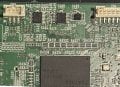
IMG_6819.jpeg
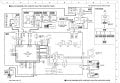
IMG_6817.jpeg
 

MrChips

Joined Oct 2, 2009
34,628
Edit: For a summary of this repair, jump ahead to post #83.

Your first task would be to locate the service manual for Yamaha Arius YDP-142 or YDP-162. What you really need is the circuit schematic so that you can begin testing for operating voltages with your DMM.

You begin with where the power adapter enters the unit at JK2. Then you check for the major voltages, +16V, +5V, +3.3V.

Assuming that the main processor is running, you next need to check for audio output. For this, you need an audio amplifier. A PC powered speaker is ideal for this.

I will gladly guide you through the trouble shooting steps.

Here is the block diagram. I will post higher resolution views of the schematics once we get started.

Yamaha YDP-162 Block Diagram.jpg
 

Thread Starter

Caroexe

Joined Jan 8, 2025
45
Your first task would be to locate the service manual for Yamaha Arius YDP-142 or YDP-162. What you really need is the circuit schematic so that you can begin testing for operating voltages with your DMM.

You begin with where the power adapter enters the unit at JK2. Then you check for the major voltages, +16V, +5V, +3.3V.

Assuming that the main processor is running, you next need to check for audio output. For this, you need an audio amplifier. A PC powered speaker is ideal for this.

I will gladly guide you through the trouble shooting steps.

Here is the block diagram. I will post higher resolution views of the schematics once we get started.

View attachment 339918
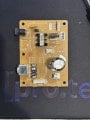
Hey, I am really thankful for your help. My DMM isn’t working properly since a long time. So I purchased a new one that will arrive in 2-3 days. I took some more pictures of the boards inside:

IMG_6839.jpeg

IMG_6838.jpeg

I have to wait for the new DMM so I can check all the points
 

abrsvc

Joined Jun 16, 2018
159
Before you go too crazy here, check the headphone jack for damage. These units are designed to "disconnect" the speakers when headphones are inserted. This means that the jack itself is a switch. If damaged, the "shorting" pin inside that will allow for the speakers to work may not be shorting the connection properly which means that the speakers will be silent. This same damage may also mean that one leg of the headphone connection is also not there resulting in the headphones not working. This is perhaps the most common failure of these units. Check also the connections for the jack. A poor solder connection may be hte only problem. -Dan
 

Thread Starter

Caroexe

Joined Jan 8, 2025
45
Your first task would be to locate the service manual for Yamaha Arius YDP-142 or YDP-162. What you really need is the circuit schematic so that you can begin testing for operating voltages with your DMM.

You begin with where the power adapter enters the unit at JK2. Then you check for the major voltages, +16V, +5V, +3.3V.
I checked CN2 pins and those were the values from the left to right:
0 / 2.95 / 2.91/ 0 / 3.24 / 0 / 3.10 / 3.07 (Triangle)

Not sure where to check the +5V tbh.

Assuming that the main processor is running, you next need to check for audio output. For this, you need an audio amplifier. A PC powered speaker is ideal for this.
How exactly can I check that? Sorry bit of newbie ...

After checking for voltages, we jump ahead and check the /MUTE signal at R413.

View attachment 339923

View attachment 339924
I checked the R413 and I get around 3.24/3.25 on the side with the arrow and 0 on the other side
 

Thread Starter

Caroexe

Joined Jan 8, 2025
45
Before you go too crazy here, check the headphone jack for damage. These units are designed to "disconnect" the speakers when headphones are inserted. This means that the jack itself is a switch. If damaged, the "shorting" pin inside that will allow for the speakers to work may not be shorting the connection properly which means that the speakers will be silent. This same damage may also mean that one leg of the headphone connection is also not there resulting in the headphones not working. This is perhaps the most common failure of these units. Check also the connections for the jack. A poor solder connection may be hte only problem. -Dan
I could take it out and take a picture of the board? Not sure where to check after that but it might give you guys an idea
 

MrChips

Joined Oct 2, 2009
34,628
With the power disconnected from the keyboard, measure the resistance across R413.

Something is not right with R413. Don't do any other dismantling or testing until we figure out what is going on with R413.
Can you post a sharper and closer photo around R413? I need to see where R413 is connected.

I have more tests coming up to do with R413.
 

Thread Starter

Caroexe

Joined Jan 8, 2025
45
With the power disconnected from the keyboard, measure the resistance across R413.

Something is not right with R413. Don't do any other dismantling or testing until we figure out what is going on with R413.
Can you post a sharper and closer photo around R413? I need to see where R413 is connected.

I have more tests coming up to do with R413.
I get 69.2 with DMM on 200ohm
 

MrChips

Joined Oct 2, 2009
34,628
I am going to assume that IC405, pin-6 is connected to the side of R413 that is showing 3V.

On the other side of R413 that is showing 0V, measure the resistance from that side (the side with the arrow) to ground (with the power off).

We are expecting to see a fault with the /MUTE signal shorting to ground somewhere. Finding the short will be our next step.
 

Thread Starter

Caroexe

Joined Jan 8, 2025
45
I am going to assume that IC405, pin-6 is connected to the side of R413 that is showing 3V.

On the other side of R413 that is showing 0V, measure the resistance from that side (the side with the arrow) to ground (with the power off).

We are expecting to see a fault with the /MUTE signal shorting to ground somewhere. Finding the short will be our next step.
I get .693 with DMM on 2M
 

MrChips

Joined Oct 2, 2009
34,628
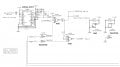
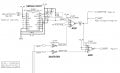
Our attention will be focused on two signals, /MUTE and /MUTE-CHK, which would give the symptoms now presenting, i.e. no output from speakers or headphones. These two signals are generated by IC405 in the CPU ERROR DETECTION CIRCUIT shown at the bottom of the page of the block diagram.


Yamaha YDP-142 CPU Error Detection.jpg


Yamaha YDP-142 MUTE circuit.jpg


/MUTE and /MUTE-CHK are both generated at IC405 pin-6 and fed to R413, 68Ω.
R413 is showing 3.3 V on the input side and 0 V on the output side.

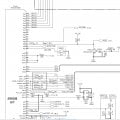
/MUTE feeds the following inputs:
IC405 pin-13
DAC IC102 pin-10 via R114, 0Ω
POWER AMP IC103 pin-21 via R133, 100Ω
HP AMP IC151 pin-9 via R159, 10kΩ

/MUTE-CHK feeds CPU IC101 pin-W1, direct

Yamaha YDP-142 MUTE-CHK input.jpg

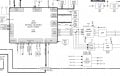
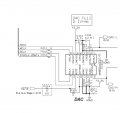
With that information, the prime suspect is /MUTE at R114, DAC IC102 pin-10 and /MUTE-CHK at IC101 pin-W1.

Yamaha YDP-142 DAC circuit.jpg

Continued in next post...
 

MrChips

Joined Oct 2, 2009
34,628
Note that in the DAC circuit schematics, R114 is connected to R160 which is a direct connection to +3.3A.
On your circuit board, R114 is omitted. Hence this eliminates this as a possible fault.

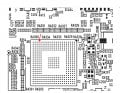
This brings the focus on /MUTE-CHK at IC101, pin W1.
At this point I suggest that you try to trace the PCB trace from R413 to IC101. In order to do some trouble shooting, you will have to cut some PCB traces.

Where is IC101 pin-W1?
I suspect that W1 is the pin pointed out in red. Since this is a BGA (ball gate array) package, the pin will be inaccessible under the IC.

Yamaha YDP-142 IC101 BGA W1.jpg
 

Thread Starter

Caroexe

Joined Jan 8, 2025
45
Note that in the DAC circuit schematics, R114 is connected to R160 which is a direct connection to +3.3A.
On your circuit board, R114 is omitted. Hence this eliminates this as a possible fault.

This brings the focus on /MUTE-CHK at IC101, pin W1.
At this point I suggest that you try to trace the PCB trace from R413 to IC101. In order to do some trouble shooting, you will have to cut some PCB traces.

Where is IC101 pin-W1?
I suspect that W1 is the pin pointed out in red. Since this is a BGA (ball gate array) package, the pin will be inaccessible under the IC.

View attachment 340082
I do have to apologize and correct myself because my new DMM arrived today and I did some retesting with it because my old one was in really bad condition. And after some retesting I measured 3.3V on both R413 points, which I guess means it is working correctly?

here a video of me measuring the point:
https://streamable.com/14eew9
 

MrChips

Joined Oct 2, 2009
34,628
No problem. Thanks for the correction. Now we go back to before we started looking at R413.
Any chance that you can get a PC powered speaker?
 

Thread Starter

Caroexe

Joined Jan 8, 2025
45
No problem. Thanks for the correction. Now we go back to before we started looking at R413.
Any chance that you can get a PC powered speaker?
Yeah I can ask a friend tomorrow and borrow one as long as we don’t have to cut it open or something lol. If that is needed then I can just buy a cheap one somewhere tomorrow morning.
 

MrChips

Joined Oct 2, 2009
34,628
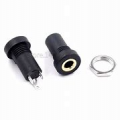
Hopefully, it will come with a 3.5 mm stereo plug that plugs into the PC audio output.
You will need a mono or stereo jack to mate with the plug. We will only need one of the two channels.
Something like this:
1736549062340.png


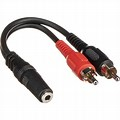
Or you can use a stereo 3.5 mm to RCA splitter cable.
1736548922271.png

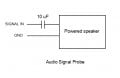
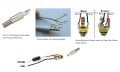
Then we will connect to your keyboard via a capacitor to block all DC voltages.
Audio signal probe.jpg
Audio probe.jpg
 

Thread Starter

Caroexe

Joined Jan 8, 2025
45
Hopefully, it will come with a 3.5 mm stereo plug that plugs into the PC audio output.
You will need a mono or stereo jack to mate with the plug. We will only need one of the two channels.
Something like this:
View attachment 340091


Or you can use a stereo 3.5 mm to RCA splitter cable.
View attachment 340090

Then we will connect to your keyboard via a capacitor to block all DC voltages.
View attachment 340093
View attachment 340092
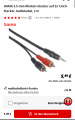
Would something like this work?
1736549531332.png
Edit: and what capacitor do I need exactly?
 
Top