Yamaha YDP-142 No Sound on Speaker and Headphone

MrChips

Joined Oct 2, 2009
35,276
That cable has a 3.5 mm plug on the end. What you need is one with a 3.5 mm jack.
Something resembling this would be simpler.
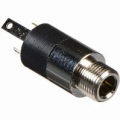
1736555141612.png

If the cable/adapter ends with an RCA plug, you will need an RCA jack to fit into the plug.
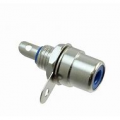
1736555244628.png

The capacitor is 10 μF 16 V, but anything from 1 μF to 100 μF and any voltage will do.

Do you have a soldering iron?
 

Thread Starter

Caroexe

Joined Jan 8, 2025
45
The capacitor is 10 μF 16 V, but anything from 1 μF to 100 μF and any voltage will do.

Do you have a soldering iron?
Yes I have a soldering iron.


Unfortunately not, will have to purchase the parts online. So to recap before I order something, I need a
pc speaker (preferably with 3.5mm ending)
An rca plug female
And a capacitor

and obviously the equipment to solder everything. I will look if I maybe find some spare cable/ electronics laying around. If not I will have to purchase them and I think that will take a few days. Best I have is a Mediamarkt near me unfortunately
 

MrChips

Joined Oct 2, 2009
35,276
You don't need the RCA jack.
Wait until you get the amplified speaker to see what you need. Any bluetooth speaker with a wired audio input will work. And you most likely don't need the capacitor if the input is already AC coupled.
 

Thread Starter

Caroexe

Joined Jan 8, 2025
45
You don't need the RCA jack.
Wait until you get the amplified speaker to see what you need. Any bluetooth speaker with a wired audio input will work. And you most likely don't need the capacitor if the input is already AC coupled.
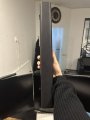
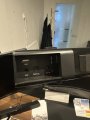
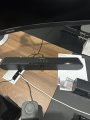
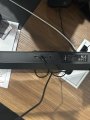
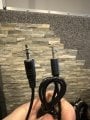
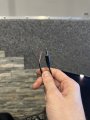
I have these two laying around:
IMG_6877.jpeg
IMG_6878.jpeg

IMG_6879.jpeg
IMG_6880.jpeg
 
Last edited:

MrChips

Joined Oct 2, 2009
35,276
That will do.
Now you need a 3.5 mm stereo plug or cable that plugs into the AUX jack. If you have a spare cable that you can sacrifice then that will do. Otherwise you need to find a plug or jack that gives you access to direct solder connections to the signal and ground, either to the 3.5 mm jack or to the end of any connecting cable.
 

Thread Starter

Caroexe

Joined Jan 8, 2025
45
That will do.
Now you need a 3.5 mm stereo plug or cable that plugs into the AUX jack. If you have a spare cable that you can sacrifice then that will do. Otherwise you need to find a plug or jack that gives you access to direct solder connections to the signal and ground, either to the 3.5 mm jack or to the end of any connecting cable.
Will this be enough?
image.jpg
 
Last edited:

MrChips

Joined Oct 2, 2009
35,276
Yes.
You have two choices. You can either cut the cable or you can get a 3.5 mm stereo jack. I prefer to get the jack and save the cable.
 

Thread Starter

Caroexe

Joined Jan 8, 2025
45
Much easier to cut the cable. I have a few more of these so no problem to sacrifice one
 
Last edited:

MrChips

Joined Oct 2, 2009
35,276
Ok, cut the cable and remove about 1 cm of insulation to expose the bare wire.
Use your DMM on continuity range to identify which wire is TRS, T = tip, R = ring, S = sleeve (COMMON).

With the power to the speaker OFF and the cable plugged in, measure the resistance (in both directions), between T-S, R-S, and T-R.

With the power ON, set the DMM to measure DC volts and measure the voltage between T-S, R-S, and T-R.

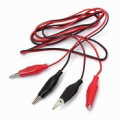
If you have alligator jumper cables, these will come in handy. (They will avoid having to cut the audio cable.)

1736615286072.png
 

Thread Starter

Caroexe

Joined Jan 8, 2025
45
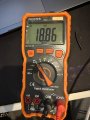
Okay so I cut the cable open and here are the values:

IMG_6881.jpeg

Black Cable is Sleeve,
Red is Ring
and White is Tip


POWER OFFRed-BlackBlack-Red
T-S9.429.42
R-S9.439.43
T-R18.8618.86

POWER ONRed-BlackBlack-Red
T-S9.439.43
R-S9.449.44
T-R18.8718.87

IMG_6883.jpeg
 
Last edited:

Thread Starter

Caroexe

Joined Jan 8, 2025
45
Sorry, what do the numbers represent (resistance, voltage?) and what are the units?
I see I missed the "power ON, set the DMM to measure DC volts and measure the voltage between T-S, R-S, and T-R." part. I will be right back with the correct values
 

Thread Starter

Caroexe

Joined Jan 8, 2025
45
Sorry, what do the numbers represent (resistance, voltage?) and what are the units?
I measured with the DMM on DC Voltage and Power On but got 0 on all? Am I doing something wrong or ...?

Edit: well it jumps first then gets to 0 eventually
 

MrChips

Joined Oct 2, 2009
35,276
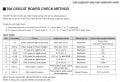
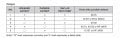
Your piano symptom is that there is no audio on speaker output and headphones output. This suggests that the fault is common to both circuits. Since the sound data is digital this would suggest that the problem lies before the DACs or with /MUTE or /MUTE_CHK or something other than the DACs.

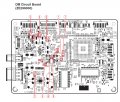
In order to test the digital signals you would need an oscilloscope. Nevertheless, here are some test procedures suggested in the service manual.

Yamaha YDP-162 DM board check.jpg

Yamaha YDP-162 DM board audio check.jpg

Yamaha YDP-162 DM board test points.jpg

Thus, use the powered speaker to check for an audio signal at test-points 8 and 9. You can check one at a time. Connect the Sleeve (black) of the powered speaker to a ground point. Connect Tip (white) to test-point 8 or 9. Play a note or a demo song. You will need to adjust the volume level on both the piano and the speaker. You may also need a helping hand to play a note and adjust the volume levels.

It would be next to a miracle if you get sound out! Let's hope for the best outcome.
 

Mitch_78

Joined Jan 12, 2025
1
I measured with the DMM on DC Voltage and Power On but got 0 on all? Am I doing something wrong or ...?

Edit: well it jumps first then gets to 0 eventually
I think you forgot to switch the multimeter to AC to check for the audio signal with c
keyboard powered ON.
Now you have only measured the DC voltage on your jack/cable, which will show 0 V like you mentioned.
This is as it is supposed to be.
Check again using the AC setting on your multimeter to see of there is an audio signal present when you play during the measurement. Make sure that you volume is turned up :)
 

Thread Starter

Caroexe

Joined Jan 8, 2025
45
Your piano symptom is that there is no audio on speaker output and headphones output. This suggests that the fault is common to both circuits. Since the sound data is digital this would suggest that the problem lies before the DACs or with /MUTE or /MUTE_CHK or something other than the DACs.

In order to test the digital signals you would need an oscilloscope. Nevertheless, here are some test procedures suggested in the service manual.

View attachment 340183

View attachment 340187

View attachment 340185

Thus, use the powered speaker to check for an audio signal at test-points 8 and 9. You can check one at a time. Connect the Sleeve (black) of the powered speaker to a ground point. Connect Tip (white) to test-point 8 or 9. Play a note or a demo song. You will need to adjust the volume level on both the piano and the speaker. You may also need a helping hand to play a note and adjust the volume levels.

It would be next to a miracle if you get sound out! Let's hope for the best outcome.
Okay the Piano is at the Office which is closed today, so i will try it out tomorrow. Thank you for the help!
 

Thread Starter

Caroexe

Joined Jan 8, 2025
45
Your piano symptom is that there is no audio on speaker output and headphones output. This suggests that the fault is common to both circuits. Since the sound data is digital this would suggest that the problem lies before the DACs or with /MUTE or /MUTE_CHK or something other than the DACs.

In order to test the digital signals you would need an oscilloscope. Nevertheless, here are some test procedures suggested in the service manual.

View attachment 340183

View attachment 340187

View attachment 340185

Thus, use the powered speaker to check for an audio signal at test-points 8 and 9. You can check one at a time. Connect the Sleeve (black) of the powered speaker to a ground point. Connect Tip (white) to test-point 8 or 9. Play a note or a demo song. You will need to adjust the volume level on both the piano and the speaker. You may also need a helping hand to play a note and adjust the volume levels.

It would be next to a miracle if you get sound out! Let's hope for the best outcome.
Okay I checked point 8 and 9 and did got no sound unfortunately. Whats next?
 
Top