Why LED is not turning OFF - 8051 Timers

Thread Starter

Djsarakar

Joined Jul 26, 2020
489
Now try to write simple code for this flowchart using while() loops and delay() functions.
I have written code but It doesn't work as it suppose to do. so when I run below code LED is turning ON for forever. I am not sure 20 counts will give 20ms delay time

C:
#include<reg51.h>

sbit Button  = P3^7;
sbit LED     = P2^0;

#define Button_Pressed       1
#define FOREVER              1

void Wait (unsigned long int DelayTime)    /* Function to generate delay time */
{
    unsigned long int Count = 0;

    for (Count = 0; Count < DelayTime; Count++)
    {
        /* Do nothing */
    }
}

void main() /* Program start from this  line */
{
    P2 = 0x00;  /* P2.0 as output Pin */
    P3 = 0x80;  /* P3.7 as input Pin  */ 

    while (FOREVER) // Run for forever
    {
       if (Button == Button_Pressed ) /* Check if Push Button Pressed */
        {
              LED =~ LED;     /* Toggle LED  */
   
             Wait(20);       /* Wait for 20 ms but I am not sure that will give 20 ms */
   
            if (!Button == Button_Pressed ) /* Check if Push Button still Pressed */
            {
                 Wait(20);       /* Wait for 20 ms but I am not sure this will give 20 ms */
           }
        }
     }
}
Edit

P2 = 0x00; /* P2.0 as output Pin
P3 = 0x80; /* P3.7 as input Pin
 
Last edited:

trebla

Joined Jun 29, 2019
599
There is couple of things to think about:

1. Is input for button tied to pull-up or pull-down resistor? From this depends is button input in pushed state 0 or 1 level.
2. Your Wait() function takes input for milliseconds count but your MCUs clock is much faster. This means you must make inside this for() loop another loop which spends about one millisecond time.

I see, you can code but you must think more about hardware behavior, then you can make your programming skills better.
 

Thread Starter

Djsarakar

Joined Jul 26, 2020
489
1. Is input for button tied to pull-up or pull-down resistor? From this depends is button input in pushed state 0 or 1 level.

Multi-line comments are dangerous if you are deleting or copy-paste code fragments.
@trebla
1. I don't know button is with pull-up or pull-down resistor on the board but I am checking on the internet

2. as many gives suggestion we should write comments that's why I have written comments for every line

3. I can write nested loop to generate time delay

No timers? No simulation?. You have regressed all the way back to post #3.
@JohnInTX why timers, I think hardware timer to set debounce time, I am doing simulation but its difficult to simulate behavior of push button. OK I will use hardware timer to get 20ms
 
Last edited:

Thread Starter

Djsarakar

Joined Jul 26, 2020
489
1. Is input for button tied to pull-up or pull-down resistor? From this depends is button input in pushed state 0 or 1 level.
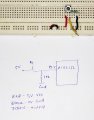
I am not sure about onboard Push button so I made small circuit to get 1 state at the pin of microcontroller

Push button with pull down resistor

IMG_20200907_193926.jpg
 

trebla

Joined Jun 29, 2019
599
Datasheet and silicon errata docs are your friends!

If you are managed to make 1ms loop inside Wait() functions for() loop and correcting commented out code then you can test your setup.
 

Thread Starter

Djsarakar

Joined Jul 26, 2020
489
No timers? No simulation?. You have regressed all the way back to post #3.
I am using timer o mode 1 to get 20 ms delay but I am having trouble in simulation
C:
#include<reg51.h>

sbit Button  = P3^7;
sbit LED     = P2^0;

#define Button_Pressed       0
#define FOREVER              1

//20 ms delay, 65536-18433 = 47103
void Delay ()
{
   TMOD = 0x01;  // Set timer0 in mode 1

   TH0 = 0xB7;
   TL0 = 0xFF;

   TR0 = 1; // Start timer0
   TF0 = 1;  // Enable Timer0 overflow flag TF0

     if(TF0 == 1)
        {
                TF0 = 0;
        }

}

void main(void)
{

   P2 = 0x00;  // P2.0 as output Pin
   P3 = 0x80;  //P3.7 as input Pin

    while (FOREVER) // Run for forever
    {
       if (Button == Button_Pressed ) // Check if Push Button Pressed
        {
           LED =~ LED;     // Toggle LED
                
            Delay();  // Wait for 20 ms

                      if (Button != Button_Pressed ) // Check if Push Button still Pressed
                     {
                          Delay();       // Wait for 20 ms
                      }
        }
     }
}
Edit
if (!Button == Button_Pressed ) // Check if Push Button still Pressed
 
Last edited:

Thread Starter

Djsarakar

Joined Jul 26, 2020
489
my mistake, after correction code doesn't work as it suppose to do. so when I run below code LED is turning ON for forever
C:
#include<reg51.h>

sbit Button  = P3^7;
sbit LED     = P2^0;

#define Button_Pressed       0
#define FOREVER              1

//20 ms delay, 65536-18433 = 47103
void Delay ()
{
     TMOD = 0x01;  // Set timer0 in mode 1 

   TH0 = 0xB7; 
   TL0 = 0xFF; 
 
   TR0 = 1; // Start timer0
   TF0 = 0;  // clear Timer0 overflow flag TF0
   
     if(TF0 == 1)
        {
                TF0 = 0;
        }
   
}
int main(void)
{
 
   P2 = 0x00;  // P2.0 as output Pin
   P3 = 0x80;  //P3.7 as input Pin
   
    while (FOREVER) // Run for forever
    {
       if (Button == Button_Pressed ) // Check if Push Button Pressed
        {
           LED =~ LED;     // Toggle LED
                    
                     Delay();  // Wait for 20 ms

                      if (Button != Button_Pressed ) // Check if Push Button still Pressed
            {
               Delay();       // Wait for 20 ms
            }
        }
     }
}
 
Last edited:

JohnInTX

Joined Jun 26, 2012
4,787
You should step through 'Delay' with the debugger. It is about 10 microseconds long.
It still can not get to line 42 under most circumstances.

All of that took less than 5 minutes to figure out using the debug tool.
 

Thread Starter

Djsarakar

Joined Jul 26, 2020
489
You should step through 'Delay' with the debugger. It is about 10 microseconds long.
It still can not get to line 42 under most circumstances.

All of that took less than 5 minutes to figure out using the debug tool.
How did you debug code? I am trying to simulate code in last post

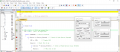
How to configure timer 0? I have attached screen shot of my attempt

1599503594041.png
 
Last edited:

trebla

Joined Jun 29, 2019
599
@Djsarakar Look at the last flowchart and compare it against your code beginning at line 40. On flowchart, program stays at button release checking until button released. But your code check the button off state once and goes ahead without debounce delay. I suggested one possible checking loop type in #87

 
Top