Whirlpool WEG745H0F gas range repair

Thread Starter

hottubthompson56

Joined Dec 22, 2024
30
I am just a novice, so please bear with me.

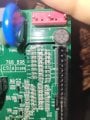
I am trying to diagnose/repair this circuit board and my multimeter is showing no continuity on c1 and c51.

-Other capacitors? in that column read ~.561 m ohms.

-Can anyone tell me what component and where to get?

Is it possible this is the culprit?
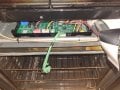
This is a contol board for an oven- error code is for stuck key/shorted wiring for touchpad. Ribbon wire for the touchpad connects to the right in the Pic and error is present whether touchpad is connected or not. All buttons do seem to work on touchpad.
 

Attachments

MrChips

Joined Oct 2, 2009
34,630
You are making two errors.

Firstly, capacitors are not supposed to show any continuity with an ohmmeter.

Secondly, you cannot test most components while they are still on the board.

It is very unlikely that those chip capacitors are bad. I think that your trouble shooting is flawed. I cannot suggest anything to find the fault from where I am. How do you know that the buttons are working if all you get is an error code?

For starters, state the make and model of the appliance.
 

Thread Starter

hottubthompson56

Joined Dec 22, 2024
30
With the oven on and assembled every button on the touchpad works.

With the touchpad disconnected the oven still shows the same error code- stuck button/shorted wire- even though in the technician manual is shows there is an error code for disconnected touchpad.

The ribbon connector for the touchpad did have damage to it- partially melted with some wires having conductor exposed. I checked for continuity on each pin of ribbon and for no crossed continuity with adjacent pins. Ribbon is intact.

Model of oven is :
whirlpool weg745h0fs0
Main board is:
w10759290.d
 

Thread Starter

hottubthompson56

Joined Dec 22, 2024
30
For further information, I do suspect that prior to getting the error code the ribbon connector was shorting out on the chassis of the oven as there was exposed conductor right where it would have.

With ribbon connector repaired (exposed conductor recovered) still the same error. This leads me to think possibly the ribbon connector shorted caused damage to the main board.

Regarding the capacitors, I do realize I am not able to check the microfarads, but at least the ohmmeter would show there is a continuous connection for electrons to flow? All the other chip caps show at least a continuity.
 

MrChips

Joined Oct 2, 2009
34,630
Regarding capacitors, a definitive NO.
That is not how capacitors work. Low value capacitance, lower than 1 μF, should register open circuit.

What you are measuring is conductivity from the rest of the circuit, not the capacitor.
 

MrChips

Joined Oct 2, 2009
34,630
The unit is providing confusing information.
You say that the touch pad works. Pressing the buttons give the correct responses?
Yet the display gives an error code indicating that the touch pad is disconnected? What is the error code?
Where is the documentation on the error code list?
 

Thread Starter

hottubthompson56

Joined Dec 22, 2024
30
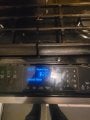
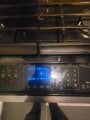
Error code is F2E1. I had moved the appliance out to do some work behind it. And I suspect moving it is when the connector ribbon shorted out on the chassis. When it first started acting up the touchpad was acting odd- basically repetitive pressing of buttons without me pressing them. Sp originally the error seemed correct. After pulling it apart and repairing the ribbon connector it is still throwing the same error code.

I have the service manual at home that lists all the error codes- not with me at the moment. But there is a separate error for disconnected touchpad and the appliance still throws F2E1 with the touch pad and ribbon connector disconnected.
 

narkeleptk

Joined Mar 11, 2019
586
. But there is a separate error for disconnected touchpad and the appliance still throws F2E1 with the touch pad and ribbon connector disconnected.
If everything works now and its just code that is left then It may need to pass its own system checks a certain amount of times before it will erase the code.
 

Thread Starter

hottubthompson56

Joined Dec 22, 2024
30
If everything works now and its just code that is left then It may need to pass its own system checks a certain amount of times before it will erase the code.
I was under the impression that with unplugging the appliance for a minute or so would reset the board. Error always returns after ~30 seconds.
 

Thread Starter

hottubthompson56

Joined Dec 22, 2024
30
Additionally, once appliance errors out you are locked out from using any of the oven functions. I can ignore an error code all day, but not if it puts it into 'limp mode'
 

MrChips

Joined Oct 2, 2009
34,630
Without access to technical information, here is what I can surmise.
The touch pad works but the unit still shows an error code.
The control unit is expecting some input signal from the touch pad or the error code is incorrect.
 

Thread Starter

hottubthompson56

Joined Dec 22, 2024
30
Okay, just to bring it full circle. Is it possible, or is it unlikely, the touchpad ribbon connector shorting out to the chassis would/could case damage to the main board thus causing a faulty error code?
 

Thread Starter

hottubthompson56

Joined Dec 22, 2024
30
Okay, just to bring it full circle. Is it possible, or is it unlikely, the touchpad ribbon connector shorting out to the chassis would/could case damage to the main board thus causing a faulty error code?
I was looking for one as well but unfortunately was unable to find one. There is no obvious visible damage to the board.
 

MrChips

Joined Oct 2, 2009
34,630
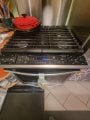
Can you post a photo of your console from the front showing the entire range top so we can see the style of the range?
Also post a photo showing the error code on the display panel, also so that we can see the location of the touch panel with respect to the display (i.e. we don't know what your range looks like).
 

MrChips

Joined Oct 2, 2009
34,630
Ok, thanks. Now we have a clearer picture, so to speak.

If you get the same error code with the touch panel disconnected, one would have to conclude that the fault is on the control board.
 

Thread Starter

hottubthompson56

Joined Dec 22, 2024
30
That is the case. And if you clear the code it comes back. But what, if anything, could I do to diagnose the problem with the board. I would like to make an attempt at not just being a parts swapper.
 

MrChips

Joined Oct 2, 2009
34,630
Without the circuit schematics, I would be doing some reverse engineering. I would try to trace all the connections from the touch panel connector back to the MCU. See if the interface is single lines to the MCU (possibly via some RC filtering) or is it multiplexed. That's a lot of resistors and capacitors just to interface to the touch panel.

If it is truly a stuck button, then there must be a low or lower impedance path between two traces or components.

If you can trace out what one button circuit looks like, it should be the same for all the other buttons.
 

MrChips

Joined Oct 2, 2009
34,630
Assuming that the error code is valid, we need to trace the connections around the connector and the cluster of resistors and capacitors. Your photo is not sharp enough.

Visually inspect the pins in the connector.

Post new photos of the resistors and capacitors, the full length of the connector, and the reverse side of the board. Make sure that the photos are sharp before posting.

With these, I will be able to give you some test points.
 
Top