What is the best signal interface for PC ?

Jon Chandler

Joined Jun 12, 2008
1,614
Here's a picture of a general-purpose circuit board I designed for PIC18F-series chips. On the left edge near the top are solder jumpers for I2C pull-up resistors, as well as a pull-up and solder jumper for a reset line. The 6-pin connector is an IC2 or general purpose I/O connector. In addition to SDA and SCL pins plus 2 additional port pins. I followed the pinout of Microchip's ICSP connector, with +5 on pin 2 and ground on pin 3 – I have found this arrangement pretty tolerable of those "Oh crap" moments when you install the connector the wrong way around.
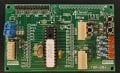
CM220609-011059002.jpg
 

MrSalts

Joined Apr 2, 2020
2,767
I am so sorry my comment about having multiple pull-up resistors has somehow offended it.
I wasn't offended, i was simply being efficient. I was letting you know that in posts 1 to 35, the OP already implied that his budget was over-extended with the price of bare chips alone. If you had read them, I'm sure you would have remembered the phrase "pocket is crying", which means, spending more than he planned. He has considered his options and made his plan. Your suggestion about relatively expensive modules wasn't helping move his project forward.
 

Thread Starter

q12x

Joined Sep 25, 2015
2,227
...I was letting you know that in posts 1 to 35, the OP already implied that his budget was over-extended with the price of bare chips alone. If you had read them, I'm sure you would have remembered the phrase "pocket is crying", which means, spending more than he planned. He has considered his options and made his plan. Your suggestion about relatively expensive modules wasn't helping move his project forward.
- Yes, @MrSalts very sensible and very correct and I am very glad you understood my project needs and my financial position !!!
In a sense, I am very lucky that you answered me.
- On another hand, I do like other options that are up there, so mister @Jon Chandler who is an an old friend here on AAC, he knows me very well that I like diversity and I like to see other ways. So his post is more about "what else is there" and his experience in this I2C direction, which is always Gold knowledge for me and he knows I like it. I have no idea mister @Jon Chandler chips, they are as new as this MCP23017 I already bought and I will take a look on them as well, just to compare them. But not right this momment, I have to learn what I got, and after that I will make the true comparison. Right now Im looking at them like the cat in the mirror seeing other cat. Haha. It is a good thing you mention these new chips, thank you !
 
Last edited:

k1ng 1337

Joined Sep 11, 2020
1,038
Not sure if this was suggested.. you can use shift registers to expand inputs or outputs. Might be cheaper and easier to write code for.
 

Thread Starter

q12x

Joined Sep 25, 2015
2,227
... you can use shift registers to expand inputs or outputs. Might be cheaper and easier to write code for.
I know @djsfantasi mentioned them before and a bit late, way after I bought the microchip MCP23017, but for some reason only when you write it like that, I remember I used shift registers back in 2000's when I was using the parallel port. I dont remember how easy or how hard they were to use, I remember I had to keep evidence of the I/O, like a map, like a register almost... its all blurry right now in my head. I didnt use them from those times.
- So this question goes to both you guys @djsfantasi and @k1ng 1337 :
- What is the best shift register IC at this hour?
That you know of and that you can suggest to use. I dont care if its new or old, I care to have many I/O pins on them because thats the only reason I need them.
I just looked today more closely into how to use a general I2C code and also I refreshed my memory with shift registers code. I start to think I2C is not that easy to drive from code, compared with the shift registers. But I have no experience with them, I might be wrong. I only watched a couple of YT videos and conclude from them. I remember and I know, that shift registers are very intuitive once you learned them. Also I checked a 74HC595 datasheet to see the speed and it's clock speed is at 5MHz, while these fancy I2C MCP23017 are running at a maximum of 100kHz, wow, what a difference. I know I said speed is not an issue... but a simple shift registers beats the hell out this MCP23017 on the speed alone. So in other words, it is transmitting/receiving more data than MCP23017. That's my conclusion. Again, I might be super wrong, I don't want to upset either party.
And I don't care of the wiring how complicated it is, I know it will be a jungle, but I care the quantity of I/O, scalability, and easy of code, to be logic and intuitive, simple and efficient, not swimming through a jungle of registers like microchip usually is forcing us to do and I dont like this side at all on them. I believe it will be a nightmare to understand and to code these MCP23017 chips.
Now I am starting to regret I buy them.... I was inpatient.
 

k1ng 1337

Joined Sep 11, 2020
1,038
I can't offer an opinion to the efficacy of either I2C or a shift register for your goals. Arduino supports both so my basic opinion is using an I2C interface probably adds to the complexity because you have to code for the I/O in addition to controlling the I2C bus.
 

MrSalts

Joined Apr 2, 2020
2,767
I can't offer an opinion to the efficacy of either I2C or a shift register for your goals. Arduino supports both so my basic opinion is using an I2C interface probably adds to the complexity because you have to code for the I/O in addition to controlling the I2C bus.
Coding the I2C controls the I/O bus. These expanders are not multiplexed to the Arduino pins, the status of each pin (in/out (high or low)) are set or queried via I2C transfers on the data bus.
 

k1ng 1337

Joined Sep 11, 2020
1,038
Coding the I2C controls the I/O bus. These expanders are not multiplexed to the Arduino pins, the status of each pin (in/out (high or low)) are set or queried via I2C transfers on the data bus.
Well in that case I like it a lot and now that you mentioned it, it seems obvious. Would you say I2C expanders are superior to shift registers?
 

MrSalts

Joined Apr 2, 2020
2,767
Well in that case I like it a lot and now that you mentioned it, it seems obvious. Would you say I2C expanders are superior to shift registers?
I2C is just so simple to me. The PCBs are super easy vs all the routing needed for shift registers (or long code and strings to bit-bang if shift registers are cascaded).
 
Last edited:

Jon Chandler

Joined Jun 12, 2008
1,614
Using the MCP23017 does have a learning curve, but there are some advantages:

○ Each pin may be individually set as an input or output and may be changed at any point.

○ Bits may be individually read or controlled.

○ Adding additional port expanders doesn't wreck existing code.
 

k1ng 1337

Joined Sep 11, 2020
1,038
I2C is just so simple to me. The PCBs are super easy vs all the routing needed for shift registers.
I2C is nice to use and makes the most sense of the communication methods I've sampled. I figured there was some applications where a low cost shift register would serve just as well.
 

MrSalts

Joined Apr 2, 2020
2,767
I2C is nice to use and makes the most sense of the communication methods I've sampled. I figured there was some applications where a low cost shift register would serve just as well.
There are some super cheap I2c expanders designed as LED driver/keystroke monitors. They were under $0.50/ea. Holtek is a Chinese brand that made a popular one. 24-bits of LED drive (output only) and 16-bits of keystroke (button) detect (input only). Unfortunately, it has been available for about two years so I've had to go with the more common port expanders from more known vendors. All I'm saying, it doesn't have to be expensive to be I2C. Some very cheap I2c devices exist that can compete price-wise with shift registers.
 

k1ng 1337

Joined Sep 11, 2020
1,038
There are some super cheap I2c expanders designed as LED driver/keystroke monitors. They were under $0.50/ea. Holtek is a Chinese brand that made a popular one. 24-bits of LED drive (output only) and 16-bits of keystroke (button) detect (input only). Unfortunately, it has been available for about two years so I've had to go with the more common port expanders from more known vendors. All I'm saying, it doesn't have to be expensive to be I2C. Some very cheap I2c devices exist that can compete price-wise with shift registers.
I'll be looking into them for my own projects. I have been using AVR family chips to extend my Pi's I/O via I2C so a dedicated chip for this purpose would be cheaper and less headache to set up. I prefer the concept of a bus rather than sequential logic as in a shift register though I'm still curious if a shift register would become better at high data rates / transmission distance as the I2C bus becomes overloaded.
 

MrSalts

Joined Apr 2, 2020
2,767
I'll be looking into them for my own projects. I have been using AVR family chips to extend my Pi's I/O via I2C so a dedicated chip for this purpose would be cheaper and less headache to set up. I prefer the concept of a bus rather than sequential logic as in a shift register though I'm still curious if a shift register would become better at high data rates / transmission distance as the I2C bus becomes overloaded.
Speed and complexity really depends on definitions (code vs PCB routing) and the number of I/o and whether you are cascading the shift registers vs singles. Shift registers can definitely get you the speed until you get into many cascaded strings and the speed starts to drop off. Also, the way you set up libraries (function calls) to handle data flows. Some people get how to use function calls to simplify and some people end up running thousands of lines of code and just don't get how to reuse code.
 

MrAl

Joined Jun 17, 2014
13,722
I mean.... the best and the easiest to use.
I remember back in the 2000's I used a serial interface, I think it was the printer serial port, 25 pins or similar. I believe I even used a mouse port as well, that versatile those systems were back then.
What I could do with it was ... program in C++ and pascal back then, using some imported dll's specific for communication with this serial port, I think it was port 40 or 25? It had a number is all I remember. And I could link to it any transistor base, back then I was working exclusively with BJT's, to light LED's, drive motors, beep some 8ohm I think they were speakers, drive a VU-meter LED bar I think directly from the port pins, without transistors, and also drive IC's , that was the time I learned about multiplexers and expanding the number of output pins. Also input sensors like LDR and buttons. I Loved that kind of easy and straight forward communication.
Today I dont know c++ or pascal anymore, but I am very good in c# and still use VS2010 because its very cool interface and very user friendly overall.
So I want you, to help me first of all, to find the hardware, the port I suppose or something more than a printer port, something more advanced and having more in/out's. The more the better. I want the best you can find for the moment. Best ideas or best adaptations, why not. As long as it's easy and stable to install and use.
And then, the software drivers and possible problems will appear along the way. I can debug a large majority of problems, I grow up debugging computer problems, so I have a 5'th sense for them. Im more concerned about the hardware part and the integration with my win7 that I still run today and my VisualStudio2010 for my c#. I know I still run old software but they are extremely stable and they don't f me up.
Thank you and I'm really curious what you will find for me.
Hi,

I've used RS232 in the past with great success. If you dont have an RS232 port then use a USB to RS232 adapter. The adapters often work with 5v signals while the RS232 raw port may not so you have to check.

RS232 isnt super fast so it may not be good for an oscilloscope interface but it's good enough for a volt meter interface for example.

One thing you have to be careful about though and that is you really need to have galvanic isolation. if you dont have that, you can blow out your motherboard if you try to make a measurement that is connected to the mains line (120vac in the USA). It's best to have that anyway though.
To get that, you need an opto coupler between your circuit and the computer if you are rolling your own RS232 with a microcontroller. If you use an adapter, you'd have to provide isolation to the adapter or see if you can find an adapter with galvanic isolation.
 

Thread Starter

q12x

Joined Sep 25, 2015
2,227
I've used RS232 in the past with great success. If you dont have an RS232 port then use a USB to RS232 adapter. The adapters often work with 5v signals while the RS232 raw port may not so you have to check.
From pure curiosity I checked: It is a range of voltages, specified on the "RS-232" wikipedia page. That means any voltage value between that range is accepted and interpreted as a logic 1. This means 5V is perfectly fine as logic 1, and as I remember it as well, when I briefly work with these cables and ports back in the 2000's. Here is the official statement:
1655104449011.png
RS232 isnt super fast so it may not be good for an oscilloscope interface but it's good enough for a volt meter interface for example.
I know, I know, I said speed is not an issue, but I check it anyway. Because speed is very relevant, but to a point. You really dont have to go into Giga-Tera speed just to light a simple LED on the other side of the port. This table I didnt find on wikipedia page, which surprisingly it does not mention any kind of speed or ranges of speeds for some reason. But I find this after a google search and it appears it can go up to 1Mbps.
1655104249807.png
The actual google converter is giving me this result which is from another website he choosed to be its reference:
1655105016931.png
and usually that 20k baud means 20kbps. But, when I go into converting baud to bps(bits per second) I got into this page:
https://www.physics.udel.edu/~watson/scen103/projects/96s/thosguys/baud.html
that is saying there are many bits packaged into a single 1 baud, so that 20k baud can have 20baud*64bits per baud for example and = 1280kbps or 1.2Mbs.

And from a brief reading into wikipedia page I discovered there is a newer type of RS232, it is called RS442 or TIA-442 dedicated to higher speeds than original RS-232.
1655105715522.png
But I believe, and Im really guessing here, that this TIA-442 is just a dedicated and very obscure port, used only in a few cases, not a General port as it was the case with RS232 DB-25 or DB-9 used everywhere by everybody.
- Again, im not trying to prove anything here, im just amused by some curiosities I never had time to look into and I didnt check them before buying. And also intrigued by some of @MrAl details.
- Usually, and from my personal experience, everything from microchip is extremely and unnecessarily complicated in code and datasheet. I really hope it will not be the case with these chips. This is my only fear at the moment. We'll see. It's also exiting using a new device and a new method, this I2C thing, very new to me. A bit too expensive to my taste, but definetly memorable, and hopefully for a good memory that I'll practice and recommend in the future! We'll see.
 
Last edited:

MrAl

Joined Jun 17, 2014
13,722
From pure curiosity I checked: It is a range of voltages, specified on the "RS-232" wikipedia page. That means any voltage value between that range is accepted and interpreted as a logic 1. This means 5V is perfectly fine as logic 1, and as I remember it as well, when I briefly work with these cables and ports back in the 2000's. Here is the official statement:
View attachment 269327

I know, I know, I said speed is not an issue, but I check it anyway. Because speed is very relevant, but to a point. You really dont have to go into Giga-Tera speed just to light a simple LED on the other side of the port. This table I didnt find on wikipedia page, which surprisingly it does not mention any kind of speed or ranges of speeds for some reason. But I find this after a google search and it appears it can go up to 1Mbps.
View attachment 269326
The actual google converter is giving me this result which is from another website he choosed to be its reference:
View attachment 269328
and usually that 20k baud means 20kbps. But, when I go into converting baud to bps(bits per second) I got into this page:
https://www.physics.udel.edu/~watson/scen103/projects/96s/thosguys/baud.html
that is saying there are many bits packaged into a single 1 baud, so that 20k baud can have 20baud*64bits per baud for example and = 1280kbps or 1.2Mbs.

And from a brief reading into wikipedia page I discovered there is a newer type of RS232, it is called RS442 or TIA-442 dedicated to higher speeds than original RS-232.
View attachment 269329
But I believe, and Im really guessing here, that this TIA-442 is just a dedicated and very obscure port, used only in a few cases, not a General port as it was the case with RS232 DB-25 or DB-9 used everywhere by everybody.
- Again, im not trying to prove anything here, im just amused by some curiosities I never had time to look into and I didnt check them before buying. And also intrigued by some of @MrAl details.
- Usually, and from my personal experience, everything from microchip is extremely and unnecessarily complicated in code and datasheet. I really hope it will not be the case with these chips. This is my only fear at the moment. We'll see. It's also exiting using a new device and a new method, this I2C thing, very new to me. A bit too expensive to my taste, but definetly memorable, and hopefully for a good memory that I'll practice and recommend in the future! We'll see.
Hi,

Well specs were made to be broken :)

I read that 5v may not work with some adapters but you can always test for that. That was unipolar though i think so just 0 to +5v. 0 to 5v works with some RS232 and does not work with some other RS232 ports. The microcontrollers i have used put out 0 to about +5v and it worked with my native mobo RS232 port and my two USB to RS232 adapters but it may not work with all mobos or adapters.

Also, my understanding of baud rate is that since RS232 carries (usually) one parity and one start/stop bit the character transfer rate is about N/10 which means 1200 baud transfers about 120 ascii characters per second. I never heard of the baud being multiplied by 64 or anything like that ever, it's always divided as far as i know and it's been my experience using RS232 both in microcontroller on board peripherals and bit banging techniques that division by 10 is true or at least approximately if you dont know if parity and start/stop bits are being used. So the range as far as i can see righ now is baud/11 to baud/8 in characters (or 8 bit bytes) per second.
 
Top