What is the best signal interface for PC ?

Thread Starter

q12x

Joined Sep 25, 2015
2,227
today is 14-06-2022 and I got an update email for the delivery

1655203511715.png
Original purchase date is 08-06-2022 So... officially departed from China after... 4 days. Ohoa, Very fast !!! (also sat-sun included in these 4days) because comparative to romania, when the envelope/package arrives here, it stays like 1 to 2 (even 3) MONTHS here, until finally distributed to my adress. We are very proud of our national mail delivery, what jokers we have there (mostly highly inefficient females) . Hahahaha. I hope it will arrive soon and I really hope it will arrive on speed delivery system, and not on normal state mail as usually come and got stumbled and forgotten as I mentioned. I believe, after a certain $ value, on ebay only, at least from my observations so far, they automatically include this fast delivery system like 'DHL' in germany (here a tiny bit) or here in romania is 'Fan Courier'. It will arrive in a couple of weeks if thats the case... uuuh... we'll see.
 

Thread Starter

q12x

Joined Sep 25, 2015
2,227
Update.
It passed 3 weeks and I received today the 2 modules: temperature and LCD board. It is a miracle they come this fast.
I did not received the IC's yet !
I finished to check out what voltages they work and I had to dig deeper than I planned.
Here are my findings:
1- the OLED display, this is the simple one, it says on its purchase page is working from 3Vto5V.
I checked its datasheet anyway, to discover it has 2 voltages and I assume it must have a voltage regulator somewhere for the 3V IC. Here is it's datasheet: SSD1306.
SSD1306 info.jpg
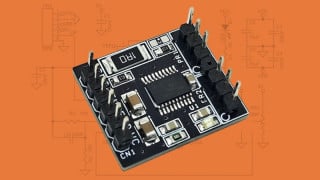
2-I2C AHT10 High Precision Digital Temperature and Humidity Sensor
This board did not had any input Voltage information on it's purchase page. So I had to literally dig it's components out to understand it's limits. And I did discovered new and interesting stuff.
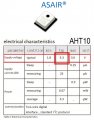
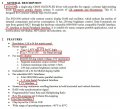
It's actual sensor chip works at 3.3V, specified in a couple lines in it's datasheet Aosong_ASAIR_AHT10.
Aosong_AHT10-1 copy 1.jpgaliexpress-34954c93b2dd064326ad.jpg
Next, I read a transistor like component, and turned out to be a voltage regulator for 3.3V.
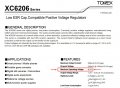
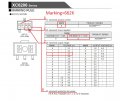
It's marking on the board is 662K but it's real identification name is XC6206. Don't ask me how I get it. But is the right one.
XC6206 is 662K -2.jpgXC6206 is 662K -1.jpg
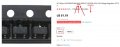
actually here is how I get it, from multiple sources:
XC6206 is 662K -3.jpgXC6206 is 662K -4.jpg
I am very interested how to find this component:
1656583319095.png
I have others like it that I scrapped from other boards and I never find out what they may be. IC's? 2transistors? series diodes? I never find their markings or real name from google. If you have an idea what the hell they are, do tell me. Also how to find them.
- The important IC's didn't arrive yet. I'm very impressed these come so fast !!! really, usually takes like 2,3,4 or even 5 months! And I am not joking. The incompetence here in my country, due to a lot of 'ladies', is over the roof. Eh... I still remain very impressed. Corona virus is still good at something perhaps, haha.
Thanks for reading.
 

k1ng 1337

Joined Sep 11, 2020
1,038
I stopped buying non OEM / China products simply because they lack clear and complete datasheets which I now consider mandatory for my purposes. Also, I got a few modules that we dead on arrival. Luckily my sellers have a conscious and refunded me!

I have a I2C LCD that lists input voltage at 3.3V or 5V. Oddly, only the backlight works on 3.3V and I must use 5V to power up the LCD.
 
Last edited:

Thread Starter

q12x

Joined Sep 25, 2015
2,227
Hello everyone, how quickly the time pass.
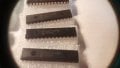
Today I received all 10 x MCP23017 IC's !!! It took exactly 1 month! That is very good time, and also no aditional taxes from my dear compatriots here.
@MrSalts don't leave me now, because now I need you the most. Please show/give me a circuit I should built.
Huh, Im very emotional right now, especially because they are expensive and also a very old dream is almost a reality... uhhh.
So, please be with me these days. I'm waiting your reply.
Thank you !
20220707_154957.jpg20220707_155205.jpg
 
Last edited:

Thread Starter

q12x

Joined Sep 25, 2015
2,227
I didnt managed to make it work in the first round. Because I used 1 PSU for the IC circuit and the Arduino was using it's own 5V from USB. I believe I could make it work in this configuration if I connect the 2 grounds together, but I didn't want to risk it, so I didn't do it. I was contemplating on the possible issues why the 2 circuits didnt worked.
I googled some more and I found a proper arduino to MCP23017 connection and I made it work. The trick was to link everything to a single supply that comes with arduino board.
I put all 8 leds on portB pins.
This test program can lit some MCP23017 IO pins, on and off, using Wire.write(11111111); or Wire.write(00000000);
I admit I don't know yet how to lit individual leds/pins. If I write 00000001, the first led indeed lits up fine. But if I write (intuitively) 00000010 to lit the second led, nothing happens. I tried every other bit and nothing. It's either a mistake somewhere I cant see it yet or a hidden command or combination to be discovered or understood. Very weird. It should be 00000010...
Here are all the pins/LED's I could activate:
//00000001 = B1
//00000010 = B4
//00000100 = B7
//00001000 = x
//00010000 = x
//00100000 = x
//01000000 = x
//10000000 = B8
//11111111 = B1,B2,B3,x,x,x,B7,B8
//11110000 = x,x,x,x,B5,B6,B7,x
//00001111 = B1,x,x,B4,x,x,B7,x

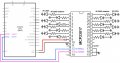
Here is the circuit I built so far:
MCP23017-IO-port-expander-circuit-with-arduino.jpg
 
Last edited:

Thread Starter

q12x

Joined Sep 25, 2015
2,227
And you left me @MrSalts when I needed your help the most. Aaah.
I managed to figure out the problem. Now every pin/led on portB is liting up and is controllable.

Original code I find it here: MCP23017-GPIO-Expander
I used this modified code with some special setting:
access portB only:
#include "Adafruit_MCP23017.h"
/*
2. Select 'Sketch' -> 'Include Library' -> 'Manage Libraries'
3. Search for '23017'
The newest versions 2.0.3 or 2.1.0, throw me big red error and nothing worked.
I installed an older version 1.3.0, and is working fine.
*/
Adafruit_MCP23017 mcp;    // Instantiate mcp object
void setup()
{
  Serial.begin(19200);
  Serial.println("Ready");
  mcp.begin(); // "Start" the mcp object

/*  We are configuring ALL GPIO as output. */
  for(int i = 0; i <= 15; i++)
  {
    mcp.pinMode(i, OUTPUT);
  }
}

int dly = 100;
void loop()
{
  /* Loop only in PORTB (from 8 to 15) and flash ON-OFF.*/
  for(int i = 8; i <=15; i++)
  {
    mcp.digitalWrite(i, HIGH);
    delay(dly);
    mcp.digitalWrite(i, LOW);
    delay(dly);
  }
}
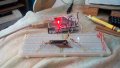
and this is the setup so far:
20220708_092717.jpg
 
Last edited:

Thread Starter

q12x

Joined Sep 25, 2015
2,227
Hi, @MrSalts, thanks for the interest !
- I finished only 1 single board that I call it "prototype" because I am not completely sure if it will stay like it is now, or it will get future changes. I made a movie about it as well. It worked perfectly from 1 shot; from it's first built and it's first test. I still have to deal with some pads placements and easy to access - easy to connect features; modularity issues. Because, that saying, "I built it for me". I encounter extreme difficulties on deisolating the very small diameter copper wires, and I had way too many of them, and I worked very slow only because this technical problem. NOW, well, from ~5 days and still today, Im working on a electromechanical device that will deisolate the wires, not automatic, but it will shorten considerably the process and is also a bit more fun to do it with a machine than with your hands only. So I got a slight split from the main project at this point in time. But without this "deisolator" device, only doing it manually, holly caramboli, it's too much, is impossible for me alone. I hope im right and this will speed up the process. It still have to pass the practical test when I will make the next board (hopefully).
- It's a bit of a too long story with my 'deisolator' as well... that's why it took me a couple of days and not a few hours as I originally planned. I had to repair the motor that was not doing anything when powered. It had a VERY strange circuit inside, and a capacitor was BLACK-fried. I change it with a similar looking (but unsure if was the right value) and now is running OK. Although I got a small string of white smoke out of this one as well, for some reason, but I managed to make it work somehow and I never got any problems since. I made the mechanical parts of the 'deisolator' that took me 2-3 days or so and now im on the electronic part that I am tweaking up and down, and a funny thing is that I literally scorched the poor cardboard on how many tries, changes and failures it got. I had some very unlucky days in a row, with stupid mistakes that I was sure they were right in the first place. Also some unexpected parameters of the motor I'm using, that's what it drag me down on tweaking and trying multiple transistors and some other parts as well.
Thank you for your sincere interest !
 

Thread Starter

q12x

Joined Sep 25, 2015
2,227
Update on the progress:
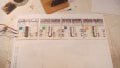
I finished 4 of them at this point. Notice how well they fit inside one A4 page; as a perspective size overall. Im very proud so far.
I worked like a slave for them. With many-many breaks and come backs. I also tested everything, every wire and every led assemble immediately after I soldered. Precaution never killed anyone. Very cool so far, right?
IMG_20220729_230051.jpg
 

MrAl

Joined Jun 17, 2014
13,722
Update on the progress:
I finished 4 of them at this point. Notice how well they fit inside one A4 page; as a perspective size overall. Im very proud so far.
I worked like a slave for them. With many-many breaks and come backs. I also tested everything, every wire and every led assemble immediately after I soldered. Precaution never killed anyone. Very cool so far, right?
View attachment 272525


Hi,

Yes very cool. I used to do stuff like that a lot too in the distant past. Designed a 12 socket plug in board before the plugboards we have to day came out. Mine allowed soldering though not just plug in so you could go higher in power than with the modern ones that only do maybe 100ma.
 

dcbingaman

Joined Jun 30, 2021
1,065
If you want maximum flexibility, power and maximum IO nothing can beat an FPGA module. This module provides a standardized C#/C++ interface that allows for multiple paths of data at Gigabit speeds. I have used similar boards for high end requirements. You need to learn VHDL/Verilog but it is worth the learning curve.

https://opalkelly.com/
 

dcbingaman

Joined Jun 30, 2021
1,065
Ok, after reading more from other postings sounds like you want a cheaper solution for a lot of digital IO control? If so you could use an FTDI USB to UART chip as the front end. These new chips can run up to 10 Mbit per second and are very cheap then place a simple CPLD to it with lots of IO, also rather cheap, something like the XC9572 from Xilinx with 64 or 100 pin SMD package. Have a serial interface provide control over all the IO and it would be fairly fast as well.
 

Thread Starter

q12x

Joined Sep 25, 2015
2,227
I'm interested into the smallest SIZE W/H arduino board that can do the same thing as 'Arduino Uno' that I currently have. This smaller board will stay all the time connected to these boards I made. That's the idea. If you know their sizes, and you know the smallest of them all, please tell me. I imagine maybe there are other not so comercial or public boards from arduino that you may know better than me. Thank you.
 

Thread Starter

q12x

Joined Sep 25, 2015
2,227
This is me in HERO mode. All 4 at once. The last 4. After they are finished, I will complete the entire project.
This picture is all 4 drawn and 1 of them starting to get metal pads.
20220801_125805.jpg
This is all 4 starting to get some wires on them. You can see the small diagram, where I marked with red, the location and how many wires are placed at this stage. Very hard work I tell you, but it is possible, is all that I can show here.
You can also see my dezizolator machine, without it I could not start this project.
20220803_080549.jpg
Pretty cool so far. Im working with numerous breaks because this is more intense than usual.
Thank you.
- Im also curious if is a possibility to replace arduino UNO that I have, with a --permanent smaller board--, more compact in size, but essentially to do exactly the same thing this UNO is doing. Is it possible? I am no expert with arduino, this UNO board is all I have all my life, but watching some youtube videos, it appears that it is possible as I say. If not, then I think on an alternative that is a bit more crazy, to buy the arduino UNO MCU, program it with this UNO code, and use only the pins I need, just to cut down in size. But I really think it is possible with somethng already made, like PICO or something. Which is the smallest you recommend?(but doing the same thing as UNO) Thank you !
 
Last edited:

Janis59

Joined Aug 21, 2017
1,893
For each task the interface choice ought be another. For one task the distance is important, for another the speed, for third, probably both together, for other probably the wire simplicity is ultimate goal. Wikipedia have good page about existing few HUNDREDS of existing standards.
 
Top