Just a point you should consider if you try using that USB to Centronics (parallel) adapter. You don’t have 25 IO pins, you have 8 plus 5 status pins that can be used variously. The 8 data pins are output only in compatibility mode, but later versions (and I assume that dongle) can operate in other modes. Of particular interest is byte mode which allows the data pins to be bidirectioal.
But remember, it is parallel data so all 8 bits are set and them the strobe pin is pulled high to indi ate the 8 bits are good data. It is also possible to use the acknowledge, busy, paper out, and select pins to send either discrete states or a nybble (4 bits) of data at a time back to the computer because the are inputs to the computer even in compatability mode.
In the end, an approach like the one @MrSalts is suggesting is almost certainly far more fruitful, though in the olden times the Centronics interface was a great way to get 8 outputs to run something like relays. This has been well overtaken by modern MCU options.
...Remember that the I2C bus is easy in both the code design and the board design (a single bus and two wires to each chip (plus power). $20 is much of a price to pay for the 100 I/O pins. But, in the end, chip price, PCB price, time, code complexity, PCB design complexity and the chance of wiring & code errors are all trade-offs that each person must make on their own.
This part really is the best argument I needed. I totally understand your point !!! And it put me on the right direction, because like I said, is a VERY old idea I wished it come to reality, and if I delay it more ... you know, Im an idiot. I did shoot some serious money on the them.... my pocket is crying right now, but is a gift for my patience from 2000's. So, I buy the damn chips, 10pcs at 30usd total, transport and tva included to bloody Romania. Hopefully here in romania not too big problems at arrival as usually are. And they are the DIP versions, not SMD's. It will be a big MF board. Haha. What I really want you to not flee from here after 2 months(usually) when they arrive and help my ass setup them. I did understand the general lines from your explanations, but other is to deal with them, when my hands are trembling not to damage them. Thank you so far !!! It is a very old crazy dream about to be real in some months from now. Huuuih ! It will be very cool !
From pure curiosity, what is your best recommended demultiplexer IC? If they are cheap enough, maybe to have some as well. (I understand that they will output only) .. I want to check prices at this point.
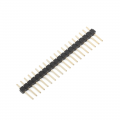
Also some interesting connectors for the 100 I/O's. I usually make my own connectors as solderable tabs, but maybe you have some other good points. I also have these male pin headers :
I may put multiple options , solderable tabs and pin headers per each line. What you think?
From pure curiosity, what is your best recommended demultiplexer IC? If they are cheap enough, maybe to have some as well. I just want to check prices at this point.
Also some interesting connectors for the 100 I/O's. I usually make my own connectors as solderable tabs, but maybe you have some other good points. I also have these male pin headers :View attachment 268991
I may put multiple options , solderable tabs and pin headers per each line. What you think?
I really try to avoid these old chips unless I have to use them. I haven't used a multiplexer chip in almost 30 years.
You should order an I2C temp sensor and/or 7-segment display with an I2C interface to give you a chance to work with one I2c to make sure you understand how they work. https://www.digikey.com/en/products...s=N4IgTCBcDaIIIBMCGAzATgVwJYBcAEAHAOwEgC6AvkA
Oooh, so demultiplexers are old technology ? I didnt know that. I thought they are still the good stuff... hmmm.
I searched for "I2C temp sensor". Is this ok?
and this :
Are they both good ? I can see the I2C mentioned in their name so they should be good, right?
I took those 2. I look first after the price because my pocket is crying. I know you are used with some gadgets probably but we will figure these out as well. Im certain we will.
Yes, that stuff is great.
im not sure if multiplexers/demultiplexers are "old" technology or not but I haven't needed them in a very long time because things like serial bus communication and cheap microcontrollers with lots of pins are so available and have worked so well for me.
Using I2C is the best solution for your problem. However, there is another solution you may consider.
Shift Registers. They are often used with an Arduino to increase the number of IO pins available. The trade off is time. You shift each input/output into a chain of registers to read/write your data.
The 74165 chip allows for 8 bits of IO, and can be daisy chained for as many bits you need. A 74165 chip is around $1USD. You only need 3 pins on the Arduino for all of your IO.
I said the trade off is time. You have to loop through all of the bits you have in order to read/write them. I’d separate my inputs from my outputs and process them separately. You could also use multiple chains of shift registers and loop through all of the chains at the same time. I.e., break 128 bits into two chains of 64 bits…
If you’re interested, research shift registers and the 74165 (and 74195) chips and the Arduino. The Arduino forum contains examples.
Since @djsfantasi brought up time, you should also consider that the I2c is kind of slow vs SPI bus but it is very easy to use and only requires two wires for the bus.
Make sure you can update all of the pins that you need in the time-scale that you want them updated.
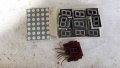
I just remembered for testing purposes, I can use these as well:
I can drive them directly through the I/O port or it needs additional transistors?
I am sure relays ,coils,motors, need aditional transistors + their protection flyback diodes in paralel. But normal simple leds?
What is the maximum IO current of this MCP23017 ?
Since @djsfantasi brought up time, you should also consider that the I2c is kind of slow vs SPI bus but it is very easy to use and only requires two wires for the bus.
Make sure you can update all of the pins that you need in the time-scale that you want them updated.
Im only concerned on how easy you can command these IO pins and how many. Your solution is right on my need. You understand excellent from the first round. So we are very good. I am aware of slow speeds, I mentioned this in the beginning replies. I was fine with those demultiplexers which I guess they are much slower than this I2C and also I was fine with parallel port that is also very slow in itself... so speed is not that important for me. Only quantity.
I remember this MCP23017 speed is 100kHz which is not the craziest speed out there, but is sufficient for analogue components they will drive like leds, transistors, probably some logic gates and stuff like this.
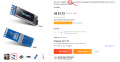
"Common maximum sink current: 15mA " from the SSD1306 IC onboard 7-seg display:
link to the 7-seg display I took : https://www.aliexpress.com/item/1005002438228358.html
link to the Digital Temperature: https://www.aliexpress.com/store/2138141
Each have some specifications on their page.
Hahaha, lucky me I just read the wikipedia page today. I thought they had some other type of comunication:
"Interface Type: IIC interface " but that IIC is the same thing as I2C - good one.
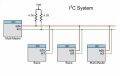
An I2C bus can have 127 (128?) devices on it. Yes, only 8 of them may be MCP23017s. But you can also add RTCs, EEPROMS, digipots, etc, etc, up to 127 devices.
Look at Seeed Studio's "Grove" system of boards, Elecrow's "CrowTail" system and a few others. Somehow, these guys have agreed on a standard 4-pin connector (power, ground, SCL and SDA) so you can easily daisy-chain modules from various sources to create what you want.
And about those pull-up resistors – you must have ONE on SCL and ONE on SDA. More then one per line is a probem. Trouble arises when every module decides to include pull-ups. You may end up needing to remove them from some modules.
Yes, I love your options mister @MrSalts !
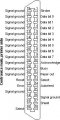
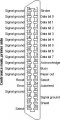
I just searched for: USB to parallel adapter and is very interesting !!! I was searching originally, just before writing this post on this forum, for boards. But I think I love more the idea of a simple cable with the parallel port ready. Something like this picture: View attachment 268972
Now... my target is to have 100 I/O ports ! I know, I'm crazy, but I like freedom of expression !!! Haha
This parallel port has 25 pins already.... so theoretically if I link 4 of them I will have those 100 I/O, but on different port numbers I guess and in program it will be a bit messy. So back to strategic board here, help me find a solution, whatever it is, I dont care what brand or how it looks, all I care is expandability - scalability. You are with me? Something that I can LEGO it, board on board and get those 100 I/O or even more, why not. And ideally from a single port number. And very preferably, to be able to do it from my c# environment that I am very comfortable to work into. But I will trade for Arduino as well.... for the moment. Just to find that combination first. I think they may be ways to port into c# after.
USB is a good interface for I/O is you don't need very high refresh rates on a 'PC'.
This board I designed has 16 24vdc capable outputs (MC33996) and 24 24vdc capable inputs (TIC12400) and a 9 axis BMX160 IMU for motion control. The internal board data interface is SPI using the MCP2210 USB interface chip with 9 Chip Select lines for I/O devices https://forum.allaboutcircuits.com/...2210-on-linux-with-libusb.179080/post-1693734
And about those pull-up resistors – you must have ONE on SCL and ONE on SDA. More then one per line is a probem. Trouble arises when every module decides to include pull-ups. You may end up needing to remove them from some modules.
One excellent way to avoid getting a setup with multiple pull-up resistors on each line is to use $2 chips instead of buying expensive modules with daisy-chained connectors. As seen from the above post, a $2 chip quickly comes to $6 when purchased from Adafruit or Seeed Studios and even more if they place it on a dev board for you. Those luxuries are not great if you are living on a fixed budget in Romania vs other economic situations.
USB is a good interface for I/O is you don't need very high refresh rates on a 'PC'.This board I designed has 16 24vdc capable outputs (MC33996) and 24 24vdc capable inputs (TIC12400) and a 9 axis BMX160 IMU for motion control. The internal board data interface is SPI using the MCP2210 USB interface chip with 9 Chip Select lines for I/O devices
- Very nice prototyping/testing board !!! I love the 3d sensors in it, very cool !!! I might ask you for its circuit some day if its not a big problem.... Also @nsaspook what language are you using to code that 3d cube?
Its an interesting subject in itself, to see what other prototyping boards might have on them... Im not very sure what Im building here to be completly honest... its partially a prototyping board but also is only a simple interface board... hmmm it might be both anytime.
Mine is stupid simple concept, no unnecessary bells on it. It has ONLY the I/O pins and on the other side (will be) 2 wires into arduino board, for now, for non complexity sake, exactly like mister @MrSalts suggested and I am doing it as he is guiding me completely for now. Until I will get the idea, and I have time later to get crazy. But in the same time, I am dedicated completely to figuring out a solution for using c# with this new I2C board (to be)... or c# through arduino uno...I dont know. What I imagine, is an IC containing some usb interface in it, probably, that will simulate some COM port that arduino is already using it from the start. My arduino for example is using COM5 right now. It has 2 options for COM1 and COM5. THats all there is to arduino, its proper connectivity that I didnt figure it out yet.... Im not sure in c# if there is a COM port communication class, i'll have to research that as well, but it must be something somewhere.... i'll have to dig deep for that. Essentially these are my problems!
- Thats why I choosed parallel interface in the very begining because 2 reasons: 1-I have already some experience with it and I know is working, 2-is not complicated at all to install and setup and run and use it in code. Its quite straight forward, after you learn all it's tricks that I forget right now and I have to exercise them again to regain them... but is not the case anymore. THe conclusion is that parallel interface was simple to use, while usb is extremely complicated for the common people (not for the industry). Thats why I jumped into I2C because it is promising a easy comunication solution like mister @MrSalts prescribed. We'll see .... and to be clear, the arduino solution is a very good one, dont get me wrong, but I have somethng else in plan, although different than arduino , is never bad to have 2 options to code from, correct? I will use arduino until I figure out the c# version. Hopefully. I hope you understand what my point is. I am grateful for everything until here but I am pushing for more is what Im saying. Ok.
One excellent way to avoid getting a setup with multiple pull-up resistors on each line is to use $2 chips instead of buying expensive modules with daisy-chained connectors. As seen from the above post, a $2 chip quickly comes to $6 when purchased from Adafruit or Seeed Studios and even more if they place it on a dev board for you. Those luxuries are not great if you are living on a fixed budget in Romania vs other economic situations.
Well, what are you going to do with that $2 chip? For $3.65 on ebay, you can buy an MCP23017 mounted on a breakout board so you can actually make some connections to it and use it.
I am so sorry my comment about having multiple pull-up resistors has somehow offended it. It wasn't meant to take away from your illustration but merely to provide information to those who might try out I2C devices. I had a colleague who didn't understand this, and wasted hours trying to figure out why things worked perfectly when he connected one or two I2C devices on breakout boards, but any combination of 3 or more boards failed.
The MCP23017 and MCP23008 (16 & 8 bits respectively) are a couple of my go-to chips. If I wanted a lot of I/O, I'd probably design a printed circuit board with one or two MCP23017s with terminal blocks and perhaps header pins for connections. Two 4-pin connectors on the board allow daisy-chaining of boards (+5v, gnd, SCL & SDA), and each board would have solder jumpers to enable/disable pull-ups as required.

 Facebook
 Google
 GitHub
 Linkedin

 540.6 KB Views: 1