What is the best signal interface for PC ?

djsfantasi

Joined Apr 11, 2010
9,237
This is me in HERO mode. All 4 at once. The last 4. After they are finished, I will complete the entire project.
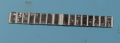
This picture is all 4 drawn and 1 of them starting to get metal pads.
View attachment 272937
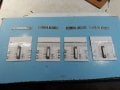
This is all 4 starting to get some wires on them. You can see the small diagram, where I marked with red, the location and how many wires are placed at this stage. Very hard work I tell you, but it is possible, is all that I can show here.
You can also see my dezizolator machine, without it I could not start this project.
View attachment 272938
Pretty cool so far. Im working with numerous breaks because this is more intense than usual.
Thank you.
- Im also curious if is a possibility to replace arduino UNO that I have, with a --permanent smaller board--, more compact in size, but essentially to do exactly the same thing this UNO is doing. Is it possible? I am no expert with arduino, this UNO board is all I have all my life, but watching some youtube videos, it appears that it is possible as I say. If not, then I think on an alternative that is a bit more crazy, to buy the arduino UNO MCU, program it with this UNO code, and use only the pins I need, just to cut down in size. But I really think it is possible with somethng already made, like PICO or something. Which is the smallest you recommend?(but doing the same thing as UNO) Thank you !
The Arduino Nano is very similar (if not identical) to the Arduino Uno in capabilities, but a much smaller package. About 3/4” by 1-3/4”
 

djsfantasi

Joined Apr 11, 2010
9,237
Thank you ! anything smaller than Nano?
Yes.
There are other microprocessors supported by the Arduino IDE.

Otherwise, it requires more of an investment of time than the Arduino platform. The Arduino was developed for a non-electronic and beginner programming audience. Hence, it’s learning curve is shortened. You can develop your own microprocessor board based on other chips (such as the PIC series) but you’re starting from scratch. Plus the process of writing code regardless of the platform, developing libraries for peripherals, compiling that code for different chips and uploading it to the chip is not as integrated as the Arduino environment. The Arduino environment is all contained in one utility program. Other chips may require learning four or more programs.

So, it depends on your background and available time.
 

Thread Starter

q12x

Joined Sep 25, 2015
2,227
- The first layer of wires is done for all, you can tell because the squares have a second longer bottom cardboard they are glued to.
- What Im showing here are the PADs - I worked literally 4 days on them. I had to take longer breaks because is so repetitive and so incredible boring doing it manually. Surprisingly, it was 'kind of' pleasant after you manage to enter in trance, in 'the flow'. Especially when you literally STOP thinking in perspective, in the future, when you STOP expecting total and full results, as our mind is tricking us so often, and concentrate on the damn job, piece by piece, pad by pad, 1 by 1, until you wake up from the trance and realized (after a good couple of hours, sometimes >5) that finally, 1 strip of pads is done. Aaaah, I cant explain in words what a relief is. Haha. Now, all 4 are finished. One big stage of the project is done.

1659770243431.png
-
20220806_100449.jpg
 

Thread Starter

q12x

Joined Sep 25, 2015
2,227
...this is a longer discussion about my future Inputs. I realized I will need some ADC's for each Input pad, at least for 1-one MCP board. This means 16 Input pads to accommodate, so 16 ADC's for each pad.
...long story short...
I start to realize that the best thing is to buy a 10bit(or higher) ADC, as expensive as it is per 1pcs.
It's small dimension beats everything and also I don't have to built them... this is my current thought.
- Ideally, I wished to have 16 ADC, one for each pad on one of my square MCP23017 board. At least one full and complete. Hmmm.... Things start to get hairy at this point. But in the end, 1 or 2 expensive but good brand ADC will probably satisfy the curiosity, at least, in the beginning. And is always room for upgrades later in the future. Nice is to have it good from the start, when Im cooking it now, but... Ill have to adapt to the contemporan capitalistic monetary situation.
- On another way of view the situation, LM358 is already a dual opamp in one package, and I have 100smd and another 100DIP in my stock. Also they are very cheap. But is a ton of work if I have to get on this road, and I know it... But I am thinking, that 3bit ADC made from 7 opams, I can use 3xLM358 and one uA741 which I also have 100pcs as well. And voila, 7 opamps for a very shitty ADC but I will have 16 shitty ADC for each pad on 1-ONE MCP board at least.
Money, huh? In capitalism. It sucks. Thats why this project stagnated so long from my youth years, because capitalistic money... Damn. Eh well. All I wish right now is not having the worst idea ever and regret it later with the 3bit ADC.

(a friend from this original post, suggested very brilliantly, that I already have LM3914 and use them as ADC)
...

I just searched for half an hour because I forget where I put them, and I count I have 8xLM3914 left.
So yes, we are good for 2 or 3 mounted in cascade for a bit better ADC.
...
- To continue your idea, with the LM3914, I can use all 8 of them also as a 3bit ADC, using only 7 of its opamps... or all 10 opamps why not. It will be a tiny bit over 3bit in this case. But this means that 8 of them will serve for only half of my 16-I/O MCP board. Thats why I bring the idea of using the actual opamps, 7 of them to cover all 16 pads. My idea is an alternative. Its the same shitty 3bit resolution either way, haha.
Also, is good to mention:
with __3bit ADC we will have 2^3 = 8 steps resolution (using 7 opamp comparators)
with __8bit ADC we will have 2^8 = 256 steps resolution. (using 255 opamp comparators)
with 10bit ADC we will have 2^10 = 1028 steps resolution. (using 1027 opamp comparators)
with 24bit ADC we will have 2^24 = 16777216 steps resolution. (highest ADC ever built)
Thank you for involvement !
...................
I believe... it all comes down to:
A- Many and Bad (multe si proaste- its a saying in my language)
(Many because I have many opamps already and Bad because only 3bit resolution)
or
B- Few and Good
(Few because expensive and Good because 10bit resolution)
What are your thoughts? What you will do in my place?
...................
I have a very funny idea, to use a single opamp for each pad of all my 8 MCP boards. So I have 128 pads in total, linked to 128 opamps and it will give me a gigantic big azz ADC ! Hahahaha. 128 steps resolution means 2^7 . Just for the fun of it I suppose.
 
Last edited:

Thread Starter

q12x

Joined Sep 25, 2015
2,227
And the moment we all were expecting, all 8 boards are finished, tested and working.
I still have some small problems to resolve until the "final product", this right now is in test stage still.
I am very happy how it come out.
I've also made a movie about it:
Thank you.
 

Thread Starter

q12x

Joined Sep 25, 2015
2,227
My very first project using the MCP boards and a LED Matrix display.
I also touch many interesting points in there. Thank you for watching.
and
 
Last edited:

Thread Starter

q12x

Joined Sep 25, 2015
2,227
Is so disappointing that my Arduino Uno can Not go down under 1ms !!! Ahhhh what a stick in the hearth.
 

Thread Starter

q12x

Joined Sep 25, 2015
2,227
update: I received my Arduino Nano board, the replacement for Arduino Uno, and the upgrade for this MCP board I built. I will show some pictures and movie later after I mount everything. Hopefully it will work. First time for me using arduino Nano, I have no idea of its limitations compared to arduino uno. We'll see.
 

MrSalts

Joined Apr 2, 2020
2,767
A standard Arduino Nano is virtually the same as the Uno - just fewer pins accessible.
The Arduino "Nano Every" is faster but not available as a clone the last time I checked.
 

Thread Starter

q12x

Joined Sep 25, 2015
2,227
A standard Arduino Nano is virtually the same as the Uno - just fewer pins accessible.....
Thank you ! I am glad you understand my rookines with these boards. Im learning them now.
---
But problems.... I actually searched for Arduino Nano on aliexpress and I got a bunch of results and I chose this one: -link-
5 boards at 12$. I thought is a very nice deal, since 1 single board is like 5$ or more. I did catch there are some 'issues' in the title but... i said 'blyme' and I bought them like that, risking everything I have.
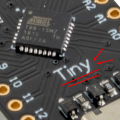
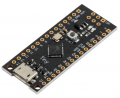
These are actually called arduino Tiny, looking in their driver name and its picture and it's tutorial forum page:
1660913388895.png1660913470053.png
But I didnt catch all these details when my finger was trembling on the "buy" button at that time.
I catch them now, when I have them in my palm. Briliant, right?
Now that they arrived, I managed to install this board driver in my win7. On aliexpress page is a link in the very first line in their description. On that link page is explained everything to make this board work, including installing the drivers and setting up the arduino IDE. I did everything on that tutorial page, I did the sample program and I managed to make it work.
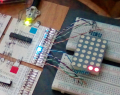
I connected my MCP board to it, linked to SCL and SDA and common grounded (exactly as it was with arduino UNO). So all hardware connections are made correctly.
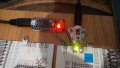
20220819_154935.jpg
Like I said, I made their test program on that page and it worked. So I programmed this chip successfully already. This proves the new data cable is good, all my connected wires are fine(probably), is properly powered and secured on my board.
BUT... when I tested a MCP program .... 2 (similar) errors:
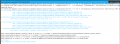
1660913065611.png
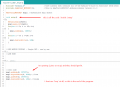
Here is the entire code I used:
1660913105795.png
minor detail - (Heh, actually only 1 led set HIGH should get lit since the second led is set LOW to gnd)
(this code is for the LED dot matrix im playing right now and this picture is when it worked with arduino UNO)
1660913943860.png
I can change the program to a much more basic one if needed. I will test everything I have anyway if I will manage to make this new board work.
If this board will nor work, I will revert back to arduino UNO and put away this Tiny board. Hmmm. I will wait your judgement.
As always, thank you very much we reach this level.
 
Last edited:

Thread Starter

q12x

Joined Sep 25, 2015
2,227
- The thing is about these boards is if you want to program one, you have to unplug the usb cable, send the program to the chip from the arduino IDE, wait for it to prompt you to 'connect the device', connect back the usb cable and the programming process is starting and the device is really programmed. But if you ask me this it total bullcr*p. So normal testing with multiple re-programming with it is a pain in my bat anyway, even if we resolve the MCP library error. I bet they are testing some form of chip, very experimental and very unconventional than the original on the arduino boards. Like you guys are saying, is a 'clone'. And this appears to be an authentic clone. What I can think to do with these boards, because there is some juice to them, is to make some stand alone projects that require less or no extra libraries like I have right now with the Adafruit_MCP23X17.h that is giving troubles, and use its available pins and thats it. I think its I2C might work as well. Only the MCP library is not understood. So projects with I2C involved will be awesome if they will work. And program only once and not used as testing and experimentation boards like my arduino uno supports very well. I got unlucky but I got over it and I move on.
- I rechecked again and 1 arduino Nano is from 4$ up, the large majority are almost 5$ and up. So my original thought was a good deal indeed, but it turned out too good to be true. Damn. I was so happy and now Im back to square 1.
- What I will do: - I will reinstate my arduino uno as before. Then, I will buy an -original- arduino nano board, wait for it to arrive and install it. Thats the plan.
Thank you.
 

Thread Starter

q12x

Joined Sep 25, 2015
2,227
I reinstalled back my arduino Uno and everything is working as before.
But in my latest program that I made, I can obtain a diagonal line on a Led Dot Matrix as a test program, but its refresh rate can not be lower than 1ms as arduino is restricting. MCP chip is minimum 100kHz (actually has higher values specified) which means 10μs per cycle.
- Do anyone know how to lower arduino fv to μs instead of ms ?
In the movie here I present using it's internal fuction
delay(dly);
which is a ms function, I read about it and I get that. I tried also its other function as well, named
delayMicroseconds(dly);
and the result is exactly as the delay(dly); in ms and not under 1ms, to it's promoted μs.
This is a 2min video where I explain the entire problem, please watch it.
Thank you.
 

Thread Starter

q12x

Joined Sep 25, 2015
2,227
On another forum, a friend of mine rise this to my attention:
marconi said:
For most people a refresh rate of 50 to 100Hz fools the eye and brain to see a flicker free image as in a conventional TV picture
And my answer was:
100Hz not 100kHz! - VERY Interesting that you mention this! This is helpful. So my 1ms delay in code might not be a real 1ms at all. The speed in reality is probably somewhere at 20Hz now that I think about it. Hmmmm... very intriguing. They definitely have some issues on their I2C pins on that arduino board.
I just google a bit and I find and confirm with: "most humans can't easily distinguish individual frames at 30 hz."
The visible fast flickering is under 30Hz !
So the SCL pin from arduino is simply under 30Hz and not even close to 1ms which is 1000Hz. Hmmm, very interesting.
 

Thread Starter

q12x

Joined Sep 25, 2015
2,227
I got an interesting reply from arduino forums, to actually find other libraries that deal with MCP23017.
I think is an interesting idea.
Someone told me to use this: https://github.com/blemasle/arduino-mcp23017/blob/master/src/MCP23017.h
which I recognize from youtube and the official arduino tutorials, that "Wire.h"
But I never installed something from github into arduino IDE. Also I dont know if this library can be found in "Library Manager" of the IDE. I dont know what to search for it.
I will try to find a way to install it.
 
Last edited:

Thread Starter

q12x

Joined Sep 25, 2015
2,227
update: I find that library inside "Library Manager" of the IDE, I guided myself after the name of the author.
1661101403374.png
I looked inside the examples and the headers of this new library and is too complicated for me.
What you recommended the first time, the Adafruit library, is very easy and has good examples.
It worth a try at least.
Im digging inside Adafruit library to find hidden jewels, but .... is hard stuff for me that I am not doing this daily.
...
I find this Adafruit-MCP23017 page with all its classes, very well made btw:
https://adafruit.github.io/Adafruit-MCP23017-Arduino-Library/html/functions_func.html
and if you click on 1 link in there it will send you to a more detailed page.
But still im looking like the cat at the wall right now.
I have no clue how or what to change in the codes that we made so far to actually speed it up.
If it helps, here is the current code for the led dot matrix '3ledsdiagonal' program:
Code:
#include "Arduino.h"                    //core library that contains all of the Arduino’s built-in functions (from 2022)
#include <Adafruit_MCP23X17.h>          //this is Adafruit-MCP23017-Arduino-Library version 2.1.0
 
Adafruit_MCP23X17 mcp1; //Instantiate mcp1 object
 
void setup()
{
  Serial.begin(9600);
  mcp1.begin_I2C(0x20);
  for(int i = 0; i <= 15; i++)
  {
    mcp1.pinMode(i, INPUT);
  }
  for(int i = 0; i <=15; i++)
  {
    mcp1.digitalWrite(i, LOW);
  }


//LED MATRIX DISPLAY - Single LED - one by one
/*  LOGIC:
//Columns----------------------------------------
//  mcp1.digitalWrite(1, LOW); //A1=1=column A
//  mcp1.digitalWrite(10, LOW);//B1=10=column B

//  mcp1.digitalWrite(3, LOW); //A3=3=column C middle
//  mcp1.digitalWrite(11, LOW);//B2=11=column C middle

//  mcp1.digitalWrite(4, LOW); //A4=4=column D
//  mcp1.digitalWrite(13, LOW);//B6=13=column E

//Lines----------------------------------------
//  mcp1.digitalWrite(5, HIGH);//Line1
//  mcp1.digitalWrite(0, HIGH);//Line2
//  mcp1.digitalWrite(6, HIGH);//Line3

//  mcp1.digitalWrite(2, HIGH);//Line4
//  mcp1.digitalWrite(12, HIGH);//Line4

// mcp1.digitalWrite(8, HIGH);//Line5
//  mcp1.digitalWrite(14, HIGH);//Line6
//  mcp1.digitalWrite(9, HIGH);//Line7
*/

}

void Reset()
{
 for(int i = 0; i <=15; i++)
 {
   mcp1.pinMode(i, INPUT);
   mcp1.digitalWrite(i, LOW);
 }
}


int dly = 300;
void drawDiagonal()
{

  //line1
 mcp1.pinMode(6, OUTPUT);   //line
 mcp1.digitalWrite(6, HIGH);
 mcp1.pinMode(10, OUTPUT);   //column
 mcp1.digitalWrite(10, LOW);
 delay(dly);
 Reset();

  //line2
 mcp1.pinMode(2, OUTPUT);   //line
 mcp1.digitalWrite(2, HIGH);
 mcp1.pinMode(3, OUTPUT);   //column
 mcp1.digitalWrite(3, LOW);
 delay(dly);
 Reset();

   //line3
 mcp1.pinMode(8, OUTPUT);   //line
 mcp1.digitalWrite(8, HIGH);
 mcp1.pinMode(4, OUTPUT);   //column
 mcp1.digitalWrite(4, LOW);
 delay(dly);
 Reset();
 
}

void loop()
{
 drawDiagonal();
}
 
Last edited:

Thread Starter

q12x

Joined Sep 25, 2015
2,227
In summary :
I made a mistake last time when I bought this Arduino Tiny board:
1664299352661.png
I took it for a 'deal' 5pcs for 12.52$.
It is a somewhat good board, its a new board for sure, but it has some undesirable downsides:
1 - Troublesome installation of its very special driver. It worked in the end but troublesome.
2 - After EVERY program upload, it does not automatically RUN the program, like in any arduino UNO or NANO boards. No; to ACTIVATE the program you have to press it's button OR as I usually did it until I discovered that button press method, was to unplug the usb cable and plug it back. What a pain in the proverbial azz. So I stash these boards away for "future" use. The only practical way to use them is to program something in it, and sell it or gift it away. It is not good for experimenting like a normal --original-- arduino !
So, I buy another Arduino Nano board, 1pcs for $4.50$. I guess, the original is a bit more costly. Lesson learned then.
 
Top