Trying to understand TV Power Supply Schematic

Thread Starter

Gravydog

Joined Mar 8, 2018
41
Even if the zener had failed short-circuit, the voltage that would be applied to the comparator input would be somewhat less than the comparator's supply voltage due to some drop across R3. Even if R3 were zero, the voltage would be no greater than the comp's supply. The comparator won't work properly at that voltage but it won't be harmed.
OK, I'll try to do some component testing on PCB1 before I order, maybe I'll find something else suspicious, thanks.
 

Thread Starter

Gravydog

Joined Mar 8, 2018
41
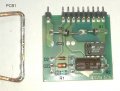
OK, PCB1 was in far too cramped a space to do much of anything. I have a small heat gun but I didn't want to heat up everything unnecessarily so I made a custom soldering gun tip from 10 gauge wire that worked great! Here is what I have found:
R1 and R2 test spot on their values
D1 and D2 pass diode testing
C1 marked 35v/56uF, tests 59uF
C2 doesn't exist on this rev.
U1 not tested, is there a practical way? Just replace?
DZ2 marked C15PH, tested to 14.8v
DZ1 marked BZT03C200, I have no way to test a 200v zener diode so maybe just replace?

IMG_20180327_153458.jpg
 

AlbertHall

Joined Jun 4, 2014
12,629
I don't think DZ2 would cause your problem. Likewise, as this supply is producing some output, I doubt that U1 is the problem.
So I believe the problem is that this supply is being overloaded so dragging down its output voltage.
You could lift one end of D10 and D11 which would disconnect the Vaux and 5V outputs and eliminate them. If the C9 voltage is then above 16V then one of those outputs is the problem.
 

Thread Starter

Gravydog

Joined Mar 8, 2018
41
I don't think DZ2 would cause your problem. Likewise, as this supply is producing some output, I doubt that U1 is the problem.
So I believe the problem is that this supply is being overloaded so dragging down its output voltage.
You could lift one end of D10 and D11 which would disconnect the Vaux and 5V outputs and eliminate them. If the C9 voltage is then above 16V then one of those outputs is the problem.
Sorry for the delay but I have been trying to get a parts list from both the projector and power supply manufacturers (in Italy) with no luck so far. I really want to replace DZ2 on PCB2 in case it is bad but on the other hand since there is a 200v zener on PCB1 it seems possible that this DZ2 is just a higher voltage than I used for testing and is not bad at all. I really want that parts list!

Also, since they use some of the same callouts for parts on the main board and on the sub-boards it would be very helpful to me if I knew which U1, DZ2, etc. you are talking about at the time.

I will reinstall the diodes I have off of PCB2 and try your advice above.

Rob
 

AlbertHall

Joined Jun 4, 2014
12,629
Sorry for the delay but I have been trying to get a parts list from both the projector and power supply manufacturers (in Italy) with no luck so far. I really want to replace DZ2 on PCB2 in case it is bad but on the other hand since there is a 200v zener on PCB1 it seems possible that this DZ2 is just a higher voltage than I used for testing and is not bad at all. I really want that parts list!

Also, since they use some of the same callouts for parts on the main board and on the sub-boards it would be very helpful to me if I knew which U1, DZ2, etc. you are talking about at the time.

I will reinstall the diodes I have off of PCB2 and try your advice above.


Rob
The DZ2 and U1 I was referring to are on PCB 1. D10 and D11 that I was suggesting you lift one end of are shown on the main part of the schematic.
 

Thread Starter

Gravydog

Joined Mar 8, 2018
41
The DZ2 and U1 I was referring to are on PCB 1. D10 and D11 that I was suggesting you lift one end of are shown on the main part of the schematic.
OK, I reinstalled the diodes I had off of PCB2 so it's all as original. I reinstalled PCB1 onto the main board and I removed D10 and D11 near T4 on the main board. I measured dc voltages for the pins that are in use for PCB1. +VB to -VB is 166v. I'm using a Fluke DMM not labeled True RMS.

Pins 1,2,3 to Pin 7 = 166v
Pin 7 (-VB) to Pin 8 = 0v
Pin 7 to Pin 9 = about 9v, varies a little from one test to another
Pin 7 to Pin 10 = 166v
Pin 9 to Pin 10 = 157v

I measured to the pads where D10 and D11 mounted, I get 0 to a few mV from -VB or +VB to any pad and the same thing when measuring across where the diodes would be. Hopefully all this might mean something to you, I know how hard it is to diagnose things from a distance and I really appreciate this help.

Rob
 

AlbertHall

Joined Jun 4, 2014
12,629
OK, so the PCB1 circuit still isn't working correctly despite removing D10 and D11. The only other load on the output of this supply is PCB2. So the next thing is to remove PCB2 and measure pin 7 to pin 9 on PCB1 again. If that is still significantly less than 16V then the fault is definitrly on PCB1 and so PCB1 U1 must be the next suspect.
 

Thread Starter

Gravydog

Joined Mar 8, 2018
41
OK, so the PCB1 circuit still isn't working correctly despite removing D10 and D11. The only other load on the output of this supply is PCB2. So the next thing is to remove PCB2 and measure pin 7 to pin 9 on PCB1 again. If that is still significantly less than 16V then the fault is definitrly on PCB1 and so PCB1 U1 must be the next suspect.
I removed PCB2 and a curious thing happened: the line voltage to P1 dropped to about 17vac and I smelled something warm (no smoke, not too bad). I think the relay RL1 is not bypassing thermistor RT1 which measures about 11 ohms at room temp. Since bypassing it must be normal operation, do you think it is safe to jumper RT1 for testing voltage at PCB1 pins 7 and 9? It seems logical but I don't want to be wrong.
 

AlbertHall

Joined Jun 4, 2014
12,629
I removed PCB2 and a curious thing happened: the line voltage to P1 dropped to about 17vac and I smelled something warm (no smoke, not too bad). I think the relay RL1 is not bypassing thermistor RT1 which measures about 11 ohms at room temp. Since bypassing it must be normal operation, do you think it is safe to jumper RT1 for testing voltage at PCB1 pins 7 and 9? It seems logical but I don't want to be wrong.
No, do not jumper RT1.
Add a jumper between the PCB2 Gate and Com terminals.
Without PCB2 the gates of Q1 and Q2 are floating and it seems they they float positive and turn on the MOSFETS. Adding the jumper will ground the gates and switch off the FETs.
 

Thread Starter

Gravydog

Joined Mar 8, 2018
41
No, do not jumper RT1.
Add a jumper between the PCB2 Gate and Com terminals.
Without PCB2 the gates of Q1 and Q2 are floating and it seems they they float positive and turn on the MOSFETS. Adding the jumper will ground the gates and switch off the FETs.
Progress, I think! I soldered a wire from PCB2 Com to Gate and now +VB to -VB is back to 166vdc and between PCB1 pins 7 and 9 is 20 volts. Still no significant readings where D10 and D11 were, go ahead and reinstall them? What should I check next, Professor?
 

AlbertHall

Joined Jun 4, 2014
12,629
Progress, I think! I soldered a wire from PCB2 Com to Gate and now +VB to -VB is back to 166vdc and between PCB1 pins 7 and 9 is 20 volts. Still no significant readings where D10 and D11 were, go ahead and reinstall them? What should I check next, Professor?
OK!
Progress indeed. This tells us that it is PCB2 that is lo
Progress, I think! I soldered a wire from PCB2 Com to Gate and now +VB to -VB is back to 166vdc and between PCB1 pins 7 and 9 is 20 volts. Still no significant readings where D10 and D11 were, go ahead and reinstall them? What should I check next, Professor?
OK! Progress indeed!
So now we know that PCB2 is overloading the supply on PCB1 and pulling down its output voltage.
Suspect components on PCB2 include: C10, C14, C17, U1, U2, Q3, Q4. You can check these except for U1 and U2. Good luck.
 

Thread Starter

Gravydog

Joined Mar 8, 2018
41
[QUOTE="OK! Progress indeed!
So now we know that PCB2 is overloading the supply on PCB1 and pulling down its output voltage.
Suspect components on PCB2 include: C10, C14, C17, U1, U2, Q3, Q4. You can check these except for U1 and U2. Good luck.[/QUOTE]

I have now removed and tested C10 (313 nF), C14 (10.6 uF), C17 (111 nF), Q3 and Q4 and all appear to test out fine. I think at this point I will order U1 and U2.

I also want to revisit DZ2 on this board (PCB2). I removed and tested DZ1 and DZ2 again and DZ1 still tests at 8.8v while DZ2 doesn't drop the 46v battery supply at all. You thought DZ2 must be lower voltage than than DZ1. So without any markings or a parts list may I have your best guess at a value to order?

Thanks so much for your continued help.

Rob
 

AlbertHall

Joined Jun 4, 2014
12,629
Can you tell me the values of R1, R2, and R10 on PCB2 and R19 and R21 on the main board to help me understand the circuitry around DZ2, please.
Also what was the current through DZ1 when you measured the 8.8V (value of series resistor and battery voltage)?
 

Thread Starter

Gravydog

Joined Mar 8, 2018
41
Can you tell me the values of R1, R2, and R10 on PCB2 and R19 and R21 on the main board to help me understand the circuitry around DZ2, please.
Also what was the current through DZ1 when you measured the 8.8V (value of series resistor and battery voltage)?
On PCB2: R1=100k, R2=1k, R10=12k

Main board: R19=273k, R21=330k

All resistors measure very close to their rating.

When testing DZ1 from PCB2 I used 5 9v batteries supplying 46v. I grabbed a resistor for testing that turned out to be 56k. When testing I saw 8.8v, then I put my meter in series and read 0.770mA.
 

AlbertHall

Joined Jun 4, 2014
12,629
OK.
The current you were testing DZ1 at is lower than the current at which the voltage is normally specified so I expect it to be 9.1V or 10V.
With those values it wouldn't make much sense for DZ2 to be a zener however a simple didoe in that position would make sense and be useful, protecting the U1 input from excess voltage. If DZ2 in the forward direction conducts and drops about 0.7V then leave it alone.
 

Thread Starter

Gravydog

Joined Mar 8, 2018
41
OK.
The current you were testing DZ1 at is lower than the current at which the voltage is normally specified so I expect it to be 9.1V or 10V.
With those values it wouldn't make much sense for DZ2 to be a zener however a simple didoe in that position would make sense and be useful, protecting the U1 input from excess voltage. If DZ2 in the forward direction conducts and drops about 0.7V then leave it alone.
In thinking about what you have said, and with the lack of a parts list or marking, it seems to make perfect sense that DZ2 may not be a zener diode at all and that's why I haven't found a breakdown voltage in my testing. It does test good using my DMM's diode test if that's what you are referring to by a 0.7v drop.

I'm ordering U1 and U2 so it will be a few days until I will know more.
 

AlbertHall

Joined Jun 4, 2014
12,629
It is not unusual to find discrepancies between the schematic/parts list and the actual product, presumably because updating the documentation is done in slow time.
 

Thread Starter

Gravydog

Joined Mar 8, 2018
41
Well, I'm starting to get a little bit discouraged. Today I replaced U1 and U2 on PCB2 and reinstalled all other parts that were removed for testing. Now the voltage between pins 7 and 9 is only 4.7v. and still not really seeing signs of life. I measured the voltages at the pins of PCB2 from the COM pins 2-3 in case it might mean anything to you.
1 - 3.25
2
3
4 - 1.85
5 - 0
6 - 13.9
7 - 17.2
8 - 3.3
9 - 4.7
10 - 0.02
11 - 0
12 - 0.05
I appreciate all your help and if you can stand to ponder this any longer I will keep trying.
 

AlbertHall

Joined Jun 4, 2014
12,629
We know that the PCB1 circuit supplies a good voltage with PCB2, D10, D11 disconnected. You have checked/replaced the suspect parts on PCB2 and you have reconnected D10 and D11 and the PCB1 voltage is low.

I think the next thing is to again remove D10 and D11 and check the voltage on C9.
If C9 voltage is then greater than 16V then reconnect each of D10 and D11 and see which one drags down that voltage.

If C9 voltage is still low without D10 and D11 then I am getting desperate and I can't think of a good fault-finding check from here.
On PCB1, check C2, D1 and DZ1 ( DZ1 will probably be too high a voltage for your battery test but make sure it looks like a normal diode).
If those are OK, replace U1 on PCB1 and keep your fingers crossed!
 
Top