Technics SU-VX800 amplifier

Thread Starter

Marius83

Joined Dec 28, 2017
423
Thanks guys, finally done inside my garage for some working.
Now i got heat in here as well.
I know it's been a while but i hope you can catch up, if you guys want to help me further :)
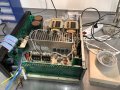
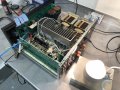
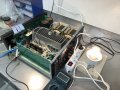
I soldered the two 12V 21W bulbs to the R506 and R505 points..
Then connected my dim bulb tester between the socket and amp.

Power on!

As you can see on the pictures, the 100W bulb is shining very bright.
The two 21W bulbs are not, if you zoom on the picture you can see the bulb at R506 glowing just a little bit

But also, after about 5-10 seconds with power on, Q415 gets very hot and starts smoking..... so i turned the power off... hmm..


IMG_3984.JPGIMG_3986.JPGIMG_3987.JPG
 
Last edited:

JoeJester

Joined Apr 26, 2005
4,390
The bulb glowing (R506) shows that dc supply working. it's the other polarity shorted to ground.

Can you check D601 for a shorted diode or two in the bridge.

If you installed a new one, make sure you installed it properly ... AC to the transformers.
 
Last edited:

Thread Starter

Marius83

Joined Dec 28, 2017
423
The new bridge rectifier was installed with the flat corner the same way the original was, it's illustrated on the pcb as you can see.
Took some pictures, you can see the flat corner.

So you suspect the new part? How do i check it? Do i need to pull it?

IMG_3992.JPGIMG_3993.JPG
 
Last edited:

JoeJester

Joined Apr 26, 2005
4,390
Let's look at what you have ...

The main lamp indicates a short in the power supply.

Typically that would be the bridge rectifier. Check it and make sure it's installed properly and there are no shorts or opens.

The one bulb that does not glow at all, well, you have half the 4xx section out of the circuit and that could be the cause of that.

The one bulb that glows dimly, has some current draw and the power supply is working slightly. If you measured the voltage on C607 and C608 you will see they are no where near their normal value.
 

Thread Starter

Marius83

Joined Dec 28, 2017
423
I understand..

I believe you guys earlier stated that it must be a short somewhere, but measurements told us it must be an active short ?

The last problems was R505 and R506 did fry instantly, even when we replaced them with 100 ohm units, this happened with the original bridge rectifier, and also with the new one.
I only replaced the rectifier to be sure it wasn't our problem.

The new one is installed properly, but i could of course check it for shorts or opens, how do i do it ?:D
 
Last edited:

JoeJester

Joined Apr 26, 2005
4,390
That may be true, and with each test a picture becomes clearer.

That voltage is distributed to many sections. We see that the two that have the bulb are not lit.

Both go to X4xx and X5xx sections but you have those covered already with the 12 V lamps.

Both voltages go to the X6xx the Extend Active Servo section via R677 and R678.

Both go to the X3xx area and R602/R603 removes that section.

One voltage from the supply goes back to control voltage via R601.

The strategy is to remove the different loads until the main lamp extinguishes. Do them one by one. That will identify the section where the short is. If the lamp doesn't extinguish, we work backwards, from those disconnected resistors to the AC line checking the components.
 

Thread Starter

Marius83

Joined Dec 28, 2017
423
That's good... so you think we have covered a lot with those lamps in the sections, but yet.. Q415 starts to smoke after a couple of seconds :rolleyes:

I understand the strategy but i'm not capable of doing it myself.
What component would you suggest me to check/remove/test next ? :D
 

JoeJester

Joined Apr 26, 2005
4,390
Remove Q414 and check it. Leave it out. Test again to see if the main light is extinguished. If the lamp is still lit, work on removing the sections till it is extinguished.

Now, it doesn't matter which resistor you move first as you are going to lift one leg, and turn on the set to see if the main bulb goes dim. then shutdown if it does not and move to the next. I would leave it disconnected till the main light problem is solved.

Once the main light is extinguished, you can reconnect the resistors, one at a time, if the lamp reenergizes, lift that last component and we will troubleshoot the problem of that area.

Let me know when you extinguish the lamp, by resistor number, so we know look at that section.
 

MrChips

Joined Oct 2, 2009
34,841
Checking in now.
Checking over the previous 400+ posts, there was never a problem reported with Q415.
Something is different now.
Is IC401 installed in the socket?
If it is not installed I cannot see why it would overheat.
 

MrChips

Joined Oct 2, 2009
34,841
I would not expect any of the lamps to glow. Anyhow, that is why R505 and R506 are blowing.

See if you can measure the DC voltages at

D409
D411

D410
D412

I assume Q415 is shot.
 

Thread Starter

Marius83

Joined Dec 28, 2017
423
Just need to explain something.
Some days ago when i first tested with the dim bulb tester, i disconnected the wires to the pcb, and turned on, it lit a second and went dark as i expected.

Today it has gone a couple of days... and i did connect the wires to the pcb... but the power button on the amplifier was on.
So i guess it got power from the capacitors, which i though were empty.. but, the 21W bulb at R506 lit up and almost blew.
Don't think it made any damage else. Just wanted to explain why the bulb looks like it does now.

I tested the voltages, only power on for a second or two before turning off again.
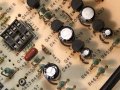
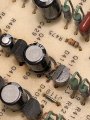
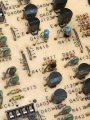
But in my third measurement, something blew... smoke everywhere.. hard to see what went, but i think i found out... C409 seems blown, and also R415 is black... i don't think this looked like this earlier! See pictures.

After this, the 100W bulb got much darker, but after some power on and off it seems to light brighter again... but much less that earlier..

I stuck my finger on the small transistors to feel heat and now its Q407 that's getting really hot.

I measured both sides of the diodes, second line on each is towards heatsink...

D409 : +38 V / + 35 V
D411: +17 V / -30 V

D410; +6,5 V / -1,6 V
D412 -1,6 V / -8 V

IMG_4031.JPGIMG_4032.JPGIMG_4033.JPG
 

Thread Starter

Marius83

Joined Dec 28, 2017
423
Do you have replacements for the following?

Q407
Q415
R415
C409
D411
No i don't..
Missing:

Q407/Q415
C409

I have two diodes, same as used in D410 and 412, was the same in the parts list i saw, i remember i ordered 4 pcs. earlier and we used the two who had the closest value in D410 and D412, should i order new ones or do you think the two units i have will do?
They are new.

I will order components... but will take some weeks i guess..
 

MrChips

Joined Oct 2, 2009
34,841
Evidently, D411 is blown. The ones you have now will do.
Eventually you will have to replace the blown components. We can replace the ones I listed but I still do not know what is causing these components to go bad. This section of the amplifier did not present any problems in the past as far as I can see.
 

Thread Starter

Marius83

Joined Dec 28, 2017
423
Evidently, D411 is blown. The ones you have now will do.
Eventually you will have to replace the blown components. We can replace the ones I listed but I still do not know what is causing these components to go bad. This section of the amplifier did not present any problems in the past as far as I can see.
That's true, haven't touched these components earlier...
100W bulb still shines pretty bright....

I recall earlier we replaced numerous components with success, then suddenly a new one blew a place you couldn't understand, after that it seems just blowing the next component after we leave just more and more out ... ?

If a resistor blows... it is something else causing it, isn't it... usually a transistor or what?

If i replaced all the transistors left... would that be a good idea?
o_O
 

MrChips

Joined Oct 2, 2009
34,841
What some people would do is replace all the semiconductor components.
That does not fix the problem if there is still a bad resistor or capacitor.

So why not replace all the components?
That still does not fix the problem if there is a short on the board or a broken track.
 
Top