i will do it shortly Sir and let you know
one more thing i want to tell you that i am using unshielded wire for my output and input is it also can cause rfi ???
thank you
An open-circuit input (no mic connected), unshielded input wiring, and building on a breadboard are all recipes for hum and interference pick-up.
If you have the mic clipped to your chest (ouch!) or shirt you will pick up a lot of noise from clothing movement.
An open-circuit input (no mic connected), unshielded input wiring, and building on a breadboard are all recipes for hum and interference pick-up.
If you have the mic clipped to your chest (ouch!) or shirt you will pick up a lot of noise from clothing movement.
yes Sir i know that i have created many threads but that time the oroblem was related to rfi when i had connected the laptop to the charger but this time the problem arise when laptop is on battery mode that is why i asked
Of course the cable from a microphone to a preamp must be shielded audio cable. The output cable from the preamp to a recorder or power amplifier also must be a shielded audio cable. Your unshielded wires are antennas that pickup interference.
The LM358 has many audio problems which is why it is never used as a mic preamp. Use an audio IC instead.
If your power supply produces humming or buzzing then try using a battery instead to see if the noises disappear.
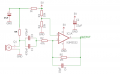
The circuit you built has a gain that is less than 1M/47k= 21.3 times which is much too low for a microphone that needs a gain 20 times higher.
Of course the cable from a microphone to a preamp must be shielded audio cable. The output cable from the preamp to a recorder or power amplifier also must be a shielded audio cable. Your unshielded wires are antennas that pickup interference.
The LM358 has many audio problems which is why it is never used as a mic preamp. Use an audio IC instead.
If your power supply produces humming or buzzing then try using a battery instead to see if the noises disappear.
The circuit you built has a gain that is less than 1M/47k= 21.3 times which is much too low for a microphone that needs a gain 20 times higher.
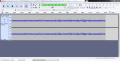
i hv connected the input and output with shielded wire and did what you said to do with 47uF and 10k resister but still getting the same inteference one thing i noticed that when i am touching both ceramic disc 470nf capacitor kind of response i can observe in my audacity like inteference increases after touching and holding it
i hv connected the input and output with shielded wire and did what you said to do with 47uF and 10k resister but still getting the same inteference one thing i noticed that when i am touching both ceramic disc 470nf capacitor kind of response i can observe in my audacity like inteference increases after touching and holding it
thank you very much audio guru my problem disapeared like it will never come again i hv purchased a new 9v battery now working perfect gain is at even higher than what i had wanted to because of switching to usb 5v to 9v battery now i hv to work on background noise cancellation
is there any schematic that can improve background noise
Your interference problem was caused by noisy USB?
You are probably using a cheap ordinary electret mic that is omni-directional and it picks up sounds front, sides and back.
Please describe the background noise sounds (low frequency rumble, high frequency hiss, traffic sounds or voices.
Digikey in United States and Canada lists electret mics from 5 manufacturers. They have in stock today hundreds of ordinary omni-directional mics that sound great and 25 different "noise cancelling mics" and 25 different directional mics.
The omni mics sound great because they have a flat frequency response.
The noise cancelling mics reduce low frequencies a lot from the front (a thin and tinny sound) when the mic is close to your mouth and reduces distant low frequencies a little more. They also reduce distant high frequencies a little.
The directional mics also reduce low frequencies from the front (but not as much reduction as the bad sound from the noise cancelling mics) and reduce high frequencies a lot from the sides and rear.
Simply make the omni microphone closer to your mouth (a gooseneck type that is directly in front of your mouth).
Your interference problem was caused by noisy USB?
You are probably using a cheap ordinary electret mic that is omni-directional and it picks up sounds front, sides and back.
Please describe the background noise sounds (low frequency rumble, high frequency hiss, traffic sounds or voices.
Digikey in United States and Canada lists electret mics from 5 manufacturers. They have in stock today hundreds of ordinary omni-directional mics that sound great and 25 different "noise cancelling mics" and 25 different directional mics.
The omni mics sound great because they have a flat frequency response.
The noise cancelling mics reduce low frequencies a lot from the front (a thin and tinny sound) when the mic is close to your mouth and reduces distant low frequencies a little more. They also reduce distant high frequencies a little.
The directional mics also reduce low frequencies from the front (but not as much reduction as the bad sound from the noise cancelling mics) and reduce high frequencies a lot from the sides and rear.
Simply make the omni microphone closer to your mouth (a gooseneck type that is directly in front of your mouth).
yes sir noise was because of usb
now it has gone i will buy omnidirectional from aliexpress can you suggest me one from their website so that i could order it because i dont know how to select best mic according to the specification given in the product description
the backgroubd noise was kind of hiss
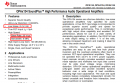
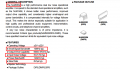
i want to know according to the red enclosed feature which one is better having a greater one or a lower one for, an example is noise 8nV is better than 5nV because 8 is greater than 5????
The Japanese NJM5532D is slightly better than the American OPA2134, but you probably will not hear any difference.
AliExpress sells cheap no-name-brand Chinese junk!
The hiss you hear could be produced by the mic (short it to see if the hiss is reduced) or by the opamp and its resistors.
The Japanese NJM5532D is slightly better than the American OPA2134, but you probably will not hear any difference.
AliExpress sells cheap no-name-brand Chinese junk!
The hiss you hear could be produced by the mic (short it to see if the hiss is reduced) or by the opamp and its resistors.
The distortion might be caused by the power amplifier volume control being set too high causing the amplifier to produce clipping.
If the problem is not the power amplifier then maybe it is the speaker that has trouble producing loud bass.
If it is not the power amp or speaker then maybe the preamp is clipping because its gain is set too high.
If it is not the above then maybe the electret mic is distorting because it is too close to a very loud guitar.
Oh, is it the recording device that produces distortion when bass is loud?
.
Yes Probably Problem Caused by preamp because my speaker gives fantastic result when I play 320kbps mp3
recording like this guitar at a distance of 1feet of the mic and mic to preamp and preamp to pc with a software audacity
by the way what changes i should make in my circuit to fix the distortion

 Facebook
 Google
 GitHub
 Linkedin