[S.T. 2] - Semester task 2

ericgibbs

Joined Jan 29, 2010
21,444
hi,
The LTS temp is the ambient temperature of the 'circuit plot'
The diode is passing current and so it generates heat which raise its body temperature above the 100C ambient.
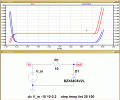
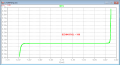
Look at the self heating dissipation of the diode in this image

EDIT:

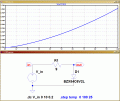
Look at this modified Sim of the diode self heating at a fixed 25C temp ambient, its dissipating 1 Watt.! as the current increases.
 

Attachments

Last edited:

Thread Starter

PsySc0rpi0n

Joined Mar 4, 2014
1,786
hi,
The LTS temp is the ambient temperature of the 'circuit plot'
Ok, let me try to understand what you're telling me!
You mean that the
Code:
.step temp
directive is not the component temperature but the ambient temperature?
If so, how can I simulate the junction temperature? I think that it's this temperature we are interested in!

The diode is passing current and so it generates heat which raise its body temperature above the 100C ambient.
Look at the self heating dissipation of the diode in this image
So, when our teacher asks us to check what is the temperature influence in the Zener diode behaviour, what should we plot in terms of XX-axis and YY-axis?

I think he's asking to check the temperature's influence in forward voltage and reverse voltage!

EDIT:
Look at this modified Sim of the diode self heating at a fixed 25C temp ambient, its dissipating 1 Watt.! as the current increases.
But here we are changing 2 factors. Temperature and current. Both these factors has influence in forward and reverse voltage due to current raise, right?
 
Last edited:

ericgibbs

Joined Jan 29, 2010
21,444
But here we are changing 2 factors. Temperature and current. Both these factors has influence in forward and reverse voltage, right?
Yes,
I have never tried a method of changing the temperature of only one component in a simulation.
If you think about a real diode thats working in a ambient temperature of say 100 Cdeg and its forward voltage is 1V at 1Amp, it must be self generating 1Watt of heat. So its temperature will be well above 100C.
You could measure using a temperature probe the actual diode body temperature.

The d/s does quote values for thermal resistance, if want to try and calculate the body temperature at 100C
 

Attachments

Thread Starter

PsySc0rpi0n

Joined Mar 4, 2014
1,786
Yes,
I have never tried a method of changing the temperature of only one component in a simulation.
If you think about a real diode thats working in a ambient temperature of say 100 Cdeg and its forward voltage is 1V at 1Amp, it must be self generating 1Watt of heat. So its temperature will be well above 100C.
You could measure using a temperature probe the actual diode body temperature.

The d/s does quote values for thermal resistance, if want to try and calculate the body temperature at 100C
Ok, Mr. EricGibbs.
However I don't want to do things I don't have to do or I'll get late with this task. I mean, I'm not going to measure the diode body temperature with a probe because I have no time for that. I'm only going to do what LTSpice allows me to do.

And for this question, my teacher is asking us to plot the characteristic curve for this zener (6V2) when the temperature is 100ºC... So, I assumed he was referring to body temperature and also assumed that .step temp list would alter diode's body temperature and not ambient temperature!


But you can do it in LTspice without any problem.

View attachment 81084
So, only by that command, the body temperature of a given component is changed???
 

ericgibbs

Joined Jan 29, 2010
21,444
If ambient and body temperature are the same
I said they are NOT the same.!
I said:
If you think about a real diode thats working in a ambient temperature of say 100 Cdeg and its forward voltage is 1V at 1Amp, it must be self generating 1Watt of heat. So its temperature will be well above 100C.
 

Thread Starter

PsySc0rpi0n

Joined Mar 4, 2014
1,786
I said they are NOT the same.!
I said:
If you think about a real diode thats working in a ambient temperature of say 100 Cdeg and its forward voltage is 1V at 1Amp, it must be self generating 1Watt of heat. So its temperature will be well above 100C.
I understood that, but that is in real situation.
I'm talking about LTSpice directive ".step temp list val1 val2 ..." and Jony130 method... Which one should I consider???

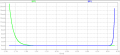
The plots are different in terms of values using both methods!
 

Attachments

Last edited:

WBahn

Joined Mar 31, 2012
32,857
hi,
The LTS temp is the ambient temperature of the 'circuit plot'
The diode is passing current and so it generates heat which raise its body temperature above the 100C ambient.
Look at the self heating dissipation of the diode in this image

EDIT:

Look at this modified Sim of the diode self heating at a fixed 25C temp ambient, its dissipating 1 Watt.! as the current increases.
The temperature parameter is SPICE is the device temperature. The model has no reasonable way to account for self-heating effects since it has no way of knowing the thermal environment the device is subjected to. It's up to the designer to take that into account explicitly if they want to.
 

WBahn

Joined Mar 31, 2012
32,857
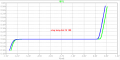
Another thing is the forward voltage relationship with temperature. We were said that the reverse saturation current increases by 7% for each ºC. For example, when temperature increases 10ºC, the Is is ~1.97 times greater. This will affect forward voltage in less ~2.2mV per ºC.

So, if Temp = 25ºC, the zener behaves as usual. If I set the Temp to 100ºC, there is a 75ºC raise, so if I multiply 2.2mV by 75 I'll get the new forward voltage for a Temp of 100 ºC, right? This will result in ~165mV.

Well, this plot shows almost twice as 165mV for new forward voltage for 100ºC of Temp.
And shouldn't the forward voltage also be ~0.67V for 25ºC??? I'm getting in the attached plot and circuit ~10mA at ~0.400mV of V_out.

What is wrong?
Not only does the reverse saturation voltage change, but so too does the thermal voltage. Are you taking that into account?
 

WBahn

Joined Mar 31, 2012
32,857
I understood that, but that is in real situation.
I'm talking about LTSpice directive ".step temp list val1 val2 ..." and Jony130 method... Which one should I consider???

The plots are different in terms of values using both methods!
Why do you think that setting the device name equal to 100 is going to set the temperature to 100°C?
 

ericgibbs

Joined Jan 29, 2010
21,444
hi WB,
As I understand the .temp option, is that it calculates the effects of temperature of each of the components in the circuit.
So if .temp =100C thats equivalent to the all the circuit operating in an ambient temperature of 100C.

As for the real world a diode for example dissipating 1Watt would obviously be hotter than 100C.

If my understanding is incorrect, I would appreciate it if you could show the documentation which explains, so that I correct any advice I may give in future on this topic.

Eric
 

WBahn

Joined Mar 31, 2012
32,857
From the LTSpice manual:

The optional TEMP value is the temperature at which this device is to operate, and overrides the temperature specification on the .OPTION control line.

I've run across numerous other references on numerous sites ALL of which are consistent with the .TEMP option setting the device temperature and NONE of them even implying that it is an ambient temperature and that the models somehow magically know (or assume some default) thermal environment for the device.

If you could provide some documentation that implies otherwise, then we explore things further.
 

Thread Starter

PsySc0rpi0n

Joined Mar 4, 2014
1,786
Ok, guys... I got it. Our teacher wants the ambient temperature to be 100ºC and because of that, I'll use the usual .step temp list command.

This part is solved and I got to move on...

WBahn, there are some details we are not studying... Even our teachers can't teach all and every detail of each subject our class issues!!! I'm talking about most of the data present in the datasheets. I basically talk about one or two main currents, one or two main voltages and one or two resistances... So, most of that data is not covered in our classes.

Anyway, let's move on!

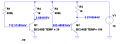
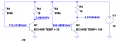
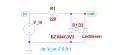
For the last question of this 2nd task, our teacher wants us to suggest a possible circuit to make usage of a zener diode and a LED diode so that we can observe the characteristic curve of both diodes. Can I simply add a LED in a parallel setup with the zener like the attached file? And help me with the values, please!
 

Attachments

WBahn

Joined Mar 31, 2012
32,857
For the last question of this 2nd task, our teacher wants us to suggest a possible circuit to make usage of a zener diode and a LED diode so that we can observe the characteristic curve of both diodes. Can I simply add a LED in a parallel setup with the zener like the attached file? And help me with the values, please!
Are you supposed to capture the characteristic curves in both the forward and the reverse directions? If so, can you see the problem you have with this circuit?

Do you know what the peak inverse voltage of your LED is? Is it less than the zener voltage? If so, what does that tell you?
 

ericgibbs

Joined Jan 29, 2010
21,444
I've run across numerous other references on numerous sites ALL of which are consistent with the .TEMP option setting the device temperature and NONE of them even implying that it is an ambient temperature and that the models somehow magically know (or assume some default) thermal environment for the device.
If you could provide some documentation that implies otherwise, then we explore things further.
hi WB,
I believe we are both saying the same thing but in a different way.:)
The .temp step/list sets the environmental operating temperature/s for the complete circuit, which could be considered the 'ambient' temperature in which the circuit is operating and the BZX84c6V2 TEMP = 100 posted by Jony sets the device temperature.

I guess we all agree on that wording.?
Eric

Hi Psy,
Sorry to drift slightly off your topic, but its important we all agree on these definitions.
E
 

Thread Starter

PsySc0rpi0n

Joined Mar 4, 2014
1,786
Are you supposed to capture the characteristic curves in both the forward and the reverse directions? If so, can you see the problem you have with this circuit?

Do you know what the peak inverse voltage of your LED is? Is it less than the zener voltage? If so, what does that tell you?
I can't see the problem you're referring to. I have placed the zener in the opposite direction of the LED having in mind that to make the LED work, zener should be reverse biased!

The LED's Breakdown Voltage is 5V and the Zener's is 6V2.
What our teacher is asking is to purpose a circuit to make a LED light on using a Zener and get the characteristic curves for both the Zener and LED. So I suppose he only wants the plot of these curves when the LED is ON (Zener in reverse bias mode and LED e direct bias mode simultaneously).

hi WB,
I believe we are both saying the same thing but in a different way.:)
The .temp step/list sets the environmental operating temperature/s for the complete circuit, which could be considered the 'ambient' temperature in which the circuit is operating and the BZX84c6V2 TEMP = 100 posted by Jony sets the device temperature.

I guess we all agree on that wording.?
Eric

Hi Psy,
Sorry to drift slightly off your topic, but its important we all agree on these definitions.
E
No problem for the OFF TOPIC. I'll also learn something out of it!
 

WBahn

Joined Mar 31, 2012
32,857
hi WB,
I believe we are both saying the same thing but in a different way.:)
The .temp step/list sets the environmental operating temperature/s for the complete circuit, which could be considered the 'ambient' temperature in which the circuit is operating and the BZX84c6V2 TEMP = 100 posted by Jony sets the device temperature.

I guess we all agree on that wording.?
Eric

Hi Psy,
Sorry to drift slightly off your topic, but its important we all agree on these definitions.
E
I don't think we are. I took from several of your posts that you were asserting that, in simulation, if you set the .temp to 100 that the device would be simulated as being at a temperature higher than 100°C because of self-heating. That is not the case. Unless overridden, the simulator will consider the device to be at the temperature set by the global option variable (or the default temperature if no such option setting exists).

Yes, the .temp option sets the operating temperature for the complete circuit, but unless that is explicitly overridden for the device, that is the operating temperature for the device, as well. It doesn't matter if that device is dissipating microwatts or megawatts. The simulator engine has no conception of thermal effects and therefore can't account for self-heating. The person writing the SPICE file CAN take it into account, but only by writing their own functions that explicitly override the device temperature with a temperature that they have calculated.

Now, one thing I don't know is whether the device (or the global temp, for that matter) can be calculated quantities that change dynamically during the simulation. That's something I've never played with.
 
Top