RMS value calculation

Thread Starter

kalemaxon89

Joined Oct 12, 2022
389
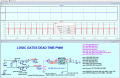
In my circuit (not relevant to the purpose of the question, but if you want I can post it) I have a PWM signal input to a gate driver, two external mosfets (HS and LS) and a load resistor (it's a classic half bridge configuration).

I need to measure the efficiency of the system by doing: Power(rms)_Rload[W] / Power(rms)_Vcc[W]

I am using PSpice for TI and it display the RMS value of Rload and Vcc.
I don't know if it's a "reliable" calculation, because with switching frequency = 10kHz and with 90kHz the calculated RMS power is the same! ... it seems a bit strange to me.
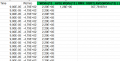
So I decided to export (.csv file) the red plot (below) of Power_Rload[W] and Power_Vcc[W] to excell and do the RMS calculation by hand.
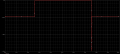
1734004201752.png

However, I am not clear on what time interval I should take the data and use it in the calculation.
I want to do the calculation at:
f = 10kHz (T = 100us)
f = 30kHz (T = 33.33us)
f = 60kHz (T = 16.66us)
f = 100kHz (T = 10us)
But, before even exporting the red plot (image above) to excell, I have to choose the simulation times:

1734001618582.png

Which one do I choose for each frequency range?

If I am not mistaken RMS is calculated over a period, so for each frequency the difference between "run to time" and "start saving data after" must be equal to the period (1/f) .. am I wrong?
i.e: in the case of f=10kHz .. I choose T=1/10k = 100us
1734001618582.png
 
Last edited:

Thread Starter

kalemaxon89

Joined Oct 12, 2022
389
In my circuit (not relevant to the purpose of the question, but if you want I can post it) I have a PWM signal input to a gate driver, two external mosfets (HS and LS) and a load resistor (it's a classic half bridge configuration).

I need to measure the efficiency of the system by doing: Power(rms)_Rload[W] / Power(rms)_Vcc[W]

I am using PSpice for TI and it display the RMS value of Rload and Vcc.
I don't know if it's a "reliable" calculation, because with switching frequency = 10kHz and with 90kHz the calculated RMS power is the same! ... it seems a bit strange to me.
So I decided to export (.csv file) the red plot (below) of Power_Rload[W] and Power_Vcc[W] to excell and do the RMS calculation by hand.
View attachment 337785

However, I am not clear on what time interval I should take the data and use it in the calculation.
I want to do the calculation at:
f = 10kHz (T = 100us)
f = 30kHz (T = 33.33us)
f = 60kHz (T = 16.66us)
f = 100kHz (T = 10us)
But, before even exporting the red plot (image above) to excell, I have to choose the simulation times:
View attachment 337784

Which one do I choose for each frequency range?

If I am not mistaken RMS is calculated over a period, so for each frequency the difference between "run to time" and "start saving data after" must be equal to the period (1/f) .. am I wrong?
i.e: in the case of f=10kHz .. I choose T=1/10h = 100us
View attachment 337784
Beyond the whole introduction I made about the project, etc., the question is purely mathematical:
over what interval should I integrate for each frequency?


---------------------------------------------------------LTSpice .asc file------------------------------------------------------------------------------
Download the model here Spice
 

Attachments

Last edited:

Thread Starter

kalemaxon89

Joined Oct 12, 2022
389
Any whole number of periods.
Perfect, thank you!
I take the opportunity to ask you one more thing inherent to LTSpice and this project.

In LTSpice I wrote the directive:
.meas PIN_RMS RMS V(Vin)*I(Vin)
..the result is 466,567 W

Per curiosità, ho esportato il plot di Pin su excell e calcolato il RMS:
1734011863345.png
Here I get 357W

Unless I misspelled the RMS formula on excell (likely), why are the values different?
 

ericgibbs

Joined Jan 29, 2010
21,390
Hi k89,
I get the same result when using LTS.
E

BTW: in case you do not know, you have to use the Ctrl key and C to Copy from the error log, and then Ctrl key and V to Paste.

vin_rms: RMS(v(vin))=48 FROM 0 TO 0.0002
iin_rms: RMS(i(vin))=9.72013 FROM 0 TO 0.0002
vin_avg: AVG(v(vin))=48 FROM 0 TO 0.0002
iin_avg: AVG(i(vin))=-9.46774 FROM 0 TO 0.0002
pin_avg_meas: AVG(v(vin)*i(vin))=-454.452 FROM 0 TO 0.0002
pin_avg_calc: (vin_avg*iin_avg)=-454.452
pin_rms: RMS(v(vin)*i(vin))=466.566 FROM 0 TO 0.0002
vsw_rms: RMS(v(sw))=46.6509 FROM 0 TO 0.0002
vsw_avg: AVG(v(sw))=45.4445 FROM 0 TO 0.0002
isw_avg: AVG(i(r1))=-9.46762 FROM 0 TO 0.0002
isw_rms: RMS(i(r1))=9.71894 FROM 0 TO 0.0002
psw_avg: AVG(v(sw)*i(r1))=-453.397 FROM 0 TO 0.0002
psw_rms: RMS(v(sw)*i(r1))=465.502 FROM 0 TO 0.0002
n: 100*psw_rms/pin_rms=99.772
pdriver_avg: pin_avg_meas - psw_avg=-1.0546
pdriver_rms: pin_rms - psw_rms=1.06393
 

Thread Starter

kalemaxon89

Joined Oct 12, 2022
389
Hi k89,
I get the same result when using LTS.
E

BTW: in case you do not know, you have to use the Ctrl key and C to Copy from the error log, and then Ctrl key and V to Paste.

vin_rms: RMS(v(vin))=48 FROM 0 TO 0.0002
iin_rms: RMS(i(vin))=9.72013 FROM 0 TO 0.0002
vin_avg: AVG(v(vin))=48 FROM 0 TO 0.0002
iin_avg: AVG(i(vin))=-9.46774 FROM 0 TO 0.0002
pin_avg_meas: AVG(v(vin)*i(vin))=-454.452 FROM 0 TO 0.0002
pin_avg_calc: (vin_avg*iin_avg)=-454.452
pin_rms: RMS(v(vin)*i(vin))=466.566 FROM 0 TO 0.0002
vsw_rms: RMS(v(sw))=46.6509 FROM 0 TO 0.0002
vsw_avg: AVG(v(sw))=45.4445 FROM 0 TO 0.0002
isw_avg: AVG(i(r1))=-9.46762 FROM 0 TO 0.0002
isw_rms: RMS(i(r1))=9.71894 FROM 0 TO 0.0002
psw_avg: AVG(v(sw)*i(r1))=-453.397 FROM 0 TO 0.0002
psw_rms: RMS(v(sw)*i(r1))=465.502 FROM 0 TO 0.0002
n: 100*psw_rms/pin_rms=99.772
pdriver_avg: pin_avg_meas - psw_avg=-1.0546
pdriver_rms: pin_rms - psw_rms=1.06393
Hello and thank you for your response.

I don't understand what you are referring to with the sentence:
in case you do not know, you have to use the Ctrl key and C to Copy from the error log, and then Ctrl key and V to Paste.
..how does this informaizon relate to my Excell-related problem?

The problem is due to the fact that the RMS calculated by LTSpice differs from that calculated on Excell, obviously with the same data (see my post #4)
 

MrChips

Joined Oct 2, 2009
34,626
You are making the mistake of using the square of the average voltage.
This is not the same as the average of the square of the voltage.
 

ericgibbs

Joined Jan 29, 2010
21,390
I don't understand what you are referring to with the sentence:
hi k89,
I was referring to the case when you open the LTS Error.log file.

For example, if you wanted to Copy a selection of the log text you would normally select the text block and use the drop menu Copy option.
This method does work on some PC's, so a workaround is to select the text and press the Ctrl key and C, and then use Ctrl V to paste that text into another document.

In your post #4, I saw that you used an image clip to show the Error.log

E
 

Papabravo

Joined Feb 24, 2006
22,058
You are making the mistake of using the square of the average voltage.
This is not the same as the average of the square of the voltage.
RMS or "Root Mean Square" gives you the algorithm for computation if you read the words from right to left.

  1. Square the "values"
  2. Take the "mean" or average of the squared values
  3. Take the square root of the "mean" of the the squared values
 

Thread Starter

kalemaxon89

Joined Oct 12, 2022
389
RMS or "Root Mean Square" gives you the algorithm for computation if you read the words from right to left.

  1. Square the "values"
  2. Take the "mean" or average of the squared values
  3. Take the square root of the "mean" of the the squared values
You are making the mistake of using the square of the average voltage.
This is not the same as the average of the square of the voltage.
Sorry again for the misunderstanding, did I get the formula used in the excell wrong? (see post #4)
In my excell I seem to have done as @Papabravo suggests in his post #11
 

Thread Starter

kalemaxon89

Joined Oct 12, 2022
389
hi k89,
I was referring to the case when you open the LTS Error.log file.

For example, if you wanted to Copy a selection of the log text you would normally select the text block and use the drop menu Copy option.
This method does work on some PC's, so a workaround is to select the text and press the Ctrl key and C, and then use Ctrl V to paste that text into another document.

In your post #4, I saw that you used an image clip to show the Error.log

E
Thank you for the clarification.

The fact remains that the calculations performed with excell do not match those performed with LTSpice.
LTSpice calculates an RMS value of 466W while excell (if I used the RMS formula correctly) calculates 357W
I would like to understand where I am going wrong
 
Last edited:

MrAl

Joined Jun 17, 2014
13,667
Thank you for the clarification.

The fact remains that the calculations performed with excell do not match those performed with LTSpice.
LTSpice calculates an RMS value of 466W while excell (if I used the RMS formula correctly) calculates 357W
I would like to understand where I am going wrong
The full definition of RMS is:
Vrms=sqrt[integrate(v^2,t,0,Tp)/Tp]
where v is really v(t) a function of time t, and Tp is the total period unless it's a pure sine wave and then Tp can be 1/2 of the total period (which is 1/2 cycle), and of course that also works with any wave that is half wave symmetrical.

You can see we square the voltage v^2, then take the mean by integrating that over time and dividing by the total period, then take the square root. It is interesting that we don't have to perform the integration starting at t=0 because v(t) is squared, but it is customary to start at that point. For example, if we started at t=1 and then ended at t=1+Tp, we'd get the same result with waves that are symmetrical like that. Thus we could integrate as:
integrate(v^2,t,a,b)
where b=a+Tp/2.
It may be a bad habit to get into though.
 

Thread Starter

kalemaxon89

Joined Oct 12, 2022
389
The full definition of RMS is:
Vrms=sqrt[integrate(v^2,t,0,Tp)/Tp]
where v is really v(t) a function of time t, and Tp is the total period unless it's a pure sine wave and then Tp can be 1/2 of the total period (which is 1/2 cycle), and of course that also works with any wave that is half wave symmetrical.

You can see we square the voltage v^2, then take the mean by integrating that over time and dividing by the total period, then take the square root. It is interesting that we don't have to perform the integration starting at t=0 because v(t) is squared, but it is customary to start at that point. For example, if we started at t=1 and then ended at t=1+Tp, we'd get the same result with waves that are symmetrical like that. Thus we could integrate as:
integrate(v^2,t,a,b)
where b=a+Tp/2.
It may be a bad habit to get into though.
Let me try to explain myself better.

I am currently using a simulator that does not allow to calculate the RMS, so the only thing I can do is to export the plot of the power of my system to Excel and calculate it myself manually there.
So I did ... I simulated for a time equal to the period of my pwm input signal and exported the plot to Excel (whose screenshot uploaded a few posts ago).
In theory I would have completed my work, but I would like to be sure that the RMS calculated on Excel is right.

So, both out of curiosity and my own interest, I opened in LTSpice another old project of mine (the attached one of EPC2152) in which the RMS was calculated by LTSpcie and did the same procedure of exporting data to Excel.
However, I noticed that the values (RMS_Excell and RMS_LTSpice) are different!

I appreciate your detailed description, actually I hadn't gone into that much detail ... however, after reading your answer, the only thing I can answer you is "so what? what are you trying to tell me? that I miscalculated the RMS? That you cannot compare the calculation of LTSpice with that of Excel?"
..I hope I don't sound rude, but I still don't understand where I am going wrong :(
 

MrChips

Joined Oct 2, 2009
34,626
Where did you specify the load resistance in Excel?
From your LTS results, I calculated the load resistance to be 491.76 ohm.

(Beware that EU usage of comma is confusing for others who normally would use decimal point.)
 

Thread Starter

kalemaxon89

Joined Oct 12, 2022
389
Where did you specify the load resistance in Excel?
From your LTS results, I calculated the load resistance to be 491.76 ohm.

(Beware that EU usage of comma is confusing for others who normally would use decimal point.)
you can see the result of LTSpice by opening the .asc file uploaded in post #2

On excel I did not specify the resistance.
On LTSpice I plotted the power curve (input) then exported it to Excel and calculated the RMS.
I then compared it with the one calculated by LTSpice (shown in the error log) and they are different
 
Top