Remote control by location (PIC in Oshonsoft)

Thread Starter

camerart

Joined Feb 25, 2013
3,832
Hi,
Here's the new program to match the different tracks etc of the PCB on #699.
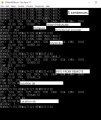
Also a Terminal view, of the Peripheral outputs.
I use a second terminal with a MACRO to simulate sending $Sentences from the REMOTE. Thi must be switched ON/OFF to get all of the peripherals to be READ. I'm now trying to fix this.
EDITED
C.
 

Attachments

Last edited:

Thread Starter

camerart

Joined Feb 25, 2013
3,832
Hi,
I've been changing the INTERRUPT and BUFFER section of the program, (A bit of a learning curve) I failed at the RING type (for now) but the LINEAR, appears to be working:D
I've added it to the FULL program, which surpising seem to be working (In SIM) also, here it is:

Next I'll try it LIVE.
Cheers, C.
 

Attachments

Thread Starter

camerart

Joined Feb 25, 2013
3,832
Hi JT,
Hopefully. you've changed threads.
At end of play today, I added your CODE into the FULL program, where there were a lot of duplicates and changes, some of my old ones I've deleted or commented out, and tried it in SIM, where only the 3x Peripherals we've been working are, and first go it worked. This has never happened before, so don't hold your breath till I try the LIVE all systems go tomorrow.
C.
 
Last edited:

Thread Starter

camerart

Joined Feb 25, 2013
3,832
Hi,
First LIVE test:
Both INTERRUPT/PARSE CODE and FULL program together. There are 2x LOOPs 1x INTERRUPT/PARSE and 1x Other peripherals, e,g, Compass, Alt, etc.
At the moment only the INTERUPT/PARSE LOOP is set-up, and that is working, and showing all 3x READings in the computer Terminal.
Next join the 2x LOOPs.......
C
 

Thread Starter

camerart

Joined Feb 25, 2013
3,832
Hi,
I've now joined the FULL program MAIN LOOP to the INTERRUPT/PARSE MAIN LOOP, and LIVE, the results are promising.
It seems pretty fast and all of the peripherals are working and showing in the Terminal view.
There are issues with the REMOTE signal, as it doesn't update, but this was expected, and may need special treatment.
Here is the program, please excuse my comment squiggles and lines, as I need to to see where I am when cutting and pasting. This has been quite a dangerous way to work, but hopefully most of the program is still there:)
It needs checking and editing, but I ought to stop for a while as I'm quite surprised that it's doing anything:)
C.
 

Attachments

Thread Starter

camerart

Joined Feb 25, 2013
3,832
Hi,
Earlier, I mentioned the REMOTE problem. It has been pointed out to me, that it may be a conflict, with TX and RX clashes, i,e, they can't both work at the same time.

I thought I'd look into the GPS module and its timings, so had a look on the data sheet, which led to another more specific data sheet, which started to get a bit deep, and needs a separate study, before re-configuring the PCB GPSs.

In particular TIMEPULSE2, SPI SCK, and the 5.5MHz, crystal output. I'll note this, but leave it till it becomes necessary.
C
 

JohnInTX

Joined Jun 26, 2012
4,787
Hi,
Earlier, I mentioned the REMOTE problem. It has been pointed out to me, that it may be a conflict, with TX and RX clashes, i,e, they can't both work at the same time.

I thought I'd look into the GPS module and its timings, so had a look on the data sheet, which led to another more specific data sheet, which started to get a bit deep, and needs a separate study, before re-configuring the PCB GPSs.

In particular TIMEPULSE2, SPI SCK, and the 5.5MHz, crystal output. I'll note this, but leave it till it becomes necessary.
C
I don't see how changing the GPS timings will help. The problem is the unsynchronized $REMOTE message blocking the numerous Hserouts from the code. If anything, a lower rep rate for the $REMOTE sentences would offer a statistically higher chance of an Hserout making it through at the expense of $REMOTE message latency. If you are going to yak it up by sending lots of messages back over that half-duplex channel, I think you're going to have to find a way to synchronize with the $REMOTE messages. As you add characters to $REMOTE, the problem will only get worse.

Your integration needs a lot of work. You have a lot of old constructs active that could interfere with the new stuff e.g. you are using old check the length tests to send some of the same information that the slicked up test code does. You have a lot of obsolete code commented out. I would delete ALL of that including unused variables etc. to make it more manageable. I would also get rid of all of those gratuitous Waitms statements. I can see some flow problems in your integrated code but it's a .. challenge to read it so it's hard to tell. Do the cleanup pass before messing with subtle timing issues. Otherwise, you'll be chasing your tail forever.

Good luck!
 
Last edited:

Thread Starter

camerart

Joined Feb 25, 2013
3,832
I don't see how changing the GPS timings will help. The problem is the unsynchronized $REMOTE message blocking the numerous Hserouts from the code. If anything, a lower rep rate for the $REMOTE sentences would offer a statistically higher chance of an Hserout making it through at the expense of $REMOTE message latency. If you are going to yak it up by sending lots of messages back over that half-duplex channel, I think you're going to have to find a way to synchronize with the $REMOTE messages. As you add characters to $REMOTE, the problem will only get worse.

Your integration needs a lot of work. You have a lot of old constructs active that could interfere with the new stuff e.g. you are using old check the length tests to send some of the same information that the slicked up test code does. You have a lot of obsolete code commented out. I would delete ALL of that including unused variables etc. to make it more manageable. I can see some flow problems in your integrated code but it's a .. challenge to read it so it's hard to tell. Do the cleanup pass before messing with subtle timing issues. Otherwise, you'll be chasing your tail forever.

Good luck!
Hi JT,
I also have difficulty in reading the FULL program. I can't see the wood for the trees at the moment, so tackle it until I'm crosseyed, then do something different. I'm checking the commented out stuff, but have to be careful before deleting it too quickly, from past experience. I'll re-post the program with what I've been able to do, as soon as possible, but it will still have the some of the interfering stuff in, aas I have to work slowly.

Regarding the GPS:
The modules, I'm using use the GPS satellites for timing, and can be configured to output a signal from one of the pins. When both BASE and REMOTE have signals, these signals will be within ns from each other. I thought these could be used as a form of synchronisation withought messages going in between.

EDIT: I've just got a test module to output @ 5/sec :)
C.
 

JohnInTX

Joined Jun 26, 2012
4,787
I also have difficulty in reading the FULL program. I can't see the wood for the trees at the moment, so tackle it until I'm crosseyed, then do something different. I'm checking the commented out stuff, but have to be careful before deleting it too quickly, from past experience. I'll re-post the program with what I've been able to do, as soon as possible, but it will still have the some of the interfering stuff in, aas I have to work slowly.
Just keep the starting file as an archive. That way you can compare problem areas.
Now would be a great time to start packaging functions like reading the ADC into subroutines and calling them from the main area rather than doing it inline. Many good reasons to do this not the least of which is that you can change where the ADC runs or temporarily 'remove' it by moving or commenting the Gosub statement. I can help you sort out any errors you make.
Regarding the GPS:
The modules, I'm using use the GPS satellites for timing, and can be configured to output a signal from one of the pins. When both BASE and REMOTE have signals, these signals will be within ns from each other. I thought these could be used as a form of synchronisation withought messages going in between.
Interesting idea!
 

Thread Starter

camerart

Joined Feb 25, 2013
3,832
Just keep the starting file as an archive. That way you can compare problem areas.
Now would be a great time to start packaging functions like reading the ADC into subroutines and calling them from the main area rather than doing it inline. Many good reasons to do this not the least of which is that you can change where the ADC runs or temporarily 'remove' it by moving or commenting the Gosub statement. I can help you sort out any errors you make.
Interesting idea!
Hi JT,
At every change in the program, I use a new date and time, so will have the starting program, also, I sometimes post them, but I can see that people read them, and actually, waste their time, as they will soon be changed. Trouble is, that without a secretary, I don't really know what changes each time, so can be dangerous, and I try to avoid it.

I'll try to re-package the functions into subroutines, and will post the first one, for you or anyone to check.

Regarding the not sync, sync: Glad you like it. I think the output pin can be set to quite a high speed, but I'm still figuring it out. If this works, what speed would should I aim for? I have been advised that the early beats, near the 1 sec time, is the most accurate, but I'm not sure what happens during the between the 1sec beats.
C
 

JohnInTX

Joined Jun 26, 2012
4,787
Trouble is, that without a secretary, I don't really know what changes each time, so can be dangerous, and I try to avoid it.
Try keeping a log file separate from the source. Cut and paste the filename that you're archiving into the log.txt file so it matches the archived file name. Do a quick summary of what you did in the log file. You'll notice I've been summarizing my changes at the top of the source. You could maintain that as you update things then when it's time to archive, cut and paste the whole block to the log. As soon as you archive a file do a 'SaveAs' and save it with the date and time as dashes to indicate that it is the working file. You don't have to be super detailed in the summary, just note what you did to each module. That's what I do anyway.
 

Thread Starter

camerart

Joined Feb 25, 2013
3,832
Try keeping a log file separate from the source. Cut and paste the filename that you're archiving into the log.txt file so it matches the archived file name. Do a quick summary of what you did in the log file. You'll notice I've been summarizing my changes at the top of the source. You could maintain that as you update things then when it's time to archive, cut and paste the whole block to the log. As soon as you archive a file do a 'SaveAs' and save it with the date and time as dashes to indicate that it is the working file. You don't have to be super detailed in the summary, just note what you did to each module. That's what I do anyway.
Hi JT,
Ok.
I like your use of a comment after [ENDIF] to suit the [IF]
C
 

Thread Starter

camerart

Joined Feb 25, 2013
3,832
Hi,
I've been playing with the GPS and got it to output $sentences @5/sec and up to 8MHz from the output PIN. The square wave at this speed is wobbly and slightly mistimed, but regular, and it may be possible to square it, but if the frequency is lowered to 1KHz, the square wave is ok, with the odd overshoot.

I noticed corrections for cable speed, in ns and correction delays, so we now know that this is possible and later could be used for timing or triggering.

I'm going crosseyed again, so better get back to the program, now where was I? :)
C
 

Thread Starter

camerart

Joined Feb 25, 2013
3,832
Cleanup pass. See right there? I helped!:p
HI JT,
So you did, thanks:) This morning I was helping and old mate of mine to understand and 'get' a podcast using radios. A 10 minute job, = 2 1/2 hours.o_OFirst pass, deleted what I think is unused stuff, hopefully left stuff, needed later, still loads of Variables, which need thought.
C.
 

JohnInTX

Joined Jun 26, 2012
4,787
$REMOTE problem:
I was nosing around our RF section for another project and ran across a post suggesting a master-slave setup for a half-duplex RF link. Doh! Perfect.

You could fix the $REMOTE problem by declaring the 18F4620 unit the RF master and the $REMOTE unit the slave. The $REMOTE unit would generate sentences as usual but buffer them instead of sending. The 4620 unit could then use the link back to the REMOTE without conflict. When the 4620 wanted to hear from $REMOTE, it would send a unique query string to poll for the $REMOTE message and then shut-up for awhile to leave the channel open. The query would be decoded by the REMOTE unit and that would trigger immediately sending the buffered $REMOTE message. Simple and direct. No crazy synchronization, no waiting for the $REMOTE message after switching to that channel. Nice.
 
Last edited:

Thread Starter

camerart

Joined Feb 25, 2013
3,832
Hi JT,
I'll finish the first pass today, hopefully, then post as you suggest.

Regarding MASTER/SLAVE. I tried this before, and din't get it to work properly, so changed the the DATASWITCH idea, for connecting the two PICs. This was a while ago, so I'll have another go, if you like. It's a long post, and probably not helpful to read, but here's a link: https://forum.allaboutcircuits.com/...-pics-using-hwspi-in-oshonsoft.156175/page-18 I'm interested to see it work over a radio link.
C
 

Thread Starter

camerart

Joined Feb 25, 2013
3,832
The next time you post an update, post the fontsms.bas file too so we can follow along and do test compiles.
Thanks.
Hi JT,
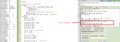
A dyslexics nightmare:eek:Anyway, here is the INITIAL program with all changes in red, and the changed program:

I was unable to post the file with colour in it, how do I do it?
EDIT: Changed the colour file to DOCX, and it worked.
C.
 

Attachments

Last edited:
Top