Facebook
 Google
 GitHub
 Linkedin
Remote control by location (PIC in Oshonsoft)
- Thread starter camerart
- Start date

Scroll to continue with content

Hi JT,Don’t forget to post the fonts, too.
Just to clarify, the $REMOTE comes from the PC via radio link, correct?
Here is the fonts file:
NOTE: It is a .BAS file, so perhaps you have to open it in Oshonsoft and save it as a .BAS?
This was designed by EG a long time ago, along with a large font and a scrolling one. I can send you a link if needed.
You can comment out [Include "fontsml.bas"] instead as it won't be needed for a while.
Regarding $REMOTE. As there isn't a REMOTE yet, I'm using the computer TERMINAL/MACRO, to simulate it. The actual message I SEND is just an idea.
C.
Attachments
-
3.9 KB Views: 5
Been thinking about this. For the stuff that does not use the radio why not? It will reduce the latency waiting for the next sentence.Hi,
I've been playing with the GPS module and tried uprating the $Sentences output, and got it to output 10x Sentences/sec. Now it's approx $sentence = 57ms and the gap =28ms. Perhaps the other two INPUTs could be speded up the same?
C.
I also looked at the re-integration you posted in #720. There are some problems as a result of the general lack of structure and changing paradigms over time. Rather than laboriously describing each detail I just made a pass through the code myself and rearranged, cleaned up and re-wrote to make it more like I would do it to show by example. The high points are:
- Configuration, IO, memory declarations are collected together, each in its own block at the top of the code. I personally do the same and put each in their own include file, one for config, IO, memory etc. That way I know where everything is and can keep a copy open in Notepad for easy reference. Mixing declarations and code makes things very hard to read. The comment/uncomment lines for the target (LIVE or SIM) is collected at the very top so you don't miss something when selecting.
- Indented code makes it stand out.
- You should try to use the native data types as the only working representation of data. For example, maintaining a value as a number AND a string is overly complex and wasteful of resources. A better way is to read whatever goofy data types are used by the various peripherals, GPS text, BMP280 multi byte registers, ADC values etc. and NORMALIZE them to an internal data type (byte, word, signed, unsigned etc) that you can calculate and control with. Convert to strings ONLY when sending human readable text to the display or terminal and ONLY in the reporting routine itself. It's probable that you'll have to read and act on the data way more often than you type it out so why burn the CPU cycles for each update when you only type it out occasionally.
- With this in mind, I separated the init, calculation and reporting functions for the various functional blocks. The code for each block is grouped together. I'd put the code for each block in its own include file.
- Use OSH's capability to use #variable to embed string equivalent of numerical data. Example: The ADC channel report was obviously and old construct. You used 5 separate strings to hold the text for the channel values when you could have used #ch1 etc in the Hserout statement. PLUS, you calculated those strings and reported each time you read the ADC. That is expensive. I changed that one to use the #var construct and freed up 100bytes of RAM.
- There were different ways of telling whether it was time to report the code. The parse routine sets flags which are detected and cleared when that function is finished. Earlier code looked at the length of strings to see when things changed. Like all string operations in OSH, that is expensive and clumsy. But pick ONE way to handle that and be consistent.
- Instead of embedding long code sequences in the normal code flow, use subroutines to move that code and just call them for the function. I did that in your compass, radio, altimeter stuff. That way, you can see what happens and when just by looking at where you do the call. That showed an issue in main_loop where the ADC, barometer et al don't run when its waiting for a $sentence. That's probably not good.
Finally, I don't mean to be overly pedantic but even at this point, this is a complicated program and the problems with integrating this main code with the comms stuff we did effectively demonstrate, IMHO, the benefit and necessity of getting some structure and consistency in the coding. I think some effort in that area would be well repaid in future development.
Have fun!
Attachments
-
32.6 KB Views: 9
Hi JT,Been thinking about this. For the stuff that does not use the radio why not? It will reduce the latency waiting for the next sentence.
I also looked at the re-integration you posted in #720. There are some problems as a result of the general lack of structure and changing paradigms over time. Rather than laboriously describing each detail I just made a pass through the code myself and rearranged, cleaned up and re-wrote to make it more like I would do it to show by example. The high points are:
I could have combed through it a few more times but that's sufficient for the example. If you are OK with it, you should find it's easier to understand the flow and work with additions. If you are uncomfortable with it you can ignore my example and proceed.
- Configuration, IO, memory declarations are collected together, each in its own block at the top of the code. I personally do the same and put each in their own include file, one for config, IO, memory etc. That way I know where everything is and can keep a copy open in Notepad for easy reference. Mixing declarations and code makes things very hard to read. The comment/uncomment lines for the target (LIVE or SIM) is collected at the very top so you don't miss something when selecting.
- Indented code makes it stand out.
- You should try to use the native data types as the only working representation of data. For example, maintaining a value as a number AND a string is overly complex and wasteful of resources. A better way is to read whatever goofy data types are used by the various peripherals, GPS text, BMP280 multi byte registers, ADC values etc. and NORMALIZE them to an internal data type (byte, word, signed, unsigned etc) that you can calculate and control with. Convert to strings ONLY when sending human readable text to the display or terminal and ONLY in the reporting routine itself. It's probable that you'll have to read and act on the data way more often than you type it out so why burn the CPU cycles for each update when you only type it out occasionally.
- With this in mind, I separated the init, calculation and reporting functions for the various functional blocks. The code for each block is grouped together. I'd put the code for each block in its own include file.
- Use OSH's capability to use #variable to embed string equivalent of numerical data. Example: The ADC channel report was obviously and old construct. You used 5 separate strings to hold the text for the channel values when you could have used #ch1 etc in the Hserout statement. PLUS, you calculated those strings and reported each time you read the ADC. That is expensive. I changed that one to use the #var construct and freed up 100bytes of RAM.
- There were different ways of telling whether it was time to report the code. The parse routine sets flags which are detected and cleared when that function is finished. Earlier code looked at the length of strings to see when things changed. Like all string operations in OSH, that is expensive and clumsy. But pick ONE way to handle that and be consistent.
- Instead of embedding long code sequences in the normal code flow, use subroutines to move that code and just call them for the function. I did that in your compass, radio, altimeter stuff. That way, you can see what happens and when just by looking at where you do the call. That showed an issue in main_loop where the ADC, barometer et al don't run when its waiting for a $sentence. That's probably not good.
Finally, I don't mean to be overly pedantic but even at this point, this is a complicated program and the problems with integrating this main code with the comms stuff we did effectively demonstrate, IMHO, the benefit and necessity of getting some structure and consistency in the coding. I think some effort in that area would be well repaid in future development.
Have fun!
After editing #720, I had to do other things, to get over it, as it takes a couple of sleepless nights to be able to 'see' again. Having done that and looking at your explanation, and program, I'm more than please with it, thanks.
I've tried it in SIM, unusually with the 'basic program tracking' switched off, for speed, also LIVE, and it works, but not perfectly, which could be my end, e,g, poor GPS signal, so it needs more reading and testing.
Regarding INCLUDES, are yours a different type to the FONT one? or are they intended for the same treatment later?
I don't really understand, structure of a program, as I've made it up as I've gone along, making it so I can read it, and I'm happy for any improvement changes, as it would be impossible for me to do. Looking through your program, it looks good, and I should get used to it pretty soon. If there are many changes, it's best for it to be done sooner than later. I'm happy to try making changes, and I don't expect anyone else to do it, but it takes me a long time to make changes, in case I spoil things.
You say "it's a complicated program". It's taked years to write, with great help from others on these forums, and you should see the set-up to 'drive' it

I'll dip into your explanation and this program, while making the REMOTE PCB.
Not finished.
I was proposing that all of the routines for a particular system function or peripheral be put in a separate INCLUDE file. I'd have several, one for the ADC/joystick stuff, another for the barometer etc. Open a new editor window and cut/paste the section to it and save it as a new file e.g. inclADC.bas, inclBARO.bas etc. That keeps your main code file smaller and more manageable. On a program like this, that's important. As I mentioned, I'd put the IO, config, and variable declarations in their own INCLUDE files too. A big benefit of this approach is that you can have multiple versions of the include files to support different versions of hardware, PCB revisions, target processors, LIVE or SIM etc. Put the INCLUDE directive for these at the top of the main program where it's easy to see and use. One downside is that you have to post multiple files if someone else is to compile and test your code. That can be done by a .zip or just drag and drop them.Regarding INCLUDES, are yours a different type to the FONT one? or are they intended for the same treatment later?
If you can dig through and understand how I structured the integrated code that would go a long way. You'll probably find that it could be better in places. The goal and reason for structure is to separate things into small, unique functions that have a specific purpose - little black box helpers if you will. You write and debug those ONCE then they are available when you need them. Your 'main' program then just consists of calling those in some useful manner. That also allows 'main' to be compact and by reading it, offer a concise description of the code flow. The details are deferred to the called routines.I don't really understand, structure of a program, as I've made it up as I've gone along, making it so I can read it, and I'm happy for any improvement changes, as it would be impossible for me to do. Looking through your program, it looks good, and I should get used to it pretty soon. If there are many changes, it's best for it to be done sooner than later. I'm happy to try making changes, and I don't expect anyone else to do it, but it takes me a long time to make changes, in case I spoil things.
Hi JT,I was proposing that all of the routines for a particular system function or peripheral be put in a separate INCLUDE file. I'd have several, one for the ADC/joystick stuff, another for the barometer etc. Open a new editor window and cut/paste the section to it and save it as a new file e.g. inclADC.bas, inclBARO.bas etc. That keeps your main code file smaller and more manageable. On a program like this, that's important. As I mentioned, I'd put the IO, config, and variable declarations in their own INCLUDE files too. A big benefit of this approach is that you can have multiple versions of the include files to support different versions of hardware, PCB revisions, target processors, LIVE or SIM etc. Put the INCLUDE directive for these at the top of the main program where it's easy to see and use. One downside is that you have to post multiple files if someone else is to compile and test your code. That can be done by a .zip or just drag and drop them.
If you can dig through and understand how I structured the integrated code that would go a long way. You'll probably find that it could be better in places. The goal and reason for structure is to separate things into small, unique functions that have a specific purpose - little black box helpers if you will. You write and debug those ONCE then they are available when you need them. Your 'main' program then just consists of calling those in some useful manner. That also allows 'main' to be compact and by reading it, offer a concise description of the code flow. The details are deferred to the called routines.
So to clarify, the INCLUDES will look the same as the FONT one, is that correct?
If so then once all of the INCLUDES and the FULL program have been posted, they will stay as they are, unless upated, and can be pointed to using the #XXX that you've introduced me to.
If we can leave them in the program for a while for my scanning, and during these 'what I would call' major updates, it would be a help.
What I ususally do is print it all out, and colour it in with LOOPs and GOSUBS, so I'll do that when you tell me, it's about right, if that's ok.
Cheers, C.
Last edited:
Yes to the first part. INCLUDE just inserts a copy of the BASIC source in the included file when compiling. It's exactly as if the source text itself were in the main file, you just don't have to look at it all the time.So to clarify, the INCLUDES will look the same as the FONT one, is that correct?
If so then once all of the INCLUDES and the FULL program have been posted, they will stay as they are, unless upated, and can be pointed to using the #XXX that you've introduced me to.
#XXX ???
From the OSH manual:
Basic source code from an external file can be included to the current program by using INCLUDE directive. Its only argument is a string containing the path to the external .BAS file. This can be the full path or only the file name, if the external file is located in the same folder as the current basic program file. During the compilation process the external basic source will be appended to the current program. Multiple files can be included with separate INCLUDE directives. To maintain the overall basic code structure, it is strongly suggested that the external file contains global declarations, subroutines, procedures and functions, only.
That's fine for now. I was just giving you something to think about.If we can leave them in the program for a while for my scanning, and during these 'what I would call' major updates, it would be a help.
What I ususally do is print it all out, and colour it in with LOOPs and GOSUBS, so I'll do that when you tell me, it's about right, if that's ok.
I also like working from a printed source with flow arrows and markups as necessary so have at it. When you get tired of printing the entire program just to look at a few routines, remember that INCLUDE idea.
Carry on!
H JT,Yes to the first part. INCLUDE just inserts a copy of the BASIC source in the included file when compiling. It's exactly as if the source text itself were in the main file, you just don't have to look at it all the time.
#XXX ???
From the OSH manual:
That's fine for now. I was just giving you something to think about.
I also like working from a printed source with flow arrows and markups as necessary so have at it. When you get tired of printing the entire program just to look at a few routines, remember that INCLUDE idea.
Carry on!
Ok, thanks.
#XXX = your #720, see link.
C.
Attachments
-
 101.6 KB Views: 5
Hi,
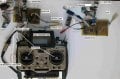
We finally have a BASE and a REMOTE PCB
Here's a photo, wires everywhere.
From now there will be two different programs, here are the starting programs. These are, at the moment as #724 (I've forgotten the other method of adding links), but renamed BASE and REMOTE
First I've got to check the new REMOTE, although it looks like it's working. I'll then have to change the REMOTE program and remove the JOYSTICK and INCREMENTAL ENCODER inputs and add MOTOR CONTROL, then get it to output what was REMOTE (From the computer).
EDIT: I've changed from the suggestion of 'TOREMOTE' ETC and remembering that MOSI and MISO clarifies TX and RX at each end.
Messages from the BASE will be $BOSI and to the BASE will be $BISO.
C.
Mod edit: add link to #724 - JohnInTX Edit: What does this mean?
We finally have a BASE and a REMOTE PCB
Here's a photo, wires everywhere.
From now there will be two different programs, here are the starting programs. These are, at the moment as #724 (I've forgotten the other method of adding links), but renamed BASE and REMOTE
First I've got to check the new REMOTE, although it looks like it's working. I'll then have to change the REMOTE program and remove the JOYSTICK and INCREMENTAL ENCODER inputs and add MOTOR CONTROL, then get it to output what was REMOTE (From the computer).
EDIT: I've changed from the suggestion of 'TOREMOTE' ETC and remembering that MOSI and MISO clarifies TX and RX at each end.
Messages from the BASE will be $BOSI and to the BASE will be $BISO.
C.
Mod edit: add link to #724 - JohnInTX Edit: What does this mean?
Attachments
-
32.6 KB Views: 4
-
 199.1 KB Views: 6
 -
34.5 KB Views: 2
Last edited:
For AAC classic (blue) format on a PC/Firefox:(I've forgotten the other method of adding links)
- Right click on the post number in the upper right corner of the target post
- Select 'Copy Link Location'
- Left click and drag over the text in the current post that you want to associate with the link to highlight it
- Click the Insert Link button on the toolbar or type CTRL+K
- Paste the link (CTRL+V) to the URL field in the dialog.
https://forum.allaboutcircuits.com/...location-pic-in-oshonsoft.148795/post-1533954
Good work so far. Hopefully your editing will be a bit simpler with more modular code.
Hi JT,For AAC classic (blue) format on a PC/Firefox:
You can also just copy the link as described and paste it directly into the new post:
- Right click on the post number in the upper right corner of the target post
- Select 'Copy Link Location'
- Left click and drag over the text in the current post that you want to associate with the link to highlight it
- Click the Insert Link button on the toolbar or type CTRL+K
- Paste the link (CTRL+V) to the URL field in the dialog.
https://forum.allaboutcircuits.com/...location-pic-in-oshonsoft.148795/post-1533954
Good work so far. Hopefully your editing will be a bit simpler with more modular code.
Thanks for the link info, but what I meant was your way of adding a #XXX link, so it goes red, like the #720 you added.
C.
#724Thanks for the link info, but what I meant was your way of adding a #XXX link, so it goes red, like the #720 you added.
While the reference text is highlighted, use the font color and style as desired, then proceed to paste the link.
Hi JT,
I've had a go at changing the REMOTE program, which will be receiving messages from the BASE, so I've changed all REMOTE to MORI, as mentioned previously.
I tried to mark all of the commented out sections with a [[[£]]] i,e QEIDEG as they are not used on this. and all of the changed bits with a [[[&]]]. So if you search for either [£] or [&] you should find all of my changes. I got a bit mixed up and if I go any farther, I'll most probably mess it up, so here it is: (Note: Nothing has been deleted)
C.
I've had a go at changing the REMOTE program, which will be receiving messages from the BASE, so I've changed all REMOTE to MORI, as mentioned previously.
I tried to mark all of the commented out sections with a [[[£]]] i,e QEIDEG as they are not used on this. and all of the changed bits with a [[[&]]]. So if you search for either [£] or [&] you should find all of my changes. I got a bit mixed up and if I go any farther, I'll most probably mess it up, so here it is: (Note: Nothing has been deleted)
C.
Attachments
-
34 KB Views: 3
So what you are calling the REMOTE is U4 18F4620 on the schematic. The ISCP connector calls it MASTER. Which is it?
It processes:
SPI:
Compass,
Air-data (altimeter et al),
Display
UART messages:
$GNRMC from GPS,
$BORI messages from the HC-12 radio (formerly $REMOTE),
NOTHING from PIC18F4431 (U5) ($QEIDEG is commented out)
It also does NOT process any ADC analog in (commented out). Doesn't this one have the joysticks?
No PWMs (there's no PWM code at all)
Is that correct? If so, I would delete all of the commented out stuff that doesn't belong to the PIC18F4620 and proceed from there.
I note that while you are only using UART channels 0 and 1, next_channel still increments through 0-1-2. That will cause problems. If you are going to eventually process UART messages from the other PIC (U5) I would leave them in as a placeholder but at any rate, next_channel needs to cycle only through valid channels.
It processes:
SPI:
Compass,
Air-data (altimeter et al),
Display
UART messages:
$GNRMC from GPS,
$BORI messages from the HC-12 radio (formerly $REMOTE),
NOTHING from PIC18F4431 (U5) ($QEIDEG is commented out)
It also does NOT process any ADC analog in (commented out). Doesn't this one have the joysticks?
No PWMs (there's no PWM code at all)
Is that correct? If so, I would delete all of the commented out stuff that doesn't belong to the PIC18F4620 and proceed from there.
I note that while you are only using UART channels 0 and 1, next_channel still increments through 0-1-2. That will cause problems. If you are going to eventually process UART messages from the other PIC (U5) I would leave them in as a placeholder but at any rate, next_channel needs to cycle only through valid channels.
Hi JT,So what you are calling the REMOTE is U4 18F4620 on the schematic. The ISCP connector calls it MASTER. Which is it?
It processes:
SPI:
Compass,
Air-data (altimeter et al),
Display
UART messages:
$GNRMC from GPS,
$BORI messages from the HC-12 radio (formerly $REMOTE),
NOTHING from PIC18F4431 (U5) ($QEIDEG is commented out)
It also does NOT process any ADC analog in (commented out). Doesn't this one have the joysticks?
No PWMs (there's no PWM code at all)
Is that correct? If so, I would delete all of the commented out stuff that doesn't belong to the PIC18F4620 and proceed from there.
I note that while you are only using UART channels 0 and 1, next_channel still increments through 0-1-2. That will cause problems. If you are going to eventually process UART messages from the other PIC (U5) I would leave them in as a placeholder but at any rate, next_channel needs to cycle only through valid channels.
A quick answer to the first line of your question.
If you look at #730 I've edited the BASE/REMOTE photo to clarify things hopefully. There are now two separate PCBs, one is the BASE and is fixed, and the REMOTE will fly.
Both have the 18LF4620 and almost similar perpherals.
The BASE has GPS, ALT, COMPASS, RADIO, JOYSTICKS, SCREEN and INCREMENTAL ENCODER. The 18F4431 of the BASE PCB is only for decoding the INCREMENTAL ENCODER, as it has onboard QEI.
The REMOTE has GPS, ALT, COMPASS, RADIO, SCREEN and will have MOTOR CONTROL via PWM and analogue inputs, for battery etc monitoring, (not yet thought about). NOTE: No 18F4431 as it may not be needed, but space for it if needed later.
What I posted is where I got to before brain scrambling, I'm in danger of messing up the program, I leave the commented out sections, so I can check that they are ok, I've deleted stuff before then can't remember what was there before, (when it worked)
EDIT: QUESTION ANSWER
It (REMOTE) processes:
SPI:
Compass,
Air-data (altimeter et al),
Display
UART messages:
$GNRMC from GPS,
$BORI messages from the HC-12 radio (formerly $REMOTE),
$BORI = messages from BASE to REMOTE (BASE OUT REMOTE IN) $BIRO = messages from REMOTE to BASE (BASE IN REMOTE OUT) all between each PCB via the HC-12 radio.
I chose this as $BORI and $BIRO are the same at each end of the transmission.
NOTHING from PIC18F4431 (U5) ($QEIDEG is commented out)
As there is no 184431 on the REMOTE which produces $QEIDEG there is no $QEIDEG
It also does NOT process any ADC analog in (commented out). Doesn't this one have the joysticks?
No PWMs (there's no PWM code at all)
At the moment there is no ADC analog in, so commented out, there will be ADC later for REMOTE battery monitoring. The REMOTE has propellors not joysticks.
Is that correct? If so, I would delete all of the commented out stuff that doesn't belong to the PIC18F4620 and proceed from there.
As mentioned, I leave the stuff not being used, until I have the program working without them, then delete them when I feel it is safe. The ADC will be left commented out till later.
Previously there was a TEST message from a computer TERMINAL e,g, '$REMOTE,77,88,99,W' from now the REMOTE will send this TEST message, but as mentioned will now be called e,g, '$BIRO,77,12,72,W'
Let me know that you understand all the above, please.
NOTE: I'm pretty sure I used to call the 18F4431 REMOTE in error, as I used to get mixed up about. Let's hope I'm out of the habit
Cheers, C.
Last edited: