Remote control by location (PIC in Oshonsoft)

ericgibbs

Joined Jan 29, 2010
21,452
hi C,
It is not stalling at the !!!! marked text, all that is a Pin assignment.
Its stops when you send a serial string, its jumping into the Low Interrupt trap, instead of using get_mess.
You must have the On serial RXD interrupt set somewhere in your program.
Put that short trap routine back in your program, send a mess and you will see its looping in the Low Trap Intr.
E

EDIT:

Here it is line #46
PIE1.RCIE = 1 'rxd Intr , used for GPS serial input work, for test make =0

EDIT #2

You have it also on another line #300
PIE1.RCIE = 1
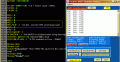
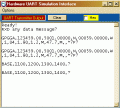
AA1 31-Jul-18 10.16.gif
 
Last edited:

ericgibbs

Joined Jan 29, 2010
21,452
Hi C,
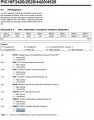
Add this bit of test code, ref image
It reads the USART OK and prints the test msg OK.
E
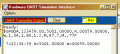
AA1 31-Jul-18 10.32.gif

EDIT:
This section of code is for the OLD GPS program.!
If str1(5) = 0x47 Then 'G' ' there is no 'G' in the Servo msg
csv = 0
For txi = 1 To 73
char = str1(txi)
strchr = Chr(char)
If strchr <> "," Then
msg1 = msg1 + strchr
Else
csv = csv + 1
Gosub get_val
Endif
Next txi
Else
msg1 = ""
Goto get_mess
Endif
 
Last edited:

Thread Starter

camerart

Joined Feb 25, 2013
3,835
Hi C,
Add this bit of test code, ref image
It reads the USART OK and prints the test msg OK.
E
View attachment 157252

EDIT:
This section of code is for the OLD GPS program.!
If str1(5) = 0x47 Then 'G' ' there is no 'G' in the Servo msg
csv = 0
For txi = 1 To 73
char = str1(txi)
strchr = Chr(char)
If strchr <> "," Then
msg1 = msg1 + strchr
Else
csv = csv + 1
Gosub get_val
Endif
Next txi
Else
msg1 = ""
Goto get_mess
Endif
Hi E,
In a previous program, I had the message gleaning set for (1) '$' and (2) B, and will change it in this program, at the moment, I'm testing with the$GPGGA, sentence.
As both of these sentences will be received, there will need to be a 'fork' set in the program. I'm thinking about this, as each sentence has differences, (i,e, length)
C.
 

Thread Starter

camerart

Joined Feb 25, 2013
3,835
Hi,
I haven't found the problem yet, but something seems to have changed. (I have changed a few things in the program)
Can someone run this through the Sim please.
If you copy and paste the $ sentence into the UART, after the program waits for it, the UART stops at $.
If you paste the sentence well before then, the program stops before as before.
Does this give any clues to the fault?
C.
 

Attachments

ericgibbs

Joined Jan 29, 2010
21,452
hi C,
Why have you removed that debug Low interrupt trap.?
Replace it and you will see that you have the Low interrupts enabled continuously.
It not being serviced so its looping in the Low Intr.
Sort out the interrupt enables etc..
E
 

Attachments

Thread Starter

camerart

Joined Feb 25, 2013
3,835
hi C,
Why have you removed that debug Low interrupt trap.?
Replace it and you will see that you have the Low interrupts enabled continuously.
It not being serviced so its looping in the Low Intr.
Sort out the interrupt enables etc..
E
On Low Interrupt
Save System
Hserout "Low", CrLf
PIR1.TMR1IF = 0 'clear the TMR1 IF flag
T1CON.TMR1ON = 0 ' deleting this line, tmr1 keeps calling the Low Intr
Resume

You will see that the Program is using Timer1 in a Low Intr mode, it could be the Oshonsoft IDE.????

Eric[/QUOTE]
Hi E,
I'm not getting the same results.
Will you post all of the INTERRUPT routine after END and including YOUR TRAP and all of the RESUMES please.
EDIT: I've just found out what LOW HIGH PRIORITY MEANS:)

C.
 

Attachments

Last edited:

ericgibbs

Joined Jan 29, 2010
21,452
hi,
All you have to do in order to check if your program is incorrectly calling a Low interrupt is to insert a On Low Interrupt with some code
On Low Interrupt
Save System
Hserout "Low", CrLf
Resume

If you see on the UART screen 'Low' it means your interrupts are not set correctly!
 

Thread Starter

camerart

Joined Feb 25, 2013
3,835
hi,
All you have to do in order to check if your program is incorrectly calling a Low interrupt is to insert a On Low Interrupt with some code
On Low Interrupt
Save System
Hserout "Low", CrLf
Resume

If you see on the UART screen 'Low' it means your interrupts are not set correctly!
Hi All,
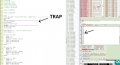
To clarify, add the TRAP like this:
Or remove it and note this:
C.
 

Attachments

Last edited:

jjw

Joined Dec 24, 2013
823
On Low Interrupt
Save System
Hserout "Low", CrLf
PIR1.TMR1IF = 0 'clear the TMR1 IF flag
T1CON.TMR1ON = 0 ' deleting this line, tmr1 keeps calling the Low Intr
Resume

You will see that the Program is using Timer1 in a Low Intr mode, it could be the Oshonsoft IDE.????

Eric
Hi E,
I'm not getting the same results.
Will you post all of the INTERRUPT routine after END and including YOUR TRAP and all of the RESUMES please.
EDIT: I've just found out what LOW HIGH PRIORITY MEANS:)

C.[/QUOTE]
Did you add from #175
IPR1.TMR1IP = 1
 

Thread Starter

camerart

Joined Feb 25, 2013
3,835
hi,
I am not sure what you are saying.?
Hi E,
To date I have been changing the existing INTERRUPT routine with your TRAP, and getting an error because there are two RESUMES, but now find I should have added it as well as the original.
In case there's anyone watching who has my limited capabilities, I thought I would clarify it. Is what I posted clear?
C.
 

Thread Starter

camerart

Joined Feb 25, 2013
3,835
Hi E,
I'm not getting the same results.
Will you post all of the INTERRUPT routine after END and including YOUR TRAP and all of the RESUMES please.
EDIT: I've just found out what LOW HIGH PRIORITY MEANS:)

C.
Did you add from #175
IPR1.TMR1IP = 1[/QUOTE]
Hi J,
I've seen HIGH and LOW, but thought they were triggered when a BIT goes HIGH/LOW, I now find they are Priority.

EDIT: Sorry just re-read your message, yes I added it. (and commented what it does)
C.
 
Last edited:

Thread Starter

camerart

Joined Feb 25, 2013
3,835
hi C,
What input from me would help clarify the problem and move us forward.?
E
Hi E,
Do I leave your TRAP in place till this problem has cleared or can I just look for the INTERRUPT LOW in the RCIF?

When the program has gone to LOW, using the above tests. What am I searching for to correct?
C.
 

ericgibbs

Joined Jan 29, 2010
21,452
hi,
You seem to be having problems in using the High and Low interrupts in the program.
I understand that you will be using Tmr1 on Int High and that you intend to use Low Int for the Serial RXD.

You are having a stall problem, so I added a Low Int to show you that was the cause of the stall.[ you were not yet using the Low Int]
You can leave it it in BUT you will to overwrite when you want to use for the RXD Int.
Do you follow OK.
E
 

Thread Starter

camerart

Joined Feb 25, 2013
3,835
hi,
You seem to be having problems in using the High and Low interrupts in the program.
I understand that you will be using Tmr1 on Int High and that you intend to use Low Int for the Serial RXD.

You are having a stall problem, so I added a Low Int to show you that was the cause of the stall.[ you were not yet using the Low Int]
You can leave it it in BUT you will to overwrite when you want to use for the RXD Int.
Do you follow OK.
E
Hi E,
As mentioned, I've only just found out what HIGH and LOW means!

I SEE!! The RXD is also an INTERRUPT, and HIGH or LOW has to be chosen for each INTERRUPT. (You asked me this 6 months ago, now I understand:), but may need remindingo_O)

When you say I will overwrite the TRAP, I presume you mean a second INTERRUPT routine, but this time LOW, for the NMEA and SERVO sentences. [I'm not sure how these two sentences will sort themselves out, but this is for later)
Perhaps it's better to remove the TRAP and watch the 'last instruction' box?

If this is correct, then yes, I follow OK.
C.
 

ericgibbs

Joined Jan 29, 2010
21,452
hi,
The get_mess is extinct.:)
Copy and over Paste that Low Int with this code clip.
Rerun the test
E
BTW: for this test I have disabled timer1 int, re-enable ans see the print out
EDIT:
Added the hser print
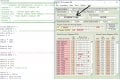
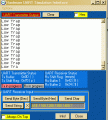
AA2 02-Aug-18 16.16.gif
 

Attachments

Last edited:
Top