Remote control by location (PIC in Oshonsoft)

ericgibbs

Joined Jan 29, 2010
21,452
hi C,
I have a number of different tests on post #74, it works without any problems.
What do you think the effect of T1CON %00111101 is going to have on a working demo program.
When you write the actual program, you will know what the delays need to be and modify the T1CON to the correct timing periods for your project.
I will try your Hex file.
E

Update:
Loaded and ran your Hex, no problems
AA1 19-Jul-18 18.53.gif
 

Thread Starter

camerart

Joined Feb 25, 2013
3,834
Hi E,
I have just tried #74 on a laptop, and it doesn't work there either.

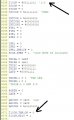
Regarding T1CON, Is this intentional? See attached:

Previously, I've had the SIM stall and show RUNTIME ERROR, then shut down. Could this be a problem.

EDIT: I commented out: 'T1CON,RD16 = 1' and it HB is now incrementing.

C.
 

Attachments

Last edited:

ericgibbs

Joined Jan 29, 2010
21,452
hi C,
The T1CON.TMR1ON = 0 'stops Tmr1 counting Up
The T1CON.TMR1ON = 1 'starts Tmr1 counting Up.


If you plan to re-install, make sure you have the re-install programs on hand.
Delete the existing PIC18 program, I use Add/Remove feature.
You may need to reinstall into the Registry the licensed User code, you should have this on your PC.
PIC18SimulatorIDE-xxxx.reg

I had to do this a couple of times a few years ago, based on what Vlad advised.

Good Luck.
Eric.
Please post, when ready, the NON working demo program you are trying.
 

Thread Starter

camerart

Joined Feb 25, 2013
3,834
Hi E,
I've left T1CON.TMR1ON alone.

I've commented out the RD16 line so that TIMER1 is written to in two 8 BIT operations and it now #74 works, so I will leave updating Oshonsoft till another time. I'm using Windows10, which may have some bearing on it.

EDIT: The bottom arrow missed the target in my attachment :)

C
 

Attachments

Last edited:

Thread Starter

camerart

Joined Feb 25, 2013
3,834
Hi E,
I reinstalled Oshonsoft, but it didn't stop the error.

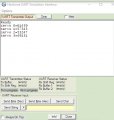
It did run long enough to test the maths program, here is the UART.

As long as I keep re-starting OSH, It looks as though I can Simulate programs ok, with a bit of inconvenience, till I find out what the problem is.

I'll try to re-build the program using you TMR1 CODE, thanks.
C.

C.
 

Attachments

ericgibbs

Joined Jan 29, 2010
21,452
hi C.
I have been looking at the Oshonsoft IDE, there is definitely a problem with the 16 Bit operation of Timer1.
It works OK in the 8 Bit mode, but you have to load with two Bytes.

Keep your programs limited to just one or two servo's until you have debugged your code.

E
 

Thread Starter

camerart

Joined Feb 25, 2013
3,834
hi C.
I have been looking at the Oshonsoft IDE, there is definitely a problem with the 16 Bit operation of Timer1.
It works OK in the 8 Bit mode, but you have to load with two Bytes.

Keep your programs limited to just one or two servo's until you have debugged your code.

E
Hi E,
Ok, I understand.
C.
 

ericgibbs

Joined Jan 29, 2010
21,452
hiC,
Checking your servo program code.
I assume that they each require a 20mSec Frame rate, during which time the 'drive data' is High for a period proportional to the servo drive data value.
Using your interrupt routine which is driving 6 servo's, I don't see how it can service all 6 servo's in a 20mSec period.?

Do you have data you could post ref the servo's?

E
 

Thread Starter

camerart

Joined Feb 25, 2013
3,834
hiC,
Checking your servo program code.
I assume that they each require a 20mSec Frame rate, during which time the 'drive data' is High for a period proportional to the servo drive data value.
Using your interrupt routine which is driving 6 servo's, I don't see how it can service all 6 servo's in a 20mSec period.?

Do you have data you could post ref the servo's?

E
Hi E,
Each servo needs a time between 1mS and 2mS, the total SERVO time is 20mS, So For 6x SERVOS 6x2=12 20-12=8 Therefore there is 8mS for the MAIN program LOOP has.
(I have also seen reference to 25mS)
------------------------------------------------------------------------------------------------
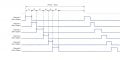
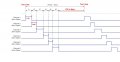
I've had this working (3xSERVOS connected), but it has OFF times, and looking at the image (attached) it looks as though OFF times aren't needed, so that's what I'm trying first.

(No MAIN LOOP for this test)
SERVO:
Toggle wled

PORTB.0 = 1
WaitUs x
PORTB.0 = 0
WaitUs xx

PORTB.1 = 1
WaitUs x
PORTB.1 = 0
WaitUs xx

PORTB.2 = 1
WaitUs x
PORTB.2 = 0
WaitUs xx

PORTB.3 = 1
WaitUs x
PORTB.3 = 0
WaitUs xx

PORTB.4 = 1
WaitUs x
PORTB.4 = 0
WaitUs xx

PORTB.5 = 1
WaitUs x
PORTB.5 = 0
WaitUs xx

WaitUs 8000
Goto servo

C.
 

Attachments

ericgibbs

Joined Jan 29, 2010
21,452
hi,
OK, so the 'On' period of each servo is 1mSec thru 2mSec.
What is misleading are the test message values ,,, '$BASE,1100,1200,1300,1400
With a 8MHz clock, divided by 4 in the PIC, the TMR1 clock is 2MHZ ie: 0.5uSec.
The pre-scaler is set for 1:8, so that a 4uSec period [250KHz]

So if you load the timer with 1100 count, thats 1100 * 4uS= 4.4mSec, for a 1400 count its 5.6mSec.
Trying to load 6 with say 1400 counts is times is 6 * 5.6mS = > 30mSec.
So you need to reduce the test message values to 250 [1mS] thru 500 [2mS].

The other point is the IF Servo =0 Then ...................... ENDIF, for each servo write routine, its redundant.
You are always writing to every servo in turn anyway, so no IF's needed.

The final point you have to consider is a way of 'packing' out the servo write interval to an overall20mSec period.

E
 

Thread Starter

camerart

Joined Feb 25, 2013
3,834
hi,
OK, so the 'On' period of each servo is 1mSec thru 2mSec.
What is misleading are the test message values ,,, '$BASE,1100,1200,1300,1400
With a 8MHz clock, divided by 4 in the PIC, the TMR1 clock is 2MHZ ie: 0.5uSec.
The pre-scaler is set for 1:8, so that a 4uSec period [250KHz]

So if you load the timer with 1100 count, thats 1100 * 4uS= 4.4mSec, for a 1400 count its 5.6mSec.
Trying to load 6 with say 1400 counts is times is 6 * 5.6mS = > 30mSec.
So you need to reduce the test message values to 250 [1mS] thru 500 [2mS].

The other point is the IF Servo =0 Then ...................... ENDIF, for each servo write routine, its redundant.
You are always writing to every servo in turn anyway, so no IF's needed.

The final point you have to consider is a way of 'packing' out the servo write interval to an overall20mSec period.

E
Hi E,
Ok.
Small point, as you know we are getting round obstacles all of the time. My PCBs are only capable of 4xSERVOS, till I make some more. (I have the LEDS on RA4-5:rolleyes:)

C.
 
Last edited:

Thread Starter

camerart

Joined Feb 25, 2013
3,834
hi,
OK, so the 'On' period of each servo is 1mSec thru 2mSec.
What is misleading are the test message values ,,, '$BASE,1100,1200,1300,1400
With a 8MHz clock, divided by 4 in the PIC, the TMR1 clock is 2MHZ ie: 0.5uSec.
The pre-scaler is set for 1:8, so that a 4uSec period [250KHz]

So if you load the timer with 1100 count, thats 1100 * 4uS= 4.4mSec, for a 1400 count its 5.6mSec.
Trying to load 6 with say 1400 counts is times is 6 * 5.6mS = > 30mSec.
So you need to reduce the test message values to 250 [1mS] thru 500 [2mS].

The other point is the IF Servo =0 Then ...................... ENDIF, for each servo write routine, its redundant.
You are always writing to every servo in turn anyway, so no IF's needed.

The final point you have to consider is a way of 'packing' out the servo write interval to an overall20mSec period.

E
Hi E,
The $BASE,1100,1200,1300,1400 is:
SERVO1 1100uS, SERVO2 1200uS, SERVO3 1300uS SERVO4 1400uS (These 4x numbers are set by the received $,BASE sentence all of the time)

INTERRUPT RB0 ON 1100uS OFF, INTERRUPT RB1 ON 1200uS OFF, INTERRUPT RB2 ON 1300uS OFF, INTERRUPT RB3 ON 1400uS OFF

CALCULATION 1100+1200+1300+1400 = 5000. So, 20,000-5000=15000.

MAIN program LOOP running then:

INTERRUPT after 15000uS RB0 ON XXXXuS OFF, INTERRUPT RB1 ON XXXXus OFF and so on...................................
C.
 

ericgibbs

Joined Jan 29, 2010
21,452
hi C,
You will have to convert those 1100uS into TMR1 clocking pulses, as I said, a Timer1 pulse occurs every 4uSec the way your program initialises Timer1.
You could change the pre-scaler setting from 1:8 to 1:2, to get 1uSec period pulses
E
 

Thread Starter

camerart

Joined Feb 25, 2013
3,834
hi C,
You will have to convert those 1100uS into TMR1 clocking pulses, as I said, a Timer1 pulse occurs every 4uSec the way your program initialises Timer1.
You could change the pre-scaler setting from 1:8 to 1:2, to get 1uSec period pulses
E
Hi E,
I've changed the Pre-scaler to 1:2 So now the $BASE inputs can be directly used as TMR1 SERVO values.

How can 5x INTERRUPTS (4x CH and 1x WAIT) be done without IFs and ENDIFs to STEP through each INTERRUPT.

C.
 

ericgibbs

Joined Jan 29, 2010
21,452
hi C,
I think the best way forward is that you explain how you wish to control the timing of the Timer1 interrupts.

Post #90 diagram looks the way I understand the timing, but your demo code snippet is IMO incorrect.
Check thru the following code fragments.

Taking the first 2 servo's
SERVO:
Toggle wled

PORTB.0 = 1
WaitUs x ' this is the servo ON time
PORTB.0 = 0
WaitUs xx ' what is this time.???

PORTB.1 = 1
WaitUs x
PORTB.1 = 0
WaitUs xx

From the actual program code

If servo = 0 Then 'The first SERVO OUT PIN is SERVO'1'.
PORTB.servo = 1 'ON
tim1h = 65535 - tim1h
TMR1H = %11111111 'tim1h.HB
TMR1L = %00000000 'tim1h.LB
Hserout "tim1h ", strtim1h, CrLf
PORTB.servo = 0 'OFF
servo = 1 ' making this 1 means that the next but one line condition is satisfied, so the IF condition is redundant
Endif
If servo = 1 Then 'The first SERVO OUT PIN is SERVO'1'.
PORTB.servo = 1 'ON
tim2h = 65535 - tim2h
TMR1H = %11111111 'tim2h.HB
TMR1L = %00000000 'tim2h.LB
Hserout "tim2h ", strtim2h, CrLf
PORTB.servo = 0 'OFF
servo = 2 ' and so ON, so all 6 servos are serviced,
Endif
 

Attachments

Thread Starter

camerart

Joined Feb 25, 2013
3,834
hi C,
I think the best way forward is that you explain how you wish to control the timing of the Timer1 interrupts.

Post #90 diagram looks the way I understand the timing, but your demo code snippet is IMO incorrect.
Check thru the following code fragments.

Taking the first 2 servo's
SERVO:
Toggle wled

PORTB.0 = 1
WaitUs x ' this is the servo ON time
PORTB.0 = 0
WaitUs xx ' what is this time.???

PORTB.1 = 1
WaitUs x
PORTB.1 = 0
WaitUs xx

From the actual program code

If servo = 0 Then 'The first SERVO OUT PIN is SERVO'1'.
PORTB.servo = 1 'ON
tim1h = 65535 - tim1h
TMR1H = %11111111 'tim1h.HB
TMR1L = %00000000 'tim1h.LB
Hserout "tim1h ", strtim1h, CrLf
PORTB.servo = 0 'OFF
servo = 1 ' making this 1 means that the next but one line condition is satisfied, so the IF condition is redundant
Endif
If servo = 1 Then 'The first SERVO OUT PIN is SERVO'1'.
PORTB.servo = 1 'ON
tim2h = 65535 - tim2h
TMR1H = %11111111 'tim2h.HB
TMR1L = %00000000 'tim2h.LB
Hserout "tim2h ", strtim2h, CrLf
PORTB.servo = 0 'OFF
servo = 2 ' and so ON, so all 6 servos are serviced,
Endif
Hi E,
I have a TRANSMITTER program Sending the $BASE,XXXX,XXXX,XXXX,XXXX,crlf sentence.(Tested with computer Terminal reading)

We are working on the RECEIVER.
I have programs where I have used the NMEA sentence READing CODE, set to READ the $BASE line and extract the 4X Channel times (Tested)

As I have to write programs in modules to be joined later (Not easy, but I can just about do it) This is a simple TEST:

SEND $BASE sentence, RECEIVE $BASE sentence. Use the 4X times as the (WAITS) for each SERVO ON/OFF time. Calculate the remainder of the 20mS and within this 'while' run the MAIN program LOOP.

As mentioned in #90 looking at the image attached, it appears to have no OFF times, so my first test is without OFFs.

Here's a program, that may look ok. (There is no MAIN program LOOP wait yet) Watch the Microcontroller View
C.
 

Attachments

ericgibbs

Joined Jan 29, 2010
21,452
hi C,
I will wait until you have a completed program, it is not possible to give any meaningful help based on code snippets/loops that are not representative of the way the project is expected to work.
I would advise you prepare a project specification, explaining how you expect the program to control the hardware.

Eric
 

Thread Starter

camerart

Joined Feb 25, 2013
3,834
hi C,
I will wait until you have a completed program, it is not possible to give any meaningful help based on code snippets/loops that are not representative of the way the project is expected to work.
I would advise you prepare a project specification, explaining how you expect the program to control the hardware.

Eric
Hi E,
There's not much more to it actually. If 'say' RB0 is switched ON for 1500us and OFF for 18500uS, and a SERVO input is attached to RB0, then the SERVO will move 1/2 way between left and right.

When watching PORTB switching ON/OFF in the Simulator, should the ON/OFF times represent the settings? (They don't appear to do?)

The main thing is that you have unlocked the TIMER which is now working, so I'll carry on, and ask for help later if that's ok.
Thanks, C.
 

ericgibbs

Joined Jan 29, 2010
21,452
hi,
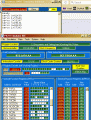
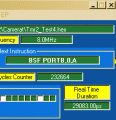
There is a Real Time Duration display on the IDE.
Just before the block of code you want to time measure, insert a BREAK cmd.
Just after the block of code you want to time measure, insert a BREAK cmd.

Run the sim until the Break point stops it, Note the Real time value in uSecs. [ sim will be STEP mode]
Click on Rate then Ultimate and the program will run onto the next BREAK point, Note the Real Time.

Subtract the first value from the last and thats the Execution time for that block of code.

To try a rerun Stop the sim and then restart

E

EDIT:
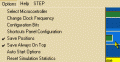
To avoid doing the maths, use the Reset Sim Statistics, at the Break
 

Attachments

Last edited:
Top