Remote control by location (PIC in Oshonsoft)

Thread Starter

camerart

Joined Feb 25, 2013
3,832
Hi E,
While checking the CODE I found errors, so I cleaned it up and here it is again:

Hopefully what happens is the GET_MESS receives 4x numbers between 1000uS and 2000uS, which are converted to TMR1 values which are fed in turn to RB0 to RB3 4Channels. repeatedly. The whole sequence take 20Ms So if 4CH takes perhaps 6MS. this would leave 14MS which will be calculated.
C
 

Attachments

ericgibbs

Joined Jan 29, 2010
21,451
hi C,
In the loop: routine
Gosub get_mess
Goto loop

get_mess:
'gets an incoming serial msg, if one is available
return

Query.??
Which device interrupt calls the On High interrupt.???
Is it supposed to PORTB.? if so, where is the INTCON Bit set/reset control code.?

E
 

Thread Starter

camerart

Joined Feb 25, 2013
3,832
hi C,
In the loop: routine
Gosub get_mess
Goto loop

get_mess:
'gets an incoming serial msg, if one is available
return

Query.??
Which device interrupt calls the On High interrupt.???
Is it supposed to PORTB.? if so, where is the INTCON Bit set/reset control code.?

E
Hi E,
The Gosub get_mess works ok For testing enter $BASE,1100,1200,1300,1400,? into the Hardware UART.

The interrupt is a constant loop of 20mS. In the loop is (at the moment 4CH) 4 times e,g, 1100,1200,1300,1400. RB0 switches ON for 1100uS then OFF-- RB1 switches ON for 1200uS then OFF and so on. The total of these times e,g, 5000uS is subtracted from 20mS leaving a time of e,g, 15mS till the next INTERRUPT loop. Each time is between 1000uS and 2000uS.
All of the rest of the program is within the remainder (15mS) of the INTERRUPT.
C.
 

ericgibbs

Joined Jan 29, 2010
21,451
hi C,
The program is getting very difficult to follow what with all the Rems etc.
I would recommend the following debug program.
Write a program that uses timer1 to call an interrupt.
In the interrupt code have a simple Hserout indicating that the interrupt is being called on a regular period.
Make sure that within the interrupt the Timer1 control coding is being correctly used.

Delete all the unused code lines [ you could leave in the Header ]

I will then test it in Oshonsoft and if it works we can add the next fragment of code.

Eric
BTW: the PIR1.TMR1IF = 0 'clears the TMR1 interrupt flag, it does not clear the timer1 counter
 

Thread Starter

camerart

Joined Feb 25, 2013
3,832
hi C,
The program is getting very difficult to follow what with all the Rems etc.
I would recommend the following debug program.
Write a program that uses timer1 to call an interrupt.
In the interrupt code have a simple Hserout indicating that the interrupt is being called on a regular period.
Make sure that within the interrupt the Timer1 control coding is being correctly used.

Delete all the unused code lines [ you could leave in the Header ]

I will then test it in Oshonsoft and if it works we can add the next fragment of code.

Eric
BTW: the PIR1.TMR1IF = 0 'clears the TMR1 interrupt flag, it does not clear the timer1 counter
Hi E,
I need all of the REMs as they remind me what all of the lines/BITs do.

[PIR1.TMR1IF = 0 'clears the TMR1 interrupt flag, it does not clear the timer1 counter] I presume that why the times seemed odd?

Ok, I'll start again with a TMR1 program.
C.
 

ericgibbs

Joined Jan 29, 2010
21,451
hi V,
Just checking out the Oshonsoft TMR1 maths.....
E
EDIT:
Check this out, the maths are not being done correctly.
I think the compiler is getting confused with the closely named labels.....

If servo = 0 Then 'The first SERVO OUT PIN is SERVO'1'.
tim1h = 0x4000 'dummy '16384d for test ONLY.
PORTB.servo = 1 'ON
tim1h = 65535 - tim1h '49151d == 0xBFFF OK
Hserout #tim1h, CrLf 'OK

TMR1H = tim1h.HB
Hserout "tim1h=", #tim1h.HB, " + " '== 191d = 0xBF OK

TMR1L = tim1h.LB

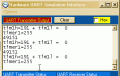
Hserout "tim1l = ", #tim1l.LB, CrLf '' 0x00 WRONG !! its dropped the 0xFF == 255

Hserout "timer1=", #TMR1, CrLf ''' 255 WRONG, should be 49151d 0xBFFF

PORTB.servo = 0 'OFF
Endif


AA1 19-Jul-18 12.57.gif
 

Attachments

Last edited:

ericgibbs

Joined Jan 29, 2010
21,451
hi C,
I cannot get Tmr1 to recognise T1CON.RD16 = 1, ie 16Bit Write/Read, it appears Oshonsoft does not support WORD wr/rd.???
It reports a 'not a Byte constant' when you attempt a WORD wr/rd.


I have had to use this work around code fragment.

On High Interrupt
Save System

PIR1.TMR1IF = 0 'clear the TMR1 IF flag

T1CON.TMR1ON = 0

tim1h = 49151 '' 65535 - 0x4000 '49151d == 0xBFFF OK

TMR1H = 0xbf
TMR1L = 0xff

t1word.HB = TMR1H
t1word.LB = TMR1L

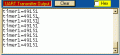
Hserout "timer1=", #t1word, CrLf

T1CON.TMR1ON = 1

Resume

EDIT:
You must have this in the Header, even though OSH will not do WORD, it is needed. for the maths.
T1CON.RD16 = 1
AA1 19-Jul-18 13.39.gif
 
Last edited:

ericgibbs

Joined Jan 29, 2010
21,451
hi C,
If I follow you OK, I have used a dummy value for testing, you have to replace that with your actual value.
eg: I have used tim1 = 0x1000, tim2 =0x2000 ... etc... 'test dummy values
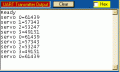
You need to write code for your values, the demo was for debugging and demonstrating the Interrupt and the finding the bug in Oshonsoft.

E
 

Thread Starter

camerart

Joined Feb 25, 2013
3,832
hi C,
If I follow you OK, I have used a dummy value for testing, you have to replace that with your actual value.
eg: I have used tim1 = 0x1000, tim2 =0x2000 ... etc... 'test dummy values
You need to write code for your values, the demo was for debugging and demonstrating the Interrupt and the finding the bug in Oshonsoft.

E
Hi E,
If I try the program in #74 unchanged, into the SIM and watch TMR1H. When TMR1L trips over, nothing changes in TMR1H.

If it runs ok in your SIM, then perhaps there is an error in mine! Should I re-install it?
C.
 

ericgibbs

Joined Jan 29, 2010
21,451
hi C,
Why should TMR1H trip over.? Its being loaded with same value in the routine.

Post a clip of the Hserout window, annotate the clip showing where you think its wrong

E
 

Thread Starter

camerart

Joined Feb 25, 2013
3,832
hi C,
Why should TMR1H trip over.? Its being loaded with same value in the routine.

Post a clip of the Hserout window, annotate the clip showing where you think its wrong

E
Hi E,
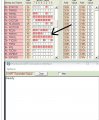
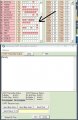
Here you can see TRIP1 then step through the program to TRIP2. TMR1L has TRIPPED over, but TMR1H has not INCREMENTED so after 10 minutes no INTERRUPT.
C
 

Attachments

ericgibbs

Joined Jan 29, 2010
21,451
hi C,
Retry post #68 program, you said it worked OK.
Thats using TMR1 interrupt.
E

Edit:
Compile program in post #74. post the hex file it creates, lets check your OSH.
 
Top