Remote control by location (PIC in Oshonsoft)

Thread Starter

camerart

Joined Feb 25, 2013
3,835
Hi,
As mentioned the QEI section of this program is working OK, and only appears to fail because of the INTERRUPT (I think)

The INTERRUPT and PARSE section, was written for PIC #1 MASTER. and I copied it from there and pasted into PIC#2 SLAVE, and had to remove the parts that weren't needed because of this, and change others.

The main areas that I changed were: [ setUARTchannel and IRQinitBuf ] which include [PIE1.RCIE = 1 '1 = Enables the EUSART receive interrupt ]

Regarding [setUARTchannel] this is a switch on PIC#1 for switching the '2 into 1' RX PIN sentences, and this is why we're trying to get it onto PIC#2 SLAVE, which is an alternative. So as the [setUARTchannel] is not needed now it needs changing on PIC#2 more.
C
 

Thread Starter

camerart

Joined Feb 25, 2013
3,835
Hi,
Could there be a problem with DISABLE HIGH, DISABLE LOW, ENABLE HIGH, ENABLE LOW?
I've never fully understood this, although I think it is INTERRUPT related.
C
 

sagor

Joined Mar 10, 2019
1,050
Your setUARTchannel and IRQinitBuf seem to be called only when buf_done = 1, and that can only happen when interrupts are enabled, to fill a buffer. So you are in a catch-22, you try to initialize the interrupts, but only attempt it once the buffer is "done", which requires the interrupts to be enabled before that.
Do your initialization of IRQ and UART just before you enter the "main:" routine, enabling interrupts as you enter the main loop..
 

Thread Starter

camerart

Joined Feb 25, 2013
3,835
Your setUARTchannel and IRQinitBuf seem to be called only when buf_done = 1, and that can only happen when interrupts are enabled, to fill a buffer. So you are in a catch-22, you try to initialize the interrupts, but only attempt it once the buffer is "done", which requires the interrupts to be enabled before that.
Do your initialization of IRQ and UART just before you enter the "main:" routine, enabling interrupts as you enter the main loop..
Hi S,
I tried a GOSUB setUARTchannel, then a GOSUB chan_set, then this:

---------------------------------------------------------------------------
'Set up UART and RX interrupt for immediate use
Hseropen 9600 'does a basic config of TX and RX including BAUDCON, SPEN, CREN, TXEN etc.
Serout PORTB.4, 9600, "SLAVE READY ", CrLf ''Needs HC-12 configured to show on live PC
WaitMs 60
RCSTA.CREN = 0 'not ready to receive yet
INTCON = 0 'kill any interrupts

main:

RCSTA.CREN = 1
RXIRQchar = RCREG
RXIRQchar = RCREG
PIE1.RCIE = 1 '1 = Enables the EUSART receive interrupt
-------------------------------------------------------------------
Some of which is inside the LOOP, but none worked!

I also tried going back to the program, before I 'cleaned it up' and it sort of works, but depending on how the QEI Incremental encoder is turned, is whether it stalls or not.

I'm now trying removing the QEI CODE line by line, and this is having an effect, so the problem may be something to do with both working at the same time, but I'm only guessing.
C
 

sagor

Joined Mar 10, 2019
1,050
You may still have to enable interrupt bits in the INTCON register. When INTCON is zero, all interrupts will be disabled globally.
 

Thread Starter

camerart

Joined Feb 25, 2013
3,835
You may still have to enable interrupt bits in the INTCON register. When INTCON is zero, all interrupts will be disabled globally.
Hi S,
Ok, I'll look into it.
This CODE is running on PIC#1 successfully, with only [ INTCON =0 ], so I wonder what's different?
C
 

sagor

Joined Mar 10, 2019
1,050
Hi S,
Ok, I'll look into it.
This CODE is running on PIC#1 successfully, with only [ INTCON =0 ], so I wonder what's different?
C
No harm in turning on main interrupts with INTCON, then disable/enable individual device interrupts like UART or Timers using their own register flags.
Some PICs may have slightly different uses of interrupt registers, though most follow the same structures.
 

Thread Starter

camerart

Joined Feb 25, 2013
3,835
No harm in turning on main interrupts with INTCON, then disable/enable individual device interrupts like UART or Timers using their own register flags.
Some PICs may have slightly different uses of interrupt registers, though most follow the same structures.
Hi S,
This is just above my skill level, but I may get it as I 'play'
My mate is helping me, and will look at all of this, so we should sort it out.

Earlier the CODE was called 'bloated' I'm not sure which sections are bloated, but today, I was looking at 'setUARTchannel' which I can almost see that it may not be needed. Originally, this CODE was on PIC #1 and had a switch between GPS and radio control, and as GPS will hopefully be on PIC#2 now, this is not needed by eitehr PIC.
C
 

Thread Starter

camerart

Joined Feb 25, 2013
3,835
Hi,
Hopefully, we'll soon be getting to the RC section of this project.

I've been puzzling about how to go about it, and bearing in mind loss of GPS, or signal between BASE (Sending orders) and REMOTE (receiving orders) I think they should be synchronised by the GPS clock, correcting a running clock on each unit.
The REMOTE sends information back to BASE, but this will be battery voltage and stuff like that, so not too important.
I imagine the BASE will send orders, as many times/sec as possible. (I can't guage yet) and the REMOTE will send DATA as a % of the BASE rate.

Any ideas welcome.
Cheers, C
 

Thread Starter

camerart

Joined Feb 25, 2013
3,835
Hi,
I think, I've got the answer to the above question:
I have investigated synching each units clock, with each GPS, which appears to be fine, and may only need synching before a 1hr 'flight' and not again, as it is so accurate.
There have been other recommendations: one being simply have the BASE transmitting most of the time, and REMOTE receiving most of the time.
Each time any order/movement is sent to the REMOTE, they both switch, and the REMOTE sends "RECEIVED" back to BASE, or if signal is lost stay still. I could then perhaps have a little boost of signal to bring it back or a R.T.H.
C
 

Thread Starter

camerart

Joined Feb 25, 2013
3,835
Hi,
Update:
We've now got the BASE to read all of the peripherals, including the BASE SLAVE reading QEI and GPS then sending to BASE MASTER via SPI.
My mate is tidying this up, while I copy most of BASE onto REMOTE, while removing e.g. Joysticks etc and adding motor control.
C.
 

Thread Starter

camerart

Joined Feb 25, 2013
3,835
Hi,
Update:
A couple of things to tidy up: I'm working on the SERVO/MOTOR control, and my mate is finalising some SPI.

EDIT: We now have the SERVO/MOTOR CODE working, which is the last peripherals. :0
C
 
Last edited:

Thread Starter

camerart

Joined Feb 25, 2013
3,835
Hi,
Fiveish years ago, I started this project (I didn't realise how much time it would take)
anyway, I puzzled over how it would all work, especially the relationship between BASE and REMOTE (in this case a Tricopter) and the location GRID, see #1: https://forum.allaboutcircuits.com/...location-pic-in-oshonsoft.148795/post-1270205

The main reason for this is my eye sight, and inability to see which way round the REMOTE is, so I can bring it back towards me, in case of it going too far.

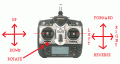
The BASE can rotate the REMOTE by using the AIM knob (360Deg), so if turned to180Deg, the REMOTE will point towards BASE.
The FORWARD/REVERSE and LEFT RIGHT joysticks will move the LAT/LON around.

I'm having difficulty in visualising how the above can be implemented, as there a choices. I realise that there will be calculations to maybe 'swing' the GRID lines as the AIM is turned, or something like that.

Has anyone ideas about this please?
EDITED
C.
 
Last edited:

ericgibbs

Joined Jan 29, 2010
21,452
Hi,
The usual way to direct an object to a set point, is to give a
Heading relative to North,
a distance to travel along that Heading
and the Velocity.


So the drone must know its current orientation relative to the North, so that the new Heading can be realised from your Base instructions.
This means you must decide which point on the periphery of the drone is its reference North


Use the Eastings and Northings as shown on the Earths Grid Lat/Long, not your own standard


E
 

Thread Starter

camerart

Joined Feb 25, 2013
3,835
Hi,
The usual way to direct an object to a set point, is to give a
Heading relative to North,
a distance to travel along that Heading
and the Velocity.


So the drone must know its current orientation relative to the North, so that the new Heading can be realised from your Base instructions.
This means you must decide which point on the periphery of the drone is its reference North


Use the Eastings and Northings as shown on the Earths Grid Lat/Long, not your own standard


E
Hi E,
Yes, that works!
Some time ago, it was agreed that there would be BASE and REMOTE, instead of drone, which includes most vehicles, land sea and air.

The usual way to direct an object to a set point, is to give a
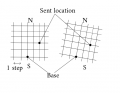
The SET POINT is movable, in the it starts at 0,0. which is the BASE location (Earths Grid Lat/Long), adjusted to be 0,0, at start, and is incremented by using the joysticks. FOR/REV.

Heading relative to North,
This would be the natural front of the REMOTE, which has an inbuilt COMPASS, and would be controlled with ROTATE (See image).

a distance to travel along that Heading
That would be where the LAT LON point is.
This is moved by incrementing the Earths Grid Lat/Long along the Heading using FOR/REV.

and the Velocity

The Velocity, would be set by the difference between the Lat/Long point or LOCPOINT, and the location of the REMOTE.

There is also UP/DOWN which compares the BASE airpressure with the REMOTE air pressure and is incremented by UP/DOWN.

C.
 

Attachments

Thread Starter

camerart

Joined Feb 25, 2013
3,835
Hi,
Re-checking my #1275 explanation, I noticed and error or two?

This is moved by incrementing the Earths Grid Lat/Long along the Heading using FOR/REV.
If this were true, then 2x increments of LAT and LON would produce, see left GRID. (Only for visualisation)
In this case it would be 45° CW of N, not the HEADING set by ROTATE.
I've no idea how to calculate this.

If ROTATE was used instead, then the LON/LAT increment doesn't work. I'll have to work out how to do this alternative, if it's thought to be better?
C
LAT LON.png
 
Last edited:

Thread Starter

camerart

Joined Feb 25, 2013
3,835
Hi,
Looking at my answers above, they are confused! When actually 'say' flying a REMOTE, and it flies overhead, and the pilot turns to face the REMOTE, this is disorienting, making this very difficult, if not impossible.

Taking the GRID above (Left side) Using LAT/LON increments to move the desired location around the GRID/MAP, between A and B, there would be no need for Trigonometry at this stage.
This this through, this would be easier to fly, but would be uncomfortable if the REMOTE flew South of BASe meaning the pilot would turn round towards the REMOTE, and the joystick would feel odd.

This method however, means that if there were minimum of 4x LEDS showing whether the REMOTE was NSWE of BASE, using these, a very poor sighted pilot could direct the REMOTE to BASE.

Still thinking it all through!
C
 

Thread Starter

camerart

Joined Feb 25, 2013
3,835
Hi,
I'm a bit stuck!
Here are programs 1 and 2 from the BASE.:

The SLAVE 18F4431 reads the GPS, and the Incremental encoder, and sends it via SPI to the MASTER 18F46K20. when monitoring the MASTER using a computer terminal, I can see the SPI working, but then it stops, and recovers if I reset the SLAVE, until the next time?

The MASTER reads the ALT, COMP, JOYSTICKS ok, and the screen is working, however, even though the RX is receiving simulated DATA via the radio, and was working a year ago, is not working now.

Any ideas welcome. (I may have missed something!, I'll also post this on ETO, as they have contributed to it)
Cheers, C.
 

Attachments

Thread Starter

camerart

Joined Feb 25, 2013
3,835
Hi,
I'm a bit stuck!
Here are programs 1 and 2 from the BASE.:

The SLAVE 18F4431 reads the GPS, and the Incremental encoder, and sends it via SPI to the MASTER 18F46K20. when monitoring the MASTER using a computer terminal, I can see the SPI working, but then it stops, and recovers if I reset the SLAVE, until the next time?

The MASTER reads the ALT, COMP, JOYSTICKS ok, and the screen is working, however, even though the RX is receiving simulated DATA via the radio, and was working a year ago, is not working now.

Any ideas welcome. (I may have missed something!, I'll also post this on ETO, as they have contributed to it)
Cheers, C.
Hi,
I've just noticed that I posted the HEX files incorrectly instead of the BAs files, but as there are no comments, I had no way of knowing.
C
 
Top