Remote control by location (PIC in Oshonsoft)

Thread Starter

camerart

Joined Feb 25, 2013
3,835
hi ,
How are you selecting the 3 devices on that common SPI bus.?
E
Hi E,
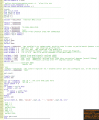
Each one has a C/S. e,g, [ Symbol compss = LATD.2 'AK8963C ]
----------------------------------------------------------------------------------
'READ COMPASS XYZ REGISTER
SPICSOn
For i = 0 To 18 '5 'READ XYZ Xx2 Yx2 Zx2
compss = 0 'CHIP SELECT COMPASS ON
SPISend addr
SPIReceive data
b(i) = data
compss = 1 'CHIP SELECT COMPASS OFF
addr = addr + 1
If addr = 0x93 Then addr = 0x80 '???CHECK???
Next i
SPICSOff
-----------------------------------------------------------------------------------
C.
 

jjw

Joined Dec 24, 2013
823
Hi E,
Each one has a C/S. e,g, [ Symbol compss = LATD.2 'AK8963C ]
----------------------------------------------------------------------------------
'READ COMPASS XYZ REGISTER
SPICSOn
For i = 0 To 18 '5 'READ XYZ Xx2 Yx2 Zx2
compss = 0 'CHIP SELECT COMPASS ON
SPISend addr
SPIReceive data
b(i) = data
compss = 1 'CHIP SELECT COMPASS OFF
addr = addr + 1
If addr = 0x93 Then addr = 0x80 '???CHECK???
Next i
SPICSOff
-----------------------------------------------------------------------------------
C.
Why do you read always all 19 registers?
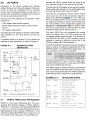
Warnings from the D/S:

----- adr
TS1 0DH READ/ WRITE Test 1 8 DO NOT ACCESS
TS2 0EH READ/ WRITE Test 2 8 DO NOT ACCESS

RSV 13H READ Reserved 8 DO NOT ACCESS
 

Thread Starter

camerart

Joined Feb 25, 2013
3,835
Why do you read always all 19 registers?
Warnings from the D/S:

----- adr
TS1 0DH READ/ WRITE Test 1 8 DO NOT ACCESS
TS2 0EH READ/ WRITE Test 2 8 DO NOT ACCESS

RSV 13H READ Reserved 8 DO NOT ACCESS
Hi J,
I read that, but gave it a try and it worked ok, then forgot it. I could cut it down to ASTC, if it's a problem.

EDIT: From D/S [ It is required to read ST2 register after data reading ]
C.
 

Thread Starter

camerart

Joined Feb 25, 2013
3,835
Hi,
I cut the tracks going to the 18F4431. See MASTER/SLAVE #579
MISO voltage now 3.3V, Compass working:D
Thanks to all. C.
 

Thread Starter

camerart

Joined Feb 25, 2013
3,835
Hi,
The second PCB is working as usual, even before I cut the SPI tracks. Mystery.
Let's hope the blocking problem has gone. I'll keep testing.
C.
 

Thread Starter

camerart

Joined Feb 25, 2013
3,835
Hi,
The second PCB (REMOTE) is working as usual, even before I cut the SPI tracks. Mystery.
Let's hope the blocking problem has gone. I'll keep testing.
C.
 
Last edited:

Thread Starter

camerart

Joined Feb 25, 2013
3,835
Hi,
All the peripherals are working so far, but since getting the Compass working, by cutting the SPI tracks to the 18F4431 PIC, now the QEI serial DATA from the 18F4431 isn't being READ. Can anyone think of any reason?

The DATA signal is arriving at the 18LF4620 PIN.
C.
 

Thread Starter

camerart

Joined Feb 25, 2013
3,835
Hi,
All the peripherals are working so far, but since getting the Compass working, by cutting the SPI tracks to the 18F4431 PIC, now the QEI serial DATA from the 18F4431 isn't being READ. Can anyone think of any reason?

The DATA signal is arriving at the 18LF4620 PIN.

I'm going to try a test using the 2nd PCB.
C.
 

Thread Starter

camerart

Joined Feb 25, 2013
3,835
Hi,
It's been pointed out to me, that I'm using HSEROUT and SERIN, which don't match. I've been here before, and I'll look into it.
C
 

ericgibbs

Joined Jan 29, 2010
21,452
hi C,
Are using this format:
Serin PORTC.7, 9600, i ;;; Software access

on the 18F4620
PORTC.7 is the hardware UART TX

I have no idea what the OSH complier will make of mixing the two options in the same program.???

E
 

Thread Starter

camerart

Joined Feb 25, 2013
3,835
hi C,
Are using this format:
Serin PORTC.7, 9600, i ;;; Software access

on the 18F4620
PORTC.7 is the hardware UART TX

I have no idea what the OSH complier will make of mixing the two options in the same program.???

E
Hi E,

The SERIAL track is between 18LF4620 RC6 and 18F4431 RA4.

I'm pretty sure that HSEROUT and SERIN worked for quite a while, till last week. Must have been a fluke!

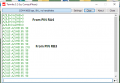
Here are examples from both PICs, showing one of the formats I've tried.

Note: I match what is being sent to what I receive i,e send azi.LB, receive azi.LB

The HSEROUT appears on a screen terminal.

I also tried this format:
If RA4 = 1 Then
Waitus 100
Serin PORTA.4, 9600, azi 'software uart
Else
If RA4 = 0 Then
Hserout "MASTER AZI= ", #azi, CrLf
Endif
Endif

C.
 

Attachments

Thread Starter

camerart

Joined Feb 25, 2013
3,835
Hi,
The 18F4431 seems to be working ok,and sending DATA to the 18LF4620 RA4 PIN, which I can READ using a terminal.
NOTE: The PCBs I posted previously, have had the RA4 and RA5 tracks swapped over. (RA5 is included in the Analogue in plug)

Is there a test, I can carry out to test whether the RA4 SERIN is working?
C
 

ericgibbs

Joined Jan 29, 2010
21,452
hi,
Extract from the OSH manual

Example 2:
Dim i As Byte
loop:
Serin PORTA.4 , 9600, i
if i=1 then
''LED OFF
else
LED ON
Endif
goto loop

You could use your logic analyser to see the 'i' state rather than added test LEDs
Send some Serial test data into PORTA.4

To be sure, set PORTA.4 as an Input, in case the complier does not.

E
 

Thread Starter

camerart

Joined Feb 25, 2013
3,835
hi,
Extract from the OSH manual

Example 2:
Dim i As Byte
loop:
Serin PORTA.4 , 9600, i
if i=1 then
''LED OFF
else
LED ON
Endif
goto loop

You could use your logic analyser to see the 'i' state rather than added test LEDs
Send some Serial test data into PORTA.4

To be sure, set PORTA.4 as an Input, in case the complier does not.

E
Hi E,
LED OFF doesn't compile, but LED = 0 does!

Here's what I tried:
---------------------------------------------------------------------------------

ADCON0 = %00000011
ADCON1 = %00001010
ADCON2 = %10100100

Hseropen 9600
WaitMs 500

Hserout "MASTER WORKING", CrLf

Disable High
Disable Low

main:
Serin PORTA.4, 9600, i
If i = 1 Then
RB3 = 1 'yled = 0 'off
Else
RB3 = 0 'yled = 1 'On
Endif

Goto main

End
---------------------------------------------------------------------------------------
A Scope connected to RB3 shows nothing.

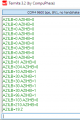
Here's a Terminal view of RA4:
While turning the QEI Knob connected to 18F4431.
C.
 

Attachments

Thread Starter

camerart

Joined Feb 25, 2013
3,835
Hi,
I changed 18LF4620 to:
------------------------------------------------------------------------
main:
'''Serin PORTA.4, 9600, i
If RA4 = 1 Then
RB3 = 1
Else
RB3 = 0
Endif

Goto main
------------------------------------------------------------------------------
Now RB3 mirrors the RA4 DATA. It seems that there is something wrong with SERIN?
C.
 

Thread Starter

camerart

Joined Feb 25, 2013
3,835
Hi,
I tried this:
---------------------------------------------------------------
Dim azi As Word

main:

Serin PORTA.4, 9600, azi.LB, azi.HB

Serout PORTB.3, 9600, "AZI.LB AZI.HB: ", #azi.LB, " ", #azi.HB, CrLf

Goto main
----------------------------------------------------------------------------
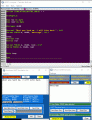
18LF4620:
PIN RA4 shows correct input READings.
PIN RB3 shows incorrect READings.

AZI.LB AZI.HB 65 90 are error READings, they should be '0'.
C
 

Attachments

Thread Starter

camerart

Joined Feb 25, 2013
3,835
hi,
Tried a number of ideas, they will not work together in simulation, on receive.
E
Hi E,
I checked RA4 in the D/S and there may be a complication with setting IN and OUT. Although I suppose that the previous tests showing an ouput at RB3 may prove RA4 is inputting.
The DATA signal when at rest is 3.3V, is this correct?
C.
 

Attachments

Last edited:
Top