Prototype PCB troubleshooting - Audio preamp

Thread Starter

rpschultz

Joined Nov 23, 2022
808
This is a continuation of a thread here about troubleshooting PN4392 transistors. That either wasn't the issue or it got resolved, there's still something else going on.

I have designed and built an acoustic guitar preamp. It has a bunch of EQ and gain sections, focused on acoustic guitar.
(Previous thread of a previous version).

The current PCB's are 4 layer I designed in EasyEDA, outer 2 signal, inner ground and power. +/- 15v on Vcc/Vee.

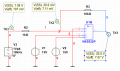
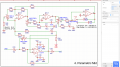
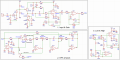
I can input a tone at the input A from a signal generator and it gets stuck at pin6 of IC1... but the tone's there at pin 7. That's weird, and it's not just going through the 50k pot, if I remove IC1 it's much less - if it's going through IC1.2, then why can't I read it at pin 6? Same thing with IC2, the tone is there at IC2 pin 1, but not at pin 2.

I probed around and noticed the impedance between Vcc/Vee to a lot of components is only 670 kΩ... to me that seems low.

I'm not sure what else to check. I've got a good scope, I'm sure there are tools there that could help me beyond what I'm doing if I knew what to do.
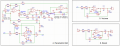
1772586012109.png
1772585972238.png
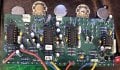
View attachment IMG_7904.jpeg
 

Thread Starter

rpschultz

Joined Nov 23, 2022
808
Scope is in that attached picture, Siglent SDS804X HD

volume goes to another switch that ties in the boost.

this one doesn’t work, but previous version did, linked at top of first post.
 

Ian0

Joined Aug 7, 2020
13,097
I can input a tone at the input A from a signal generator and it gets stuck at pin6 of IC1... but the tone's there at pin 7.
It's an inverting amplifier. The inverting input is a virtual earth.
Don't forget that the job of an op amp it to keep its two input pins at the same voltage, and it seems as though it has succeeded perfectly.
 

0ri0n

Joined Jan 7, 2025
160
I can input a tone at the input A from a signal generator and it gets stuck at pin6 of IC1... but the tone's there at pin 7. That's weird, and it's not just going through the 50k pot, if I remove IC1 it's much less - if it's going through IC1.2, then why can't I read it at pin 6?
The signal is there, it's just very small which is perfectly normal for an op amp in inverting configuration. Increase the frequency to 10kHz and try making the output voltage at Pin 7 as large as possible without going into clipping. If you still can't resolve the voltage at Pin 6 with the scope in time domain switch to FFT mode to make it visible.

The op amp used in the attached sim has an open loop gain Aol of 60dB @ 10kHz and the voltage at Pin 6 reflects that. A real NE5532 has, according to the datasheet (ON Semi), a typ. Aol ~ 72dB so the voltage at Pin 6 will be somewhat smaller.
 

Attachments

Thread Starter

rpschultz

Joined Nov 23, 2022
808
Status: Last night I was able to trace the signal all the way to the end of the Parametric Mid, IC4 pin 1. So that's progress, probably 90% to the end. But then I can't find it. I wondered about the electrolytic cap orientation of C4, C25 and C28, but it seems correct from the original and I also asked this question in this thread before. So I'll have to examine the components in the Volume section and see if I can find the problem.
 

Ian0

Joined Aug 7, 2020
13,097
This is a continuation of a thread here about troubleshooting PN4392 transistors. That either wasn't the issue or it got resolved, there's still something else going on.

I have designed and built an acoustic guitar preamp. It has a bunch of EQ and gain sections, focused on acoustic guitar.
(Previous thread of a previous version).

The current PCB's are 4 layer I designed in EasyEDA, outer 2 signal, inner ground and power. +/- 15v on Vcc/Vee.

I can input a tone at the input A from a signal generator and it gets stuck at pin6 of IC1... but the tone's there at pin 7. That's weird, and it's not just going through the 50k pot, if I remove IC1 it's much less - if it's going through IC1.2, then why can't I read it at pin 6? Same thing with IC2, the tone is there at IC2 pin 1, but not at pin 2
I probed around and noticed the impedance between Vcc/Vee to a lot of components is only 670 kΩ... to me that seems low.

I'm not sure what else to check. I've got a good scope, I'm sure there are tools there that could help me beyond what I'm doing if I knew what to do.

View attachment 364163
View attachment 364162
View attachment 364164
Not too surprised about 670k between the supplies as you are using NE5532 which need lots of current.
Electrolytic capacitors will not block an AC signal. If they have a bit of reverse bias they behave like a diode. If they have a lot of reverse bias they behave like a squib.
You need to read up on inverting amplifiers. as several contributors have mentioned the signal at the inverting input of an op-amp wired as an inverting amplifier will be the output level divided by the OPEN-loop gain, which is about 100000. So for 775mV signal, you should be reading about 7.75uV
 
IC1 pin 6 should have no (measurable) signal because it's normally so tiny, as it is the feedback summation node. Even a mV there is huge. Don't get lost about that - for op-amp's in the inverting configuration, the (-) input has such a tiny uV (AC) signal typically.

A basic troubleshooting technique is to measure the DC voltages an all IC pins, write them down.

There are NE5532 fakes, they seem to be the die-shrink LM358.
 

Thread Starter

rpschultz

Joined Nov 23, 2022
808
Wo hoo! I figured it out. I have signal all the way to the end. 2 things going on:

1) IC3 pins 10, 12 and IC1 pin 5 (op amp +) were not grounded. Unbeknownst to me, in EasyEDA you can have a GND on a non-ground net. So I jumpered them and subsequently fixed the schematic. I need to check ALL grounds to make sure they are on the GND net.

2) Electrolytic caps C10, C24, C28, I suspect, I blew during initial powerup when I incorrectly designed D2 backwards. During troubleshooting, the signal stopped there, so I removed and jumpered to continue troubleshooting. Once I got the IC grounds fixed, I went back and installed new caps there and it all worked. Are those caps necessary? I worked without them.

Haven't hooked up an actual guitar to it yet, tomorrow night. Thanks for the help!

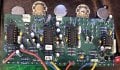
View attachment IMG_7911.jpeg

IMG_7912.jpeg
 

Attachments

kaindub

Joined Oct 28, 2019
176
Couple of observations. Always do use your layout program to check your layout against yourvcircuit diagram. Itvwouks have picked up the missing ground.
Having designed hundreds of boards many similar to your circuit, it could easily be done in just 2 layers. I know 4 layer is cheap, but unnecessarily complicated. Practice makes perfect.
Have you ever prototyped this circuit, or is this the first time ( on the pcb). Its easy to prototype audio circuits either of perf board or proto board. Build one section at a time, test and move on.
 

Thread Starter

rpschultz

Joined Nov 23, 2022
808
@kaindub thanks for the observations.

1st prototype I designed in Eagle and built in late 2023. It had a few major issues on the PCB, that I ultimately was able to modify and get it working. 2nd prototype (also designed in Eagle) built last summer, more/less worked with only minor issues. This one was great fun because I learned how to do Bode plots with my signal generator and scope. With the Eagle EOL date looming (June 2026), I felt the need to learn something else. I tried KiCad for a while, it was ok. Then I tried EasyEDA which was great because it was 1) easy, 2) integrated with JLC smda so well. This project isn't smda, but I have another one that is, and I've been told that JLC will do assembly with thru-hole too!?!

This thread (and this one) is a build of the 3rd prototype that was designed in EasyEDA, two 4-layer boards. I've had multiple EE's tell me never do a 2 layer when a 4 layer is so easy and cost the same. Except Eagle (free version) won't let you do 4 layer, but EasyEDA does and it cost the same at JLC. And for this particular one, 4 layer DOES give me more space, by routing the power lines on the inner layers, it makes things much easier on the outer signal layers. But I made some errors that are now fixed.

As for "Always do use your layout program to check your layout against yourvcircuit diagram. Itvwouks have picked up the missing ground." DRC showed no errors. The grounds were in the schematic, just not on the GND net. I'm admittedly a novice, but 4 layer seemed easier than 2 in this case.
 

kaindub

Joined Oct 28, 2019
176
DRC is different to comparing the schematic.
DRC just checks that you have not violated design rules ie traces , pads too close; crossed traces etc.
And neither Eagled to KakI’d nor any other pcb software is a design tool. They are layout tools. You could “ design” any piece of garbage circuit and they will lay them out perfectly. Does not mean that the circuit works.
My design tools are pen and paper and the LT spice.
Youve proved that your method does not work because you had 3 versions of the pcb. I aim to have one version because I prototype before laying out.
 

Thread Starter

rpschultz

Joined Nov 23, 2022
808
I'm a hobbyist. I did extensive spice simulations and bread/perfboard when I was developing the schematic. All the errors for all the prototypes were PCB layout related. Actually the 2nd one worked great, I could've stopped with that.
 

panic mode

Joined Oct 10, 2011
4,864
DRC showed no errors. The grounds were in the schematic, just not on the GND net. I'm admittedly a novice, but 4 layer seemed easier than 2 in this case.
congrats on making it work. if you don't mind, could you please show how exactly this appeared and what you fixed? i find it hard to imagine that GNDs are not GNDs and need to be manually made GNDs. i am not using same software but probably many other do, so it would be great to document pitfalls and solutions in more detail.
 

Thread Starter

rpschultz

Joined Nov 23, 2022
808
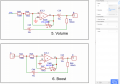
First picture, all the GND's in this section of the schematic, list as GND net in the properties tab over on the right, the one under R34 is selected here:
1772811245111.png

Second picture. Even though the schematic looks correct, the 2 GNDs here in section 5 and 6 are not on a net, IC3 pin10 is selected.
1772811349241.png

2 different ways to fix it. Either type in GND in the properties tab, or delete the GND and copy an existing one that's already on the GND net and then connect it up.

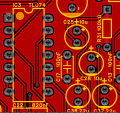
Looking at the PCB, you can see that IC3 pin 10 is not on the GND net but on net $2N6749. GND nets can be seen on C37 below (and cap above C25), showing the cross fill tying it to the ground plane.
1772811656783.png
 
Last edited:

eetech00

Joined Jun 8, 2013
4,704
2) Electrolytic caps C10, C24, C28, I suspect, I blew during initial powerup when I incorrectly designed D2 backwards. During troubleshooting, the signal stopped there, so I removed and jumpered to continue troubleshooting. Once I got the IC grounds fixed, I went back and installed new caps there and it all worked. Are those caps necessary? I worked without them.
C10, C24, C28 look to be audio coupling caps. Probably should be non-polar. Might try 1uf instead of 10uf.
 

Thread Starter

rpschultz

Joined Nov 23, 2022
808
C10, C24, C28 look to be audio coupling caps. Probably should be non-polar. Might try 1uf instead of 10uf.
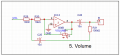
I wondered about this, I'll test it out. Help me understand the purpose of C28 and C25 below, and how to size them. C28 is a coupling cap, blocking DC but not AC. Is C25 the same?

1772821776917.png
 

wayneh

Joined Sep 9, 2010
18,085
I'll be curious to hear what you think of the testing with a guitar. Did you base your design off an existing product, or are you hoping to have something novel? In other words, what were the design goals?
 
Top