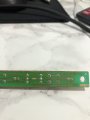
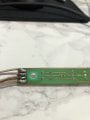
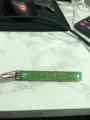
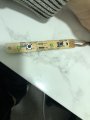
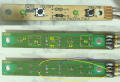
Please help - PCB stopped working due to resistor.

Thread Starter

ClubmanGT

Joined Jan 25, 2023
17
post good photos of the PCB front and back so we can check how they are connected. also check if there is a break in PCB tracks if the PCB was bent (button pressed too hard). that would explain your workaround where you are pressing on the bottom side of the board (tracks side). this bends the board back and broken tracks make the contact. the same would happen if resistor is not soldered correctly (cold joint). this is fixed by touching up all pads with soldering iron. broken tracks can be cured by adding wire in parallel (connecting pads that are on same track).

View attachment 286071
This is Genius... Makes complete sense.

As the Resistor is in the middle of the board, providing the most flex.

What sort of wire should I use?

I can't see anything obvious with a magnifying glass.

Pictures below.

Thanks
 

Attachments

panic mode

Joined Oct 10, 2011
5,003
use any thin insulated wire (PVC or enameled).

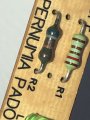
Resistor R1 is for used for LED L1 and has nothing to do with this button.
Resistor R2 is used with button P1 and should be checked and resoldered.

flexing in PCB is a common issue when there are manual controls and PCB support is less than perfect. This board has support on far sides but none in the middle. this means middle of PCB can be bent. i would put jumpers on longer traces as shown here:
1674741894609.png
 

panic mode

Joined Oct 10, 2011
5,003
1. probably 5VDC
2. Both buttons
3. LED L2 (current limiting resistor for this LED is not on this board)
4. 0VDC

R1 = current limiting resistor for LED L1
R2 = current limiting resistor when both P1 and P2 are on.
 

Thread Starter

ClubmanGT

Joined Jan 25, 2023
17
use any thin insulated wire (PVC or enameled).

Resistor R1 is for used for LED L1 and has nothing to do with this button.
Resistor R2 is used with button P1 and should be checked and resoldered.

flexing in PCB is a common issue when there are manual controls and PCB support is less than perfect. This board has support on far sides but none in the middle. this means middle of PCB can be bent. i would put jumpers on longer traces as shown here:
View attachment 286091
Thank you for this.

I replicated the wiring(which was an absolute pain on something so small... wires popping off everywhere)

The issue still remains. :(

Dead button, but as soon as I put my thumb on the R1 it begins working...

I tried to flex the board without placing my thumb in the exact position but nothing worked. Only when my thumb was in that spot it fired up.
 

Thread Starter

ClubmanGT

Joined Jan 25, 2023
17
1. probably 5VDC
2. Both buttons
3. LED L2 (current limiting resistor for this LED is not on this board)
4. 0VDC

R1 = current limiting resistor for LED L1
R2 = current limiting resistor when both P1 and P2 are on.
When the unit is on and running the P2 Switch works as it should.
 

Thread Starter

ClubmanGT

Joined Jan 25, 2023
17
1. probably 5VDC
2. Both buttons
3. LED L2 (current limiting resistor for this LED is not on this board)
4. 0VDC

R1 = current limiting resistor for LED L1
R2 = current limiting resistor when both P1 and P2 are on.
Ok so I undid everything.

Tested the R2 with the multimeter, and it just reads 1.

The R1 goes to 1200

But this one doesn't move from 1

Is this the issue?
 

panic mode

Joined Oct 10, 2011
5,003
you have simple parts there that are easy to test.

PCB tracks need to be 0 Ohm

switches need to measure 0 Ohm when closed, and high value when open.

resistors should measure according their marked value.
cannot see color rings clealy on R2, picture is too dark. try closeup photo with better light.

also you need to state the units of measured values. 1 what? 1 kOhm sounds reasonable. 1 Ohm or 1 MOhm are way out of normal.
 

Thread Starter

ClubmanGT

Joined Jan 25, 2023
17
you have simple parts there that are easy to test.

PCB tracks need to be 0 Ohm

switches need to measure 0 Ohm when closed, and high value when open.

resistors should measure according their marked value.
cannot see color rings clealy on R2, picture is too dark. try closeup photo with better light.

also you need to state the units of measured values. 1 what? 1 kOhm sounds reasonable. 1 Ohm or 1 MOhm are way out of normal.
Sorry, I appreciate it's probably very frustrating but I really value your help.

Testing them all again, the only anomaly is R2. Doesn't do anything on the multimeter.

When I say 1. I mean the Resistance at 2k or 20k Ohm on the handset. It seems the default is 1. even when not in contact with anything.

For example if I touch R1 the reading goes from 1. to 1.205

I hope this helps.
 

Thread Starter

ClubmanGT

Joined Jan 25, 2023
17
you have simple parts there that are easy to test.

PCB tracks need to be 0 Ohm

switches need to measure 0 Ohm when closed, and high value when open.

resistors should measure according their marked value.
cannot see color rings clealy on R2, picture is too dark. try closeup photo with better light.

also you need to state the units of measured values. 1 what? 1 kOhm sounds reasonable. 1 Ohm or 1 MOhm are way out of normal.
 

Attachments

LesJones

Joined Jan 8, 2017
4,511
In the pictures in post #22 it looks like the end of R1 that connects to LED L1 is poorly soldered. I think pressing on the resistor causes it to make contact with the track.

Les.
 

Thread Starter

ClubmanGT

Joined Jan 25, 2023
17
@panic mode I fixed it!!!
Also thanks @LesJones

So here is what I did....

Checked all the solder and still nothing but same results.

So I plugged it in live, had a spare bit of wire and started poking... Yes stupid I know.

Turns out... L1 is faulty/blown...

So bridging the gap with the wire made it work as normal...

I don't have a spare LED so I bridged the gap with solder and her presto...

The relic lives on!

special Cudos for Panic and his amazing patience.

Big respect and case closed.

Thank you
 
Top