PID control

Thread Starter

Exjay

Joined Nov 19, 2015
196
Hello, I'm building three projects on robotics, mainly: line following robot, obstacle avoiding and IR controlled bot. Nonetheless, I am stuck in the PID control in my Arduino code. I am getting discouraged already in the line following robot. I will paste my code soon.
 

BobTPH

Joined Jun 5, 2013
11,515
For PID control you need an analog error signal. How are you getting that with a line follower? Normally one uses two photocells, which produce a 2-bit binary signal. I have made one that simply turned left or right when the corresponding sensor does not see the line.
 

liaifat85

Joined Sep 12, 2023
200
This is an Arduino-based line follower robot with a PID controller: https://www.hackster.io/anova9347/line-follower-robot-with-pid-controller-cdedbd
The distinguishing feature of the PID controller is the ability to use the three control terms of proportional, integral, and derivative influence on the controller output to apply accurate and optimal control.
If you want to do more PID controller-based projects, you can see here: https://www.pcbway.com/project/shareproject/Egg_Incubator_with_PID_controller_b5401c74.html
 

BobTPH

Joined Jun 5, 2013
11,515
Okay, I see. it uses an array of 8 detectors, giving you a very rough idea of how far off the line you are. i.e 3-bit -3..0..+3 and unknown for the eighth state (no detectors on.)

I suppose you could do a PID algorithm with that, but my gut feel is that fuzzy logic might be better.
 

strantor

Joined Oct 3, 2010
6,875
Okay, I see. it uses an array of 8 detectors, giving you a very rough idea of how far off the line you are. i.e 3-bit -3..0..+3 and unknown for the eighth state (no detectors on.)

I suppose you could do a PID algorithm with that, but my gut feel is that fuzzy logic might be better.
@liaifat85 is not the TS, @Exjay is.

The 8-sensor robot linked by @liaifat85 has 8 analog sensors or analog-ish sensors. In either case it provides more than 8 bits of data.
 

Attachments

crutschow

Joined Mar 14, 2008
38,504
I also suggest looking at Fuzzy Logic, which is digital, as compared to PID which is fundamentally analog, for control.
It basically uses a series if If-Then-Else statements for control, and it is thus generally easier to see what to tweak to get the desired results, as compared to PID which uses somewhat opaque statements to emulate the analog Proportional, Integral, and Differential functions.
Here's a good tutorial on that from a member of the Seattle Robotics Society.
 

Thread Starter

Exjay

Joined Nov 19, 2015
196
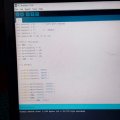
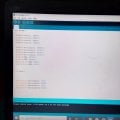
Thanks all. Please, I am taking things one step at a time. Please my motor does not even move a bit.IMG_20231224_180657_886.jpgIMG_20231224_180729_845.jpg
 

ericgibbs

Joined Jan 29, 2010
21,440
Hi Exjay,
Please post your full Arduino sketch, use the 'Insert' option on the post menu and select Code, with C Like option. Paste in your Code.
Or
Add .txt to the file name and post as a file example mysketch.ino.txt
E
 

Thread Starter

Exjay

Joined Nov 19, 2015
196
C:
int sensor1 = 7;      // Left most sensor
int sensor2 = 1;
int sensor3 = 2;      //  sensor
int sensor4 = 5;
int sensor[4] = {0, 0, 0, 0};

// Motor Variables
int ENA = 13;
int motorInput1 = 8;
int motorInput2 = 9;
int motorInput3 = 10;
int motorInput4 = 11;
int ENB = 12;

void setup()
{
  pinMode(sensor1, INPUT);
  pinMode(sensor2, INPUT);
  pinMode(sensor3, INPUT);
  pinMode(sensor4, INPUT);
 
  pinMode(motorInput1, OUTPUT);
  pinMode(motorInput2, OUTPUT);
  pinMode(motorInput3, OUTPUT);
  pinMode(motorInput4, OUTPUT);
  pinMode(ENA, OUTPUT);
  pinMode(ENB, OUTPUT);
  digitalWrite(ENA, HIGH);
  digitalWrite(ENB, HIGH);
}

void loop()
{

 
  digitalWrite(motorInput1, LOW);
  digitalWrite(motorInput2, HIGH);
  digitalWrite(motorInput3, LOW);
  digitalWrite(motorInput4, HIGH);

 
}
This is a test to run the motor. Unfortunately, it didn't turn any motor.
Please, just for confirmation, is the D2 pin number 5 for Arduino nano?
 

ericgibbs

Joined Jan 29, 2010
21,440
Hi Exjay,
Downloaded and run your Code,
What do you expect to happen on this Code section?
I am assuming these are the 4 wires to your motor?
E

void loop(){
digitalWrite(motorInput1, LOW);
digitalWrite(motorInput2, HIGH);

digitalWrite(motorInput3, LOW);
digitalWrite(motorInput4, HIGH);

}
 

Thread Starter

Exjay

Joined Nov 19, 2015
196
Hi Exjay,
Downloaded and run your Code,
What do you expect to happen on this Code section?
I am assuming these are the 4 wires to your motor?
E

void loop(){
digitalWrite(motorInput1, LOW);
digitalWrite(motorInput2, HIGH);

digitalWrite(motorInput3, LOW);
digitalWrite(motorInput4, HIGH);

}
I am expecting it to run my motor, but nothing of such happened.
 

ericgibbs

Joined Jan 29, 2010
21,440
Hi Ex,
Have you worked out the time interval the motor drive is On/Off ?
The Code is running VERY fast in that loop.

Do you have a spec sheet for the motor you could post?
E
 

Thread Starter

Exjay

Joined Nov 19, 2015
196
Hi Ex,
Have you worked out the time interval the motor drive is On/Off ?
The Code is running VERY fast in that loop.

Do you have a spec sheet for the motor you could post?
E
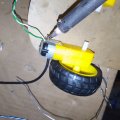
I do I test the hardware that is working based on the code. The motors are mini ones for robotics car.IMG_20231209_201304_254.jpg
 

Thread Starter

Exjay

Joined Nov 19, 2015
196
I have detected the problem. The pin number are not incongruent with the online pin configuration. So, pin 2 is D2 and the rest in that order. Instead of following pin2 after TNX which is pin1
 
Top