Odd Question for an Odd Problem: Making an Old Scoreboard into a Clock

Jon Chandler

Joined Jun 12, 2008
1,609
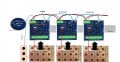
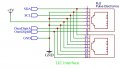
Here is the connection diagram I posted on the previous page. You may have missed it because I posted a thumbnail to click to make it full size.

Connections.jpg

From your pictures, it looks like you have some janky connections for pin 17, the common supply to the board. No. Connect pin 17 to the upper terminal block as I showed please. If you feel the need to fuse +12v, fuse it where it feeds into the driver board.

The "1"s are connected to the upper terminal block as shown. A solder jumper on the two boards connected to a "1" must be shorted with a blob of solder depending on which side of the scoreboard it's on.

The LEDs must be inserted with the positive terminal to the positive common connection on the board. DO NOT POWER THE SYSTEM UP WITH INCANDESCENT BULBS IN THE DIGITS.

As I did state, the I2C interface between the boards should be as short as possible. Extending the wires between the driver boards and digit boards may be required to keep the interface distance short. Try it as you have it and see.

I admire how quickly and nicely you've gotten the boards put together. But please, ask questions and don't get creative if something isn't clear. I'm sure I haven't explained every detail well enough at this point.
 

Thread Starter

r8f1k

Joined Oct 1, 2023
164
Here is the connection diagram I posted on the previous page. You may have missed it because I posted a thumbnail to click to make it full size.

View attachment 306238

From your pictures, it looks like you have some janky connections for pin 17, the common supply to the board. No. Connect pin 17 to the upper terminal block as I showed please. If you feel the need to fuse +12v, fuse it where it feeds into the driver board.

I haven't connected pin 17 yet. I will follow your instructions and connect it to the common wire from the light board.

The "1"s are connected to the upper terminal block as shown. A solder jumper on the two boards connected to a "1" must be shorted with a blob of solder depending on which side of the scoreboard it's on.

Understood.

The LEDs must be inserted with the positive terminal to the positive common connection on the board. DO NOT POWER THE SYSTEM UP WITH INCANDESCENT BULBS IN THE DIGITS.

Understood.

As I did state, the I2C interface between the boards should be as short as possible. Extending the wires between the driver boards and digit boards may be required to keep the interface distance short. Try it as you have it and see.

Understood. I have a kit for making RJ connectors, haven't used it in a while, but I'm sure I can sort it out. Any suggestions on the type of wire to use? Cat5? Cat5e? Cat6? I have access to plenty of most options.

I admire how quickly and nicely you've gotten the boards put together. But please, ask questions and don't get creative if something isn't clear. I'm sure I haven't explained every detail well enough at this point.

Thank you, it is a project I have been wanting to do for several years. I will post again as progress is made, I will finish up the boards ASAP.

As this progresses, I have looked and found LED bulbs that are 12v that can screw into E26 bulb bases like I have. Is that an option going forward in order to indicate AM/PM and the solstice/equinox functions? I assume another custom board would have to be made to those functions.

I currently have a student who loves programming working with the Arduino. He has a completed driver board, the Arduino, the expander chip and the clock chip. He thinks in couple days he could knock out a simple program.
 

Jon Chandler

Joined Jun 12, 2008
1,609
As far as the RJ45 jumpers, I recommend purchasing CAT6 patch cables. We're pushing the limits of length for an I2C interface so having the highest quality cables is important. I'd like the total length of cable between the driver boards and microcontroller to be less than 6 feet. Use the shortest cable possible between boards and microcontroller.

Do not "upgrade" to shielded cables - that's likely to harm rather than to help.


1698689134245.png
 

Thread Starter

r8f1k

Joined Oct 1, 2023
164
Patch cables ordered, working on finishing up some of the wiring, boards, etc. Based on the diagram for the driver board where it shows "To Micro", that is obviously an RJ45 female port, but what is the ideal connection to the Arduino? The Arduino has a USB Type B female port, would that be the best connection to the RJ45 port on the driver board? Should I find an adapter from Cat6 male to USB type B? If so, it looks like there is no direct connection, a couple of adapters would be needed.
 

Jon Chandler

Joined Jun 12, 2008
1,609
You'll need a break out board from the RJ45 to header pins at the Arduino end. And some female-female Dupont jumper cables.

The schematic shows the connections. Signals will be connected to port pins on the Arduino.

Pin 1 connects to the Arduino's SDA pin

Pin 3 connects to the Arduino's SCL pin

(Please watch a video on using the Arduino to control an MCP23017 to see how the I2C interface works. The Arduino I believe has internal pullup resistors but external 4.7k pullups may be better in this case.,)

Pin 5 connects to the Arduino's +5 volt pin.

(I have no idea what you're using as a power supply or if you've connected +5v to each driver board. But that supply should provide +5v to the Arduino.)

Pins 7 & 8 connect to port pins (digital i/o pins), each of which control one of the "1' boards (assuming solder jumpers were made on the associated driver boards as previously mentioned).

Connect any one of the ground pins to the Arduino's ground pin.


Make the connections between ONE DRIVER BOARD and the Arduino and BEEP THEM OUT BEFORE APPLYING POWER. Test with only one board connected and develop code with only one board connected until things are figured out.

I am extremely uneasy about this project because I don't have much idea of what you've got hooked up and how......


SmartSelect_20231106_075911_Dropbox.jpg
 
Last edited:

Thread Starter

r8f1k

Joined Oct 1, 2023
164
You'll need a break out board from the RJ45 to header pins at the Arduino end. And some female-female Dupont jumper cables.

The schematic shows the connections. Signals will be connected to port pins on the Arduino.

Pin 1 connects to the Arduino's SDA pin

Pin 3 connects to the Arduino's SCL pin

(Please watch a video on using the Arduino to control an MCP23017 to see how the I2C interface works. The Arduino I believe has internal pullup resistors but external 4.7k pullups may be better in this case.,)
Will do.
Pin 5 connects to the Arduino's +5 volt pin.

(I have no idea what you're using as a power supply or if you've connected +5v to each driver board. But that supply should provide +5v to the Arduino.)
Xbox power supply
Pins 7 & 8 connect to port pins (digital i/o pins), each of which control one of the "1' boards (assuming solder jumpers were made on the associated driver boards as previously mentioned).

Connect any one of the ground pins to the Arduino's ground pin.


Make the connections between ONE DRIVER BOARD and the Arduino and BEEP THEM OUT BEFORE APPLYING POWER. Test with only one board connected and develop code with only one board connected until things are figured out.
Understood
I am extremely uneasy about this project because I don't have much idea of what you've got hooked up and how......
Power supply is hooked up, Xbox as recommended. Power supply feeds to a wired into a maxi fuse block, then to a distribution block and is split into the following (5V, 12V, 12V, Ground, 5V, 12V, 12V, Ground). The first (5V, 12V, 12V, Ground) feeds the top displays and driver boards, the second (5V, 12V, 12V, Ground) feeds the lower displays and driver boards.

All the boards are built and installed. All the lighted displays are wired to the terminal block connectors. I'm still working on wiring up the 12V power and the commons to the boards. Might take me a little while yet. Still have 1300 trees to prune in the orchard this week.
 

Thread Starter

r8f1k

Joined Oct 1, 2023
164
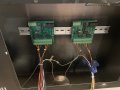
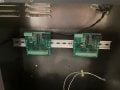
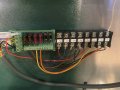
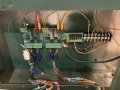
Here is a photo of some of the wired up boards. The large dark grey cable is the power supply feed into the distribution strip. Question, when I check for continuity between the grounds, I get no continuity between ground and connection “17” on the driver boards. Is that correct?
 

Attachments

Jon Chandler

Joined Jun 12, 2008
1,609
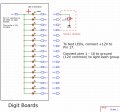
I get no continuity between ground and connection “17”
I definitely hope not! Pin 17 is the +12V common connection for the LEDs on the digit boards. Please review the attached drawing to understand what's going on - the MOSFETs on the driver board provide the ground connection for the LEDs. Verify LED orientation and test method (with driver board unplugged) to verify LEDs.

Scoreboard LED connections.jpg
 

Thread Starter

r8f1k

Joined Oct 1, 2023
164
I definitely hope not! Pin 17 is the +12V common connection for the LEDs on the digit boards. Please review the attached drawing to understand what's going on - the MOSFETs on the driver board provide the ground connection for the LEDs. Verify LED orientation and test method (with driver board unplugged) to verify LEDs.

View attachment 307018
I got it now. Typically in automotive, common is ground or a shared path to ground. I see now what the configuration is. Thank you!
 

Thread Starter

r8f1k

Joined Oct 1, 2023
164
Ok, so we (some of my students and I) have been attempting to get a program to run. I have a video that explains everything, what is the best way to upload a video?
 

Jon Chandler

Joined Jun 12, 2008
1,609
Let's see....

1. Where is the green RJ-45 cable from the driver board going? I suggest disconnecting it and starting with only one board connected.

2. Have you set different addresses on each driver board with the dip switches?

3. I'm not overly familiar with Arduino code....
A. Do you have pullup resistors enabled for SDA and SCL? Probably best to use 4.7k pullup resistors on those lines to +5v.

B. Have you defined the I2C address in the code to agree with the dip switch setting of the single connected board (as per #1)

C. It will be helpful to look for I2C address scanner code (may be a part of existing I2C library) to verify you're trying to talk to the right device.

D. The I2C library should set the necessary data format and set up all the MCP23017 registers (of which there are many).

E. Look for the simplest Arduino MCP23017 example that lets you toggle the output pins. Set the address correctly and as you cycle through the 16 output pins, the LED groups should flash. Get some life, then work on defining the patterns for the digits.


Regarding the Digit A and B connections - these are digital (high or low) lines to turn on the "1" digit. A low should illuminate the digit, a high extinguish it. Note there's a solder jumper on the digit driver board that must be jumped to enable the "1" on the adjacent digit driver board.
 

Jon Chandler

Joined Jun 12, 2008
1,609
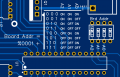
Arrgghh. I don't know if this is part of your problem - the I2C addresses I showed on the silk screen aren't correct. My apologies.

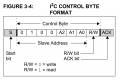
Here is the addressing per the datasheet.

improper silk screen.png


I2C address.png
 
Top