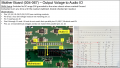
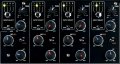
Yep, the voltages match the schematic except the 15V ones being 3V higher than the spec which I believe is okay.
I understand you need to leave, but I'll post some circuit details.
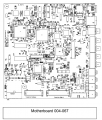
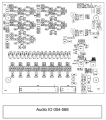
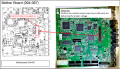
After the PSU we have the motherboard (004-067) which plugs into the Audio IO (004-068).
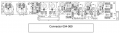
To the Audio IO comes a connector from the Connector PCB (004-069) - This is the pannel to which RCA audio cables are plugged into.
I placed the rough schematics below, respectively.
I'll wait on your response to resume live testing on the next proposed PCB.
At this time, my feeling is the Motherboard not processing signal from the Audio IO.
From here on it is going to be very challenging without the circuit schematics and special test equipment.
I am going to assume that all you have is a DMM. Having access to an oscilloscope would be very helpful.
Without the schematics and an oscilloscope, we will have to hobble along the best we can.
At the very least, we will need an audio source such as an MP3 player.
Then we will need a playback device such as a computer amplified speaker.
The question is, how much usage will you get out if it after this project?
Also bear in mind that we may not be able to get this mixer working.
A solid handheld DMM and oscilloscope for under $100 would be worth it at this point if you don't have an oscilloscope.
We can still do some trouble shooting with an MP3 player and an amplified speaker. I will let you decide.
The question is, how much usage will you get out if it after this project?
Also bear in mind that we may not be able to get this mixer working.
A solid handheld DMM and oscilloscope for under $100 would be worth it at this point if you don't have an oscilloscope.
We can still do some trouble shooting with an MP3 player and an amplified speaker. I will let you decide.
Understood. I purchased the one you proposed arrives Sat March 4th.
I’ll check in here then.
If I can at least figure out which board is faulty then I’ll replace the module. If we can get down to the component, then it’s a greater win.
Hi MrChips
I hope you are doing well!
I prepared a well-organized PPT with excellent close-ups. I could not upload it here, please use my GDrive link to download it. Please confirm receipt.
Let us focus on the functionality of the input selection.
Does the mixer work fully when the INPUT SELECT toggle switch is in USB or DIG setting?
Do the numbered LEDs 1, 2, 3, 4 also work?
The LEDs fail to work when the toggle switch is set to ANA?
If all of the above is correct then it would appear that the problem is a digital control problem on the mother board.
Can you locate the connector that connects the control panel to the mother board?
Sorry. Again I will be away from the computer for a long while.
I will have to catch up tomorrow. In the meantime, I have to think of how we can proceed with this.
We can check the voltages and analog signals on the Connector PCB but I am convinced that the problem lies on the Mother Board 004-067 or on the Master PCB 004-070.
No problem.
I'm reconnecting it and checking the requested checks above and will add the results back here. If you don't respond today that's fine. No pressure. I appreciate your guidance through this.
Quoted
"Does the mixer work fully when the INPUT SELECT toggle switch is in USB or DIG setting?
Do the numbered LEDs 1, 2, 3, 4 also work?"
The numbered LEDs work on all four channels and for all selections (ANA, DIG, USB).
I confirmed all four channels read digital input.
I confirmed all four channels read USB input.
The sound card has 4 stereo and 4 mono channels, I ran them one by one and they all deliver signal through the booth output of the mixer.
I am also convinced the problem is in the motherboard. However, between the motherboard and the Connector PCB lies the Audio IO. Can we check that one in some way to see if it is reading ok?
I'm going to prepare HD photos if the Audio IO and will update the PPT.
The numbered LEDs work on all four channels and for all selections (ANA, DIG, USB).
I confirmed all four channels read digital input.
I confirmed all four channels read USB input.
The sound card has 4 stereo and 4 mono channels, I ran them one by one and they all deliver signal through the booth output of the mixer.
Analog signal does not reach booth output. Not even metering on the 4 channels leds.
The selection green led sign lights up when the selection is on ANA however no signal is seen on the fader led or booth output.
on the other hand, Digital and USB selections reach booth output as normal.
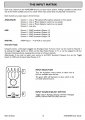
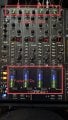
I attached an image to explain my point about selector led vs fader led.
As you can see, when in digital mode, the fader led sees signal and outputs to booth. Same for USB, just not Analog.
Just for clarity reasons, the channel selector led light is simply showing to which channel is the signal being routed.
That has nothing to do with the toggle switch for (ANA, Digital, USB)
USB, DIG signals reach booth output and headphones, and fader LEDs work.
ANA signals do not reach booth output or headphones. Fader LEDs do not work.
Is that correct?
If so, sounds like a problem with the switch matrix.
Let me look into it.
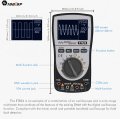
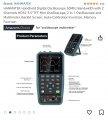
Congrats with acquiring a new toy, the dual function DMM.
Now, try to learn how to use it.
Start with testing a simple 1.5V battery. Use the meter on Voltage measurement input only, for now. Otherwise you risk blowing something inside, such as a fuse.
After straight DC measurements, see if you can measure the audio signal coming out of any audio source such as an MP3 player.
I would be interested in seeing some photos of this.
It is interesting what I hear in the headphones when I have the channel switched to ANALOG.
I hear static audio noise. If I play a track into the analog channel, that sound does not gain or change. It's just static noise kind of indicating something is blown in the analog circuit.
Thank you!!! I already read the instructions for it on how to switch back and forth between DMM and Oscilloscope.
I'll check how to read the audio with it. The RCA has White and Red terminals attached to the board.
Each RCA plug has a tip and a shield. Just to baseline what an audio signal looks like, how do I attach the multimeter to it?
Red on the tip and black on the shield?

 Facebook
 Google
 GitHub
 Linkedin