More KiCad things

Thread Starter

panic mode

Joined Oct 10, 2011
5,011
KiCad 10 was just released. Usually i wait till there are couple of bugfix releases but i decided to give it a go and maybe share few comments in general, not necessarily tied to this release.
As before, one can install multiple versions side by side. This can be handy if doing comparisons or until migration is complete but... once the project is saved in newer version, there is no going back.
So if you do like the idea of falling back, save project under different name.

Right of the bat i notice that tool bars both in schematic editor and pcb editors are shorter, so one may need to use keyboard hotkeys or make selections from menu... or... go to preferences and customize toobar yourself. also the padding around toolbar icons is reduced.

1776548637334.png

But otherwise everything appears the same. even my favourite pet peeve - part name is still called "Value". although really this is NOT the value. it is the SKU or order part number. for example capacitor may have value 100uF but that is not the part order number and there can be many products with different shape size specs or technologies that are still "100uF". so personally i just find it ridiculous to call this field "Value". but one can always add more fields and at least i do not have to alter my libraries:
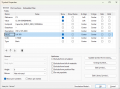
1776549717465.png

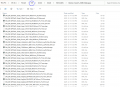
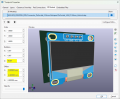
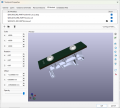
Talking about libraries, as before this is still domain of personal effort. Many parts included in the library are incomplete, most notably there are quite few that lack 3D models. i am not trying to knock down librarians, in fact it is amazing what handful of really busy volunteers managed to organize. But it is a fair statement that people have been deceived by relying on something that is a part of the library - myself included. One thing is that some 3D models are not included, but in the past it was standard practice that multiple models of same thing were included (.STP, .STEP, .WRL). This is no longer the case, from what i see so far all 3D models are *.STEP format. this cuts down on clutter and wasted HDD space.
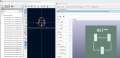
1776551161540.png

example of duplicates in 9.x

1776551365571.png
 
Last edited:

Thread Starter

panic mode

Joined Oct 10, 2011
5,011
and encountered interesting bug which i was unaware of before (and i have been using this for years). clicking "a" to add new part to schematics opened selection dialogue but it became huge. it was exceeding limits of two 4k monitors. apparently this is something know for some time and happens if one moves the window between two monitors with different settings (resolution, DPI, whatever). it repeatedly increases window size, beyond bounds of combined displays. of course it should check if window is moved, then use event when moving is complete, to set property MaximumSize to match bounds of active display, and any popup window (child) size should be limited to not more than 75% of that display. this should be an easy fix , just 2-3 lines of code. how come this is not taken care of? or maybe it got reintroduced...

anyway solution was to close KiCad completely, then navigate to %APPDATA%\kicad\10.0\ and delete eeschema json file (or eeschema.json / eeschema-v2.json)
that ended "forgetting" paths to libraries and pointing them to Documents folder, which is just an empty folder structure (no files). This was easily fixed and i wanted to prevent same thing from happening again. so, Google AI suggested:


"Excellent idea—locking this in now will save you from another headache later. Let's start with the High-DPI Manifest Override, as it's the most effective way to stop Windows and KiCad from fighting over window sizes.

1. Force "System" DPI Scaling (The Permanent Fix)
This forces Windows to handle the scaling of the "Add Symbol" window so it doesn't try to auto-resize based on crossing monitor boundaries.
  1. Close KiCad.
  2. Find the KiCad 10.0 shortcut on your desktop or Start Menu.
  3. Right-click it and select Properties.
  4. Go to the Compatibility tab and click Change high DPI settings.
  5. Check the box: "Override high DPI scaling behavior".
  6. In the dropdown below it, change "Application" to "System (Enhanced)".
  7. Click OK and Apply.

2. Back up your "Perfect" Config
Now that your window sizes and library paths are correct, save a snapshot of the config files. If the window ever blows up again, you just copy-paste these back in.
  1. Open File Explorer and go to %APPDATA%\kicad\10.0\.
  2. Copy these three files to a safe "Backup" folder (like C:\KiCad\USER\Backup_Config\):
    • eeschema.json (Stores window sizes)
    • sym-lib-table (Your fixed library links)
    • fp-lib-table (Your footprint links)

3. Optional: "Read-Only" Lock (The "Nuclear" Option)
If the window keeps growing despite the settings above, you can "freeze" the window size:
  1. Resize the "Add Symbol" window to your perfect size one last time and close KiCad.
  2. Go to %APPDATA%\kicad\10.0\.
  3. Right-click eeschema.json > Properties.
  4. Check Read-only and click Apply.
    • Note: This stops the bug, but also means any changes you make to schematic preferences (like grid size or wire thickness) won't save until you uncheck it.
If you want to be extra safe, let me know:
  • If you’d like a batch script that automatically restores your backups every time you launch KiCad.
  • If you’ve noticed any blurry text after changing the High DPI settings.

"

so far everything is back in working order. time will tell...
 
Last edited:

Irving

Joined Jan 30, 2016
5,138
Many parts included in the library are incomplete, most notably there are quite few that lack 3D models
I've spent many hours searching on GrabCAD, etc. for suitable STEP files, and have created many of my own for various projects. Sadly I've never found the time or process for sharing my own back.
 

Thread Starter

panic mode

Joined Oct 10, 2011
5,011
i did the same and i wanted to offer my creations to be included into libraries and help others but it is not as simple as sending a ZIP file. there is a standard that one need to read and adhere to, possibly tweak own creations to meet the standard and then send them to librarians. i know that many things i use would need some touching up because i also have a standard... and my own standard is centering footprint on the grid. to use 3D models if easily found or make my own. but ones i find i cannot (easily) edit so i either use them as is or make my own. and the sad things is that 99% of 3rd party models do no meet my or KiCad standard that says that 3D model need to fit in without ANY offset, rotation, scaling...
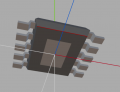
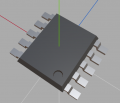
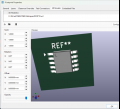
i did try to make that work but ultimately gave up. i do not have that kind of time. (sigh... sorry...). also, judging by the release 10.0, all 3D models are in STEP format. i started with WRL decades ago and still use it. WRL files are 4-5 times smaller and i can easily create what i need using Wings3D which is pretty lightweight. i do not have fancy cad. oh well... just an hour ago i made an ESOP10 which KiCad did not have.
1776621017265.png
1776621033133.png

1776621338833.png

but cannot do that with models others have created without applying corrections:
1776621640653.png

another case is placement of the screws. sure they can be added into 3D model but not sure i feel like editing 50 models in some 3D software when one can simply add new line(s) in 3D view of the footprint which is simple copy and paste.
1776623601960.png
 
Last edited:

cmartinez

Joined Jan 17, 2007
8,783
KiCad is supposed to have simulation capabilities, similar to LTSpice, for example. But I have never tried it. Does anyone here have any experience with it?
 

Irving

Joined Jan 30, 2016
5,138
KiCad is supposed to have simulation capabilities, similar to LTSpice, for example. But I have never tried it. Does anyone here have any experience with it?
Tried it once, didn't play nice, never bothered again. Pity 'cos LTSpice schematic is pants compared to KICad.
 

Thread Starter

panic mode

Joined Oct 10, 2011
5,011
if i recall correctly simulation existed in KiCad for quite some time, way before V8. i may try it on my next trip - usually not much to do anyway... unless someone knows Savannah GA and has some tips ;)
 

cmartinez

Joined Jan 17, 2007
8,783
never tried it but there tutorial online for those that have spare 30min

Great tutorial ... but it seems that KiCad is not installed with a pre-existing component library, and one has to download and install each component individually ... I guess they have to start from somewhere, and it will only get better with time.
 

Thread Starter

panic mode

Joined Oct 10, 2011
5,011
had encountered an issue that corrupted a mid-size project. not only the autosave did not work but the files actually got corrupted. day of lost work plus another day to redo it. turns out version 10.0.03 has the fix but previous 10.x are trouble. somebody decided that using GIT style backup is a good idea... until it did not work. not only it stopped backing up but copies were old and corrupted and changes are saved as zillion snippets so good luck recovering from that... with ZIP is simple, you open the archive and voila, everything is there ready to be used.

so had to upgrade to 10.0.03, make sure that old ZIP style autobackups are working, delete the messed up project, restore one from last good backup and redo changes...

it works again but... should have stayed on 9.0.7 but once you install newer version and save, older software cannot read it. so if one already did an upgrade, the only way forward is to keep upgrading...
 

Thread Starter

panic mode

Joined Oct 10, 2011
5,011
the funny thing is that both schematics and board editor passed DRC 100% but... they did not even match. for example board was showing several U3 packages stacked on top of each other. or U7 had also 4 instances but two of them were completely wrong packages (original soic-16, then one more dpack and one more as sot89). D34 was also appearing as SOD-123 (correct) and SOT23-5 (wrong) but... the wrong one was marked D41... so clicking on any of them in any editor would highlight all of them in other editor and 3D viewer. and DRC still found no problem with that.
that is on a board 6x"8" with 400 parts, 1000 SMD pads and 140 THT pads. i think some 50 parts were messed up and many nets. i do not just rely on autosave, i regularly hit Ctrl+S but... saving files is silent (no hint when something was wrong). in later experiments it looked like corruption was just getting worse with each save and netlist import to pcb editor. i am glad i found it when i did because next week and a half i was doing a lot of work and silent fails would be absolute disaster.
 
If the KiCad team does not solve the bugs of their latest version, I don't think continuing to use Kicad 10 makes any sense. Kicad 9 was more stable and convenient. Switching to other software like Easyeda, altium or LTspice can be a solution too. Here is a list of Top 10 free PCB design software of 2026.
https://www.nextpcb.com/blog/top-10-free-pcb-design-software-2026
Yes, this write-up has listed KiCad as #1 but there are many other free and good alternatives mentioned.
 

Thread Starter

panic mode

Joined Oct 10, 2011
5,011
the good news is that one never had more freedom to choose... there is plenty of EDA products and for every budget.

As with any product, KiCad is not immune to bugs, the issues are more likely in early releases (lower minor version means less mature release).
Higher major versions have more features but higher minor versions are more mature....

Therefore, those interested in stability should aim for higher minor version.

For example 9.0.9 (minor version 9) is more likely (expected) to be much more stable than 10.0.2 (minor version 2), even though major version 10.0 is higher than 9.0.
Also good idea is to backup all projects before upgrading to next major version. because one the file is saved in new version, there is no going back (at least not conveniently) so having backup is a good idea. and if you are running product with low minor version (like 10.0.1 or 10.0.02) keep an eye on new releases. Since upgrade to 10.0.3 i had no crash or project corruption, backups are what i expect them to be. In other word, things are running smoothly again.

And while there is a lot of alternatives out there, choosing EDA is a major decision, because of cost, learning curve, lung term support, dependency on cloud or other online resources etc.
need to decide what matters to them. Not everyone will have same needs. Some users like commercial libraries, or polished autorouter. This is what newbs are usually after. To me, it matters much more that same software can handle anything, any size. any number of layers, any number of connections and - use it commercially. To me, libraries are not important, i consider them secondary at best. Reason is that nobody uses 15000 parts all the time. if you reach 150, that is a lot. And i do prefer to make mine - this means library is smaller, faster loading, contains fields i want, footprint is centered on part, not on pin1, etc.

Unfortunately there is a learning curve to all of the products. Years ago i tried bunch of different products in an effort to pick one and buy full license. For more than 6 months i tried every version i could get my hands on. And was let down more than once. For example, one case: fully polished project was finally approved and i was trying to place the order. And that is when free software (not KiCad) decides it is time to renew license online. And it fails... the automatic renewal process craps out... And it took a week and several emails before being able to even open and look at the complete design. In the end i did get it but it was royal PITA so decision was made - i do not want to be held hostage ever again.

choose wisely...
 
Last edited:

cmartinez

Joined Jan 17, 2007
8,783
And here's my first beef with version 10.0.03

In the symbol properties dialog, I want to type ..\..\SD103AWS-TP.pdf in the datasheet field so I can access the file and the stupid thing keeps correcting me, and filling the field with file://../../SD103AWS-TP.pdf instead. And that, of course, does not work for the OS ... any way to fix this?
 
Top