More KiCad things

Thread Starter

panic mode

Joined Oct 10, 2011
4,915
KiCad 10 was just released. Usually i wait till there are couple of bugfix releases but i decided to give it a go and maybe share few comments in general, not necessarily tied to this release.
As before, one can install multiple versions side by side. This can be handy if doing comparisons or until migration is complete but... once the project is saved in newer version, there is no going back.
So if you do like the idea of falling back, save project under different name.

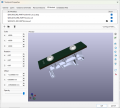
Right of the bat i notice that tool bars both in schematic editor and pcb editors are shorter, so one may need to use keyboard hotkeys or make selections from menu... or... go to preferences and customize toobar yourself. also the padding around toolbar icons is reduced.

1776548637334.png

But otherwise everything appears the same. even my favourite pet peeve - part name is still called "Value". although really this is NOT the value. it is the SKU or order part number. for example capacitor may have value 100uF but that is not the part order number and there can be many products with different shape size specs or technologies that are still "100uF". so personally i just find it ridiculous to call this field "Value". but one can always add more fields and at least i do not have to alter my libraries:
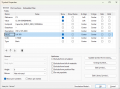
1776549717465.png

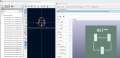
Talking about libraries, as before this is still domain of personal effort. Many parts included in the library are incomplete, most notably there are quite few that lack 3D models. i am not trying to knock down librarians, in fact it is amazing what handful of really busy volunteers managed to organize. But it is a fair statement that people have been deceived by relying on something that is a part of the library - myself included. One thing is that some 3D models are not included, but in the past it was standard practice that multiple models of same thing were included (.STP, .STEP, .WRL). This is no longer the case, from what i see so far all 3D models are *.STEP format. this cuts down on clutter and wasted HDD space.
1776551161540.png

example of duplicates in 9.x

1776551365571.png
 
Last edited:

Thread Starter

panic mode

Joined Oct 10, 2011
4,915
and encountered interesting bug which i was unaware of before (and i have been using this for years). clicking "a" to add new part to schematics opened selection dialogue but it became huge. it was exceeding limits of two 4k monitors. apparently this is something know for some time and happens if one moves the window between two monitors with different settings (resolution, DPI, whatever). it repeatedly increases window size, beyond bounds of combined displays. of course it should check if window is moved, then use event when moving is complete, to set property MaximumSize to match bounds of active display, and any popup window (child) size should be limited to not more than 75% of that display. this should be an easy fix , just 2-3 lines of code. how come this is not taken care of? or maybe it got reintroduced...

anyway solution was to close KiCad completely, then navigate to %APPDATA%\kicad\10.0\ and delete eeschema json file (or eeschema.json / eeschema-v2.json)
that ended "forgetting" paths to libraries and pointing them to Documents folder, which is just an empty folder structure (no files). This was easily fixed and i wanted to prevent same thing from happening again. so, Google AI suggested:


"Excellent idea—locking this in now will save you from another headache later. Let's start with the High-DPI Manifest Override, as it's the most effective way to stop Windows and KiCad from fighting over window sizes.

1. Force "System" DPI Scaling (The Permanent Fix)
This forces Windows to handle the scaling of the "Add Symbol" window so it doesn't try to auto-resize based on crossing monitor boundaries.
  1. Close KiCad.
  2. Find the KiCad 10.0 shortcut on your desktop or Start Menu.
  3. Right-click it and select Properties.
  4. Go to the Compatibility tab and click Change high DPI settings.
  5. Check the box: "Override high DPI scaling behavior".
  6. In the dropdown below it, change "Application" to "System (Enhanced)".
  7. Click OK and Apply.

2. Back up your "Perfect" Config
Now that your window sizes and library paths are correct, save a snapshot of the config files. If the window ever blows up again, you just copy-paste these back in.
  1. Open File Explorer and go to %APPDATA%\kicad\10.0\.
  2. Copy these three files to a safe "Backup" folder (like C:\KiCad\USER\Backup_Config\):
    • eeschema.json (Stores window sizes)
    • sym-lib-table (Your fixed library links)
    • fp-lib-table (Your footprint links)

3. Optional: "Read-Only" Lock (The "Nuclear" Option)
If the window keeps growing despite the settings above, you can "freeze" the window size:
  1. Resize the "Add Symbol" window to your perfect size one last time and close KiCad.
  2. Go to %APPDATA%\kicad\10.0\.
  3. Right-click eeschema.json > Properties.
  4. Check Read-only and click Apply.
    • Note: This stops the bug, but also means any changes you make to schematic preferences (like grid size or wire thickness) won't save until you uncheck it.
If you want to be extra safe, let me know:
  • If you’d like a batch script that automatically restores your backups every time you launch KiCad.
  • If you’ve noticed any blurry text after changing the High DPI settings.

"

so far everything is back in working order. time will tell...
 
Last edited:

Irving

Joined Jan 30, 2016
5,053
Many parts included in the library are incomplete, most notably there are quite few that lack 3D models
I've spent many hours searching on GrabCAD, etc. for suitable STEP files, and have created many of my own for various projects. Sadly I've never found the time or process for sharing my own back.
 

Thread Starter

panic mode

Joined Oct 10, 2011
4,915
i did the same and i wanted to offer my creations to be included into libraries and help others but it is not as simple as sending a ZIP file. there is a standard that one need to read and adhere to, possibly tweak own creations to meet the standard and then send them to librarians. i know that many things i use would need some touching up because i also have a standard... and my own standard is centering footprint on the grid. to use 3D models if easily found or make my own. but ones i find i cannot (easily) edit so i either use them as is or make my own. and the sad things is that 99% of 3rd party models do no meet my or KiCad standard that says that 3D model need to fit in without ANY offset, rotation, scaling...
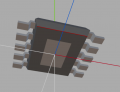
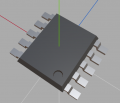
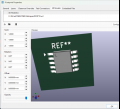
i did try to make that work but ultimately gave up. i do not have that kind of time. (sigh... sorry...). also, judging by the release 10.0, all 3D models are in STEP format. i started with WRL decades ago and still use it. WRL files are 4-5 times smaller and i can easily create what i need using Wings3D which is pretty lightweight. i do not have fancy cad. oh well... just an hour ago i made an ESOP10 which KiCad did not have.
1776621017265.png
1776621033133.png

1776621338833.png

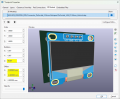
but cannot do that with models others have created without applying corrections:
1776621640653.png

another case is placement of the screws. sure they can be added into 3D model but not sure i feel like editing 50 models in some 3D software when one can simply add new line(s) in 3D view of the footprint which is simple copy and paste.
1776623601960.png
 
Last edited:

cmartinez

Joined Jan 17, 2007
8,737
KiCad is supposed to have simulation capabilities, similar to LTSpice, for example. But I have never tried it. Does anyone here have any experience with it?
 

Irving

Joined Jan 30, 2016
5,053
KiCad is supposed to have simulation capabilities, similar to LTSpice, for example. But I have never tried it. Does anyone here have any experience with it?
Tried it once, didn't play nice, never bothered again. Pity 'cos LTSpice schematic is pants compared to KICad.
 

Thread Starter

panic mode

Joined Oct 10, 2011
4,915
if i recall correctly simulation existed in KiCad for quite some time, way before V8. i may try it on my next trip - usually not much to do anyway... unless someone knows Savannah GA and has some tips ;)
 

cmartinez

Joined Jan 17, 2007
8,737
never tried it but there tutorial online for those that have spare 30min

Great tutorial ... but it seems that KiCad is not installed with a pre-existing component library, and one has to download and install each component individually ... I guess they have to start from somewhere, and it will only get better with time.
 
Top