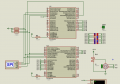
MASTER and SLAVE PICs using SPI in Oshonsoft

jayanthd

Joined Jul 4, 2015
945
Hi J2,
Testing CODE at #157in Oshonsoft:

Error: Needs HSEROPEN 9600. added, marked <<<<<<<<<<<<<<<<<<<<<<<<<<<<<<

Error: See attached:
C.
Yes, you are right. Fixed it.

Code:
Define CONFIG1L = 0x00
Define CONFIG1H = 0x02
Define CONFIG2L = 0x0e
Define CONFIG2H = 0x2e
Define CONFIG3L = 0x1c
Define CONFIG3H = 0x1d
Define CONFIG4L = 0x80
Define CONFIG4H = 0x00
Define CONFIG5L = 0x0f
Define CONFIG5H = 0xc0
Define CONFIG6L = 0x0f
Define CONFIG6H = 0xe0
Define CONFIG7L = 0x0f
Define CONFIG7H = 0x40

AllDigital

Dim data As Byte
Dim spidatareceived As Bit
Dim x As Byte
Dim msg As String

Symbol spi_cs = LATC.6
Symbol spi_cs_direction = TRISC.6


initialize_ports
initialize_variables
initialize_spi_slave
initialize_qei
Hseropen 9600
WaitMs 100
enable_interrupts

While x > 0
If spidatareceived = 1 Then
initialize_spi_master
send_spi_data CAP2BUFL
LATB = CAP2BUFL

Hserout "PORTB/CAP2BUFL/SSPBUF(DEC): ", #LATB, CrLf
data = LATB
msg = HexStr(data)
Hserout "PORTB/CAP2BUFL/SSPBUF(HEX): ", msg, CrLf
msg = "%"
           
    If data.7 = 1 Then
        msg = msg + "1"
    Else
        msg = msg + "0"
    Endif
           
    If data.6 = 1 Then
        msg = msg + "1"
    Else
        msg = msg + "0"
    Endif

    If data.5 = 1 Then
        msg = msg + "1"
    Else
        msg = msg + "0"
    Endif
           
    If data.4 = 1 Then
        msg = msg + "1"
    Else
        msg = msg + "0"
    Endif
           
    If data.3 = 1 Then
        msg = msg + "1"
    Else
        msg = msg + "0"
    Endif
           
    If data.2 = 1 Then
        msg = msg + "1"
    Else
        msg = msg + "0"
    Endif

    If data.1 = 1 Then
        msg = msg + "1"
    Else
        msg = msg + "0"
    Endif
           
    If data.0 = 1 Then
        msg = msg + "1"
    Else
        msg = msg + "0"
    Endif
           
Hserout "PORTB/CAP2BUFL/SSPBUF(BIN): ", msg, CrLf
           
initialize_spi_slave
spidatareceived = 0
Endif
Wend

End                                               

On Low Interrupt
If PIE1.SSPIE = 1 And PIR1.SSPIF = 1 Then
PIR1.SSPIF = 0

If SSPSTAT.BF Then
data = SSPBUF

If data = 0xff Then
spidatareceived = 1
Endif

data = 0
Endif

SSPCON.SSPOV = 0
Endif
Resume                                           

Proc initialize_ports()
ANSEL0 = 0
ANSEL1 = 0

TRISA = %11011100
TRISB = 0
TRISD = 0
End Proc                                         

Proc initialize_variables()
x = 1
spidatareceived = 0
End Proc                                         

Proc initialize_spi_master()
PIE1.SSPIE = 0
TRISC = %00010000
spi_cs = 1
SSPSTAT = %01000000
SSPCON = %00100010
End Proc                                         

Proc initialize_spi_slave()
SSPSTAT = %01000000
SSPCON = %00100100
TRISC = %01110000
IPR1.SSPIP = 0
PIE1.SSPIE = 1
End Proc                                         

Proc send_spi_data(data As Byte)
spi_cs = 0
SSPBUF = data

While SSPSTAT.BF = 0
Wend

SSPSTAT.BF = 0
spi_cs = 1
End Proc                                         

Proc enable_interrupts()
INTCON.PEIE = 1
INTCON.GIEH = 1
INTCON.GIEL = 1
INTCON.GIE = 1
End Proc                                         

Proc initialize_qei()
POSCNTH = 0
POSCNTL = 0
QEICON = %10000000
QEICON = %10010100
DFLTCON = 0
MAXCNTH = %00000100
MAXCNTL = 0
End Proc
 
Last edited:

Thread Starter

camerart

Joined Feb 25, 2013
3,842
Master and slave both has to be connected through SPI.
Hi J2,
If you mean SPI connects through Oshonsoft protocol, then I have added them to both programs HERE:
There are many points where I could have made mistakes, perhaps you could check.

Both programs show LED flashing at start, and HSEROUT test on computer terminal, but nothing else.
C.
 

Attachments

Last edited:

jayanthd

Joined Jul 4, 2015
945
If you use my code then you don't have to add any OshonSoft bitbanged SPI code. Just use my master's code and latest slave code. It should send data from slave to master and also both master and slave will print the data on UART.
 

jjw

Joined Dec 24, 2013
823
Hi J2,
If you mean SPI connects through Oshonsoft protocol, then I have added them to both programs HERE:
There are many points where I could have made mistakes, perhaps you could check.

Both programs show LED flashing at start, and HSEROUT test on computer terminal, but nothing else.
C.
I have said about ten times:
Don't use Oshonsoft define SPI_... in the Slave.
They make the pin directions wrong.
Here the SPI is HW and no Oshonsoft SPI commands should not be used.
 

Thread Starter

camerart

Joined Feb 25, 2013
3,842
I have said about ten times:
Don't use Oshonsoft define SPI_... in the Slave.
They make the pin directions wrong.
Here the SPI is HW and no Oshonsoft SPI commands should not be used.
Hi J,
I remember!, but I was responding to J2, when he said "Master and slave both has to be connected through SPI." in #163. This is how I read it, apologies.
C.
 

Thread Starter

camerart

Joined Feb 25, 2013
3,842
I have found an error on the PCB.
If you use my code then you don't have to add any OshonSoft bitbanged SPI code. Just use my master's code and latest slave code. It should send data from slave to master and also both master and slave will print the data on UART.
Hi J2,
If you recall, I made a special set-up PCB pair, for testing your programs with different TRIS settings, but they are fragile, as I had to connect wires to surface mount PINs on the PICs, and even though I'm careful, one had to be re-soldered, so some of the programs, that you have posted I will have to re-test. sorry.

I always suggest, that it may be better for me to test edited programs, instead of me interpreting and making mistakes, as above.
C.
 
Last edited:

Thread Starter

camerart

Joined Feb 25, 2013
3,842
Hi J2,
I have been testing a different pair of programs from J, that are HSEROUTing promising results, but not there yet, but when I tried your SLAVE from #161 and MASTER from #138 with no modifications, they produced nothing in the computer terminals.
Please mark MASTER and SLAVE as you did previously.

What does this mean from #163 (Master and slave both has to be connected through SPI.)
C.
 

Thread Starter

camerart

Joined Feb 25, 2013
3,842
Master and Slave have to be connected using hardware SPI pins which I have shown in the latest circuit (Proteus screenshot).
Hi J2,
I've been working on your program, plus a second one, that is completely different, this second one is now working, on the same PCB set.
I checked the PIN to PIN SPI wiring and your Proteus example is wired differently, I'm not sure where the error occurred.
The PCBs are a mess, so my next job is to make a new one, where again the wiring may change.
I'm keen to see your programs work, and if you are also keen, once I've made the new PCB, I'll re-map your programs to suit then re-test them.
Let me know.
C
 

jayanthd

Joined Jul 4, 2015
945
Hi J2,
I've been working on your program, plus a second one, that is completely different, this second one is now working, on the same PCB set.
I checked the PIN to PIN SPI wiring and your Proteus example is wired differently, I'm not sure where the error occurred.
The PCBs are a mess, so my next job is to make a new one, where again the wiring may change.
I'm keen to see your programs work, and if you are also keen, once I've made the new PCB, I'll re-map your programs to suit then re-test them.
Let me know.
C
Yes, please proceed. Just make sure connections are like these.

SPI M-S.png
 
Last edited:

jayanthd

Joined Jul 4, 2015
945
Hi J2,
Unfortunately when I come to routing the tracks on the PCB, I try to avoid VIAS and usually, I have to move the tracks to suit, sorry.
How difficult is it to change your set-up?
C.
My setup cannot be changed because it uses Hardware SPI and hardware QEI.
 

Thread Starter

camerart

Joined Feb 25, 2013
3,842
My setup cannot be changed because it uses Hardware SPI and hardware QEI.
Hi J2,
When you say Hardware SPI I presume you mean e,g, SLAVE SDO is connected to PIN '1'?
When I make my circuit I will connect SLAVE SDO to PIN '39'. Is this not Hardware SPI too? I am not using the alternative PINs.

C.
 

jayanthd

Joined Jul 4, 2015
945
Hi J2,
When you say Hardware SPI I presume you mean e,g, SLAVE SDO is connected to PIN '1'?
When I make my circuit I will connect SLAVE SDO to PIN '39'. Is this not Hardware SPI too? I am not using the alternative PINs.

C.
Yes, pin 1 as shown in image of #172. Will see if hardware SPI pins in slave can be changed.
 

Thread Starter

camerart

Joined Feb 25, 2013
3,842
Yes, pin 1 as shown in image of #172. Will see if hardware SPI pins in slave can be changed.
Hi J,
If you can change them, then that would be great, and much less confusing.

I will be using:
MASTER 18F4620:
SCK=PIN37, SDO=PIN43, SDI=PIN42. (Not sure which C/S OUT yet.)

SLAVE 18F4431:
SCK=PIN41, SDO=PIN39, SDI=PIN40 C/S IN=PIN44
C.
 

jayanthd

Joined Jul 4, 2015
945
Hi J,
If you can change them, then that would be great, and much less confusing.

I will be using:
MASTER 18F4620:
SCK=PIN37, SDO=PIN43, SDI=PIN42. (Not sure which C/S OUT yet.)

SLAVE 18F4431:
SCK=PIN41, SDO=PIN39, SDI=PIN40 C/S IN=PIN44
C.
CS/SS pin cannot be changed for Master. I already mentioned that changing that pin will make code behave erratically atleast in Proteus (Not tested in hardware).

I will see if Slave hardware SPI pins can be changed.
 

Thread Starter

camerart

Joined Feb 25, 2013
3,842
CS/SS pin cannot be changed for Master. I already mentioned that changing that pin will make code behave erratically atleast in Proteus (Not tested in hardware).

I will see if Slave hardware SPI pins can be changed.
Hi J2,
I've been looking at the MASTER C/S SS, and now see that this is as you have said for sending parallel DATA that outputs on PORTB. This will be impractical for me, as I want two BYTE which spell a number between 0 and 359, in serial form.

For my system, any PIN on the MASTER van be used for C/S as it is an OUTPUT. If possible I will try to remember to use RA5, so you can test your variation.
C.
 

Thread Starter

camerart

Joined Feb 25, 2013
3,842
Hi,
I've just finished making a new TRANSMITTER PCB with 18F4620 (MASTER) and 18F4431 (SLAVE)

So far I've got LEDS to blink and added the radio module, which is transmitting, and will be used for HSEROUT.

J, If your still there, remind me to test your program a bit later once I've got my programming bearings back. The MASTER RA4 is connected to SLAVE RC6

In the mean time, I'm going back to the MAIN thread: https://forum.allaboutcircuits.com/threads/remote-control-by-location-pic-in-oshonsoft.148795/

EDIT: Shown in RED.
C.
 
Last edited:
Top