Hi J2,Yes it is correct. SDO = RC7.
In th eProteus circuit image you can read the pin function names on the PIC model.
Ok, thanks.
C
Hi J2,Yes it is correct. SDO = RC7.
In th eProteus circuit image you can read the pin function names on the PIC model.
MASTER board is named as PIC18F4520. You had earlier mentioned it as PIC18F4620 ?Hi J2,
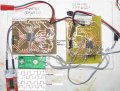
Here's your PCBs. It's a bit messy, but never mind.
Next I'll try your programs.
C
Hi J2,MASTER board is named as PIC18F4520. You had earlier mentioned it as PIC18F4620 ?
SMDs are difficult for proto work. Why not use PDIP ICs for protowork ?
Okay, but I think it will be better to keep a few development board which uses PDIP ICs (sockets) so that hardware testing can be done quickly.Hi J2,
Well spotted, but the spare board I found had an 18F4520, which will work for your purposes.
I have moved to SMDs, as much as possible, so I don't tend to buy PDIP PICs anymore.
C.
hserout test cannot be done with slave without remapping the UART pins. The UART (TX and RX) pins are shared with SS/CS and SDo pins.Hi J2,
First try to get a hserout TEST.. I tried but failed (I'm a bit circuit weary, which makes errors)
C.
Hi J2,hserout test cannot be done with slave without remapping the UART pins. The UART (TX and RX) pins are shared with SS/CS and SDo pins.
Okay, I will try to remap the UART pins and add hserout code to SLAVE. I will not change the hardware SPI pins.Hi J2,
Yes, they are connected in the way you describe.
Can you use them for a test, then I'll disconnect them.
C.
Hi J2,The UART pins cannot be remapped in PIC18F4431. There is no Peripheral Pin Select (pin mapping) option in that PIC. it is better if you output the Slave's CAP2BUFL data on say PORTD Leds. There is no point of printing Slave's SSPBUF value on Slave's UART or PORTx.
Okay, I will add that code and post it tonight.Hi J2,
Ok, but use the empty PORTB instead. As it's only for testing I won't add LEDs, but check with a meter.
C
AllDigital
Dim data As Byte
Dim spidatareceived As Bit
Dim x As Byte
Symbol spi_cs = LATC.6
Symbol spi_cs_direction = TRISC.6
initialize_ports
initialize_variables
initialize_spi_slave
initialize_qei
initialize_uart
enable_interrupts
While x > 0
If spidatareceived = 1 Then
initialize_spi_master
send_spi_data CAP2BUFL
LATB = CAP2BUFL
initialize_spi_slave
spidatareceived = 0
Endif
Wend
End
On Low Interrupt
If PIE1.SSPIE = 1 And PIR1.SSPIF = 1 Then
PIR1.SSPIF = 0
If SSPSTAT.BF Then
data = SSPBUF
If data = 0xff Then
spidatareceived = 1
Endif
data = 0
Endif
SSPCON.SSPOV = 0
Endif
Resume
Proc initialize_ports()
ANSEL0 = 0
ANSEL1 = 0
TRISA = %11011100
TRISB = 0
TRISD = 0
End Proc
Proc initialize_variables()
x = 1
spidatareceived = 0
End Proc
Proc initialize_spi_master()
PIE1.SSPIE = 0
TRISC = %00010000
spi_cs = 1
SSPSTAT = %01000000
SSPCON = %00100010
End Proc
Proc initialize_spi_slave()
SSPSTAT = %01000000
SSPCON = %00100100
TRISC = %01110000
IPR1.SSPIP = 0
PIE1.SSPIE = 1
End Proc
Proc send_spi_data(data As Byte)
spi_cs = 0
SSPBUF = data
While SSPSTAT.BF = 0
Wend
SSPSTAT.BF = 0
spi_cs = 1
End Proc
Proc enable_interrupts()
INTCON.PEIE = 1
INTCON.GIEH = 1
INTCON.GIEL = 1
INTCON.GIE = 1
End Proc
Proc initialize_qei()
POSCNTH = 0
POSCNTL = 0
QEICON = %10000000
QEICON = %10010100
DFLTCON = 0
MAXCNTH = %00000100
MAXCNTL = 0
End Proc
Proc initialize_uart(baudrate As Word)
Hseropen baudrate
WaitMs 100
End Proc
Hi J2,Here is the Slave code. It outputs CAP2BUFL value to PORTB.
The code is wrong.Hi J2,
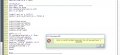
I added the configs at the beginning, and this at the bottom, is this correct?
C.
AllDigital
Dim data As Byte
Dim spidatareceived As Bit
Dim x As Byte
Symbol spi_cs = LATC.6
Symbol spi_cs_direction = TRISC.6
initialize_ports
initialize_variables
initialize_spi_slave
initialize_qei
initialize_uart
enable_interrupts
While x > 0
If spidatareceived = 1 Then
initialize_spi_master
send_spi_data CAP2BUFL
LATB = CAP2BUFL
Hserout "PORTB" #PORTB, CrLf
initialize_spi_slave
spidatareceived = 0
Endif
Wend
End
On Low Interrupt
If PIE1.SSPIE = 1 And PIR1.SSPIF = 1 Then
PIR1.SSPIF = 0
If SSPSTAT.BF Then
data = SSPBUF
If data = 0xff Then
spidatareceived = 1
Endif
data = 0
Endif
SSPCON.SSPOV = 0
Endif
Resume
Proc initialize_ports()
ANSEL0 = 0
ANSEL1 = 0
TRISA = %11011100
TRISB = 0
TRISD = 0
End Proc
Proc initialize_variables()
x = 1
spidatareceived = 0
End Proc
Proc initialize_spi_master()
PIE1.SSPIE = 0
TRISC = %00010000
spi_cs = 1
SSPSTAT = %01000000
SSPCON = %00100010
End Proc
Proc initialize_spi_slave()
SSPSTAT = %01000000
SSPCON = %00100100
TRISC = %01110000
IPR1.SSPIP = 0
PIE1.SSPIE = 1
End Proc
Proc send_spi_data(data As Byte)
spi_cs = 0
SSPBUF = data
While SSPSTAT.BF = 0
Wend
SSPSTAT.BF = 0
spi_cs = 1
End Proc
Proc enable_interrupts()
INTCON.PEIE = 1
INTCON.GIEH = 1
INTCON.GIEL = 1
INTCON.GIE = 1
End Proc
Proc initialize_qei()
POSCNTH = 0
POSCNTL = 0
QEICON = %10000000
QEICON = %10010100
DFLTCON = 0
MAXCNTH = %00000100
MAXCNTL = 0
End Proc
Proc initialize_uart(baudrate As Word)
Hseropen baudrate
WaitMs 100
End Proc
The code is wrong.
If you want to print CAP2BUFL or PORTB data on UART then you have to try this.
Hi J2,
The purpose of the thread is to get the two PICs to 'talk' via SPI, but only for testing, I have added a UART.
C.