LT Spice for Digital circuit simulation

Thread Starter

amod.mujumdar

Joined Apr 2, 2019
34
Hi Eric,

Actually method you shown will also work. But it will be hard to look at one shot. I was looking for if any option where all files can be linked. Like in schematic for multiple pages we are connecting with off page net lines.

Regards,
Amod
 

ericgibbs

Joined Jan 29, 2010
21,439
hi,
I have never tried it using that method, it is possible to reduce an 'asc' circuit to a hierarchical model, a little tricky if you are not fully conversant with LTS.

Perhaps @Bordodynov may have a method you could use,

E
 

Bordodynov

Joined May 20, 2015
3,431
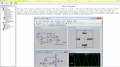
This can be done using the hierarchical method. In your blocks, you must assign a character to external pins (those pins that you want to attach to the pins of another block). For example, output, input or input/output. Then you have to build a block symbol (done automatically). Draw a new scheme as usual, but put blocks on it and connect them as you need. In addition to the blocks in this circuit may include the usual fragments (transistors resistors). Remember that you can see the voltages and currents inside the BLock.
2019-04-04_15-15-02.png
 

Attachments

Last edited:

eetech00

Joined Jun 8, 2013
4,705
Hi Eric,

Actually method you shown will also work. But it will be hard to look at one shot. I was looking for if any option where all files can be linked. Like in schematic for multiple pages we are connecting with off page net lines.

Regards,
Amod
Hi

Organize your circuits into functional blocks, then use hierarchical blocks as Bordodynov describes in #23 and #24. To summarize, each heirarchical block is created on its own schematic sheet, then a symbol is created from the schematic. Once all the blocks have been created, a new “top level” schematic is created on a new sheet where each block symbol is placed, and then interconnected with wires. This is what makes the “top level” schematic “hierarchical”. A simulation can then be performed at the “top level” schematic, and the blocks can be “drilled down” to expose the internal schematic and perform analysis. Of course, the “Top level” sheet can also contain a schematic if desired.

eT
 

Thread Starter

amod.mujumdar

Joined Apr 2, 2019
34
Hi Friends,

I could simulate many cases in LT Spice with your helping guidelines. At present I am trying to simulate SW OPEN / CLOSE position.
Schematic is attached.
In schematic I am trying to simulate at V8 as OPEN and CLOSE position.
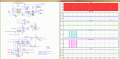
SW OPEN is LOGIC 1 and SW CLOSE is LOGIC 0. Now if I simulate it with setting OPEN condition with Logic High at U23 input just giving 5V it works and I could get Pulse at U6 .
If I set logic 0 for CLOSE condition it doesnot work as every simulation D FF goes to reset condition.
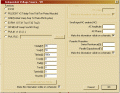
Therefore I simulated signal for some time LOGIC 1 for OPEN command and LOGIC 0 for CLOSE command. But it does not work to generate U11 o/p pulse.
Can anybody highlight on this to explain is there anything incorrect in setting signal / timing or schematic ?

Thanks,
Amod
 

Attachments

Thread Starter

amod.mujumdar

Joined Apr 2, 2019
34
Yes . OC input is correct. However I am trying to get signal as in below section. I could get LD_OPEN_TMR pulse but not the LD_CLOSE_TMR pulse. If this works above section will also work.
May be SW signal is pulse.

Regards,
Amod
 

Attachments

ericgibbs

Joined Jan 29, 2010
21,439
hi.
Looking over the asc file there are lots of missing signal sources.

I do not see a LINE_CLK, OCUR, FLT_CHK source.?, the inputs are 'floating'

What is the output of U16.?

Lots of problems in the circuit.

E
 

Attachments

Thread Starter

amod.mujumdar

Joined Apr 2, 2019
34
OK. I have attached full circuit.

Take LINE_CLK = logic 1 , OCR is over current = 0 in normal conditions.

I would like to check if U23 input = logic 1 then LD_OPEN _TMR pulse genartes and If U23 input = logic 0 then LD_CLOSE _TMR pulse generates. I am facing difficulty in getting CLOSE pulse.
 

Attachments

ericgibbs

Joined Jan 29, 2010
21,439
hi,
You have set that pulse high all the time!
Could you post your design specification pulse timing diagrams, showing the duration and relative timings, so that I can compare them with the simulation.?

E
 

Attachments

Thread Starter

amod.mujumdar

Joined Apr 2, 2019
34
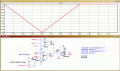
Below is tings I have captured. But considering SW is OPEN continuously. means U23 input is logic 1. LD_OPEN_TMR pulse is 10uS. Same way I am looking for LD_CLOSE TMR pulse for 10uS.
If we set logic 1 at input then after some time we should have it automatically change to logic1 in simulation as at OPEN signal after OPEN TMR cmd of 10uS all U1 , U2 U4 will be at Q = 0
Here XLS file attached
Further I have attached CLK signal. I noticed that CLOCK is 10uS however it is not started at 0. Thus this disturbs synchronization ?. How to make it happen for CLK ot start exactly at 0?
Regards,
Amod
 

Attachments

ericgibbs

Joined Jan 29, 2010
21,439
hi amod,
I have reduced the 1st section of your circuit to a hierarchical circuit, so that you can simplify the layout and check the waveforms.
Place the Block1.asy in the Lib/Sym folder.
Place the 3 *.asc files in the same folder as your OPEN_CLOSE asc files.

E
Added missing Block1.asc
 

Attachments

Last edited:

Thread Starter

amod.mujumdar

Joined Apr 2, 2019
34
Hi Eric ,

I tries but it is not running. I I need to run your trial file can i do it with separate folder ? I got errror as below

Missing Schematics of the Hirarchy: block1
 
Top