led lighting not behaving how i wanted

ebeowulf17

Joined Aug 12, 2014
3,307
On my Arduino Mega the built in LED does not flicker at all when I use standard analogWrite. I'd see what happens when only 1 transistor is PWM driven. It could be there is interference from multiple PWM signals.
I've only done one project dimming LEDs with native Arduino PWM, but it worked beautifully with no flicker and no fuss. It used a Pro Micro (Leonardo compatible.) Low current and no external drive circuitry though, so a little bit different scenario.
 

philba

Joined Aug 17, 2017
959
I've done several PWM projects with arduinos including multiple PWM outputs and no issues. In the multiple PWM case, I looked at it with a logic analyzer and everything was exactly as it should have been. I'm betting the TS's problem is either due to his long ground traces picking up interference or a problem with the LED power supply. Easy enough to figure out.
 

Thread Starter

scrumpydc

Joined Jan 23, 2018
49
The best way to figure it out (the flickering) is to look at the signals with a scope. Is the processor generating correct PWM? (Usually is though). Are the transistors getting interference? The lack of a ground plane here could be contributing to interference. Those long ground traces could be picking up noise. Generally, it's a bad idea to use ground traces and not a plane. It's especially bad running one long ground trace around the board.

On my Arduino Mega the built in LED does not flicker at all when I use standard analogWrite. I'd see what happens when only 1 transistor is PWM driven. It could be there is interference from multiple PWM signals.
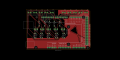
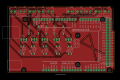
I was not using the new circuit to do the tests I used a smaller circuit so it won't be the ground I have just picked up eagle and that's my second ever board could someone explain how to implement a ground plane is it just a biggish spot on the board that all the ground wires lead to could I put a bit of copper tape on the underside and use that to connect more grounds to ? I also don't have a scope to test i was thinking it might be the LEDs as they are cheap flebay ones may pick up some better quallity
 

philba

Joined Aug 17, 2017
959
draw a rectangle around your board (use polygon). name it GND. Hit ratsnest. Use ripup to make the poured effect go away. with home etched boards a ground plane will probably be ugly (depending on your resist method) but it reduces the amount of etchant you need.
 

philba

Joined Aug 17, 2017
959
draw a rectangle around your board (use polygon). name it GND. Hit ratsnest. Use ripup to make the poured effect go away. with home etched boards a ground plane will probably be ugly (depending on your resist method) but it reduces the amount of etchant you need.

On the flickering, try using just a single LED+resistor (not your strip). First try it from the arduino pin, then try it from the transistor (C to +5V). Does it happen more when you move the pwm wires?

Something that isn't clear to me are the resistor values you are using. Also, I'm not sure about how the PWM circuit in the LED strips actually works. I would think it's a pulled high input on the plus line.
 

philba

Joined Aug 17, 2017
959
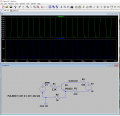
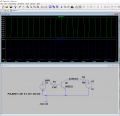
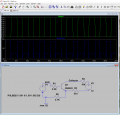
OK, looking back I think you are using the original circuit. I played around with it on ltspice and am thinking that the 4.7K resistor from the emitter to gnd might be too big. In the simulation the PWM pulse goes from 10V to about 3V. This is based on the + PMW input being pulled high by a 10K resistor R4 (which would be a logical assumption). Though, even R4 at 100K pull-up shows the same behavior. The 3V lower end may be on the edge of what the PWM circuit in the PSU expects for off. Note that the base resistor I have is 2.2K but a 4.7K resistor yields the same results.
led pwm 4K7.png
If I plug in 1K for that resistor, the bottom falls to 1.3V.
led pwm 1K.png And if I replace that with a classical pulled high configuration, I get 10V to 0V.
led pwm.png
 

Thread Starter

scrumpydc

Joined Jan 23, 2018
49
OK, looking back I think you are using the original circuit. I played around with it on ltspice and am thinking that the 4.7K resistor from the emitter to gnd might be too big. In the simulation the PWM pulse goes from 10V to about 3V. This is based on the + PMW input being pulled high by a 10K resistor R4 (which would be a logical assumption). Though, even R4 at 100K pull-up shows the same behavior. The 3V lower end may be on the edge of what the PWM circuit in the PSU expects for off. Note that the base resistor I have is 2.2K but a 4.7K resistor yields the same results.
so would you remove the 4.7 and replace it with a 2.2 +take away the 510 and 4.7 to ground ??
 

Thread Starter

scrumpydc

Joined Jan 23, 2018
49
also, ime not getting very good autoroute with a ground plane keeps coming in at 97 and don't know if i could do a 2 sided board with what i have
 

Thread Starter

scrumpydc

Joined Jan 23, 2018
49
I have messaged the people I got the driver off to ask them to see if they can clarify a bit on what would be causing the flickering behavior as they have said to use this circuit
 

philba

Joined Aug 17, 2017
959
also, ime not getting very good autoroute with a ground plane keeps coming in at 97 and don't know if i could do a 2 sided board with what i have
I don't use autoroute.

Are your ground lines also named GND? The ground polygon and your gound traces need to named the same and they should automatically hook up when you hit rats nest.
 

Thread Starter

scrumpydc

Joined Jan 23, 2018
49
Try replacing the 4.7K resistor going from the emitter to ground with 1K.
I did this and it looks like it has done it will do a bit more testing I have seen a mistake on my board and gonna have to fix it need to flip it so the screw terminals will be the correct way around
 

Thread Starter

scrumpydc

Joined Jan 23, 2018
49
So are you saying that the 1K resistor swap fixed the flickering problem?
seems to :) but the for some reason the code doesn't work anymore for some reason when logic is high the lights fade as they should but when low it just pops on straight away
 

Thread Starter

scrumpydc

Joined Jan 23, 2018
49
Code:
#include <arduino.h>
#define MDELAY 6000
int ledPin5 = 12;
int ledPin4 = 11;
int ledPin3 = 10;
int ledPin2 = 9;
int ledPin1 = 8;
unsigned long ledtime = 500;
unsigned long m;
void setup(){
pinMode( 2, INPUT_PULLUP);
pinMode(ledPin1, OUTPUT);
pinMode( 3, INPUT_PULLUP);
pinMode(ledPin2, OUTPUT);
pinMode( 4, INPUT_PULLUP);         // setting led pins and output pins to controll 5 led array
pinMode(ledPin3, OUTPUT);
pinMode( 5, INPUT_PULLUP);
pinMode(ledPin4, OUTPUT);
pinMode( 6, INPUT_PULLUP);
pinMode(ledPin5, OUTPUT);
}
void loop(){
m=millis();
static int fadeValue1 = 0;
static int fadeValue2 = 0;
static int fadeValue3 = 0;         // fade value for each pin
static int fadeValue4 = 0;
static int fadeValue5 = 0;

// for the first led
if (digitalRead(2) == HIGH) {           
    if (fadeValue1 < 255){
      fadeValue1++;
      analogWrite(ledPin1, fadeValue1);
      while(m+MDELAY>millis());
    }
  }
  else {
    if (fadeValue1 > 0){
      fadeValue1--;
      analogWrite(ledPin1, fadeValue1);
      while(m+MDELAY>millis());
    }
  }
// for the second led 
if (digitalRead(3) == HIGH) {                  
    if (fadeValue2 < 255){
      fadeValue2++;
      analogWrite(ledPin2, fadeValue2);
      while(m+MDELAY>millis());
    }
  }
  else {
    if (fadeValue2 > 0){
      fadeValue2--;
      analogWrite(ledPin2, fadeValue2);
      while(m+MDELAY>millis());
    }
  }
// for the third led
  if (digitalRead(4) == HIGH) {
    if (fadeValue3 < 255){
      fadeValue3++;
      analogWrite(ledPin3, fadeValue3);
      while(m+MDELAY>millis());
    }
  }
  else {
    if (fadeValue3 > 0){
      fadeValue3--;
      analogWrite(ledPin3, fadeValue3);
      while(m+MDELAY>millis());
    }
  }
// for the fourth led 
  if (digitalRead(5) == HIGH) {
    if (fadeValue4 < 255){
      fadeValue4++;
      analogWrite(ledPin4, fadeValue4);
      while(m+MDELAY>millis());
    }
  }
  else {
    if (fadeValue4 > 0){
      fadeValue4--;
      analogWrite(ledPin4, fadeValue4);
      while(m+MDELAY>millis());
    }
  }
//for the fith led (blue) 
  if (digitalRead(6) == HIGH) {
    if (fadeValue5 < 255){
      fadeValue5++;
      analogWrite(ledPin5, fadeValue5);
      while(m+MDELAY>millis());
    }
  }
  else {
    if (fadeValue2 > 0){
      fadeValue2--;
      analogWrite(ledPin5, fadeValue5);
      while(m+MDELAY>millis());
    }
  }
}
 

philba

Joined Aug 17, 2017
959
Well, I see some problems with your code but not sure it's the problem you are describing.

You wait inside every if statement. That means your fading will take 5 times as long. Wouldn't it make more sense to delay at the bottom, outside of the if statements?

I would set up a test program/command interpreter that is separate from your fade program. It would use Serial.read() to get a command that would turn lights on or off and set PWM values. The idea is to have a quick way to test out your HW. I do this for most of the board I design and build. Here's the general idea.
commands:
f1 - turn off led 1
n1 - turn on led 1
p1 128 set led 1 to pwm of 128

code:
Code:
cmd = Serial.read();
if(cmd == 'f') {
    num = Serial.read();
    if(num == '1') {
        // turn off string 1
    }
} else if(cmd == 'n') {
    num = Serial.read();
    if(num == '1') {
        // turn on string 1
    }
} else if(cmd=='p') {
    num=Serial.read();
    if(num == '1') {
        val = Serial.parseInt();
        analogWrite(ledPin1, val);
    }
}
 

Thread Starter

scrumpydc

Joined Jan 23, 2018
49
its working just need to get the board working it wasn't the code it was my error wires wrong way around took a day break from it and came back and spotted it
 
Top