led lighting not behaving how i wanted

Thread Starter

scrumpydc

Joined Jan 23, 2018
49
so far i have this yet i cannot figure out how to stop it from fading at the end of a run what am i missing
Not 100% sure I understand your questions. The 1000 is the delay factor. That code is the equivalent of delay(1000);

Code:
delay(1000);

is the same as

unsigned long m;

m=millis();
while(m+1000>millis());
i cannot get it to work how you described am i missing someting
Code:
int ledPin = 10;
unsigned long ledtime = 100;
unsigned long m;
void setup()
{
  pinMode( 2, INPUT);
}
void loop()
{
 
m=millis();

static int fadeValue = 0;
if (digitalRead(2) == LOW)
  {
   if (fadeValue < 255)
   {
    fadeValue++;
     analogWrite(ledPin, fadeValue);
     while(m+1000>millis());
   }
  }
else
{
  if (fadeValue > 5)
   { fadeValue--;
    analogWrite(ledPin, fadeValue);
    while(m+1000>millis());
   }
  }
}
 

philba

Joined Aug 17, 2017
959
Put pinMode(ledPin, OUTPUT); in setup().

What's connected to pin 2? A switch? Also, I'd set it to pinMode(2, INPUT_PULLUP); Use the switch on to connect it to gnd. When the switch is off, it will be at 5V (pulled up).

Lets assume the switch connects pin 2 to gnd (0V). Then your code should fade from fully off to fully on over the course of 255 seconds. And when pin 2 is connected to +5V (switch off), it will fade the LED down to about 1% bright (PWM of 5/256). If you want it off, fade it to 0.
 
Last edited:

philba

Joined Aug 17, 2017
959
By the way, once you get this working take a look at the timer1 library. It does 10 bit PWM. This will give you smoother fading (1024 steps vs 256).
 

Thread Starter

scrumpydc

Joined Jan 23, 2018
49
Put pinMode(ledPin, OUTPUT); in setup().

What's connected to pin 2? A switch? Also, I'd set it to pinMode(2, INPUT_PULLUP); Use the switch on to connect it to gnd. When the switch is off, it will be at 5V (pulled up).

Lets assume the switch connects pin 2 to gnd (0V). Then your code should fade from fully off to fully on over the course of 255 seconds. And when pin 2 is connected to +5V (switch off), it will fade the LED down to about 1% bright (PWM of 5/256). If you want it off, fade it to 0.
it dose fade but then keeps bumping back to full and re fading i need it to fade on and stay on the fade off when it detects signal low and stay off it is not doing that
 

philba

Joined Aug 17, 2017
959
Hmmm, tried your code with the mods I suggested on a Arduino Mega. Pin 2 connected to gnd and it fades up, Pin 2 to 5V, it fades down. No bumping up and down. Here's my code - set delay to 100 mS (for speed) and LED pin to 13 (built in LED).
Code:
#include <arduino.h>
#define MDELAY 100
int ledPin = 13;
unsigned long ledtime = 100;
unsigned long m;
void setup(){
  pinMode( 2, INPUT_PULLUP);
  pinMode(ledPin, OUTPUT);
}

void loop(){
m=millis();
static int fadeValue = 0;

if (digitalRead(2) == LOW) {
    if (fadeValue < 255){
      fadeValue++;
      analogWrite(ledPin, fadeValue);
      while(m+MDELAY>millis());
    }
  }
  else {
    if (fadeValue > 0){
      fadeValue--;
      analogWrite(ledPin, fadeValue);
      while(m+MDELAY>millis());
    }
  }
}
 

Thread Starter

scrumpydc

Joined Jan 23, 2018
49
Hmmm, tried your code with the mods I suggested on a Arduino Mega. Pin 2 connected to gnd and it fades up, Pin 2 to 5V, it fades down. No bumping up and down. Here's my code - set delay to 100 mS (for speed) and LED pin to 13 (built in LED).
Code:
#include <arduino.h>
#define MDELAY 100
int ledPin = 13;
unsigned long ledtime = 100;
unsigned long m;
void setup(){
  pinMode( 2, INPUT_PULLUP);
  pinMode(ledPin, OUTPUT);
}

void loop(){
m=millis();
static int fadeValue = 0;

if (digitalRead(2) == LOW) {
    if (fadeValue < 255){
      fadeValue++;
      analogWrite(ledPin, fadeValue);
      while(m+MDELAY>millis());
    }
  }
  else {
    if (fadeValue > 0){
      fadeValue--;
      analogWrite(ledPin, fadeValue);
      while(m+MDELAY>millis());
    }
  }
}
you are a wizard how what did i miss i can see you added a libary and changed to input pullup i did not know i needed a libary did i miss that in the thread i thourght i added the mods you suggested
 

philba

Joined Aug 17, 2017
959
Read the timer1 page, it pretty much tells you what you need to do. You may need to move to a different pin depending on the Arduino you use. To start with, ignore the interrupt stuff and just use initialize and pwm(). Set the period to 1000 to start with.

To install, find the arduino directory (where it stores your sketches). Go into the libraries directory and create a directory there called TimerOne. (//.../Arduino/libraries/TimerOne). Then download the zip file from github (pointed to by the timer1 page) and copy the contents of the TimerOne-master directory in zip file into the TimerOne directory you created.

If you get ambitious, you can look at the interrupt capability. It will allow you to avoid any busy waiting at all.
 
Last edited:

Thread Starter

scrumpydc

Joined Jan 23, 2018
49
I did some testing last night and I think I have got the LEDs to fade ok I cannot use timer one as I need 5 pwm pins and looking at it it can only do three the flickering has almost gone when I increased the fade time I have heard of a capacitor being used to smooth out pwm signals would this stop the flickering completely also just finishing my new board to connect everything to on eagle will post when done thanks everyone for your help
 

philba

Joined Aug 17, 2017
959
No, a capacitor won't help you as it needs to be on other side of your power supply and even then it probably would not help.

Are you planning on fading all the strings at the same time? If so, then you can feed all 5 transistors from one PWM output.

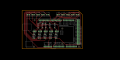
On your PCB, looks fairly good. Good placement of parts and clean routing. You can pack it all within the outline of the shield which will give you several advantages - a lower costs and require a smaller box to put it in. One point - you are running ground wires. Instead, create a ground plane on top and bottom. Not sure what PCB program you are using but in eagle you draw a polygon and name it GND. Have you run ERC and DRC?

Put silkscreen on the board. Put a name and version on it (and update the version when you make a new version). Label your terminals with + and - so you know how to wire it up without going back to the schematic.

On PCB size, 100 mm is a break point for most PCB vendors. Prices jump when you exceed 100 mm h or w. The mega shield is just a tad over that so when I made a shield I cut the left side a little short to get it under 100. For example PCBWay charges $28+shipping for a 101 x 100 board but $5 + shipping for a 100x100 board.

Also, I would make your PCB have exactly the Mega Shield outline. It makes the whole package look a lot more professional.

I also recommend you do a full prototype of the circuit (all 5 drivers). before getting a board built.
 

Thread Starter

scrumpydc

Joined Jan 23, 2018
49
No, a capacitor won't help you as it needs to be on other side of your power supply and even then it probably would not help.

Are you planning on fading all the strings at the same time? If so, then you can feed all 5 transistors from one PWM output.

On your PCB, looks fairly good. Good placement of parts and clean routing. You can pack it all within the outline of the shield which will give you several advantages - a lower costs and require a smaller box to put it in. One point - you are running ground wires. Instead, create a ground plane on top and bottom. Not sure what PCB program you are using but in eagle you draw a polygon and name it GND. Have you run ERC and DRC?

Put silkscreen on the board. Put a name and version on it (and update the version when you make a new version). Label your terminals with + and - so you know how to wire it up without going back to the schematic.

On PCB size, 100 mm is a break point for most PCB vendors. Prices jump when you exceed 100 mm h or w. The mega shield is just a tad over that so when I made a shield I cut the left side a little short to get it under 100. For example PCBWay charges $28+shipping for a 101 x 100 board but $5 + shipping for a 100x100 board.

Also, I would make your PCB have exactly the Mega Shield outline. It makes the whole package look a lot more professional.

I also recommend you do a full prototype of the circuit (all 5 drivers). before getting a board built.
Cool thanks for the advice I am using eagle but ime making it at home using my 3d printer with a pen plotter attached then etching it will have it all done by tomorrow all PCB places I've looked at want like £80 ime in UK so it's cheaper for me to do it with what I have plus £6 for the board £3 for the pen so alot cheaper not a nice as a silkscreened one and sometimes the pen fades in the etch but I take it out halfway and touch it up will post a pic when all drilled and checked for conductivity
 

Thread Starter

scrumpydc

Joined Jan 23, 2018
49
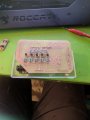
got it all together just need 1x2 3.5 term blocks rubbed off the resistor bands when I cleaned it but I am happy with how it turned out, I may give it a coat of paint or something IMG_20180129_181446.jpg IMG_20180129_181440.jpg
 

ebeowulf17

Joined Aug 12, 2014
3,307
I did some testing last night and I think I have got the LEDs to fade ok I cannot use timer one as I need 5 pwm pins and looking at it it can only do three the flickering has almost gone when I increased the fade time I have heard of a capacitor being used to smooth out pwm signals would this stop the flickering completely also just finishing my new board to connect everything to on eagle will post when done thanks everyone for your help
I'm curious about your flickering issue. Is it flickering all the time? More noticeable when it's especially dim or especially bright? Is it just a visible glitch or hiccup of sorts when changing from one brightness level to the next?

If it's flickering at all times, my guess would be that you simply need to increase the PWM frequency (what is your current PWM frequency?) Persistence of vision should make any reasonable PWM frequency indistinguishable from "analog" dimming unless the lights (or the viewer) are moving very quickly.

If it's only glitching when changing from one brightness setting to the next, then I'd be looking more closely at the code.

In either case, I agree with previous comments that analog filtering shouldn't be necessary.
 

Thread Starter

scrumpydc

Joined Jan 23, 2018
49
I'm curious about your flickering issue. Is it flickering all the time? More noticeable when it's especially dim or especially bright? Is it just a visible glitch or hiccup of sorts when changing from one brightness level to the next?

If it's flickering at all times, my guess would be that you simply need to increase the PWM frequency (what is your current PWM frequency?) Persistence of vision should make any reasonable PWM frequency indistinguishable from "analog" dimming unless the lights (or the viewer) are moving very quickly.

If it's only glitching when changing from one brightness setting to the next, then I'd be looking more closely at the code.

In either case, I agree with previous comments that analog filtering shouldn't be necessary.
It is flickering when it's dimming I have 255 steps of dimming through Arduino it's looks like it flickers all the time it's not as noticeable when I do it over 30min but I can still see it you cannot see it when is fully on just thought the dimming Process
 

ebeowulf17

Joined Aug 12, 2014
3,307
It is flickering when it's dimming I have 255 steps of dimming through Arduino it's looks like it flickers all the time it's not as noticeable when I do it over 30min but I can still see it you cannot see it when is fully on just thought the dimming Process
So 255 steps over 30 minutes should be about 7 seconds at each brightness level.

Are you seeing a flick or blip of some sort about once every 7 seconds, or all throughout every moment of the fade sequence?
 

Thread Starter

scrumpydc

Joined Jan 23, 2018
49
So 255 steps over 30 minutes should be about 7 seconds at each brightness level.

Are you seeing a flick or blip of some sort about once every 7 seconds, or all throughout every moment of the fade sequence?
Throughout the whole fade not just every seventh second
 

ebeowulf17

Joined Aug 12, 2014
3,307
Throughout the whole fade not just every seventh second
Well, I thought I might have some useful advice, but after doing a little googling to double check my memory, I don't really have anything.

The default PWM frequency on the Mega pins you're using should be 490Hz, which should be plenty fast to avoid flickering.

I found LOTS of other people searching online for ways to eliminate flicker when using Arduino analog write to dim LEDs. Very few threads had useful answers or explanations of what the underlying causes are. It seems that they people who really cared wrote their own PWM timing code so they didn't have to rely on analog write.

If you were willing to buy a board/chip and do a little more wiring, I've had great luck PWM controlling a variety of things with this:
https://www.adafruit.com/product/815

It doesn't seem like it should be necessary, but it might work if all else fails.
 

philba

Joined Aug 17, 2017
959
The best way to figure it out (the flickering) is to look at the signals with a scope. Is the processor generating correct PWM? (Usually is though). Are the transistors getting interference? The lack of a ground plane here could be contributing to interference. Those long ground traces could be picking up noise. Generally, it's a bad idea to use ground traces and not a plane. It's especially bad running one long ground trace around the board.

On my Arduino Mega the built in LED does not flicker at all when I use standard analogWrite. I'd see what happens when only 1 transistor is PWM driven. It could be there is interference from multiple PWM signals.
 
Last edited:
Top