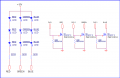
I believe the correct connections to the driver provided are as below.
According to the specs when Dim+ and Dim - are open or at least 100K the output from the supply is at 100%. Srumpydc is correct, by shorting Dim+ and Dim- will shut off the supply as a simple 100K pot can be connected across the Dim leads. Zero ohms LEDs off, 100K LEDs at 100%
The driver circuit is using the transistor as a simple ON- OFF switch to make and break the Dim leads. Therefore to keep the LEDs off would require 5 volts from the Nano as the circuit is now drawn.
SG
I believe the correct connections to the driver provided are as below. View attachment 144381
According to the specs when Dim+ and Dim - are open or at least 100K the output from the supply is at 100%. Srumpydc is correct, by shorting Dim+ and Dim- will shut off the supply as a simple 100K pot can be connected across the Dim leads. Zero ohms LEDs off, 100K LEDs at 100%
The driver circuit is using the transistor as a simple ON- OFF switch to make and break the Dim leads. Therefore to keep the LEDs off would require 5 volts from the Nano as the circuit is now drawn.
SG
The OP does not describe how the Nano is "Off" but a simple mod to the driver circuit should suffice if the 5 volt DC supply is available. As the OP described the PWM is inverted using said driver. Software rewrite or inverter required.
SG
Resistors are correct I've double checked I pulled them from the correct sets and I did unless I got duped lol the grounds are connected as you had drawn it will and when I mean off I mean no voltage to the nano whatsoever turned off via relay
If the 5V power source will be totally out of the equation, that limits options.
Have you tried my add-on circuit since replacing and reorienting the transistors? I'm not really sure it will work, but I'm not sure it won't work either. It might be worth another shot, since it gets its pull-up from the LED driver instead of the 5V side.
Failing that, another idea would be to use a depletion mode MOSFET instead of the NPN. A depletion mode MOSFET basically behaves like a normally-closed switch instead of a normally-open switch. I don't have time to try sketching or simulating it before work this morning, but it might be worth thinking about. Without drawing it up, I can't picture it clearly enough in my head to know if it would be a drop-in replacement or if some other components would need to change too.
Hopefully @philba or @sghioto will have some clearer thoughts on this than I do...
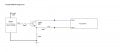
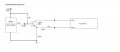
Then again, maybe a simple mechanical relay would be the easier solution. If you connected the common and normally-closed contacts of a relay across the emitter and collector, then powered the coil with the 5V supply to the Arduino, then you would have two simple states:
5V power off: relay is inactive, so normally closed contact is completing circuit to bypass transistor, creating low resistance path for LED driver circuit.
5V power on: relay activates, pulling NC contact open so that Arduino and transistor control PWM.
Then again, maybe a simple mechanical relay would be the easier solution. If you connected the common and normally-closed contacts of a relay across the emitter and collector, then powered the coil with the 5V supply to the Arduino, then you would have two simple states:
5V power off: relay is inactive, so normally closed contact is completing circuit to bypass transistor, creating low resistance path for LED driver circuit.
5V power on: relay activates, pulling NC contact open so that Arduino and transistor control PWM.
Was thinking of exactly the same.I can't get up that early. Wait a second, if the OP is using a relay to disconnect the Nano then maybe a second pair of contacts could be used.
SG
While not what you are trying to do with the timing functions and not quite on topic something you may want to try is using an analog input from a LDR (Light Dependent Resistor) adjust the Arduino PWM output to increase or decrease LED intensity based on ambient light. As the room light gets darker the LED brightness will increase and as room light increases the LED brightness will decrease. This is an overview of what I am suggesting. Rather than use PWM on your 12 volt supply you could just use it as a 12 volt supply and let the Arduino drive a single MOSFET to control the LEDs.
I may have to scrap the SSR altogether and see if I can use an Arduino as a slave so when it detects an input it brightens up and visa versa ime thinking adding more relays is more complex then trying to figure out code that may be simpler then I first thought but I can honestly say that this forum has been the most productive I've been on and thank you all for your help so far if I get the code right I will post it so other people can use it I will probably do a Wright up of the hole thing when it's done lol
You come right off the Arduino out to the mosfet gate as shown above. A logic High turns on the N channel mosfet as shown above. Not much to it and the Arduino does or can do all of the work.
I may have to scrap the SSR altogether and see if I can use an Arduino as a slave so when it detects an input it brightens up and visa versa ime thinking adding more relays is more complex then trying to figure out code that may be simpler then I first thought but I can honestly say that this forum has been the most productive I've been on and thank you all for your help so far if I get the code right I will post it so other people can use it I will probably do a Wright up of the hole thing when it's done lol
Yes, it seems like a much simpler project if the Arduino can stay on at all times.
Why were you wanting to shut it down anyway? Did that accomplish something important, or were you just doing it because it felt unnecessary to keep it running when nothing was happening?
Just curious. If we knew what you were going for with the shutdown, we might be able to help brainstorm other ways to get the same, or similar, benefits.
Yes, it seems like a much simpler project if the Arduino can stay on at all times.
Why were you wanting to shut it down anyway? Did that accomplish something important, or were you just doing it because it felt unnecessary to keep it running when nothing was happening?
Just curious. If we knew what you were going for with the shutdown, we might be able to help brainstorm other ways to get the same, or similar, benefits.
I was thinking the same thing - why complicate the problem? It won't wear the arduino out and the amount of power it consumes is like 50-100 mW - several orders of magnitude less than the lights.
Noticed something looking at your code posted in Post #10 there is a possible problem you may wish to check out:
Code:
// Fading LED
// by scrumpy
int value = 255;                            // variable to keep the actual value
int ledpin = 10;                           // light connected to digital pin 10
void setup()
{ for(value = 255; value >=0; value-=1)   // fade out (from max to min) over 30 min
  {
   analogWrite(ledpin, value);           // sets the value (range from 0 to 255)
   delay(7058);                            // brightens up over 30 mins
}
{
delay(39600000);                 // waits 11 hours
}
  for(value = 0 ; value <= 255; value+=1) // fade in (from min to max)
{
   analogWrite(ledpin, value);
   delay(7058);
}
}
void loop()
{
}
There may be a problem with your delay. You may wish to give this a read. I believe using Delay the maximum number you can use is 32767 or about 32.767 seconds. If your number being passed to delay is interpreted as an int then the delay is limited to a maximum of 32767. The way around this is explicitly declare your delay value as an unsigned long. This would look a little like this:
Code:
unsigned long seconds = 1000L; //Notice the L
unsigned long minutes = seconds * 60;

delay(minutes); //for 60,000 milliseconds
You can also include hours as an Unsigned Long:
Code:
unsigned long seconds = 1000L; // !!! SEE THE CAPITAL "L" USED!!!
unsigned long minutes = seconds * 60;
unsigned long hours = minutes * 60;
This may or may not be a problem with your code but if you run into a problem the above should serve as a work around. A Google of "Maximum Delay Arduino" should cover all of this.
delay() takes an unsigned long so, in theory, it should handle up to 4294967296 mS (2^32).
There is an issue of the millisecond timer - millis() - wrapping at around 50 days. Not sure how delay() deals with that.
Generally when I do long delays, I use millis() and count second, minutes and/or hours in my code. delay() is a blocking function so you can't look at switches and other things while using it. That also allows me the check for the 50-day roll over timer problem and avoid it.
Noticed something looking at your code posted in Post #10 there is a possible problem you may wish to check out:
Code:
// Fading LED
// by scrumpy
int value = 255;                            // variable to keep the actual value
int ledpin = 10;                           // light connected to digital pin 10
void setup()
{ for(value = 255; value >=0; value-=1)   // fade out (from max to min) over 30 min
  {
   analogWrite(ledpin, value);           // sets the value (range from 0 to 255)
   delay(7058);                            // brightens up over 30 mins
}
{
delay(39600000);                 // waits 11 hours
}
  for(value = 0 ; value <= 255; value+=1) // fade in (from min to max)
{
   analogWrite(ledpin, value);
   delay(7058);
}
}
void loop()
{
}
There may be a problem with your delay. You may wish to give this a read. I believe using Delay the maximum number you can use is 32767 or about 32.767 seconds. If your number being passed to delay is interpreted as an int then the delay is limited to a maximum of 32767. The way around this is explicitly declare your delay value as an unsigned long. This would look a little like this:
Code:
unsigned long seconds = 1000L; //Notice the L
unsigned long minutes = seconds * 60;

delay(minutes); //for 60,000 milliseconds
You can also include hours as an Unsigned Long:
Code:
unsigned long seconds = 1000L; // !!! SEE THE CAPITAL "L" USED!!!
unsigned long minutes = seconds * 60;
unsigned long hours = minutes * 60;
This may or may not be a problem with your code but if you run into a problem the above should serve as a work around. A Google of "Maximum Delay Arduino" should cover all of this.
I only wanted to turn it off and on to restart the sketch so I didn't have to do lots of coding but it is looking more like a viable option to let it stay on I may switch to a mega 2650 so I can get one device to do all the lights, Get rid of the SSR and use the circuit as shown with the original seaming it works to do the PWM but it would be nice to lessen the flicker the more I watch it the more annoying it becomes i will have to look into millis() with the new code so ime gonna be going a bit out of my comfort zone and thanks for all the info

 Facebook
 Google
 GitHub
 Linkedin


 Wait a second, if the OP is using a relay to disconnect the Nano then maybe a second pair of contacts could be used.