led lighting not behaving how i wanted

Reloadron

Joined Jan 15, 2015
7,892
Here is a little suggestion in the interest of keeping things simple as simple is a good thing. The below little code snippet is taken from here. All well written code includes remarks which tell us what the code is doing.
Code:
/*
  Fade

  This example shows how to fade an LED on pin 9 using the analogWrite()
  function.

  The analogWrite() function uses PWM, so if you want to change the pin you're
  using, be sure to use another PWM capable pin. On most Arduino, the PWM pins
  are identified with a "~" sign, like ~3, ~5, ~6, ~9, ~10 and ~11.

  This example code is in the public domain.

  http://www.arduino.cc/en/Tutorial/Fade
*/

int led = 9;           // the PWM pin the LED is attached to
int brightness = 0;    // how bright the LED is
int fadeAmount = 5;    // how many points to fade the LED by

// the setup routine runs once when you press reset:
void setup() {
  // declare pin 9 to be an output:
  pinMode(led, OUTPUT);
}

// the loop routine runs over and over again forever:
void loop() {
  // set the brightness of pin 9:
  analogWrite(led, brightness);

  // change the brightness for next time through the loop:
  brightness = brightness + fadeAmount;

  // reverse the direction of the fading at the ends of the fade:
  if (brightness <= 0 || brightness >= 255) {
    fadeAmount = -fadeAmount;
  }
  // wait for 30 milliseconds to see the dimming effect
  delay(30);
}
Take note of how
int brightness = 0; // how bright the LED is
int fadeAmount = 5; // how many points to fade the LED by
are used in the code. We know an output PWM will determine LED brightness or intensity and we know the PWM will use a value between 0 and 255 This is an 8 bit signal (2^8). Here is what I suggest you try, load the following code:

Code:
int led = 9;           // the PWM pin the LED is attached to
int brightness = 0;    // how bright the LED is
int fadeAmount = 5;    // how many points to fade the LED by

// the setup routine runs once when you press reset:
void setup() {
  // declare pin 9 to be an output:
  pinMode(led, OUTPUT);
}

// the loop routine runs over and over again forever:
void loop() {
  // set the brightness of pin 9:
  analogWrite(led, brightness);

  // change the brightness for next time through the loop:
  brightness = brightness + fadeAmount;

  // reverse the direction of the fading at the ends of the fade:
  if (brightness <= 0 || brightness >= 255) {
    fadeAmount = -fadeAmount;
  }
  // wait for 30 milliseconds to see the dimming effect
  delay(30);
}
Connect your Arduino Uno as per the link above. You will need a single basic LED, red is fine and about a 220 Ohm resistor. The Arduino Uno will drive a single LED just fine. Now change the fadeAmount from 5 to maybe 10 and run the code, change the Delay from 30 to maybe 60 and run the code. Take note of what the changes do. Watch as the LED goes through transitions of brightness or intensity.

As to a Reset of the Arduino aside from using the on board reset button there are hardware and software ways to get a reset, this is a good read on the subject, this is another good read on the subject.

You should not need a Mega for anything you are trying to do. A single Arduino Uno and a few MOSFETs is all you should need with a power supply for your LEDs.

Ron
 

Thread Starter

scrumpydc

Joined Jan 23, 2018
49
Here is a little suggestion in the interest of keeping things simple as simple is a good thing. The below little code snippet is taken from here. All well written code includes remarks which tell us what the code is doing.
Code:
/*
  Fade

  This example shows how to fade an LED on pin 9 using the analogWrite()
  function.

  The analogWrite() function uses PWM, so if you want to change the pin you're
  using, be sure to use another PWM capable pin. On most Arduino, the PWM pins
  are identified with a "~" sign, like ~3, ~5, ~6, ~9, ~10 and ~11.

  This example code is in the public domain.

  http://www.arduino.cc/en/Tutorial/Fade
*/

int led = 9;           // the PWM pin the LED is attached to
int brightness = 0;    // how bright the LED is
int fadeAmount = 5;    // how many points to fade the LED by

// the setup routine runs once when you press reset:
void setup() {
  // declare pin 9 to be an output:
  pinMode(led, OUTPUT);
}

// the loop routine runs over and over again forever:
void loop() {
  // set the brightness of pin 9:
  analogWrite(led, brightness);

  // change the brightness for next time through the loop:
  brightness = brightness + fadeAmount;

  // reverse the direction of the fading at the ends of the fade:
  if (brightness <= 0 || brightness >= 255) {
    fadeAmount = -fadeAmount;
  }
  // wait for 30 milliseconds to see the dimming effect
  delay(30);
}
Take note of how
int brightness = 0; // how bright the LED is
int fadeAmount = 5; // how many points to fade the LED by
are used in the code. We know an output PWM will determine LED brightness or intensity and we know the PWM will use a value between 0 and 255 This is an 8 bit signal (2^8). Here is what I suggest you try, load the following code:

Code:
int led = 9;           // the PWM pin the LED is attached to
int brightness = 0;    // how bright the LED is
int fadeAmount = 5;    // how many points to fade the LED by

// the setup routine runs once when you press reset:
void setup() {
  // declare pin 9 to be an output:
  pinMode(led, OUTPUT);
}

// the loop routine runs over and over again forever:
void loop() {
  // set the brightness of pin 9:
  analogWrite(led, brightness);

  // change the brightness for next time through the loop:
  brightness = brightness + fadeAmount;

  // reverse the direction of the fading at the ends of the fade:
  if (brightness <= 0 || brightness >= 255) {
    fadeAmount = -fadeAmount;
  }
  // wait for 30 milliseconds to see the dimming effect
  delay(30);
}
Connect your Arduino Uno as per the link above. You will need a single basic LED, red is fine and about a 220 Ohm resistor. The Arduino Uno will drive a single LED just fine. Now change the fadeAmount from 5 to maybe 10 and run the code, change the Delay from 30 to maybe 60 and run the code. Take note of what the changes do. Watch as the LED goes through transitions of brightness or intensity.

As to a Reset of the Arduino aside from using the on board reset button there are hardware and software ways to get a reset, this is a good read on the subject, this is another good read on the subject.

You should not need a Mega for anything you are trying to do. A single Arduino Uno and a few MOSFETs is all you should need with a power supply for your LEDs.

Ron

This was one of the first codes I used and it works well yet I found it to be no good when using the driver I couldn't configure the time of fade to how I wanted it (well it produced strange anomalies flashes and jitters and odd pulses ) all I need to do I think is to get the fade to run over 30 minis when another pin inputs say 5v or 3.5 from the raspberry pi and back off on low signal
 

Reloadron

Joined Jan 15, 2015
7,892
Something I am not quite understanding is why the Rasberry? My guess is you can use an Arduino like the Arduino Uno or you could use a Raspberry Pi but why use both? As to the timing I mentioned a note about that earlier. The idea behind that basic code sample was to get the user to understand what the actual code does and how it works. Things like a uniform transition between intensity.

My read was you are using a LED string as a border on a mirror and want the LED string to brighten or darken over a period of time following an interval. Would that be about correct?

Ron
 

wayneh

Joined Sep 9, 2010
18,117
Here is a little suggestion in the interest of keeping things simple as simple is a good thing. The below little code snippet is taken from here. All well written code includes remarks which tell us what the code is doing.
Wow, that is nice. Even I can read it and follow it.

One thing I've found that gives a very nice throbbing effect is to send a slow sine wave to the LED. You can choose the min and max brightnesses you want and span the sine wave to fit in between. I think the reason it looks so good is that it seems very smooth and organic, with no abruptness.
 

Reloadron

Joined Jan 15, 2015
7,892
Wow, that is nice. Even I can read it and follow it.

One thing I've found that gives a very nice throbbing effect is to send a slow sine wave to the LED. You can choose the min and max brightnesses you want and span the sine wave to fit in between. I think the reason it looks so good is that it seems very smooth and organic, with no abruptness.
My thinking is start with something simple as a code sample then with some trial and error expand on it. Thank God during my career I never really had to write very much code as if I had to depend on my coding skills I would have starved to death. :) I was afforded the opportunity of hiring several new engineers right out of school who could write code. Heck when I went to school any code consisted of dits and dahs. We are dortunate in that we have several members who are really proficient at writing code and good at teaching it.
Yes, I have hung a LED outside a function generator and applied a sine wave. Matter of fact I once used a small incandescent lamp, measuring sub 1 hertz in conjunction with a small LDR inside a black tube as part of a detector circuit and later did the same uning a LED source.

Ron
 

Thread Starter

scrumpydc

Joined Jan 23, 2018
49
Ime using the raspberry pi as a web server and to control timing using PHP it's for a vivarium fully automated the LEDs cannot be controlled from the pi very easy the pi is like the brain the Arduino is like the muscle the so ime using a pi to do all the thinking and the Arduino to do all the heavy lifting I will be using 5 sets of high power LEDs to simulate day and night cycle a driver and a nano on them was the plan but the driver works backwards to the way I wanted it to so I've got to rewrite the code so the Arduino stays on and ime not the best coder I have a little script together for my idea but it's not working how I wanted on phone at the moment will post later
 

Reloadron

Joined Jan 15, 2015
7,892
I have yet to play around with a Raspberry Pi but my read is you can actually use either the Raspberry Pi or any of several Arduino boards to do what you want to do. Both devices are capable of PWM out to drive LED strings with only the addition of a single MOSFET like the logic level MOSFET I referenced earlier. So while I understand your logic above I just see no need for all the hardware. All you need is a 12 VDC power supply capable of the required current for your LED string(s), A MOSFET to drive each channel of LEDs you want and either a Raspberry Pi or an Arduino to do the thinking. I see no need for both as you are looking at a relatively simple task. However, if you choose to use two micro-controllers to get where you wish that is purely your call as it is your project.

Looking at the Raspberry Pi and the available add on boards I am thinking I'll get one and play around with it. They are pretty cool and would afford me a new gizmo to mess around with as being retired and being winter in NE Ohio I have a surplus of time on my hands. :)

As to your Arduino and your power supply rather than screw around trying to invert the output of the Arduino using hardware like transistors there should be a software solution making things much easier. Apparently your power supply is On with a logic low and Off with a logic high.

Ron
 

Thread Starter

scrumpydc

Joined Jan 23, 2018
49
I have yet to play around with a Raspberry Pi but my read is you can actually use either the Raspberry Pi or any of several Arduino boards to do what you want to do. Both devices are capable of PWM out to drive LED strings with only the addition of a single MOSFET like the logic level MOSFET I referenced earlier. So while I understand your logic above I just see no need for all the hardware. All you need is a 12 VDC power supply capable of the required current for your LED string(s), A MOSFET to drive each channel of LEDs you want and either a Raspberry Pi or an Arduino to do the thinking. I see no need for both as you are looking at a relatively simple task. However, if you choose to use two micro-controllers to get where you wish that is purely your call as it is your project.

Looking at the Raspberry Pi and the available add on boards I am thinking I'll get one and play around with it. They are pretty cool and would afford me a new gizmo to mess around with as being retired and being winter in NE Ohio I have a surplus of time on my hands. :)

As to your Arduino and your power supply rather than screw around trying to invert the output of the Arduino using hardware like transistors there should be a software solution making things much easier. Apparently your power supply is On with a logic low and Off with a logic high.

Ron
That is correct off when hight the raspberry pi is great as I said it's the brains I would use it as you suggested but ime not shure how simple it would be as I am modifying something from raspiviv. And it has already been a challenge as none of the instructions worked so I had to cobble stuff from all over the net as there fourm seems to be inactive now ,The transistor is down to the specs from the driver ime using the circuit that they have provided to use with microcontrollers I assume it's to bump up the voltage from the controller the reason I was going to use both raspberry pi and Arduino is I fined the aurdino better to code with as the raspberry pi is newer to me (ime still only new to both but slowly getting there ) will post the code I have written so far next just tweeting it cannot seem to get it to do what I thought it would
 

Thread Starter

scrumpydc

Joined Jan 23, 2018
49
Code:
int ledPin = 10;
void setup()
{
  pinMode( 2, INPUT);
}
void loop()
{
static int fadeValue = 0;
if (digitalRead(2) == LOW)
  {
   if (fadeValue < 255)
   {
    fadeValue++;
     analogWrite(ledPin, fadeValue);
     delay(200);
   }
  }
else
{
  if (fadeValue > 5)
   { fadeValue--;
    analogWrite(ledPin, fadeValue);
    delay(200);
   }
  }
}
I have this so far but I have a question how can I do this with mills so I can keep track of other signals into the board (do I need to use mills)
 

philba

Joined Aug 17, 2017
959
Millis is easy to use. A simple example:
Code:
unsigned long mills;
// delay for 1000 miliseconds
mills = millis() + 1000;;
while(1) { //for ever loop
    if(mills < millis()) break;  // exit while loop
    // do other stuff
}
You can set up events that you want to happen - use an unsigned long for the time you want it to happen at . When the millis() value exceeds that, execute your code.
 

philba

Joined Aug 17, 2017
959
I suggest you organize the things you want to do into functions. An example (uncompiled, may be bugs):
Code:
unsigned long funct1mills;
void funct1() {
    // do some function 1 stuff here
}

unsigned long funct2mills;
void funct2(){
    // do some function 2 stuff here
}

unsigned long mclock;

setup(){
    mclock = millis();
    funct1mills = 10000 + mclock;
    funct2mills = 2000 + mclock;
}

loop(){
    if(fucnt1mills < millis()) {
        funct1();
        // reset funct1mills here
    }
    if(funct2mills < millis()) {
        funct2();
        // reset funct2mills here
    }
}
 

Thread Starter

scrumpydc

Joined Jan 23, 2018
49
Millis is easy to use. A simple example:
Code:
unsigned long mills;
// delay for 1000 miliseconds
mills = millis() + 1000;;
while(1) { //for ever loop
    if(mills < millis()) break;  // exit while loop
    // do other stuff
}
You can set up events that you want to happen - use an unsigned long for the time you want it to happen at . When the millis() value exceeds that, execute your code.
I kinda get it but I don't want to use it to happen at a time during the loop I would like it to happen for a set number of mills is it the same thing ie fade for millis(xx) and does this work better than delay do I need to ad millis at the start of the code or should I have it run the code on different Arduino Nanos will millis work with a switch ie imput signal
 

philba

Joined Aug 17, 2017
959
On the RasPi vs arduino front, the Arduino has plenty of smarts and can probably do it all stand alone. However there are nice things that can be done on the Pi. One thing I would do is use the Pi to keep the Arduino on the correct time. While a crystal is pretty accurate it's not very good for keeping time over weeks and months. A 50 PPM crystal could be off by as much a 4 seconds a day. Over a week that's 28 seconds, over a month, 2 minutes and so on. A clock that's 2 minutes off per month is pretty crappy. With NTP - network time, the Pi will always be bang on.

I'd use serial messages over the USB cable to communicate with the arduino. Pretty easy to non-blocking check for serial input on the arduino.

By the way, you don't need a mega. You can control quite a few outputs with an Uno (or even a Nano, my goto arduino).
 

Reloadron

Joined Jan 15, 2015
7,892
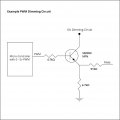
The transistor is down to the specs from the driver ime using the circuit that they have provided to use with microcontrollers I assume it's to bump up the voltage from the controller
The DIO (Digital In Out) of a micro controller chip is only capable of sourcing or sinking a given amount of current. Typically that current is rather low. Driving a single small red LED only requires about 20 mA (0.020 Amp) but when we start adding more LEDs the required current increases. Long strings of LEDs can require several amps and this is why we add a transistor to act as a switch (in this case) and allow us to drive with higher current, often several amps. The LEDs you are using should have a specification sheet (data sheet) calling out the required voltage and current. That is it overly simplified in a nutshell. So it isn't about the voltage as much as it is a matter of the current. The transistor needs to be able to handle the current required which a routine micro controller can't do. Here is an example of what an Arduino can handle. Check your LED data sheet and make sure whatever transistor you choose can handle the required LED current.

Ron
 

philba

Joined Aug 17, 2017
959
I kinda get it but I don't want to use it to happen at a time during the loop I would like it to happen for a set number of mills is it the same thing ie fade for millis(xx) and does this work better than delay do I need to ad millis at the start of the code or should I have it run the code on different Arduino Nanos will millis work with a switch ie imput signal
Not 100% sure I understand your questions. The 1000 is the delay factor. That code is the equivalent of delay(1000);

Code:
delay(1000);

is the same as

unsigned long m;

m=millis();
while(m+1000>millis());
 

philba

Joined Aug 17, 2017
959
One more point on the Pi, doing low level I/O on the Pi is more complex than an Arduino. Also, you don't get a lot of control over when your code actually runs under Linux so anything that requires specific timings is better on an Arduino (or other "bare metal" setups).
 

Thread Starter

scrumpydc

Joined Jan 23, 2018
49
The DIO (Digital In Out) of a micro controller chip is only capable of sourcing or sinking a given amount of current. Typically that current is rather low. Driving a single small red LED only requires about 20 mA (0.020 Amp) but when we start adding more LEDs the required current increases. Long strings of LEDs can require several amps and this is why we add a transistor to act as a switch (in this case) and allow us to drive with higher current, often several amps. The LEDs you are using should have a specification sheet (data sheet) calling out the required voltage and current. That is it overly simplified in a nutshell. So it isn't about the voltage as much as it is a matter of the current. The transistor needs to be able to handle the current required which a routine micro controller can't do. Here is an example of what an Arduino can handle. Check your LED data sheet and make sure whatever transistor you choose can handle the required LED current.

Ron
it will be controlling the driver, not the LEDs they are high power LEDs but i do have the data sheet for the driver https://cdn.shopify.com/s/files/1/0...ed-85c6-8fa702bd4431.pdf?13625689694586377130 which is why I am using the circuit it's the one provided so I am hoping it will hold up its taking place of a 100k 2w pot
 

Attachments

Thread Starter

scrumpydc

Joined Jan 23, 2018
49
Not 100% sure I understand your questions. The 1000 is the delay factor. That code is the equivalent of delay(1000);

Code:
delay(1000);

is the same as

unsigned long m;
m=millis();
while(m+1000>millis());
ye you hit the question on the head so I can use mills to control instead of delay but my knolage on millis they start counting from when the board comes on ? will I need to reset the millis so it checks for imputs and is it necessary for the application ie using one board to watch for 5 inputs and then act on those inputs when input 1 is detected do this for say 30 minutes and when no 3 is detected do this for 30 min or will it be more efficient to set up 5 nano on 5 drivers ( that's how many drivers ime going to need)so they are only waiting for one thing to happen ?the raspberry will be controlling inputs so timing is not important:)
 

philba

Joined Aug 17, 2017
959
It's easier than you think. What's difference between saying, at 3:00AM, ten minutes from now vs 3:10? It's what it's referenced. delay() is like saying from now and millis() is like saying at a specific time.

In the second example, I used mclock as a variable. You can set that to anything you want. Say that your Pi tells the arduino to start timing at 6AM. In the code, you set mclock to the current millis(). Then all your times use mclock. 6:30 is mclock+60*30*1000. You keep checking millis() until it is later than that and do your 6:30 thing. Note, use > not = in case you miss the exact mS time and use a flag to avoid calling your "6:30" code more than once.

You can check for a LOT of events and times this way.
 
Top