First time PCB Design Review

Thread Starter

NewbDa

Joined Jan 21, 2020
13
Hello Members,
I hope you’re all doing well. In the past, I’ve worked on smaller designs such as daughter boards, breakout boards, sensor modules, and some power boards. However, this current project is more complex than anything I’ve tackled before, and I want to ensure I’m not overlooking potential mistakes in the design process.

For this project, I initially referred to some open-source designs as a starting point, then modified the schematics to fit my requirements. The PCB layout and component placement, however, were created entirely from scratch.

I would greatly appreciate it if you could review my design and share feedback on areas where improvements can be made.

Here are some design details:
  • USB trace width: 8 mil
  • USB spacing: 16 mil
  • Input voltage is 5V, which comes from a separate power board designed previously.
  • VBAT is included only for monitoring purposes, feeding its value into the microcontroller ADC.

Specific aspects I’d love feedback on:
  1. Signal integrity (especially for high-speed lines like USB)
  2. Power routing and decoupling strategies
  3. Thermal management and heat dissipation considerations
  4. Component placement and overall layout efficiency
  5. Manufacturability and ease of assembly

Thank you in advance for your time and insights!

Note: EDA used is KiCAD version 8.0.7
 

Attachments

nsaspook

Joined Aug 27, 2009
16,275
In general for new boards.

Test points in general, power test points, signal test points, tracing test point, etc... and lots of common/ground points for test probes when something doesn't work correctly. Status and debug leds that can easily assigned by software. Catastrophic over-voltage protection for critical supply voltage regulator outputs and controller programming pins.

Get it running first (layout for ease of building and troubleshooting by hand), then optimize for things like manufacturing and ease of assembly.
 

panic mode

Joined Oct 10, 2011
4,949
you don't have 16 mill clearances, not even half of that - if you set clearance to 8 mill you will have 600+ violations.
also track sizes are all over the place. you should setup net classes and use DRC to find issues, then work through them until everything checks out.
1764784363446.png
 

Thread Starter

NewbDa

Joined Jan 21, 2020
13
In general for new boards.

Test points in general, power test points, signal test points, tracing test point, etc... and lots of common/ground points for test probes when something doesn't work correctly. Status and debug leds that can easily assigned by software. Catastrophic over-voltage protection for critical supply voltage regulator outputs and controller programming pins.

Get it running first (layout for ease of building and troubleshooting by hand), then optimize for things like manufacturing and ease of assembly.
Yeah, all those points you mentioned are covered in the design. I’ve got test points on the power rails and signals, ground pads scattered around for easy probing, and status/debug LEDs tied to GPIOs so they can be driven in software. Protection is in place too — ESD diodes on the USB lines, clamps/diodes on the power rails and LDO outputs, so the critical stuff is safe.
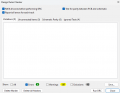
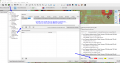
My DRC errors are coming as zero(given some consideration/exclusion). I just wanted to double‑check with you guys if I missed anything from your list or if there’s something you’d still recommend adding.


DRC_FC.png
 

Thread Starter

NewbDa

Joined Jan 21, 2020
13
you don't have 16 mill clearances, not even half of that - if you set clearance to 8 mill you will have 600+ violations.
also track sizes are all over the place. you should setup net classes and use DRC to find issues, then work through them until everything checks out.
View attachment 359908


@panic mode
I downloaded the footprint directly from the Digi-Key website and exported it to KiCAD— I didn’t create it myself. I keep running into this kind of issue whenever I import external footprints from Digi-Key. I had the same problem with the IMU, but I was able to adjust it based on the minimum specs my fab house supports.

For the USB part, though, I’m stuck. Since the datasheet only shows the pin placements and doesn’t mention pad clearance or solder mask expansion details. For USB calculations, I have used the PCB toolkit from Saturn PCB. Should I redesign the footprint from scratch using only the datasheet provided by the manufacturer?

I’ll admit the track lengths aren’t all consistent. When I first set up my netclasses, I used 10 mil, 12 mil, and 20 mil for power. Later on, as the design got more complex, I had to go down to 8 mil to fit some vias and traces, and that’s when the DRC errors started showing up with imported footprints like the IMU.

The approach for some of the power lines is to use smaller trace widths where larger ones won’t fit, and then switch back to wider traces wherever space allows. This way, we can maintain better control over how the power flows through the board.

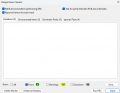
Note: I have attached the screenshot of the DRC results that I got after excluding the (externally downloaded)footprint pad clearances only.
*external download source: Digikey
 

Attachments

PadMasterson

Joined Jan 19, 2021
71
So I can't see the design since I am reading the thread from work, I can't help on spacings and trace width issues other than to echo some of what Panic_Mode mentioned and that is to try to make standard trace widths for your powers and grounds when you can. I haven't used KiCAD for layout, (I use Xpedition Layout tools and designing for 35+ years) so I am not sure on settings, etc. That said, general comments: Trace widths, as mentioned. How many layers is your board? For the USB stuff, unless you are looking at USB3.0 or above, if your runs to the connector/protection diodes to your processor are longer than about 1-2 inches, running them as a diff pair and controlled impedance shouldn't be needed, it would be a lumped impedance if you connect a USB cable to it longer than a foot. I would run them as a pair just for length matching though. If you can and have setup the diff pair and have the trace and space setup with your stackup, you are ahead of the game and should have no issues. Try to keep all your vias the same size if you can. Keep your hole aspect ratio on them to about 7:1 for any FAB shop to build and I shoot for a minimum trace width of .005" and .005" space, but more is better for both if you have the room. I design for high reliability and aerospace so I'm conservative and anyone can do 5/5 these days. Always use Non-plated holes for your mounting holes and if you need to ground them, put a ring around them so the hardware sits on the ring and use short traces to the ring from vias. As for the parts you downloaded, I can't speak for them since we have a group that does our library work, but I've built a lot of component cells/footprints over the years. I recommend your soldermask openings be 1:1 with the pads and same for the solder paste openings. Your FAB shop will open the SM to ensure you don't have it on the pads as long as you use IPC requirements on your drawing(s). The same goes for assembly shops, they will have there solder paste stencils created with the proper undersize and windows, etc. as needed per their processes. Since I don't know what your end use is, one or production, it's hard to add much more on that subject but if production, get with your assembler and see if they want panel rails or an array, etc. Lastly, everyone likes a 4 layer board because they like to put power and ground on the internal 2 layers. My advice is DON'T if you have room to run your power on the outer surface layers, do that and make both internal planes ground. Specify the stackup with a dielectric between layer 1 and 2 to be between 5 to 10 mils, same with between layers 3 and 4. Let the shop fill the L2 to L3 with what ever they need to get your final board thickness, (.031, .062, .092, etc.) You will have much better signal integrity using that stackup method. If you can't, flood as much of the internal layers with ground as you can and use vias to connect top to bottom and the internal ground areas. If you follow this, be sure to recalculate your impedance(s) for your diff pairs or any single ended routes. Adjust the L1-L2 and L3-L4 thicknesses as needed to get your impedances dialed in. Again, I use a minimum of a 5 mil line for both if at all possible and adjust the easy stuff like thickness and space for diff pairs. Don't know if this helps or not, but best of luck to you. ;-)
 

panic mode

Joined Oct 10, 2011
4,949
it does not matter where the footprint came from. what matters is what your requirements are and physical clearances.
below is what i saw in your project (note: this is using settings on my computer).
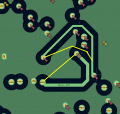
the thin line that surrounds pads is the minimum clearance. the actual clearance is what you measure at the closest points between pads/tracks. this is one of the reasons to use Net Classes - you get to specify track width and clearance per type of the circuit (power, usb data, others...). then while routing, software will automatically use those settings and aid you in design. it is impossible/impractical to do manual check between all the pads/tracks. this is what computer should handle. but you only use one class... so you cannot have different clearances or tracks sizes based on circuit.

one can get DRC to "pass" by cheating - switching the tests off or my making constraints very relaxed but - that is not right. based on what i glanced, you have disabled several checks including courtyard overlap, silkscreen overlap, minimum track clearances, edge clearances etc.

1765043205004.png

here is another where clearance is only about 0.001". but both of the tracks are on same net, they do not need to be separated - they can and should be one track anyway:
1765043853291.png

also i am a firm believer in shorter path is better. that reduces not just track resistance but also reactance. doing this for example would also make ground plane join above the tracks. that means less stitching vias.
1765044407510.png

like this:
1765045620240.png
 
Last edited:

Thread Starter

NewbDa

Joined Jan 21, 2020
13
Thank you very much, Mr. @panic mode, for your thorough analysis. I’m redesigning the board based on your detailed feedback.

After you pointed out the issue with minimum clearances using the pins of the USB that I used, I rechecked the issue. Unfortunately, the footprint comes directly from KiCAD 8.0(inbuilt), and it cannot be modified by me. One possible workaround is to switch to a different USB connector with another manufacturer’s part number, perhaps an SMD version. I initially chose this USB because it was the most economical option for my Bill of Materials.

As I'm revising the board design, I decided to introduce a mechanical constraint for the PCB by setting the mounting holes to 30.5 mm(square), which fits my frame perfectly and saves me from drilling new holes. However, with the design changes made so far, I’m now facing a courtyard overlap issue; I cannot get rid of it as of now. Hopefully, I’ll be able to resolve this before posting the updated PCB design again.
 

hrs

Joined Jun 13, 2014
525
After you pointed out the issue with minimum clearances using the pins of the USB that I used, I rechecked the issue. Unfortunately, the footprint comes directly from KiCAD 8.0(inbuilt), and it cannot be modified by me.
You can. First make a new library such as my_custom_footprints, then copy the KiCAD supplied footprint into your custom library and modify it there.

I’m now facing a courtyard overlap issue; I cannot get rid of it as of now.
Place the components further apart.
 

Thread Starter

NewbDa

Joined Jan 21, 2020
13
Update:
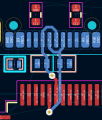
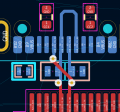
I’ve replaced the PTH USB connector with an SMD version from KiCAD’s built‑in library. Now I’m unsure how to properly draw the USB differential pair and which routing approach would be more suitable and optimal — Style 1 or Style 2.


USB-style (1).png
Fig1: Style1

USB-style (2).png
Fig 2: Style2

The PTH USB was easier in this case, since I could use the inner layers and outer layers to connect the extra pins together.
 

panic mode

Joined Oct 10, 2011
4,949
to route differential pair, both signal must have same name but one with suffix P and other other with suffix N.
for example you can call them UsbP and UsbN or in your case USB_OTG_FS_DP /USB_OTG_FS_DN. and this was already ok for THT connector. but if you want to see more, check tutorials.
 

panic mode

Joined Oct 10, 2011
4,949
there are bunch of options but this one is for KiCad and should be clear (despite accent) and short(as long as you skip first 3.5 minutes). ;-)

but to get more insight, i would suggest more general explanation such as:
 
Last edited:

Thread Starter

NewbDa

Joined Jan 21, 2020
13
there are bunch of options but this one is for KiCad and should be clear (despite accent) and short(as long as you skip first 3.5 minutes). ;-)

but to get more insight, i would suggest more general explanation such as:
Thanks for the video links!

Most of what I know about PCB design comes from Phil’s Lab(one of the links shared by you), Fedevel’s Robert Feranac, and Zach Peterson on Altium’s YouTube channel over the past few years. Still, with complex designs, I think it’s always good to have a review — there’s bound to be something I might miss. An extra set of eyes can catch those sneaky faults, which is why I wanted to post this in the forum. I am almost done with my redesign. I'll post the updated design soon.
 

Thread Starter

NewbDa

Joined Jan 21, 2020
13
So I can't see the design since I am reading the thread from work, I can't help on spacings and trace width issues other than to echo some of what Panic_Mode mentioned and that is to try to make standard trace widths for your powers and grounds when you can. I haven't used KiCAD for layout, (I use Xpedition Layout tools and designing for 35+ years) so I am not sure on settings, etc. That said, general comments: Trace widths, as mentioned. How many layers is your board? For the USB stuff, unless you are looking at USB3.0 or above, if your runs to the connector/protection diodes to your processor are longer than about 1-2 inches, running them as a diff pair and controlled impedance shouldn't be needed, it would be a lumped impedance if you connect a USB cable to it longer than a foot. I would run them as a pair just for length matching though. If you can and have setup the diff pair and have the trace and space setup with your stackup, you are ahead of the game and should have no issues.
The differential pair length is under 0.45 inch (maximum 10.8169 mm). I attempted length matching, but a 1.6137 mm difference remains between the DP and DN traces of the differential pair, as reported by KiCAD’s Net Inspector.


Try to keep all your vias the same size if you can. Keep your hole aspect ratio on them to about 7:1 for any FAB shop to build and I shoot for a minimum trace width of .005" and .005" space, but more is better for both if you have the room. I design for high reliability and aerospace so I'm conservative and anyone can do 5/5 these days.
I used two different via hole sizes—0.2 mm (0.5 mm pad) and 0.3 mm (0.6 mm pad)—exclusively for power. For the USB traces, I calculated dimensions using the Saturn PCB calculator, which recommended a preferred design of 0.25 mm (0.7 mm pad) for my USB 2.0 differential pair vias.


Always use Non-plated holes for your mounting holes and if you need to ground them, put a ring around them so the hardware sits on the ring and use short traces to the ring from vias. As for the parts you downloaded, I can't speak for them since we have a group that does our library work, but I've built a lot of component cells/footprints over the years. I recommend your soldermask openings be 1:1 with the pads and same for the solder paste openings. Your FAB shop will open the SM to ensure you don't have it on the pads as long as you use IPC requirements on your drawing(s). The same goes for assembly shops, they will have there solder paste stencils created with the proper undersize and windows, etc. as needed per their processes. Since I don't know what your end use is, one or production, it's hard to add much more on that subject but if production, get with your assembler and see if they want panel rails or an array, etc.
After reviewing your suggestions, I revised my design. While doing so, I applied the standard mechanical size constraint of 30.5 mm × 30.5 mm for the mounting holes. To comply with this constraint, I converted the PTH mounting holes to NPTH to prevent courtyard overlaps, as recommended by you guys. Additionally, my assembly shop currently requires panelization for every board I submit, which is driving up my overall manufacturing costs.


Lastly, everyone likes a 4 layer board because they like to put power and ground on the internal 2 layers. My advice is DON'T if you have room to run your power on the outer surface layers, do that and make both internal planes ground. Specify the stackup with a dielectric between layer 1 and 2 to be between 5 to 10 mils, same with between layers 3 and 4. Let the shop fill the L2 to L3 with what ever they need to get your final board thickness, (.031, .062, .092, etc.) You will have much better signal integrity using that stackup method. If you can't, flood as much of the internal layers with ground as you can and use vias to connect top to bottom and the internal ground areas. If you follow this, be sure to recalculate your impedance(s) for your diff pairs or any single ended routes. Adjust the L1-L2 and L3-L4 thicknesses as needed to get your impedances dialed in. Again, I use a minimum of a 5 mil line for both if at all possible and adjust the easy stuff like thickness and space for diff pairs. Don't know if this helps or not, but best of luck to you. ;-)
I selected a 0.196 mm (~7.8 mil) dielectric thickness between layer 1 and layer 2, and the same between layer 3 and layer 4. Based on Saturn PCB calculator results integrated into KiCAD’s layer calculations, the overall stack-up was intended to be 1.6 mm from my side, which is standard for FR4 with my OEM. However, KiCAD’s internal calculator outputs 1.4 mm when using 1 oz copper fill. According to the Saturn PCB calculator, this configuration yields an impedance of approximately 95 Ω for USB 2.0.

-------------------------------------------------------------------------

I truly appreciate your feedback and the time you took out of your busy schedule to respond. I’ve now completed my new (updated) design and will share it here in this thread. So you guys can review it before I finally upload it to my OEM’s website for manufacturing. My initial focus is on personal use, but if it proves successful, I may scale it up to production in future.
 
Top