Dso138 lcd issue

Thread Starter

Abyssoros

Joined Jan 11, 2024
11
I Recently got hold of a dso138 kit, upon finishing the kit I went through testing all of my voltages and everything appears correct. The LED flashes once when powered on but only when the LCD screen is not plugged in. If the screen is plugged in, absolutely nothing happens and when I check my voltages they are all very low. I was wondering if anyone else has had a similar problem or knows how to fix this issue. (Power is coming from a 9v wall wart)
 

MrChips

Joined Oct 2, 2009
34,627
For the price of a DSO138, you could learn some trouble shooting techniques by purchasing an assembled one. If you manage to fix the first one you would then have two DSO138.
 

Thread Starter

Abyssoros

Joined Jan 11, 2024
11
For the price of a DSO138, you could learn some trouble shooting techniques by purchasing an assembled one. If you manage to fix the first one you would then have two DSO138.
I could, but I'm building this scope to fit another project and I can't see why I would need another scope for troubleshooting this one. (Is a multimeter not enough or am i missing something) I need a disassembled kit so I can modify it the way I need. I'm testing around the modifications so they are not interfering with the original scope circuit. Like I said, the main board is working as it should until I plug in the LCD display. Was just wandering if this could be a faulty display or not. I've continuity checked every pin for the display and checked that every voltage and ground is correct aswell.
 

Thread Starter

Abyssoros

Joined Jan 11, 2024
11
Welcome to AAC!

You say that voltages are all very low. Is the above statement for when the LCD isn't connected?
Yeah all fine when the LCD is not connected. Once the LCD is connected the voltages drop and the usual boot led no longer flashes when I power the board
 

MrChips

Joined Oct 2, 2009
34,627
I could, but I'm building this scope to fit another project and I can't see why I would need another scope for troubleshooting this one. (Is a multimeter not enough or am i missing something) I need a disassembled kit so I can modify it the way I need. I'm testing around the modifications so they are not interfering with the original scope circuit. Like I said, the main board is working as it should until I plug in the LCD display. Was just wandering if this could be a faulty display or not. I've continuity checked every pin for the display and checked that every voltage and ground is correct aswell.
The point is not about using a scope vs a DMM to solve your issue. You cannot solve all electronics problems with a DMM or even an oscilloscope.

The point is that you have a circuit board and an LCD display module and you don't know where the fault lies. Having a working DSO138 will quickly tell you which one is at fault.
 

dl324

Joined Mar 30, 2015
18,216
This is easier to understand:
Without LCD
U5: 78L05, Vin=8.30V, Vout=4.94V
U3: 3.3V reg, Vin=4.94V, Vout=3.28V
U4: 79L05, Vin -9.68V, Vout=-5.02V

With LCD
U5: 78L05, Vin=8.25V, Vout=2.38V
U3: 3.3V reg, Vin=2.41V, Vout=1.43V
Can't decipher what this means:
"@U4 0.63v & 0.12v"

Open J4 and measure the voltages for the 5V and 3.3V regulators.

Have you already tried to follow the troubleshooting suggestions in the manual?
 

Thread Starter

Abyssoros

Joined Jan 11, 2024
11
This is easier to understand:
Without LCD
U5: 78L05, Vin=8.30V, Vout=4.94V
U3: 3.3V reg, Vin=4.94V, Vout=3.28V
U4: 79L05, Vin -9.68V, Vout=-5.02V

With LCD
U5: 78L05, Vin=8.25V, Vout=2.38V
U3: 3.3V reg, Vin=2.41V, Vout=1.43V
Can't decipher what this means:
"@U4 0.63v & 0.12v"

Open J4 and measure the voltages for the 5V and 3.3V regulators.

Have you already tried to follow the troubleshooting suggestions in the manual?
I have ran through the trouble shooting guide and got nowhere.
Sorry for making the voltages hard to understand. The U4 voltages are going from negative to very small positive values for some reason
 

dl324

Joined Mar 30, 2015
18,216
Sorry for making the voltages hard to understand.
It forced me to have to read that ugly schematic to find out what parts the component designators referred to.
The U4 voltages are going from negative to very small positive values for some reason
That's because the MCU isn't working.

I dislike the way that schematic is drawn. Portions of it are more like reading a netlist instead of a schematic. And the colors are just childish.
 

Thread Starter

Abyssoros

Joined Jan 11, 2024
11
This is easier to understand:
Without LCD
U5: 78L05, Vin=8.30V, Vout=4.94V
U3: 3.3V reg, Vin=4.94V, Vout=3.28V
U4: 79L05, Vin -9.68V, Vout=-5.02V

With LCD
U5: 78L05, Vin=8.25V, Vout=2.38V
U3: 3.3V reg, Vin=2.41V, Vout=1.43V
Can't decipher what this means:
"@U4 0.63v & 0.12v"

Open J4 and measure the voltages for the 5V and 3.3V regulators.

Have you already tried to follow the troubleshooting suggestions in the manual?
With J4 open I'm getting good readings at U3 and U5 but at U4 I'm getting the same readings as before
 

Thread Starter

Abyssoros

Joined Jan 11, 2024
11
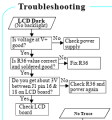
I've just ran through that tree, v+ is not good but power supply is fine 9v 1A. R36 is correct value and joints are fine. I'm not getting 3v across pin 16 & 18
That's because with J4 opened, the MCU isn't powered and it can't generate the negative voltage.

Follow the rest of these steps:
View attachment 312483
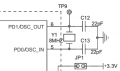
Just went through every voltage probe point on the schematic, without the screen attached and found that the OSC point is only showing 0.45v instead of the 2.16v it says it should have in the manual
 

dl324

Joined Mar 30, 2015
18,216
It has no number, just says OSC. It's mentioned in the voltage references image at 2.16v. It's right next to the 8MHz crystal
Do you mean this:
1705002468490.png

Attached is a black and white schematic. It's much easier for me to read because the meaningless colors distract me. Meaninglessly colored schematics remind me of a child with crayons...
 

Attachments

Top