Datasheet LCD Initialization 2-Line and 8-bit Mode

Thread Starter

MTech1

Joined Feb 15, 2023
181
Hi,

I've been reviewing the datasheet of LCD display 16*2 based on HD44780. I'm trying to set the LCD in 8-bit mode and configure it for a two-line display.

While going through the datasheet, I found the following references:
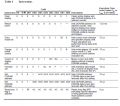
  • Table 6 on page 24, which mentions the time to execute commands.

1736784442693.png
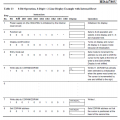
  • Table 13 on page 44, which provides details on 8-bit mode and two-line display.
1736784510938.png

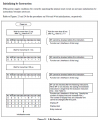
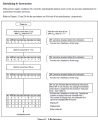
  • Figure 23 on page 45, which outlines the initialization instructions.
1736784572218.png

Could you help me on how to interpret this information correctly and proceed with the initialization?
 

Attachments

Thread Starter

MTech1

Joined Feb 15, 2023
181
Table 13 shows you exactly what to send to get 8-bit, two-line mode.
Yes, I can see that table, which is why I mentioned it in my opening post. There are a total of four commands: function set, display on/off, display clear, and entry mode set.

I have figured out the following:

  1. Function Set: Display mode (8-bit operation, 2 lines, 5 x 8 font)
    • DL = 1; 8-bit interface data
    • N = 1; 2-line display
    • F = 0; 5 x 8 dot character font
    • Command: 0011 1000
  2. Display On/Off Control: Display on and cursor on
    • D = 0; Display off
    • C = 0; Cursor off
    • B = 0; Blinking off
    • Command: 0000 1100
  3. Entry Mode Set: Sets the cursor increment mode and prevents display shift
    • Command: 0000 0110

I understand that we need to execute the function set command three times. However, what are the next commands after that? And I believe the last three are the display on/off, display clear, and entry mode set commands,
 

MrChips

Joined Oct 2, 2009
34,630
HD44780 defaults to 8-bit mode. You only need to initialize the other options. Here is my code to initialize the LCD in 4-bit mode.

C:
void LCD_init(void)
{
  LCD_ir(0x28);         // dual line, 4 bits
  LCD_ir(0x06);         // increment mode
  LCD_ir(0x0C);         // cursor turned off
  LCD_ir(0x10);         // cursor right
  LCD_ir(0x01);         // clear display
}
 

BobTPH

Joined Jun 5, 2013
11,466
After you have executed the three commands, you can start writing characters to the display. That is what line 5 is doing.
 

Thread Starter

MTech1

Joined Feb 15, 2023
181
Here’s my void LCD_init(void) function with sequence of commands and required delay according to datasheet

C:
void LCD_init(void)
{
    // First Function Set command: 8-bit operation, 2 lines, 5x8 font
    LCD_command(0x38); // 0011 1000 in binary
    delay_ms(5); // Wait for more than 4.1 ms

    // Second Function Set command:
    LCD_command(0x38); // 0011 1000 in binary
    delay_us(200); // Wait for more than 100 μs

    // Third Function Set command:
    LCD_command(0x38); // 0011 1000 in binary
    // No delay required according to the datasheet

    // Fourth Function Set command: Slight variation for final configuration
    LCD_command(0x3C); // 0011 1100 in binary (8-bit, 2 lines, 5x10 font)
    // No delay required according to the datasheet

    // Display On/Off Control: Turn on display, turn off cursor and blinking
    LCD_command(0x0C); // 0000 1100 in binary (Display ON, Cursor OFF, Blinking OFF)
    // No delay required according to the datasheet

    // Entry Mode Set: Increment cursor position, no display shift
    LCD_command(0x06); // 0000 0110 in binary (Increment mode, no display shift)
    // No delay required according to the datasheet
}
attached reference table
1736872466570.png
 

geekoftheweek

Joined Oct 6, 2013
1,429
After the third function set command you either have to wait the specified time for the command or check the "BF" flag to make sure the LCD is ready for a new command.

Edit:
The reason I say this is because you have no delay needed in commands that require 37us. I can understand if your code will naturally give the delay during execution, but "// No delay required according to the datasheet" doesn't give us that detail.
 

Thread Starter

MTech1

Joined Feb 15, 2023
181
I have followed the datasheet for both the PIC18F45K22 microcontroller and the 16x2 LCD. I have posted code but I only see black square boxes on the first row of the LCD. I have tried adjusting the potentiometer (POT) connected to the contrast pin, but the display still does not show any data.

Here are the connections from the PIC to the LCD for your reference:

  • RS (Register Select): Connected to RB0
  • RW (Read/Write): Connected to RB1
  • EN (Enable): Connected to RB2
  • Data Bus (D0-D7): Connected to PORTC (RC0-RC7)

C:
#define _XTAL_FREQ 16000000  // Define the clock frequency for delay functions

// PIC18F45K22 Configuration Bit Settings
#pragma config FOSC = INTIO7    // Use the internal oscillator
#pragma config PLLCFG = OFF     // Disable 4x PLL
#pragma config PRICLKEN = OFF   // Disable primary clock enable
#pragma config FCMEN = OFF      // Disable Fail-Safe Clock Monitor
#pragma config IESO = OFF       // Disable internal/external oscillator switchover

#pragma config PWRTEN = OFF     // Disable Power-up Timer
#pragma config BOREN = SBORDIS  // Enable Brown-out Reset in hardware only
#pragma config BORV = 190       // Set Brown Out Reset Voltage to 1.90 V

#pragma config WDTEN = OFF      // Disable Watchdog Timer
#pragma config WDTPS = 32768    // Set Watchdog Timer Postscale to 1:32768

#pragma config CCP2MX = PORTC1  // CCP2 input/output multiplexed with RC1
#pragma config PBADEN = OFF     // Configure PORTB as digital I/O
#pragma config CCP3MX = PORTB5  // P3A/CCP3 multiplexed with RB5
#pragma config HFOFST = ON      // HFINTOSC Fast Start-up enabled
#pragma config T3CMX = PORTC0   // Timer3 Clock input muxed with RC0
#pragma config P2BMX = PORTD2   // ECCP2 B output muxed with RD2
#pragma config MCLRE = EXTMCLR  // Enable MCLR pin, disable RE3 input pin

#pragma config STVREN = ON      // Enable Stack Full/Underflow Reset
#pragma config LVP = ON         // Enable Single-Supply ICSP
#pragma config XINST = OFF      // Disable Extended Instruction Set

#pragma config CP0 = OFF        // Disable Code Protection for Block 0
#pragma config CP1 = OFF        // Disable Code Protection for Block 1
#pragma config CP2 = OFF        // Disable Code Protection for Block 2
#pragma config CP3 = OFF        // Disable Code Protection for Block 3

#pragma config CPB = OFF        // Disable Boot Block Code Protection
#pragma config CPD = OFF        // Disable Data EEPROM Code Protection

#pragma config WRT0 = OFF       // Disable Write Protection for Block 0
#pragma config WRT1 = OFF       // Disable Write Protection for Block 1
#pragma config WRT2 = OFF       // Disable Write Protection for Block 2
#pragma config WRT3 = OFF       // Disable Write Protection for Block 3

#pragma config WRTC = OFF       // Disable Configuration Register Write Protection
#pragma config WRTB = OFF       // Disable Boot Block Write Protection
#pragma config WRTD = OFF       // Disable Data EEPROM Write Protection

#pragma config EBTR0 = OFF      // Disable Table Read Protection for Block 0
#pragma config EBTR1 = OFF      // Disable Table Read Protection for Block 1
#pragma config EBTR2 = OFF      // Disable Table Read Protection for Block 2
#pragma config EBTR3 = OFF      // Disable Table Read Protection for Block 3

#pragma config EBTRB = OFF      // Disable Boot Block Table Read Protection

#include <xc.h>

// Pin Definitions
#define RS LATBbits.LATB0   // Register Select - Pin RB0
#define RW LATBbits.LATB1   // Read/Write - Pin RB1
#define EN LATBbits.LATB2   // Enable - Pin RB2

#define LCD_Data_Bus LATC   // LCD Data connected to PORTC

// Function Prototypes
void lcd_command(unsigned char cmd);
void lcd_data(unsigned char Data);
void lcd_init(void);

void main() {
    OSCCON = 0x72;  // Set internal oscillator to 16MHz
    
    // Initialize all output latches to 0
    LATA = 0;
    LATB = 0;
    LATC = 0;
    LATD = 0;
    LATE = 0;
    
    // Set all ports as output
    TRISA = 0;
    TRISB = 0;
    TRISC = 0;
    TRISD = 0;
    TRISE = 0;
    
    // Configure all ports as digital (disable analog functions)
    ANSELA = 0;
    ANSELB = 0;
    ANSELC = 0;
    ANSELD = 0;
    ANSELE = 0;

    lcd_init();  // Initialize the LCD
    lcd_command(0x80);  // Move cursor to first line, first position
    lcd_data('H');  // Display 'H'
    lcd_data('E');  // Display 'E'
    lcd_data('L');  // Display 'L'
    lcd_data('L');  // Display 'L'
    lcd_data('O');  // Display 'O'

    while (1);  // Infinite loop
}

// Function to send a command to the LCD
void lcd_command(unsigned char cmd) {
    LCD_Data_Bus = cmd;  // Load command to data bus
    RS = 0;  // RS = 0 for command mode
    RW = 0;  // RW = 0 for write operation
    EN = 1;  // Generate a high-to-low pulse on EN
    __delay_ms(2);   
    EN = 0;
    __delay_ms(2);  // Small delay to allow command execution
}

// Function to send data to the LCD
void lcd_data(unsigned char Data) {
    LCD_Data_Bus = Data;  // Load data to data bus
    RS = 1;  // RS = 1 for data mode
    RW = 0;  // RW = 0 for write operation
    EN = 1;  // Generate a high-to-low pulse on EN
    __delay_ms(2);
    EN = 0;
    __delay_ms(2);  // Small delay to allow data execution
}

// Function to initialize the LCD
void lcd_init(void) {
    __delay_ms(20);  // Wait for more than 15ms after power-on

    // LCD Initialization Sequence
    lcd_command(0x30);  // Function set (8-bit interface)
    __delay_ms(5);  // Wait for more than 4.1ms
    lcd_command(0x30);  // Repeat function set
    __delay_us(150);  // Wait for more than 100µs
    lcd_command(0x30);  // Repeat function set

    lcd_command(0x38);  // Set function: 8-bit, 2 lines, 5x8 font
    lcd_command(0x0C);  // Display ON, Cursor OFF, Blink OFF
    lcd_command(0x01);  // Clear display
    __delay_ms(2);  // Wait for 1.52ms
    lcd_command(0x06);  // Set entry mode: Increment, No shift
}
I am intentionally working with the 8-bit mode because I understand that the 4-bit mode may present additional challenges, particularly regarding timing synchronization. I wanted to simplify the initial setup by using the 8-bit interface to ensure more straightforward communication.
 

geekoftheweek

Joined Oct 6, 2013
1,429
Unfortunately if you are only showing black squares on the first row it is not initializing. No amount of adjusting your pot is going to make anything appear. Your code makes sense so there's something else going on.
Can you make an LED blink?
 
Top