cd4017 how to prevent reboot

Thread Starter

Petrichor

Joined Dec 19, 2024
36
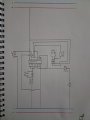
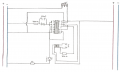
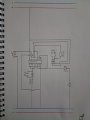
First of all, I must say that I am a novice in circuit design. Let me explain what I want to do: I want to turn on the LEDs sequentially by pressing the button, from output 0 to output 8. and when I get to the 9th exit (even if I press the button) I don't want the queue to go back to the beginning. When I just press the button connected to the reset, the sequence should return to the beginning. The circuit in the picture worked for a while, but then it stopped working. However, when I disconnect the 11th and 14th pins, the circuit works, but the circuit returns to the beginning after the 9th output. So I have two questions: Is there something wrong with the schematic and how do I make the circuit stop when I get to output 9? Finally, I'm sorry English is not very good.
WhatsApp Görsel 2024-12-19 saat 21.56.32_707e772e.jpg

View attachment 338448
 

Attachments

MrChips

Joined Oct 2, 2009
34,628
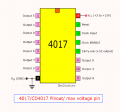
CD4017 pin-15 is reset, active-HIGH.
You need a pulldown resistor, i.e. about 10 kΩ resistor from pin-15 to GND. Connect to Vcc to RESET.
 

WBahn

Joined Mar 31, 2012
32,703
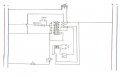
First of all, I must say that I am a novice in circuit design. Let me explain what I want to do: I want to turn on the LEDs sequentially by pressing the button, from output 0 to output 8. and when I get to the 9th exit (even if I press the button) I don't want the queue to go back to the beginning. When I just press the button connected to the reset, the sequence should return to the beginning. The circuit in the picture worked for a while, but then it stopped working. However, when I disconnect the 11th and 14th pins, the circuit works, but the circuit returns to the beginning after the 9th output. So I have two questions: Is there something wrong with the schematic and how do I make the circuit stop when I get to output 9? Finally, I'm sorry English is not very good.

View attachment 338450

View attachment 338448
You've got major issues even before you start talking about getting the logic right. You are tying multiple outputs together. This is almost always bad -- and you've very possibly damaged your chip. You also have the reset input floating, which is almost never a good idea with any CMOS part, except when the switch on the left is closed. I can't tell what the internal connections of your push button switch are (I'm assuming that's what it's supposed to be). I could guess, but engineering is not about guessing or assuming (except when necessary, and sometimes it is, but this is not one of those times).

What's the purpose of the diode with the huge capacitor across it?
 

Thread Starter

Petrichor

Joined Dec 19, 2024
36
When I press the reset button it goes floating. This is how I made the circuit go back to the beginning. The purpose of the capacitor: the circuit (before it broke down) stopped when it reached the 9th output. However, when I pressed the button, a little voltage was flowing to the 0th output. This went away when I connected the capacitor.
 

Thread Starter

Petrichor

Joined Dec 19, 2024
36
I think there are many problems with this setup. Can you draw a circuit that will activate 8 outputs sequentially when I press a button and not react when I press it next time? And I'll have to press a second button for it to start over again. I really need some help right now.
 

WBahn

Joined Mar 31, 2012
32,703
When I press the reset button it goes floating. This is how I made the circuit go back to the beginning. The purpose of the capacitor: the circuit (before it broke down) stopped when it reached the 9th output. However, when I pressed the button, a little voltage was flowing to the 0th output. This went away when I connected the capacitor.
This is known as "design by happening", in which you make random changes to the circuit and hope that, somehow, someway, at some point, something miraculous will happen.
 

WBahn

Joined Mar 31, 2012
32,703
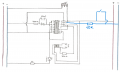
Roughly speaking, does it need to be something like this?

View attachment 338454
When you press your new, blue switch, you will short the power supply. What happens next depends on the supply in use. In some cases almost nothing perceivable will happen except nothing works. In other cases, large explosions and fires will ensue.

My advice: Don't do it.
 

Thread Starter

Petrichor

Joined Dec 19, 2024
36
When you press your new, blue switch, you will short the power supply. What happens next depends on the supply in use. In some cases almost nothing perceivable will happen except nothing works. In other cases, large explosions and fires will ensue.

My advice: Don't do it.
So can you tell me what I should do? I don't know much about circuit design and I have to finish the damn project by tomorrow.
 

MrChips

Joined Oct 2, 2009
34,628
Resetting and stopping are two different operations.

You need to gate the CLOCK with a START/STOP signal.
Hence you need a flip-flop to implement START/STOP. See if you can find a way to trigger the flip-flop to START and a way to STOP.
 

Thread Starter

Petrichor

Joined Dec 19, 2024
36
Don't need a flip flop.
Checkout the clk enabled pin 13
Hint: If the pin is high the chips stops counting.
Yesterday I solved the problem by connecting the connection from the 10k resistor to pin 13 to pin 11. It really works, but I don't know how it works or whether it's healthy or not.
 

Thread Starter

Petrichor

Joined Dec 19, 2024
36
It's fine but don't really need the resistor.
If you study how the clk enabled pin functions you will understand.
Actually, I have one last problem. The outputs stay high every time I send a clock signal. Is there a simple way to prevent the output from staying high all the time? So there should be a difference between the outputs for a while.
 
Top